
Figuring out how to record a webinar really boils down to three things: picking a solid platform, getting your attendees' consent, and choosing where to save the file—on the cloud or your own computer. Get these right, and you turn a one-time live event into an asset you can use again and again. With a platform like AONMeetings, this whole process is a breeze since unlimited, encrypted recording is built right into every plan.
Before we dive deep into the step-by-step process, here's a quick cheat sheet to get you started. Think of this table as your pre-flight checklist for recording.
Your Quick Guide to Webinar Recording
| Phase | Key Action | Why It Matters |
|---|---|---|
| Before the Webinar | Check recording settings & get consent. | Ensures a high-quality recording and keeps you compliant with privacy laws. |
| During the Webinar | Start recording & monitor audio/video. | Captures the event smoothly without technical glitches interrupting the flow. |
| After the Webinar | Save, edit, and share the recording. | Turns your live event into a valuable, long-lasting asset for marketing or training. |
This table covers the essentials, but the real magic is in the details. Let's explore each of these phases to make sure your next recording is a success.
Why Recording Your Webinar Is a Strategic Move
If you think of your webinar recording as just an archive file, you're leaving a lot of value on the table. It's actually a core part of a smart business strategy, extending the life and impact of your content long after the live event ends. Choosing not to record is like telling a huge chunk of your potential audience you're not interested because they couldn't make it live.
And the data backs this up. The webinar software market is on track to hit $29.39 billion by 2034, and on-demand recordings already make up a staggering 50% of all webinar viewership. This isn't just a minor trend; it’s a fundamental shift in how people consume content. By not recording, you're missing half your audience. You can learn more about these powerful webinar trends to see just how big the on-demand movement has become.
Double Your Reach and Create Evergreen Assets
Recording your webinar is the simplest way to serve everyone who couldn't attend live. With one click, you can practically double your reach.
Here’s how we see savvy marketers and trainers making the most of their recordings:
- On-Demand Content: They pop the recording onto a landing page, turning it into a lead-generation machine that works around the clock. For example, a SaaS company can offer a recorded product demo in exchange for an email, generating leads while they sleep.
- Marketing Material: They slice up the best moments into short clips for social media, teasing future events or highlighting key product features. A 60-second clip from a financial planning webinar explaining a new tax law can become a viral LinkedIn post.
- Training Libraries: The entire session becomes a valuable addition to a secure, internal training portal for new hires or customer onboarding. A recorded session on a new software update can train thousands of employees across different time zones.
The Value of Included, Secure Recording
Many platforms treat recording as a luxury add-on, leading to frustrating and unexpected costs. Some competitors force users onto expensive plans or demand they buy a separate webinar add-on just to unlock recording—often with tight storage limits. For example, a basic plan might seem cheap, but adding webinar and recording capabilities can triple the monthly cost.
AONMeetings offers a clear value proposition: Every single plan, starting at just ₹179 per user per month, comes with unlimited webinar hosting and recording. You get top-tier features without the eye-watering enterprise price tag.
The value here is crystal clear. You can create, record, and share as many webinars as you need without ever hitting a paywall or worrying about storage caps.
Even better, every AONMeetings recording is locked down with bank-level encryption. This added feature means your content is secure, whether you're sharing a public marketing talk or a confidential all-hands meeting. For anyone in finance, healthcare, or any other field where data security is paramount, this isn't a feature—it's a necessity.
Laying the Groundwork for a Flawless Webinar Recording
A polished, professional webinar recording doesn't start when you hit the record button. It actually starts with a few crucial steps you take before the event even goes live. Getting this prep work right is what separates a valuable, reusable asset from a messy, unusable file.
The very first thing you need to handle is getting participant consent. This is a non-negotiable step, both for legal reasons and for building trust with your audience. Don't worry, you don't need to draft a complex legal document.
A simple, clear statement is all it takes. For example, when you set up the registration form for your webinar, just add a mandatory checkbox with a message like this:
- "By registering for this event, you consent to this webinar being recorded and shared."
That one simple action ensures you're covered and gives your attendees a clear heads-up that the session will be captured.
Dialing in Your Recording and Security Settings
Once you've got consent sorted, it's time to dive into the technical setup. Modern platforms like AONMeetings build recording controls right into the main interface, so your biggest decision is where to save the file: to the cloud or to your local machine.
Cloud Recording: This is my go-to for most situations. It's perfect for getting a link to your recording almost instantly after the webinar ends, making it incredibly easy to share with your team or attendees. For sheer convenience, you can't beat it.
Local Recording: If you know you're going to be doing some heavy-duty editing, saving the file directly to your computer is a great choice. This gives you a high-quality master copy to work with in your video editing software before you upload it anywhere.
As you're setting things up, don't forget about security—especially if your webinar touches on sensitive information. If you're in an industry like healthcare or finance, protecting that data is absolutely critical.
This is one area where AONMeetings really shines. They include bank-level encryption on all live and recorded content as an added feature, and it’s included with every plan. This means your intellectual property is protected right from the start, helping you meet tough compliance standards like HIPAA without needing a pricey enterprise subscription.
This whole pre-webinar process can be boiled down to a few key stages.
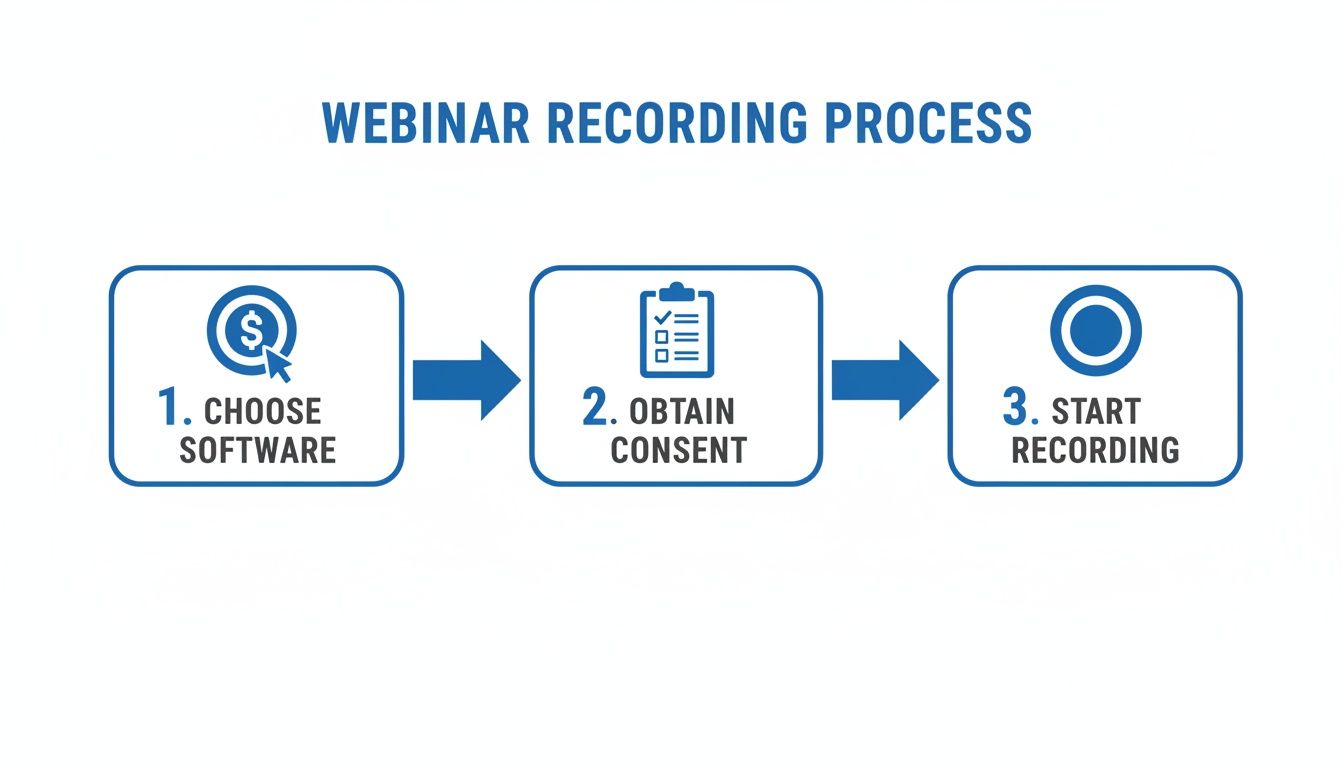
As you can see, the path from picking your software to hitting record is straightforward, but each step is vital for a successful outcome.
Don't Forget Your On-Demand Audience
All this prep work isn't just for the people who show up live. Think about this: while 56% of attendees join the live session, a massive 45% prefer to watch the on-demand recording later. This means your recording isn't just an afterthought; it's the primary way nearly half your audience will experience your content.
Taking the time to set up your recording properly ensures you're giving this on-demand crowd a top-notch experience. This includes mastering features like screen sharing, which is crucial for any kind of demo or presentation. If you're a bit rusty, we have a great guide on how to share your screen effectively during a live event.
By sorting out your tech and legal bases beforehand, you're setting yourself up to create a recording that’s every bit as powerful as the live webinar itself.
Mastering Your Recording Tools and Techniques
Alright, you've done the prep work and the webinar is about to start. This is where the magic happens. When you go live, the last thing you want to worry about is fumbling with the recording controls. Fortunately, platforms like AONMeetings have made this incredibly straightforward—it’s usually just a single click to start.
Once you hit that record button, your main decision boils down to one thing: cloud or local recording. While saving a file directly to your computer gives you a physical backup (which is never a bad idea), the benefits of cloud recording are so compelling that it’s become my go-to choice. It’s often included at no extra cost, and the time it saves is immense.
Cloud vs. Local Recording: The Practical Choice
Let me paint a practical example for you. You’ve just wrapped up a brilliant webinar for 100 attendees. If you used AONMeetings cloud recording, the system immediately gets to work for you.
- Instant Sharing: Forget waiting hours for a massive file to upload. A shareable link is generated almost instantly. You can pop that link right into a follow-up email to all 100 registrants or your team’s Slack channel within minutes of the event ending.
- Searchable Transcripts: This is a game-changer. The platform automatically transcribes the entire session. Need to find that one spot where a customer asked about pricing? Just search the transcript for "pricing" instead of scrubbing through an hour of video.
Honestly, this automation is where the real value lies. The tasks that used to eat up hours—transcribing, uploading, and generating links—are all done for you. For me, that efficiency makes cloud recording the obvious default.
Comparing Recording Storage Options
Here’s a quick breakdown of how the two options stack up, including their price implications:
| Feature | AONMeetings Cloud Recording | Local Recording |
|---|---|---|
| Price | Included in all plans (starts ₹179/mo) | Free (uses your computer's storage) |
| Accessibility | Instant via shareable link | Manual upload required to a service like YouTube or Vimeo |
| Added Features | AI summaries & searchable transcripts | None, requires separate software |
| Security | Bank-level encryption included | Dependent on your own security measures |
As you can see, the built-in features of cloud recording, especially the added feature of bank-level encryption, provide serious peace of mind. It ensures your proprietary content is secure from the second you stop recording. Of course, great software works best with great hardware. If you're looking to upgrade your setup, this practical guide to setting up a video recording system is a fantastic resource.
Engaging Both Live and Future Audiences
A truly great webinar recording doesn't feel like a leftover; it feels valuable on its own. This just takes a small but conscious shift in how you talk to your audience during the live event.
Here's a practical example I use: I’ll acknowledge the live folks with, "Thanks, Sarah, for that great question in the chat," but then I’ll turn to the future viewer by saying, "For those of you watching the recording, we're now discussing the impact of AI on project management…"
This little adjustment makes the on-demand version feel like a deliberate, timeless resource, not just a stale replay.
And please, don't forget about your audio. Nothing ruins a recording faster than bad sound. If you ever hear that dreaded echo or feedback, it’s worth taking a moment to fix it. We’ve got some easy tips on how to stop echo on a mic that can save your recording.
Think about the flow of your presentation. You might be deep in a screen share of a complex spreadsheet, but then switch to your full-screen camera to really connect with the audience while explaining a key takeaway. A good recording platform will capture these transitions smoothly, preserving the dynamic feel of your live session for everyone who watches it later.
Choosing the Right Webinar Recording Software
Picking the right software to record your webinar feels like it should be straightforward, but it's a decision that can seriously affect your quality, security, and especially your budget. I’ve seen it happen time and again: a platform looks like a bargain, but the total cost is buried in the fine print. Suddenly you’re hit with add-on fees, tight storage caps, and session limits that turn a "cheap" tool into a major expense.
The devil is in the details. For example, a provider might have a low entry price for basic meetings, but the moment you need to host an actual webinar for 500 people, you’re forced into a pricey add-on. Recording that webinar? That might be another fee on top, with limited cloud storage.
Breaking Down the Real Costs and Value
Let's put this into perspective with a practical example. Think about a small training company that hosts weekly sessions for its clients, or a marketing team running regular product demos. If your platform limits your recording time or, worse, charges you per event, your costs are going to spiral out of control. It’s simply not a sustainable model.
The AONMeetings value proposition is an all-in-one approach. You aren’t nickel-and-dimed for essential features. Full webinar functionality, unlimited webinars, and unlimited recording are built right into the base plan, which starts from just ₹179 per user per month. You get the whole package from day one.
To see how this plays out in the real world, let's compare the features and pricing you can expect from some of the big names in the industry.
AONMeetings vs Competitors Feature and Price Comparison
When you're choosing a webinar platform, looking at the advertised price is only the first step. The table below breaks down what you actually get for your money, comparing the all-inclusive AONMeetings plan against competitors where key features often require expensive add-ons.
| Feature | AONMeetings (Pro Plan) | Zoom (Pro + Webinar Add-on) | Microsoft Teams (Business Standard) |
|---|---|---|---|
| Base Price | Starts at ₹179/user/month | Starts at ₹1,300/user/month + ₹6,500/month add-on | Starts at ₹695/user/month |
| Webinars Included | Yes, unlimited | No, requires expensive add-on | Limited to 300 attendees; basic features |
| Recording Included | Yes, unlimited cloud recording | Yes, but storage is limited | Yes, but storage is pooled and limited |
| Meeting Time Limit | None, unlimited duration | 30 hours per meeting | 30 hours per meeting |
| Encryption | Bank-level on live & recorded content | Standard, advanced features cost more | Standard encryption |
This side-by-side price comparison makes it pretty clear: the sticker price rarely tells the whole story.
The numbers show that with AONMeetings, the price you see is the price you pay for a complete, secure webinar and recording setup. You completely sidestep the infamous 40-minute meeting limits that plague free plans and get the confidence of bank-level encryption on all your content—both live and recorded. For anyone handling sensitive client data or proprietary business information, that’s not a luxury; it’s a necessity.
Making the right choice from the start saves you a lot of money and headaches down the road. For a closer look at what separates a good platform from a great one, check out our guide on the best webinar software for small businesses. It’s all about getting enterprise-grade security and recording features without having to pay a typical enterprise price.
Turning Your Recording Into a Valuable Asset
Once your webinar goes off the air, the real work often begins. You're not just left with a video file; you have the raw material for a powerful content asset that can keep working for you long after the live event is over. But to get there, a little post-production goes a long way.
The first thing I always do is a quick trim. Almost every webinar has a few awkward minutes of dead air or pre-show chatter at the start and some wrap-up logistics at the end. Snipping these off creates a much cleaner, more professional viewing experience for your on-demand audience. For really detailed edits or capturing specific screen interactions, a dedicated tool like Screensnap Pro can be invaluable.
Create an Instant Knowledge Base
This is where modern platforms really shine. With a tool like AONMeetings, your recording isn't just a video. It's automatically processed to generate smart summaries and a complete, time-stamped transcript. This completely changes the game.
Think about this practical example: instead of forcing a colleague to scrub through a two-hour training to find a specific mention of a new feature, they can simply search the transcript for that feature’s name and jump right to the 1:23:15 mark. Suddenly, your entire webinar archive becomes a searchable, on-demand knowledge base.
Here are a few ways to put this into practice:
- Fuel Your Lead Gen: Gate the polished recording on a landing page. A simple email form in exchange for high-value content turns your one-off event into an evergreen lead magnet.
- Deliver Value Via Email: Follow up with everyone who registered—especially those who couldn't make it live—by sending them the recording. It's a fantastic way to build goodwill and keep your brand top-of-mind.
- Build a Secure Training Library: Use your recordings to create an internal portal for new hire onboarding or continuous employee training. With encrypted, password-protected links, you can ensure only your team can access proprietary training material.
Prioritizing Security in Content Distribution
As soon as you start sharing your recording, security has to be a top concern, particularly with sensitive material. You wouldn't leave confidential HR files on an open server, and your webinar recordings deserve the same careful handling.
This is where AONMeetings really gives you peace of mind by including bank-level encryption for all stored recordings as an added feature. It’s a core part of the service, not an expensive add-on. For anyone in healthcare or finance, this isn't just a nice-to-have; it's essential for maintaining HIPAA compliance and protecting sensitive data.
This built-in security means you can share content confidently. A practical example: a hospital could share a recorded surgical procedure with a specific team of doctors, knowing the content is fully encrypted and access-controlled via a password. This makes learning how to record a webinar securely just as critical as the act of recording itself.
The difference between an all-in-one platform and a patchwork solution becomes clear when you look at the total value and price comparison.
| Feature | AONMeetings (Included Value) | Basic Recording Tool |
|---|---|---|
| Price | Included in plan (starts at ₹179/mo) | Free/One-time cost (plus other software costs) |
| Webinars Included | Yes, unlimited | No, separate tool needed (e.g., Zoom add-on at ~₹6,500/mo) |
| AI Summaries | Yes, automatic | Manual work required |
| Searchable Transcripts | Yes, automatic | Requires third-party service (e.g., Otter.ai at ~₹1,400/mo) |
| Encrypted Storage | Yes, bank-level encryption | Dependent on your storage provider (e.g., Dropbox Business at ~₹1,200/mo) |
Ultimately, having these features integrated from the start saves a massive amount of time and effort. It shifts your post-production process from a tedious chore to a seamless part of your content strategy, ensuring every webinar you record delivers the maximum possible value over the long haul.
Common Questions About Recording Webinars
Alright, even after you've got the basics down, a few practical questions always seem to pop up right before you go live. Let's walk through the ones I hear most often, clearing up any last-minute worries so you can hit 'record' with total confidence.
How Long Can I Record a Webinar?
This is a big one, and it's a trap that catches a lot of people. The answer depends entirely on your webinar software, and you absolutely need to check this before you start.
Many platforms will slap a strict time limit on your recordings, especially on their free or lower-priced plans. A practical example: I’ve seen hosts get cut off mid-sentence because they hit a 40-minute cap on a free plan they didn't know existed. It's a classic "gotcha" designed to push you into a much more expensive subscription.
The AONMeetings value proposition is simple: unlimited duration. Every single plan, even the one starting at just ₹179 per user per month, comes with unlimited meeting and webinar duration. Whether you're running a quick 30-minute demo or an intensive 3-hour workshop, you never have to watch the clock.
Is My Recorded Webinar Secure?
Security should be a top priority, especially if your webinars involve confidential company information. The security of your recording hinges entirely on the platform's built-in protections. A standard, unencrypted recording is vulnerable—if that link gets shared or falls into the wrong hands, your intellectual property could be exposed.
This is why you can't just assume your recordings are safe. AONMeetings tackles this head-on by including bank-level encryption on all content, both live and recorded, as an added feature by default. It's not a premium add-on; it's a core feature of every plan, ensuring your valuable assets are protected from the start and helping you stay compliant with standards like HIPAA.
What Is the Price Difference for Recording Features?
This is where the true cost of a webinar platform often reveals itself. The initial price tag can be deceptive. A provider might look affordable at first glance, but the cost can easily multiply once you realize that essential features like webinar hosting and recording are locked behind expensive add-ons.
To put it in perspective, let's look at a real-world price comparison for a single user needing full webinar and recording capabilities:
| Platform | Base Price (Approx.) | Webinar & Recording Included? | Estimated Total Monthly Cost |
|---|---|---|---|
| AONMeetings | ₹179/user/month | Yes, unlimited webinars & recordings | ₹179 |
| Zoom | ₹1,300/user/month | No, requires add-on (~₹6,500/mo) | ~₹7,800 |
| MS Teams | ₹695/user/month | Limited features and storage | ₹695 (with limitations) |
The numbers speak for themselves. An all-in-one model saves a significant amount of money and eliminates frustrating budget surprises. You get everything you need—including secure, unlimited recording—without having to pay for a stack of costly extras.
The most important takeaway here is to look past the sticker price. Always evaluate the total cost of ownership for the features you actually need. A platform that bundles everything from the get-go almost always provides better long-term value.
With these common questions answered, you're not just ready to record your next webinar—you're equipped to do it securely, professionally, and without breaking the bank.
Ready to create, record, and share professional webinars without the hidden costs and complexity? AONMeetings offers unlimited, HIPAA-compliant webinars with bank-level encryption, AI summaries, and searchable transcripts, all starting at just ₹179/month. Discover a better way to connect and learn more.
