

Roughly six in ten event marketers expect hybrid formats to remain a primary part of their event mix. That matters less as a trend line and more as a buying signal. Hybrid is now an operating model, and the platform decision affects registration, content delivery, sponsor reporting, attendee data, and security controls long after the event ends.
The first platform purchase usually goes wrong in predictable ways. Teams compare feature grids, get sold on a polished front-end, then discover the full cost sits in storage limits, production support, branded apps, lead retrieval, or analytics exports. Regulated organizations feel this even more sharply. A healthcare team may need HIPAA-ready workflows and signed agreements. An education provider may care more about access control, recording rights, and budget discipline than enterprise bells and whistles they will never use.
The better question is simple. Which platform gives your team the highest value-to-feature ratio for the events you run?
That usually eliminates a large part of the market. Some tools are excellent for global conferences with complex sponsor programs, but overpriced for a hospital network running CME sessions or a university hosting mixed in-person and remote recruitment events. Others look affordable until you add the pieces required to produce a reliable attendee experience, including moderator controls, registration logic, and basic production hygiene such as reducing microphone echo during live sessions.
A hybrid events platform should help your team run a defensible program, not just stream video. It should protect attendee data, support the engagement formats your audience will use, and keep fees predictable enough that ROI survives procurement review.
What Are Hybrid Events Platforms and Why Do They Matter
Analysts project sustained double-digit growth in virtual and hybrid event software through the end of the decade. That matters less as a market headline than as a buying signal. Platform selection now affects budget control, data handling, and reporting in the same way other business systems do.
A hybrid events platform combines in-person delivery with a structured digital experience for remote attendees. The difference between a platform and a basic meeting app is operational depth. The right system handles registration, permissions, live session delivery, audience interaction, recordings, and reporting in one place, instead of forcing your team to patch together separate tools under deadline.
That distinction shows up fast on event day. A meeting tool can host a session. A hybrid platform has to coordinate attendees across locations, control who can access what, support moderators, capture useful analytics, and keep the audience experience consistent enough that remote participants do not feel like second-class viewers.
For healthcare and education teams, the buying question is not who has the longest feature list. It is who delivers the best value-to-feature ratio for the events you run. A hospital group may need HIPAA-ready workflows, access controls, and predictable recording policies, but not a costly sponsor marketplace. A university may need simple registration, dependable streaming, and strong permissions for faculty, students, and guests, without paying for enterprise add-ons that never get used.
What separates a platform from a meeting tool
A true hybrid platform usually covers four jobs at once:
- Audience management: Registration flows, attendee segmentation, access control, and reminder communications.
- Live event operations: Moderator permissions, speaker management, agenda control, and support for concurrent sessions.
- Engagement and content: Q&A, polls, chat, recordings, searchable sessions, and post-event replay access.
- Measurement and follow-up: Attendance data, engagement reporting, exports for marketing or compliance review, and lead or learner tracking where needed.
The trade-off is straightforward. Platforms with broader event operations often cost more and can take longer to configure. Lower-cost tools may work well for simple webinars or internal meetings, but they often add friction once you need branded registration, better reporting, exhibitor workflows, or stricter access rules.
That is why first-time buyers should compare actual workflows, not screenshots. A practical virtual event platform comparison for hybrid buyers will usually tell you more than a polished product demo.
Why the choice matters by industry
In healthcare, platform choice affects privacy risk, internal approvals, and patient or clinician trust. If the vendor cannot explain data handling, recording controls, and contract terms clearly, procurement slows down and legal review gets harder. Hidden fees also hit harder in regulated environments because support, storage, and compliance-related add-ons are rarely optional.
In education, the pressure points are different. Institutions usually care more about affordability, ease of access, and whether staff can run events without heavy technical support. A platform that looks inexpensive up front can become poor value once you add production help, breakout limits, attendee caps, or charges for on-demand access.
Commercial event teams still care about sponsorships and pipeline, but the underlying lesson is the same. Software choice affects ROI only if the platform fits the program design and the operating model behind it. Teams evaluating vendors through that lens should also review practical buying criteria in PSW Events' 2026 software guide, especially if they are comparing coordination needs across in-person and digital formats.
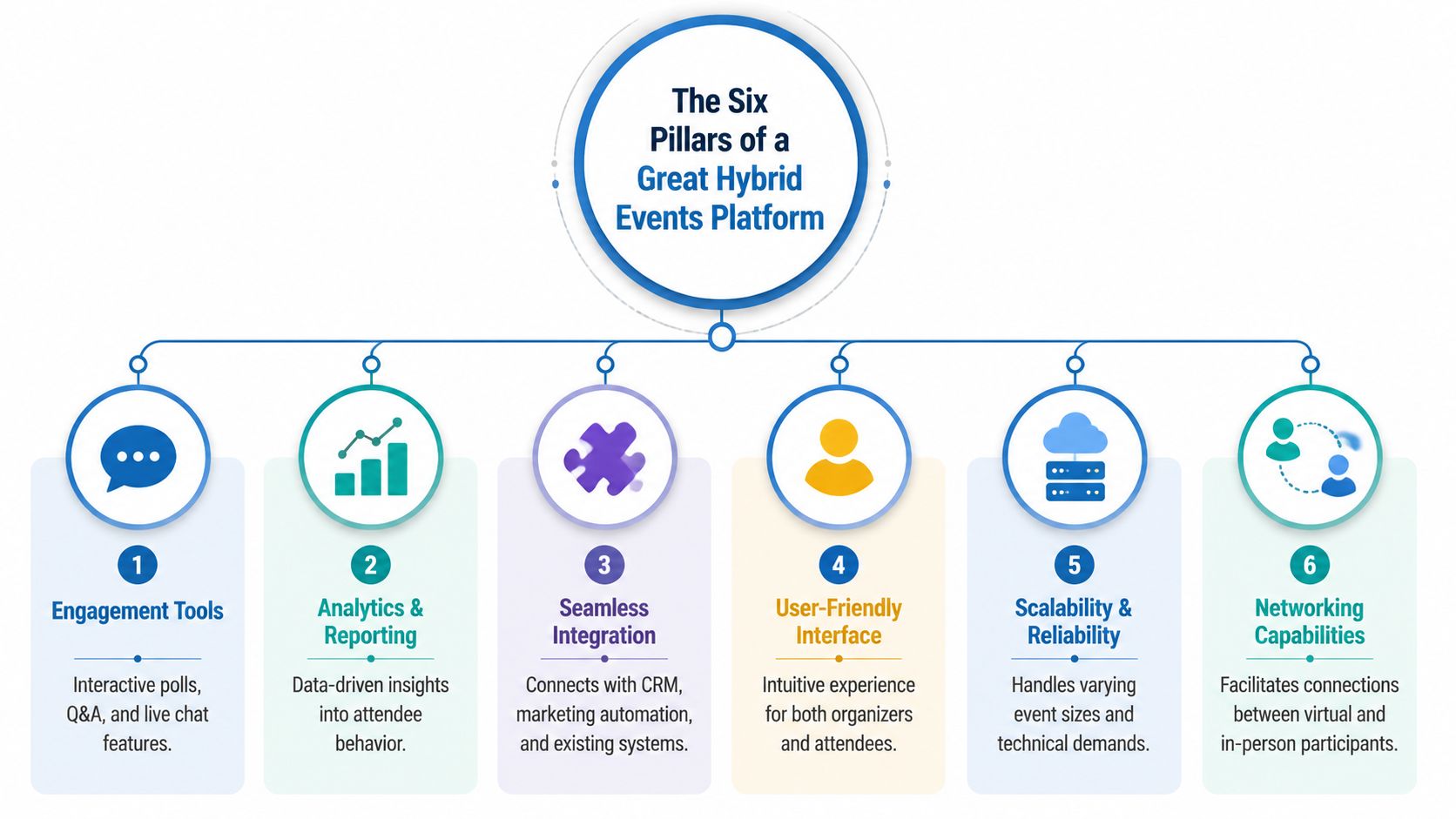
The Six Pillars of a Great Hybrid Events Platform
Most buyers compare feature lists too early. Start with the pillars that determine whether a platform will work in practical scenarios.
Security and compliance
Many guides prove inadequate for specialized buyers. While 78% of hybrid event guides focus on marketing engagement tools, only 4% discuss the specific latency and encryption requirements for medical consults where patient privacy is paramount. That gap matters because 62% of healthcare providers abandon platforms due to non-compliant features or confusing UI.
If you work in healthcare, “good enough security” isn't a buying category. You need encryption, controlled access, predictable recording behavior, and settings that staff can use correctly under pressure.
Practical rule: If a platform makes secure recording, access control, or meeting lock feel optional, it's not ready for compliance-sensitive use.
Streaming quality and reliability
Hybrid events fail in audio before they fail in video. Buyers often obsess over front-end branding and ignore the production path. Stable performance depends on bandwidth, speaker setup, room acoustics, and whether the platform can handle simultaneous uploads, downloads, chat, Q&A, and analytics without degrading the stream.
That's one reason production teams spend time on microphone discipline and echo control long before launch day. A simple resource like this guide on stopping echo on a mic is more valuable during planning than another feature deck from a sales rep.
Attendee management and engagement
Good hybrid events platforms don't bolt engagement on top. They make interaction native. Shared polls, moderator-prioritized Q&A, session chat, breakout rooms, and on-demand replay all keep remote attendees involved instead of passive.
The key trade-off is simplicity versus novelty. A cleaner interface with well-placed participation tools usually outperforms a flashy experience with too many clicks.
Integrations and reporting
Native integration matters because event data loses value fast when your team exports CSVs and cleans them manually after every session. The strongest platforms connect with CRM systems, marketing automation, and internal reporting flows without requiring a separate patchwork of middleware.
Buyers should ask one direct question: can the platform produce useful executive reporting quickly, or will your team spend the next day rebuilding the event in spreadsheets?
Transparent pricing
Hybrid software is full of pricing traps. Webinar modules, attendee caps, storage, premium support, branding controls, and security upgrades often live outside the advertised plan.
Look for clarity in these areas:
- Core delivery costs: Meetings, webinars, streaming, and recordings.
- Usage limits: Time caps, attendee caps, host caps, and storage thresholds.
- Support coverage: Live event support versus standard ticket support.
- Contract structure: Monthly flexibility versus annual lock-in.
Ease of use
Ease of use is not cosmetic. It affects adoption, training burden, moderator speed, and error rates during live sessions. A platform can be feature-rich and still be a poor operational choice if speakers, attendees, or support staff can't interact with it without hand-holding.
A platform is easy to use when your least technical presenter can join, share, switch, and recover from a mistake without derailing the session.
Comparing the Top Hybrid Events Platforms in 2026
Budgets fail on software purchases for a simple reason. Teams compare seat prices, then discover they still need webinar capacity, tighter security controls, recording storage, or live support after the contract is signed.
That gap matters most for specialized buyers. A healthcare clinic, training provider, or university department does not need the longest feature list. It needs the best value-to-feature ratio for the work it runs every month, with clear costs, acceptable security controls, and no surprise fees for core functions.
Hybrid Platform Feature and Price Comparison
| Feature | AONMeetings | Zoom (Pro + Webinar Add-on) | Webex Events |
|---|---|---|---|
| Entry pricing for meetings | ₹179/user/month (~$2.15) | $14.99/user/month | Enterprise-oriented pricing structure |
| Webinar availability | Included in every plan | Webinar add-on starts at $40/month for 100 attendees | Available in event-focused tiers |
| Meeting time limits | Unlimited | Depends on selected plan structure | Varies by plan and deployment |
| Encryption position | AES-256 and TLS 1.3 in all plans | Security settings vary by product, plan, and configuration | Enterprise security focus |
| Hybrid event tools | Includes webinar hosting, screen sharing, whiteboards, recordings, advanced tiers with breakout rooms, YouTube streaming, and multi-camera broadcast | Strong meeting ecosystem, but webinar and event functions increase cost | Strong enterprise event capabilities |
| Best fit | Cost-sensitive healthcare, education, small teams, recurring webinars | Teams already standardized on Zoom and willing to pay for add-ons | Large organizations needing enterprise event structure |
The practical comparison is straightforward. AONMeetings includes webinars at the base level, while Zoom often becomes more expensive once webinar capacity is added. For organizations running patient education, faculty training, certification sessions, or weekly public webinars, that difference changes annual cost far more than the entry seat price suggests.
Security creates another separation point. AONMeetings positions encryption and browser-based access as standard parts of the product, which is useful for healthcare and education teams that need lower deployment friction. Zoom and Webex can meet stricter requirements too, but buyers should verify which controls are available by plan, how they are configured, and whether legal or IT review will slow rollout.
That is where hidden fees usually appear. Storage, branded registration pages, production support, attendee overages, webinar licenses, and compliance reviews can all move a platform from affordable to hard to justify.
The best-value platform is the one that covers your recurring use case without pushing basic delivery, security, or audience capacity into add-ons.
Where value shifts by platform
AONMeetings stands out for buyers who care about cost control and broad baseline coverage. If a clinic wants one platform for virtual consults, group education, staff meetings, and occasional hybrid events, the bundled approach is easier to defend internally. The same logic applies to coaching businesses, colleges, and training teams that need repeatable delivery more than enterprise event production polish.
Zoom remains a strong option for organizations already standardized on it. User familiarity reduces training time. The trade-off is that hybrid event and webinar costs can rise quickly once the program grows beyond basic meetings.
Webex Events fits large organizations with formal procurement, IT support, and more complex governance. It can be the right choice for bigger event operations, but smaller specialized teams often pay for scale and structure they will not use.
I tell first-time buyers to shortlist based on operational fit, then pressure-test the contract. Ask each vendor to price your real event mix for 12 months: monthly webinars, secure recordings, attendee volume, support coverage, and admin roles. That process exposes the gap between marketed value and purchased value faster than any demo.
If your program depends heavily on broadcast-style production, it also helps to review broader guidance on how to find the right live streaming solution. If you want a tighter side-by-side review before procurement, this virtual event platform comparison for cost and feature trade-offs is a useful secondary check.
Hybrid Platform Use Cases for Your Industry
A bad platform choice shows up fastest at the point of risk. In healthcare, that risk is privacy and operational error. In education, it is lost teaching time. In marketing and training, it is weak follow-up and poor attribution.

Healthcare
Healthcare teams usually buy hybrid platforms for a mix of patient education, internal training, CME sessions, and community outreach. The shortlist should start with security and cost control, not event production flash.
A representative use case is a medical association running a hybrid conference with live presentations, moderated Q&A, breakout discussions, and recorded sessions for later review. That setup only makes sense if the platform also handles access controls, waiting rooms, host permissions, and recording policies in a way compliance teams can approve.
HIPAA risk changes the buying criteria. If protected health information might come up in a session, buyers need to ask harder questions about business associate agreements, recording storage, admin logging, and who can download files. I have seen teams save money on the base license, then lose it again on add-on webinar modules, storage overages, and extra support fees that were not obvious during procurement.
For smaller clinics, specialty practices, and provider education teams, the best value often comes from one platform that can cover secure communication and scheduled event delivery without forcing staff to learn two separate systems.
Education
Schools, tutoring groups, and professional education teams need reliability more than polish. A platform that looks impressive in a demo can still fail in practice if students need downloads, teachers cannot manage breakouts quickly, or recordings are hard to organize.
The strongest fit usually includes:
- Live instruction tools: screen sharing, whiteboards, and presenter controls that teachers can use without technical help
- Small-group learning: breakout rooms for discussion, revision, labs, or language practice
- Recorded access: searchable session libraries for make-up work, compliance review, or continuing education
- Simple join flow: browser-based access for students on mixed devices and restricted school machines
Higher education and healthcare education teams should also look closely at the value-to-feature ratio. Many enterprise platforms price for large conferences, sponsor activations, and branded expo halls. Those features add little value to a department running faculty training, nursing education, or certificate programs. Budget usually goes further when the platform does the teaching job well, keeps recordings organized, and avoids charging extra for basic admin roles.
Event marketers and trainers
Marketing teams, association organizers, and corporate trainers need different things from the same category of software. The common requirement is measurable business value after the live session ends.
For marketers, that means registration quality, attendee engagement, and handoff data that sales teams can use. For trainers, it means attendance tracking, completion records, replay access, and fewer support tickets from remote participants. In both cases, hidden fees matter. A platform can look affordable until captioning, storage, extra hosts, premium support, or attendee tiers push the annual cost well past budget.
Good use cases are usually straightforward:
- Demand generation events: webinars and hybrid launches with clear registration tracking and replay reporting
- Customer education: workshops and onboarding sessions with Q&A, polls, and searchable recordings
- Internal training: compliance briefings, partner enablement, and certification sessions with attendance records
- Association programs: member events that need stable delivery without enterprise-level production spend
The practical test is simple. If the platform cannot show a clear path from event activity to revenue, training completion, or audit readiness, the feature list is longer than the value it delivers.
Your Implementation Roadmap and Final Recommendation
Budget overruns on event software usually start after the contract is signed, not before. For healthcare groups, training teams, and education providers, the wrong hybrid platform often fails on the basics that matter most. Recording access, user permissions, compliance settings, and support coverage.
The rollout sequence that works
Start with the event program you will run repeatedly. A hospital education team running monthly CME sessions has different requirements than a university hosting virtual admissions panels or a company producing a quarterly customer event. The right platform follows the operating model, budget limits, and compliance requirements your team has.
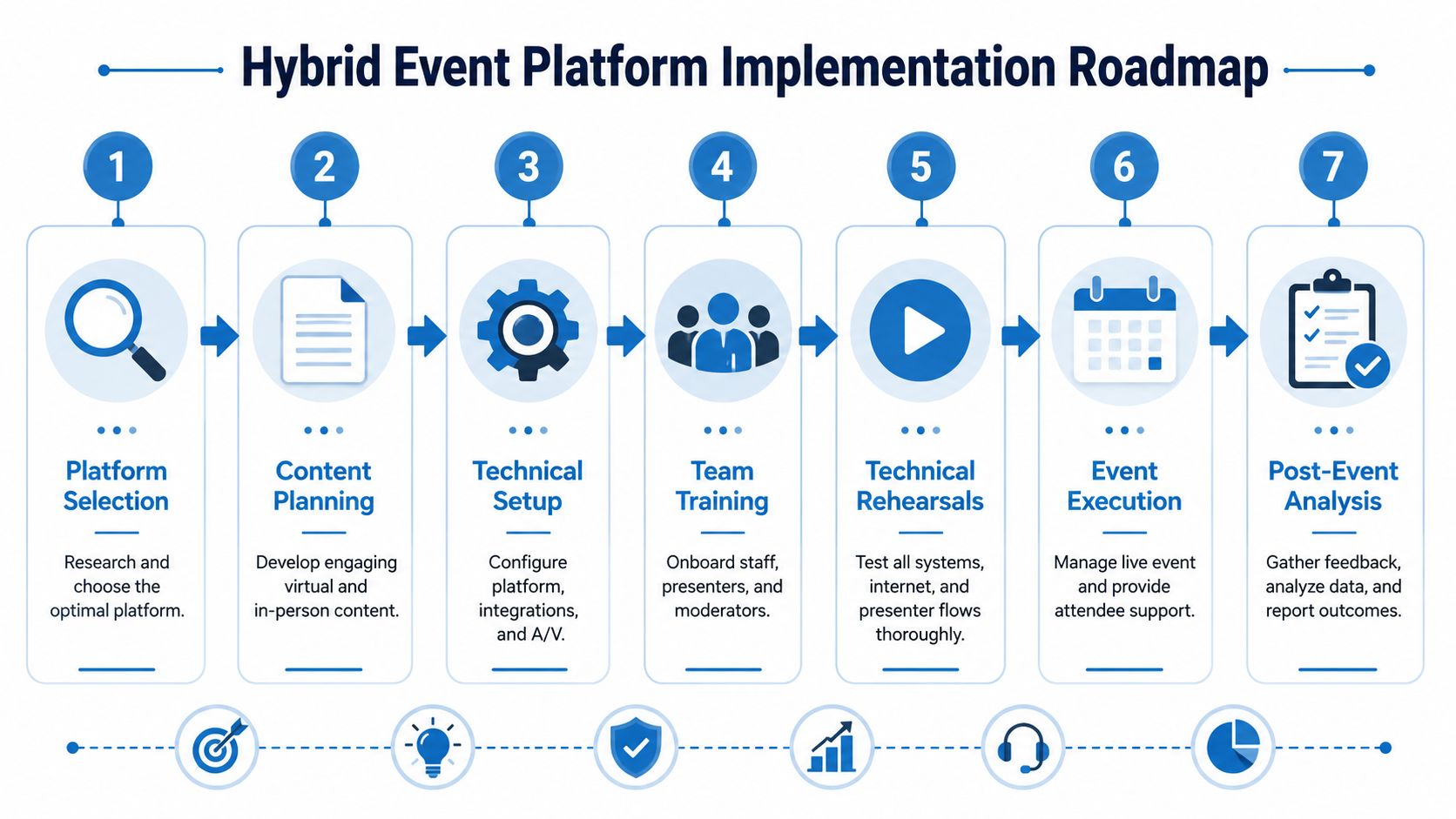
Use this order during implementation:
- Define the event format and risk level: Separate marketing webinars, internal training, continuing education, and patient or student-facing sessions. This step decides whether HIPAA controls, attendance records, or moderation depth are required.
- Confirm the technical setup: Check internet stability, room audio, camera placement, screen-share sources, and backup presenter access.
- Map the attendee journey: Registration, reminders, login steps, mobile access, and support should be clear enough that guests do not need a help article to join.
- Train speakers and moderators: Show them how to join correctly, recover from common mistakes, pass control, and handle Q&A.
- Run a full rehearsal: Test breakout rooms, recording behavior, captions, permission settings, and handoffs between in-person and remote segments.
- Assign live support ownership: One person should own the remote audience experience. Another should manage the room.
That sequence prevents a common purchasing mistake. Teams buy for feature depth, then discover they lack the staff time to run those features well.
What to insist on from the platform
A good final shortlist should be evaluated on value-to-feature ratio, not raw feature count. Specialized organizations rarely need every sponsor tool, expo hall module, or custom environment shown in an enterprise demo. They do need predictable pricing, usable security controls, and reporting that helps finance, compliance, or department leads judge whether the event was worth repeating.
Ask direct questions before signing:
- Is pricing transparent: Confirm what costs extra, including storage, captions, additional hosts, support on event day, webinar capacity, and branded registration pages.
- Are security controls appropriate for your field: Healthcare teams should verify HIPAA readiness and access controls. Education teams should check permission settings, recording governance, and admin roles.
- Can a lean team run it: If setup requires production specialists for ordinary events, the platform may be too expensive in practice even if the license price looks acceptable.
- Is reporting usable: Attendance, engagement, replay activity, and export options should be easy to access after the event, without manual cleanup.
- Will recordings be easy to manage: Searchability, retention settings, and download rules affect training value long after the live session ends.
Buy for the event program you expect to run every month and the staff you actually have.
My recommendation is simple. Choose the platform with the best operational fit, not the flashiest demo. For healthcare and education in particular, a slightly simpler platform with better compliance controls, lower support burden, and fewer surprise charges usually produces a better return than a feature-heavy suite that your team only uses at half capacity.
If recordings are part of the business case, test that workflow before procurement. A practical guide on how to record webinars can help your team spot friction in permissions, file access, and post-event follow-up before those problems affect a live audience.
Frequently Asked Questions About Hybrid Platforms
How do I manage custom branding without paying for an enterprise plan
Start with the branding elements that affect attendance and trust. For most healthcare practices, training teams, schools, and professional firms, that means a branded registration page, logo placement, event colors, confirmation emails, and a clean waiting room.
Anything beyond that needs a business case. A fully custom environment can look impressive in a demo, but it rarely improves registration conversion, compliance review, or post-event follow-up enough to justify the added cost. Specialized teams usually get better ROI from simple branding that feels credible and is easy to maintain.
What level of technical support should I expect
You should expect access to a real person during live events, especially if the platform will be used for patient education, compliance training, or continuing education sessions. Ask a direct question during procurement. Who responds if the host loses audio five minutes before start time, and is that support included in the base price?
Hidden costs often surface quickly. Some vendors advertise support, then charge extra for event-day monitoring, faster response times, or escalation to a technical producer. If your team is lean, those fees matter as much as the license itself.
How do I handle different time zones for a global audience
Plan for replay from the start. Live attendance matters, but the primary value often comes from on-demand viewing, chaptering, searchable recordings, and clear follow-up emails that guide people to the right session.
This matters even more for education and healthcare audiences because schedules are rigid and attendance windows are narrow. Clinicians, faculty, and administrators often miss live sessions for reasons that have nothing to do with interest.
Review storage limits, replay access rules, captioning, and download permissions before you sign. Many smaller organizations stop using a platform because the actual cost grows after launch, usually through recording storage fees, webinar add-ons, attendee overages, or annual contracts that are hard to exit.
Why AONMeetings' Value Proposition Stands Out
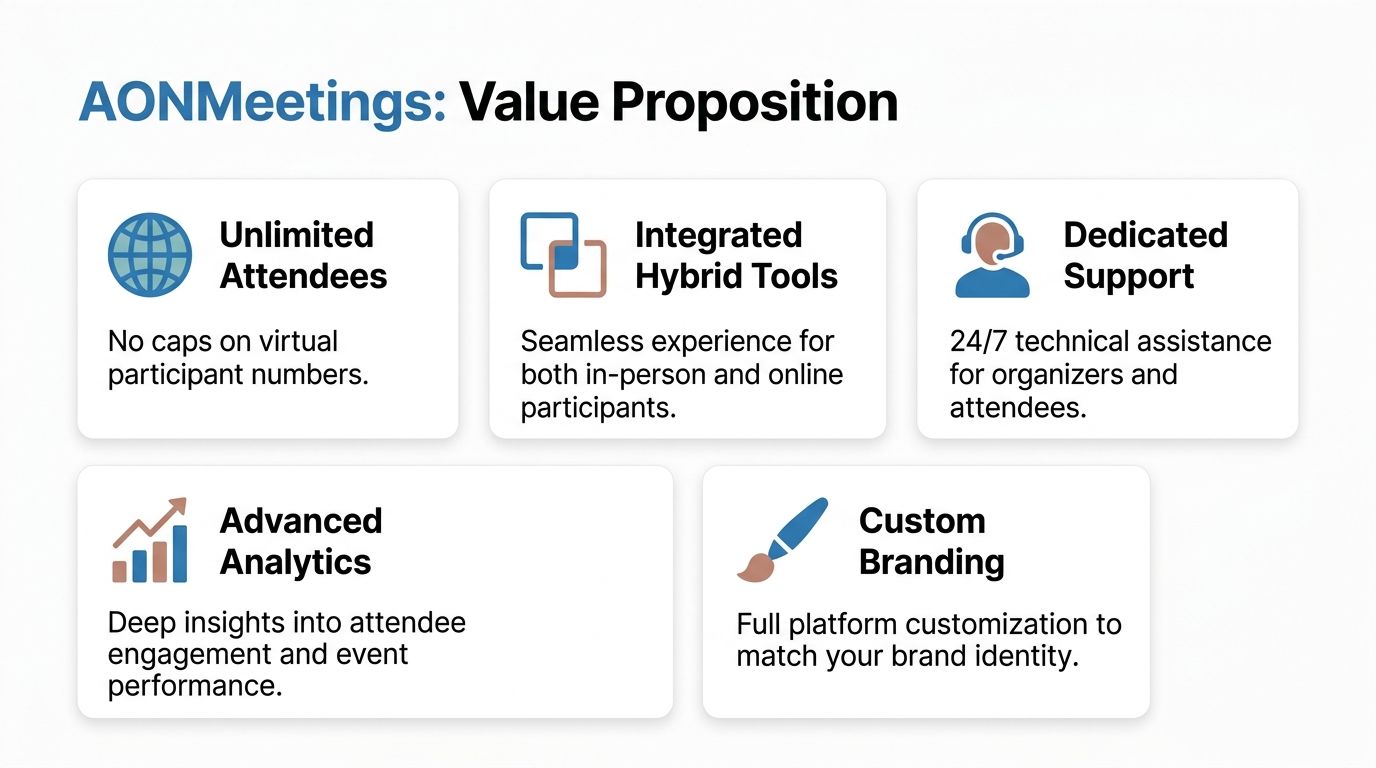
AONMeetings stands out because it focuses on a problem many buyers experience: getting the core hybrid stack without enterprise-style pricing friction.
Where the value is clear
First, the platform includes webinars in every plan. That matters for training teams, educators, clinics, and small businesses because webinar functionality is often where competing platforms start adding cost. If webinars are part of your normal workflow, inclusion is a direct value proposition, not a bonus.
Second, encryption isn't positioned as a premium upsell. AONMeetings includes AES-256 and TLS 1.3 in all plans, which is a practical advantage for organizations that need security review before deployment. That removes a common blocker for healthcare and other regulated users.
Third, the pricing model is straightforward enough to appeal to buyers who are tired of hidden fees, meeting time limits, and contract lock-ins. That's a major reason cost-sensitive professional users gravitate toward tools that bundle the essentials instead of slicing them into separate products.
Who benefits most
The strongest fit is with specialized professionals who care about:
- HIPAA-conscious deployment
- Built-in webinar hosting
- Browser-based access
- Predictable monthly cost
- Operational simplicity
That combination is rare. Many platforms are either inexpensive but limited, or powerful but bloated and expensive. AONMeetings is compelling because it aims for the middle ground that a lot of real buyers need.
If you need a platform that combines HIPAA-conscious security, built-in webinars, unlimited meeting time, and budget-friendly pricing, AONMeetings is worth a close look. It's a practical option for clinics, educators, small businesses, and teams that want hybrid-ready capability without paying enterprise-level software premiums.
