
You’ve probably seen the pattern already. You publish solid content, maybe run a few ads, collect some leads, and still struggle to move people from “interested” to “ready to talk.” Then someone suggests hosting a webinar. You try one, the turnout is thin, the audio is shaky, and the whole thing feels like more work than it was worth.
That’s usually not a webinar problem. It’s a planning, promotion, and execution problem.
When hosting a webinar is done properly, it’s one of the few marketing plays that can educate, qualify, and convert in the same session. It also works especially well for teams that need trust before purchase, including healthcare providers, educators, consultants, software companies, and service businesses. The webinar format gives people a reason to spend focused time with you, ask questions, and see how you think.
Security matters too. If your session includes sensitive discussions, client details, internal training, or regulated workflows, “good enough” video software isn’t good enough. You need browser access that’s simple for attendees, strong moderator controls, recordings, encryption, and in some cases HIPAA-compliant handling from the start. The good news is you don’t need an enterprise procurement cycle to get there.
Why Hosting a Webinar Is Your Best Marketing Move in 2026
A lot of companies still treat webinars like oversized meetings. That’s the mistake.
A webinar isn’t just a live presentation. It’s a structured conversion asset. Done right, it helps you attract the right audience, teach something useful, answer objections in public, and create a clear next step while attention is high.
The business case is strong. Webinars drive exceptional ROI, with B2B conversion rates of 5-20% to buyers, 73% of marketers viewing them as top lead sources, and 62%+ of companies deeming them vital to digital strategies, according to webinar statistics compiled by WebinarNinja.
Why webinars outperform passive content
A blog post can rank. A whitepaper can collect emails. A webinar does something those formats often can’t. It creates live intent.
Someone who registers is raising a hand. Someone who attends is giving you time. Someone who asks a question is telling you exactly where the buying friction is.
That matters in markets where trust is the sale. A telemedicine provider explaining virtual intake workflows. A test prep center walking through a study method. A software company showing how a feature functions. These are better delivered live than buried in static content.
Practical rule: If your product or service needs explanation, demonstration, or reassurance, hosting a webinar is usually a stronger move than publishing one more generic lead magnet.
Where webinars fit in a modern funnel
Use webinars when your audience needs one of these:
- A practical education step before they’ll book a call
- A product walkthrough before they’ll commit to a demo
- Proof of expertise before they trust your team
- A group Q&A setting instead of one-by-one sales conversations
That’s why webinars work across lead generation, onboarding, customer training, partner enablement, and community education.
What works and what doesn’t
A useful webinar solves one real problem. A weak webinar tries to “share insights” and ends up saying nothing memorable.
What works:
- Specific outcomes people can apply immediately
- Clear audience targeting instead of broad appeal
- Visible expertise through examples, not buzzwords
- A direct CTA that matches the session topic
What doesn’t:
- Long introductions and company history
- Overloaded slides
- A panel with no point of view
- Choosing a platform based only on brand familiarity
Hosting a webinar is worth doing because it compresses credibility-building into a single event. Few channels do that as efficiently.
The Blueprint for a High-Impact Webinar
Most weak webinars fail before anyone goes live. The topic is vague, the format is wrong, and the host tries to please too many audiences at once.
The fix is a tighter blueprint.
On average, 40-50% of webinar registrants attend the live session, according to Market Veep’s webinar benchmark roundup. That means the people who do show up are valuable. Treat their time like it’s expensive.
Start with one job for the webinar
Pick one primary objective. Not three.
Common objectives include:
- Lead generation for a service, product, or demo
- Customer education for onboarding or retention
- Authority building in a niche where trust matters
- Internal or partner training where consistency matters more than scale
Each objective changes the event design.
A lead generation webinar should surface pain, teach a framework, and end with a next step.
A customer training webinar should reduce confusion and answer common usage questions.
A product demo webinar should show real workflows, not just features.
Choose the audience before the topic
The best webinar topics come from a narrow audience problem.
Bad topic: “Digital transformation in healthcare.”
Better topic: “How small clinics can run secure virtual follow-ups without adding admin work.”
Bad topic: “How to grow your business online.”
Better topic: “How local service firms can turn website inquiries into booked consultations.”
The narrower topic usually gets better registrants. You may get fewer total signups, but the room is more qualified.
A full room of the wrong people is still a weak webinar.
Match the format to the promise
Different webinar formats create different kinds of trust.
Solo presentation
Best for a clear method, training, or point of view.
Example: A compliance consultant teaches a step-by-step process for secure online patient communication. This works when the audience wants clarity more than conversation.
Interview
Best when your guest brings credibility or experience your audience wants to borrow.
Example: A tutoring company interviews a high-performing instructor about how to structure revision sessions online.
Panel discussion
Best for comparison, trends, or multiple perspectives. Harder to moderate well.
Use a panel only if the speakers disagree in useful ways or bring clearly different expertise. Otherwise it becomes polite noise.
Live Q&A or office hours
Best for warm audiences, customer communities, and buyers near decision.
This format works when attendees already know who you are and mainly need friction removed.
Build the content around movement
A webinar should move people from one state to another.
Use this sequence:
Problem framing
Name the issue in language your audience already uses.Why the usual fix fails
This creates contrast and earns attention.A practical method
Teach a simple process people can remember.Examples
Show how the method looks in real situations.Objection handling
Answer the questions people are likely thinking but haven’t asked yet.Next step
Offer one action that fits the session.
A simple outline that works
Here’s a practical webinar structure for a professional services team:
| Segment | What to cover |
|---|---|
| Opening | Who this is for, what they’ll leave with |
| Pain point | The operational or business problem |
| Core lesson | Your method, framework, or process |
| Example | A practical scenario or mini walkthrough |
| Interaction | Poll, chat prompt, or audience question |
| Q&A | Live objections and clarification |
| CTA | Demo, consultation, resource, or replay |
Keep the promise narrow
If you promise “everything you need to know,” expect weak attention. If you promise one outcome, the session stays sharp.
Strong webinar promises sound like this:
- How to run secure client consultations online
- How to teach live classes without losing student attention
- How to turn webinar attendees into qualified sales calls
- How to present product demos that don’t feel like sales pitches
Hosting a webinar gets easier when the promise is tight. Planning gets easier too. You know what to include, what to cut, and what action should happen at the end.
Configuring Your Tech for Security and Professionalism
The platform you choose changes everything. Not just reliability, but attendance friction, visual polish, moderation, recording quality, and whether your team can run secure sessions without piling on extra subscriptions.
Often, organizations overspend by buying one tool for meetings, another for webinars, another for recordings, and still end up with limits on time, branding, or access controls.
What your platform needs to handle
For professional webinar hosting, the baseline stack should include:
- Browser-based access so attendees don’t get stuck downloading software
- Waiting rooms for managed entry
- Moderator controls for muting, admitting, removing, and guiding speakers
- Recording tools for replay and repurposing
- Screen sharing and presentation support
- Live engagement features such as chat, Q&A, and polls
- Encryption as a standard security layer
- HIPAA-compliant capability if your organization handles protected health information
If you’re in healthcare, education, or client services, the technical setup isn’t just about appearance. It’s about risk reduction.
A practical setup checklist
Before the registration page goes live, configure these settings:
Access and security
Turn on waiting rooms. Use moderator approval for speakers. Keep join links simple, but don’t make the room uncontrolled.
If the session may involve sensitive discussion, confirm encryption settings and your recording rules before inviting anyone.
Branding
Use your logo, event title, and a clean registration page. Branded interfaces matter because they reassure attendees they’re in the right place.
This is especially useful for clinics, training companies, and agencies running webinars for external audiences.
Speaker controls
Assign a host and a moderator. Don’t let the presenter carry chat, Q&A, slide timing, and troubleshooting alone.
A moderator should manage entry, speaker order, and audience questions while the presenter focuses on delivery.
Recording and follow-up settings
Enable recording by default. The replay is part of the asset, not an afterthought.
Why multi-camera matters more than many hosts realize
Most webinars use one static webcam angle and a screen share. That’s functional, but flat.
Hosting multi-camera webinars can boost viewer retention by adding visual variety, yet few guides cover it. Platforms like AONMeetings include this feature natively, unlike competitors who often require premium add-ons, giving users a way to reduce drop-offs by up to 30%, based on the source discussion at Bob Pike Group.
Use cases where multi-camera helps:
- Healthcare education with one angle on the presenter and another on a demonstration setup
- Product webinars with one feed for the speaker and one for a device close-up
- Training sessions where visual transitions help attention stay with you
The point isn’t cinematic polish. It’s visual pacing.
A second camera is often more useful than a fancier slide deck.
Price comparison and feature trade-offs
The author brief asked for price comparisons, so here’s the practical view. Some platforms look inexpensive until you add webinar capability, recording access, branding, or advanced controls.
AONMeetings lists plans starting from ₹179 per user per month and includes webinar hosting, unlimited meeting time, bank-level encryption, recordings, screen sharing, whiteboards, and document sharing across plans, according to the publisher information provided. Zoom and Teams can be workable, but many teams end up paying for layered add-ons or premium tiers to close feature gaps.
| Feature | AONMeetings (Pro Plan) | Zoom (Pro + Webinar Add-on) | Microsoft Teams (Business Standard + Teams Premium) |
|---|---|---|---|
| Webinar hosting included | Yes | Add-on typically required | Premium path often needed for advanced webinar controls |
| Unlimited meeting time | Yes | Depends on plan structure | Depends on subscription stack |
| HIPAA-compliant use case support | Yes | Available depending on configuration and plan | Available depending on Microsoft environment and setup |
| Encryption | Bank-level encryption included | Security features available | Security features available |
| Browser-based instant join | Yes | Often app or browser mix | Often account and app ecosystem dependent |
| Waiting room with custom music | Yes | Limited/varies | Limited/varies |
| Multi-camera broadcast | Yes | Often tied to higher-cost workflow or extra tooling | Limited/varies |
| Brandable UI themes | Yes on advanced tiers | Limited unless using higher-tier setup | Limited/organization dependent |
| Recording included | Yes | Usually included, but webinar stack cost rises | Usually included within Microsoft stack |
| Price simplicity | Straightforward monthly pricing | Can rise with webinar add-on | Can rise with bundled licensing |
If you’re evaluating options for a smaller team, this guide on webinar software for small business is worth reviewing because it focuses on the cost-to-feature trade-off that usually gets missed in platform comparisons.
What professionalism looks like
Professional doesn’t mean overproduced.
It means attendees can join fast, hear you clearly, see you well, trust the room, and stay oriented throughout the session. Secure webinar hosting means the same thing, plus proper access control, encryption, and handling that fits your industry.
That’s the standard worth aiming for.
Promoting Your Webinar to Beat No-Show Rates
Registration is not attendance. A lot of teams learn that the hard way.
You announce the webinar, collect a respectable number of signups, and assume the hard part is over. Then live day arrives and half the room never shows. That’s normal, but it’s also fixable.
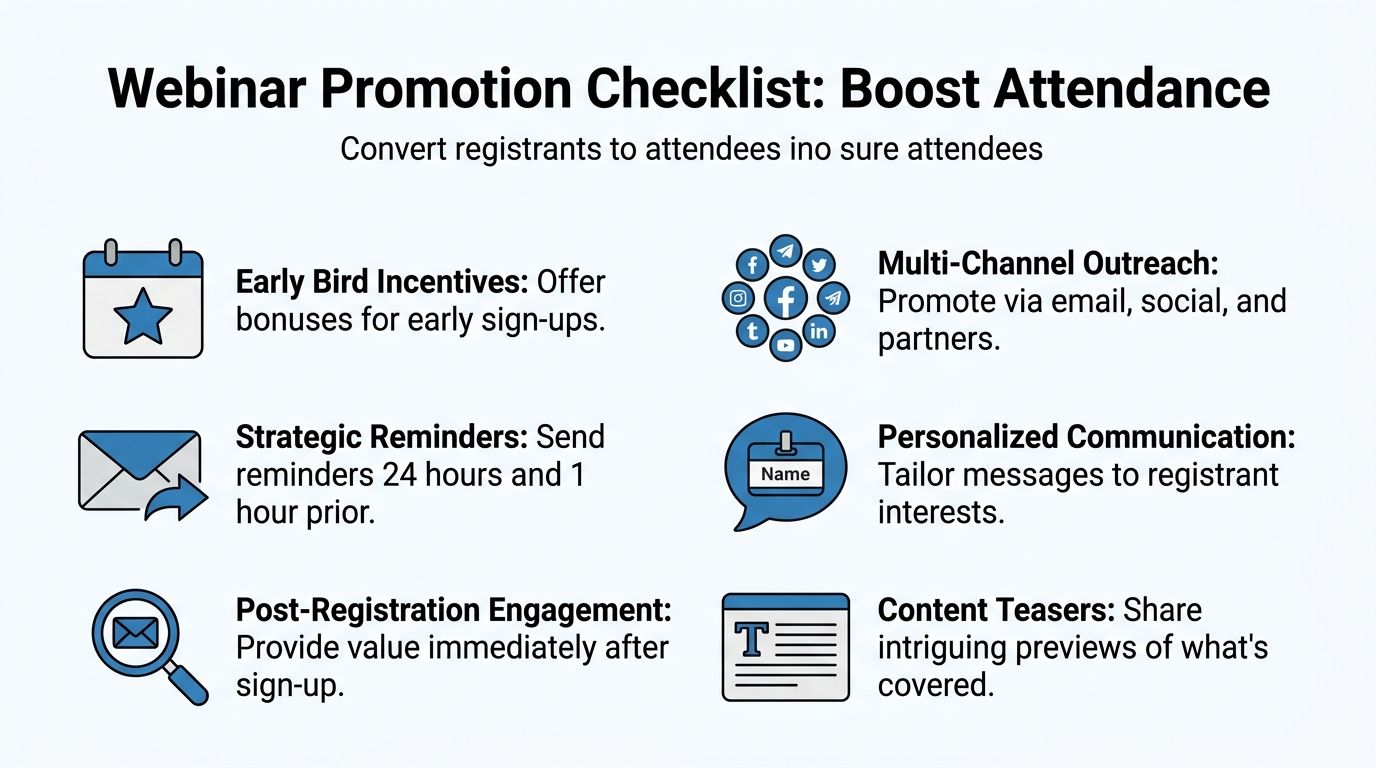
With industry no-show rates hitting 40-60%, strategies like SMS notifications (which mobile users respond to 3x better than email) and creating exclusivity can significantly boost attendance. For instance, phrasing an event as a “limited masterclass” can lift attendance by 50%, according to InEvent’s discussion of webinar mistakes and attendance issues.
The timeline that keeps registrants warm
A strong promotion plan starts earlier than many organizations expect, but the final stretch matters most.
Two to four weeks out
Publish the landing page. Send the first invitation to your email list. Post the topic on LinkedIn and any audience-specific communities where you already have trust.
At this stage, focus on the problem and outcome. Not the speaker bio.
Example email opener:
Subject: Join our live session on secure virtual consultations
If your team is still piecing together video calls, follow-up workflows, and compliance steps manually, this session will show a cleaner way to run them.
One week out
Share a teaser. Pull one useful insight from the webinar and post it as a short text post, clip, or graphic.
Partner outreach works well here too. Ask a complementary company, association, or consultant to share the session with their audience if the topic overlaps.
Final 48 hours
The final 48 hours requires reminders to do the heavy lifting. Send practical prompts, not generic “don’t forget” emails.
Use reminders that answer one of these:
- What problem will this solve?
- What will I leave with?
- How easy is it to join?
- Why should I show up live instead of watching later?
Copy you can use
Reminder email
Subject: You’re booked for tomorrow’s live webinar
Hi [First Name],
You’re registered for our upcoming webinar on [topic].
We’ll cover:
- The main mistake teams make with [problem]
- A practical workflow you can use right away
- Live Q&A so you can ask specific questions
Save your spot on your calendar now and keep your join link handy.
See you live,
[Name]
LinkedIn post
We’re hosting a live session on [specific outcome] for [audience].
If you’re dealing with [pain point], this webinar will walk through a practical approach you can use immediately. We’ll also leave time for live questions.
Register here: [link]
Partner outreach note
We’re running a short, practical webinar for [audience] on [topic]. It’s built around hands-on guidance, not a sales pitch. If it’s relevant to your audience, I’d be glad to send over copy you can share.
Why reminders fail
The common problem isn’t frequency. It’s vagueness.
Bad reminder: “We’re excited to see you.”
Better reminder: “Bring your current workflow. We’ll show where organizations often create avoidable friction.”
Generic reminders get ignored because they don’t restore urgency.
Reduce friction after registration
The confirmation step matters more than many realize.
Do these immediately after someone signs up:
- Send a calendar invite so the webinar gets onto their schedule
- Deliver the join link instantly so they don’t have to search later
- Share one useful takeaway upfront to validate the signup
- Use SMS reminders when appropriate, especially for mobile-heavy audiences
For more tactical ideas, this piece on how to increase webinar attendance is useful because it focuses on the gap between registration intent and actual show-up behavior.
Exclusivity works when it’s honest
Framing matters.
“Webinar on productivity tips” feels optional.
“Limited masterclass for clinic managers on secure patient follow-up workflows” feels specific and relevant.
Don’t fake scarcity. Do define who the webinar is really for. When people feel the event was designed for them, attendance improves.
Running a Flawless and Engaging Live Session
Live day is where planning gets exposed. A good webinar feels calm from the audience side, even when the host is actively managing timing, questions, speakers, and minor issues in the background.
A weak one usually reveals itself in the first few minutes. Late start. Awkward audio. The host is hunting for slides. Nobody explains how to ask questions. Attention drops fast after that.
The final hour before you go live
Treat the last hour like pre-show operations, not dead time.
Run this checklist:
- Audio check: Test your microphone, backup mic, and speaker output
- Video check: Confirm framing, lighting, and camera angle
- Screen check: Open the exact tabs, slides, and files you’ll use
- Role check: Confirm who is hosting, moderating, and answering questions
- Access check: Verify the waiting room and speaker permissions
- Recording check: Make sure the session will be captured
- Connection check: If possible, use the most stable internet option available
Don’t multitask during this window. Hosts who squeeze in other work right before launch almost always carry stress into the room.
How the opening should sound
The first minutes should orient people fast.
Cover these points in plain language:
- Who the session is for
- What attendees will get
- How to use chat, Q&A, and polls
- When questions will be answered
- How long the session will run
Then start teaching.
A lot of presenters waste the first ten minutes on introductions. That’s usually a mistake. Give enough context to establish trust, then move.
Engagement needs to be designed, not improvised
High-performing webinars achieve a 64% average engagement rate by using interactive elements. Extending audience interaction with chat and Q&A features can increase engagement by up to 50%, while running polls every 30 minutes boosts completion rates significantly, according to Zoom’s webinar statistics article.
That tracks with practice. People stay engaged when they’re asked to do something small and relevant.
Good engagement prompts
- Chat prompt: “What’s the biggest obstacle your team is hitting right now?”
- Poll: “Which setup are you using today?”
- Q&A checkpoint: “Before I move on, what would stop this from working in your environment?”
These prompts work because they connect directly to the topic.
Bad engagement prompts
- Random icebreakers with no link to the content
- Polls used only to create activity, not insight
- Saving all questions until the end, then running out of time
Keep interaction tied to decision-making. If an audience response won’t change the discussion, don’t ask for it.
Delivery habits that hold attention
Even strong content can lose the room if delivery is flat.
A presenter should:
- Look into the camera, not only at slides
- Vary pace and tone instead of reading in one rhythm
- Use short transitions so attendees know where they are
- Pause after key points to let people absorb them
- Switch visuals deliberately if using slides, demos, or multiple cameras
This matters even more in longer sessions where attention naturally dips.
Managing common live problems
A speaker starts rambling
The moderator should use private chat or a pre-agreed cue. Don’t correct them publicly unless you have to.
Chat gets noisy
Acknowledge useful themes, then redirect. “I’m seeing several questions about setup. I’ll cover that in five minutes.”
A disruptive attendee appears
Use host controls discreetly. Remove, mute, or restrict access without turning it into a moment.
Something breaks
Say what happened, say what you’re doing next, and keep moving. Dead air hurts more than a brief explanation.
A smooth webinar isn’t one with zero issues. It’s one where attendees never feel the issue has taken control.
Maximizing Your Impact After the Webinar Ends
Most webinar ROI is won or lost after the live session. The event creates attention. The follow-up captures value.
If your team ends the broadcast, posts the recording somewhere, and moves on, you’re leaving useful intent on the table. People who attended gave you signals. People who missed it still showed interest. Both groups deserve different follow-up.

The first 24 hours
Move quickly while the topic is still fresh.
Send:
- A thank-you email to attendees with the recording and next step
- A replay email to no-shows with a concise reason to watch
- A note to sales or customer success highlighting high-intent questions
- Internal observations while the team still remembers what came up live
Your replay workflow matters. If you need a practical walkthrough for storing and sharing sessions cleanly, this guide on how to record webinars is a useful reference.
Segment by behavior, not just by list
Not all registrants should get the same message.
Attendees
These people gave you time. Reference what they saw live.
Good follow-up angle: “You asked about implementation. Here’s the next resource.”
No-shows
Don’t guilt them. Remove friction.
Good follow-up angle: “You can still watch the replay and skip to the section on [problem].”
High-engagement participants
These are people who asked questions, stayed active, or responded in ways that suggest active evaluation.
They usually deserve personal outreach, especially if the webinar was tied to a service, software demo, or consultative sale.
Which signals matter most
You don’t need to obsess over every dashboard widget. Focus on the signals that affect follow-up quality.
Look for:
- Questions asked because they reveal buying friction
- Poll responses because they reveal context and maturity
- Drop-off points because they show where attention weakened
- Replay consumption because some buyers prefer to process later
The most useful webinar metric is often the question someone asks when they’re trying to decide whether change is worth the effort.
Turn one webinar into more than one asset
A well-run webinar should produce a full content set.
Repurpose it into:
- A blog post built from the core teaching
- Short clips answering one question each
- Email follow-ups based on the strongest audience objections
- A sales enablement asset for prospects who need education before a meeting
- An internal training resource if the session covered process or support topics
The key is speed. Repurpose while the team still remembers which moments landed.
Review what happened while it’s still honest
Right after the webinar, ask the team:
- Where did attention lift?
- Where did it sag?
- Which questions came up repeatedly?
- Did the CTA fit the room?
- Was the topic too broad or too narrow?
That discussion is often more useful than a polished retrospective a week later.
Hosting a webinar pays off most when you treat it like a repeatable system, not a one-off event.
Frequently Asked Questions About Hosting Webinars
How long should a webinar be?
Long enough to solve the promised problem, short enough to keep momentum. In practice, shorter and sharper usually wins over broad and exhaustive. If your content needs more time, cut scope instead of stretching the session.
Should I host alone or use a moderator?
Use a moderator whenever the webinar has external attendees, live Q&A, or more than one speaker. A solo host can present well or moderate well under pressure, but doing both at once usually lowers quality.
What if I’m in a regulated industry?
Pick a platform and process that match the sensitivity of the session. For healthcare and similar environments, that means thinking about HIPAA compliance, encryption, recording permissions, waiting room controls, and how links are shared before the event ever starts.
Is polished production always better?
Not always. Clear audio, stable video, and smooth flow matter more than a glossy setup. A webinar can look professional without feeling staged. In many cases, simple production with strong teaching lands better than a highly scripted presentation.
How do I handle low registrations?
Don’t immediately blame the channel. The problem is often the promise.
Check these first:
- Topic clarity: Is the outcome obvious?
- Audience fit: Is this for a defined group or “everyone”?
- Title strength: Does it name a problem people already care about?
- Reminder plan: Are you driving urgency near the event date?
Should I always offer a replay?
Usually yes. A replay extends the asset life and catches people who were interested but unavailable. Just make sure the CTA still fits the replay audience instead of assuming they watched live.
What’s the fastest way to improve my next webinar?
Review the questions, the drop-off moments, and the first ten minutes of the recording. Those areas usually reveal the biggest opportunities. If you want another perspective on practical webinar execution, Victoria OHare’s guide on how to host webinars is a useful companion read because it approaches the process from an operator’s point of view.
What’s one mistake experienced teams still make?
They reuse old webinar formats without rechecking audience intent. A webinar that worked for top-of-funnel education may fail completely when used for product evaluation, customer onboarding, or partner training. The format has to fit the job.
If you need a secure, browser-based platform for hosting a webinar without juggling extra add-ons, contract complexity, or time limits, take a look at AONMeetings. It includes webinars, recordings, encryption, and unlimited meeting time in a pricing model that’s easier for small teams, educators, clinics, and growing businesses to manage.
