
Your team needs to brief everyone on a policy change. Or launch a product to partners in multiple cities. Or train clinicians on a new workflow without flying them into one room. That’s the moment many managers start asking, what are webcasts, and how are they different from the online meetings they already use?
A webcast is the internet version of a broadcast. It’s built to deliver one message to a large audience reliably, clearly, and with far less logistical strain than an in-person event. For organizations that care about consistency, scale, recordings, and security, it solves a very specific problem that regular meetings often don’t.
The Challenge of Communicating at Scale
Most communication tools work well when a handful of people need to talk. They get awkward when one person needs to speak to a very large group.
A leadership update, compliance training, investor briefing, guest lecture, or product announcement all share the same requirement. Everyone needs the same message, at the same time, with a predictable viewing experience.
That sounds simple until the practical issues show up:
- Travel costs rise when speakers or attendees need to be in one place.
- Scheduling friction grows when audiences span offices, campuses, or time zones.
- Message drift happens when teams relay information secondhand.
- Security concerns become serious when the topic includes internal strategy, student data, or protected health information.
A webcast exists for exactly this kind of situation. It gives you a way to broadcast professionally over the internet, without turning the event into a chaotic many-person video call.
Why the format keeps growing
Organizations aren’t moving toward webcasts as a fad. They’re using them because large-scale digital communication has become normal operations.
The global webinar and webcast market was valued at approximately USD 1.305 billion in 2025 and is projected to grow at a CAGR of around 8.9% from 2025 to 2033, driven by demand for remote engagement in business, education, and healthcare, according to WebinarNinja’s webinar statistics roundup.
That growth makes sense. A school can broadcast a guest lecture across campuses. A hospital can train clinicians without packing a conference room. A company can run an all-hands event where every employee hears the same message directly from leadership.
Practical rule: If your main goal is consistent delivery to a large audience, you probably need a broadcast format, not a group meeting.
The real business issue
Managers rarely struggle with the idea of speaking online. They struggle with choosing the right format.
If you pick a normal meeting tool for a broadcast problem, you often get unstable participation, too many open microphones, weak moderation, and a less polished experience. If you pick a webcast approach, you get a format that matches the job.
That’s why understanding webcasts isn’t just a technical exercise. It’s a communication design decision.
Decoding the Webcast What It Is and How It Works
A webcast is a live event delivered over the internet to an audience that mostly watches and listens rather than actively speaks.
The easiest analogy is this. A video meeting is like a roundtable. A webcast is like your own private TV channel.
In a meeting, everyone can potentially talk. In a webcast, one presenter or a small presenter group broadcasts to many viewers. The audience may still interact through chat, polls, or moderated questions, but the event is designed around controlled delivery.
The simple model
A webcast usually has three moving parts:
The source
This is the presenter, panel, slide deck, screen share, or camera feed.The processing layer
Software or hardware encodes that video and audio into a stream the internet can deliver smoothly.The audience delivery layer
Viewers join from browsers, laptops, phones, or conference rooms and receive the stream.
You don’t need to become an engineer to make sense of this. It's similar to sending one polished video signal outward instead of opening hundreds of two-way pipes at once.
Why that matters in practice
A manager often asks, “Why can’t I just use a standard video call?”
You can, for some events. But a webcast changes the design in useful ways:
- Control improves because only designated presenters are on stage.
- Audience experience gets cleaner because people aren’t constantly joining with cameras and microphones.
- Branding gets easier because the event can feel more like a formal presentation and less like a team call.
- Scale becomes manageable because the system is built around broadcasting.
If your team is also trying to build stronger audience engagement around launch events or educational content, these effective video marketing strategies are a useful companion read because they focus on how video format choices affect attention and response.
What viewers actually experience
From the audience side, a webcast should feel simple. They click a link, join in a browser, and watch the event with minimal setup.
Good platforms also let you record the session so people who missed it can watch later. If you’re planning that workflow, this guide on how to record webinars is useful because recording is often where teams realize they need a more structured platform.
A webcast works best when the audience needs clarity more than airtime.
That’s the key distinction. The technology serves the communication goal, not the other way around.
Webcast vs Webinar vs Live Stream A Clear Comparison
People often use these terms interchangeably. That creates confusion, because the formats overlap but they aren’t identical.
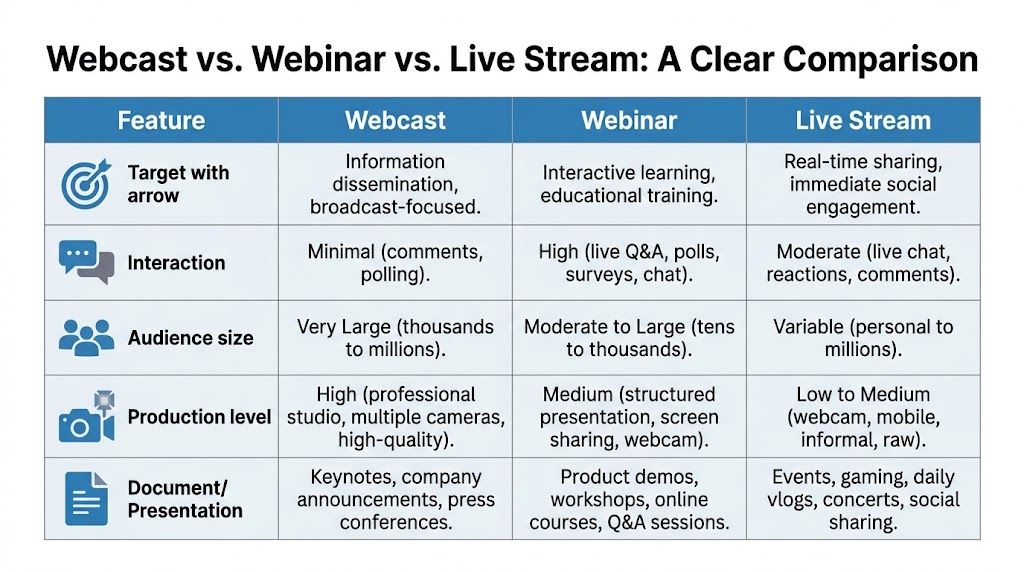
A webcast is usually best for structured one-to-many delivery. A webinar leans more interactive. A live stream is broader and often more public or informal.
The difference isn’t academic. It affects moderation, audience expectations, production style, and what kind of platform you should buy.
A practical comparison
| Feature | Webcast | Webinar | Live stream |
|---|---|---|---|
| Primary goal | Broad, controlled communication | Teaching, demos, lead capture, workshops | Real-time public sharing |
| Interaction style | Limited and moderated | Higher participation with Q&A, polls, chat | Usually comments and reactions |
| Audience feel | Formal broadcast | Guided class or presentation | Social, open, sometimes informal |
| Best for | All-hands, keynotes, compliance updates | Training, product demos, client education | Events, creator content, public moments |
| Production approach | More broadcast-oriented | Presentation-oriented | Can be simple or highly produced |
Where webinars stand apart
A webinar usually invites more active engagement from attendees. People expect to ask questions, answer polls, and respond in chat.
That matches the audience data. 73% of B2B attendees generate high-quality leads, and 92% of webinar attendees want a live Q&A, according to LiveWebinar’s statistics roundup. That’s why webinars are often used for product education, lead generation, and training.
Webcasts can include interaction, but they’re built around scale and message control. If a company is announcing a merger update, or a health system is delivering a policy briefing, that one-to-many structure is usually the safer choice.
Where live streams fit
A live stream is the widest category. It could be a keynote on a public platform, a behind-the-scenes brand session, a concert, or a creator talking to followers in real time.
It may be polished. It may also be very loose. That’s why “live stream” describes the delivery style more than the business intent.
Use a webcast when consistency matters. Use a webinar when participation matters. Use a live stream when reach and immediacy matter most.
A quick way to choose
Ask one question first: Do you want the audience mainly to watch, or to participate?
If the answer is “watch,” start with webcast thinking.
If the answer is “participate,” a webinar is usually the better fit.
If the answer is “we want public visibility and informal engagement,” you’re likely in live stream territory.
This is also where bundled webinar capability matters. Many organizations don’t need separate tools for broadcast events and interactive sessions. They need one platform that can handle both without creating extra admin work or extra invoices.
Practical Webcast Use Cases Across Industries
Webcasts make the most sense when you stop defining them by software and start defining them by job.
The job might be training. It might be executive communication. It might be public education. The format changes slightly, but the logic stays the same. One source. Many viewers. Controlled delivery.

Healthcare and clinical communication
A hospital might need to train clinicians on a new device rollout or revised care process. Putting every nurse, physician, and specialist into one room is difficult. Repeating the training over many sessions can also create inconsistencies.
A secure webcast lets the hospital run one official session with designated speakers, slides, and moderated questions. Staff can join from different locations, and administrators can keep the message uniform.
For telemedicine-adjacent education, this matters even more. If patient workflows, consent processes, or clinical images are involved, the event can’t feel like an informal social stream. It needs structure, access control, and encrypted delivery.
Practical examples include:
- Clinical training for new procedures or equipment
- Medical education sessions for distributed care teams
- Leadership briefings on policy, compliance, or documentation changes
Education and multi-campus teaching
A university, coaching center, or school network often has one excellent instructor and many groups of learners.
A webcast helps that instructor reach a larger audience without reducing the session to a standard video meeting full of interruptions. Students can watch the lecture live, submit questions through moderation, and review the recording later.
This works well for:
- Guest lectures that need broad attendance
- Entrance prep sessions for coaching programs
- Faculty announcements shared across departments
- Parent information events where consistent messaging matters
The manager’s benefit is simple. One well-produced session can serve many classrooms or cohorts.
Internal business communication
A CEO update is a classic webcast use case.
In a typical all-hands, open mics, side chatter, and unstable participation can dilute the message. A webcast format keeps leadership on stage, supports cleaner visuals, and allows questions to flow through moderation rather than interruption.
That makes it useful for:
| Business need | Why webcast fits |
|---|---|
| Quarterly all-hands | Everyone hears the same message directly from leadership |
| Policy rollouts | HR or legal teams can present consistently and clearly |
| Product launches for partners | Sales teams and resellers get a unified briefing |
| Franchise or branch communication | Central office can broadcast once to many sites |
Events, conferences, and hybrid programs
Many organizations now think in hybrid terms. Some people are in the room. Others are remote. The keynote, panel, or announcement still needs to reach everyone.
That’s where webcasts become the backbone of the event. The in-person audience gets the stage experience. The remote audience gets a stable digital front row.
A practical event stack might include:
- Opening keynote by webcast
- Breakout training as webinars
- Recorded sessions for on-demand access
- Moderated Q&A for remote viewers
A useful rule for event design is this. Broadcast the moments that need polish. Use more interactive formats for the smaller follow-up sessions.
Community and public information settings
Not every webcast belongs to a corporation.
A public health group can share guidance updates. A nonprofit can host a donor or stakeholder briefing. A community organization can deliver a structured information session without the chaos of an open meeting.
These examples matter because they show the core value of webcasting. It doesn’t just put video online. It helps an organization communicate with discipline.
Technical and Security Essentials for Webcasting
A webcast can look simple from the outside and still fail for very predictable reasons behind the scenes.
The biggest issues usually come from two places. Weak delivery design and weak security design.
If the stream buffers, freezes, or drops quality during a critical event, viewers remember the failure more than the message. If sensitive material is exposed, the problem is much worse.
Bandwidth is the first reality check
Professional webcasting requires enough sustained bandwidth for each viewer connection. FINRA technical guidance recommends a minimum of 400 Kbps sustained bandwidth per client, with default encoding around 300 Kbps per client, as described in this FINRA webcast technical specification document.
That sounds abstract until you translate it into operations. Every attendee pulls a stream. As the audience grows, total demand grows too.
If a team underestimates that requirement, the webcast may stutter at exactly the moment people need it most. That’s why serious hosts test their network, prioritize traffic where possible, and avoid treating a major webcast like a casual office call.
Video quality is not just aesthetics
For some industries, video quality isn’t about looking polished. It’s about preserving detail.
Professional broadcast specifications can require formats such as XDCAM HD 422 with strict constraints around color space and signal accuracy. In healthcare contexts, those standards matter because color drift or image degradation could misrepresent clinical details.
That’s a very different requirement from a general social video stream. If you’re showing medical imaging, pathology visuals, dermatology examples, or surgical planning material, compression choices can affect interpretation.
Security has to be built in
Many buyers ask about features first and security second. For healthcare, education, and internal business communication, that order should be reversed.
Look for a platform that supports:
- Encryption to protect content in transit
- Access controls so only approved viewers join
- Waiting rooms or moderated entry for tighter session control
- Host permissions that limit who can present, share, or interact
- Recording controls so sensitive sessions are handled deliberately
For healthcare organizations, compliance matters too. If protected health information may appear anywhere in the session, HIPAA readiness can’t be an optional add-on. This overview of HIPAA-compliant video conferencing platforms is a practical starting point for evaluating that requirement.
Security should feel boring during the event. That’s a good sign. It means the platform did its job before anyone clicked Join.
The checklist a manager should actually use
You don’t need to review codec specs line by line before every purchase. You do need to ask better questions.
Use this short checklist:
- Will it stay stable for the audience size we expect?
- Does it support encrypted delivery and controlled access?
- Can it handle recordings cleanly for on-demand viewing?
- Will the video quality hold up for our content type?
- Does it meet our compliance needs if sensitive information is involved?
Those questions separate consumer-grade streaming from enterprise-ready webcasting.
Finding the Right Platform ROI and Price Comparisons
A webcast platform is not just a communications purchase. It’s an operations and finance decision.
Many teams compare tools feature by feature and miss the larger issue, which is total cost of ownership. A low-looking starting price can become expensive if webinar hosting, recordings, security controls, branding, support, or event features are sold separately.
The financial side is often underexplained. As the Webinar.net guide on what a webcast is notes, many discussions cover the mechanics but miss the business justification. That’s the right lens for buyers.
What you’re really paying for
When comparing platforms, look beyond the monthly line item.
A practical review should include:
Licensing model
Is pricing straightforward, or does it depend on layered add-ons and annual commitments?Included event tools
Are webinars included, or will you need a second product for training and lead generation?Security features
Is encryption part of the plan, or treated like a premium extra?Operational simplicity
Can attendees join in the browser, or will support teams spend time handling downloads and access friction?
A useful price comparison mindset
Some enterprise platforms are designed around larger contracts, more setup, and more custom cost. That can make sense for some organizations, but not all.
Other tools use a simpler model. AONMeetings, for example, starts at ₹179 per user per month and bundles webinar hosting into the platform rather than splitting meetings and webinars into separate purchases. That pricing model matters because it changes the budget conversation from “How many extra modules do we need?” to “Can one system cover our normal communication needs?”
If you’re reviewing options side by side, this virtual event platform comparison helps frame the tradeoffs buyers usually miss.
The value proposition managers tend to care about
For most organizations, the strongest business case looks like this:
| Buying concern | Better outcome |
|---|---|
| Too many separate tools | Meetings and webinars in one platform |
| Unclear security posture | Encryption and controlled access built in |
| Rigid contracts | More flexible purchasing options |
| Event cost creep | Fewer add-ons and less platform sprawl |
That’s the practical reason webcasting often becomes attractive. You’re not only replacing travel-heavy communication. You’re also reducing tool fragmentation.
A smart platform choice should lower friction for hosts, reduce confusion for attendees, and make finance teams less nervous about hidden cost layers.
Frequently Asked Questions About Webcasts
Can a webcast be recorded?
Yes. Many organizations record webcasts so people can watch later, review key information, or use the session as training material. That’s especially useful for global teams, shift-based staff, and students.
Can attendees ask questions during a webcast?
Usually, yes, but in a controlled way. Instead of open microphones for everyone, most webcast formats handle interaction through moderated Q&A, polls, or chat. That keeps the session orderly.
Are webcasts only for very large events?
No. They’re useful anytime one-to-many communication matters more than open discussion. A formal internal briefing can benefit from webcast structure even if the audience isn’t enormous.
Do webcasts need special software for viewers?
Not always. Many modern platforms let people join through a browser, which reduces friction and support issues.
If you’re weighing secure online events for healthcare, education, training, or company-wide communication, AONMeetings is one option to evaluate. It offers browser-based meetings, built-in webinars, recordings, encryption, and HIPAA-focused capabilities, with pricing that starts at ₹179 per user per month. That combination makes it useful for teams that want webcast-style communication without adding separate tools for webinars and routine video calls.
