
When it comes to virtual meetings, there’s a world of difference between just talking and truly working together. Video conferencing with screen sharing is that difference. It’s the tool that lets you move from describing an idea to actually showing it, turning abstract thoughts into concrete visuals everyone can see, discuss, and even edit in real time.
Why Screen Sharing Is No Longer Optional
Let’s face it, a simple video feed of faces just doesn’t cut it for serious work. What was once a “nice-to-have” feature has become the absolute lifeblood of remote and hybrid collaboration. It’s how we bridge the gap when we can’t all huddle around the same monitor or point to a physical whiteboard.
Think about it in practical terms. A sales lead can guide a potential customer through a live software demo, pointing out key features as they go. A doctor can securely review lab results with a patient hundreds of miles away, highlighting and explaining what the numbers actually mean. These critical interactions hinge on the clarity that only screen sharing can provide. It's become so fundamental that a whopping 89% of users now depend on it for their daily tasks.
From Feature to Foundation
A great video conferencing platform is about much more than a clear camera feed. It’s about building a productive digital space that feels just as functional as an in-person meeting, and that’s where a solid, all-in-one feature set comes in.
Many businesses get stuck paying for separate tools—one for meetings, another for webinars—which can easily run into hundreds of dollars every month. This is where you can find huge value. The core value proposition of a platform like AONMeetings is bundling full webinar functionality in all its plans. This integrated approach doesn't just save money; it simplifies your entire workflow.
The real value isn’t just in the price but in what’s included. A single subscription that covers meetings, webinars, and secure file sharing eliminates hidden costs and software juggling.
Security Is Part of the Package
Sharing your screen means sharing your data, and that makes security a top priority, not an afterthought. When you’re evaluating platforms, end-to-end encryption should be a non-negotiable item on your checklist. This is what guarantees that the content you’re sharing—whether it’s a sensitive financial report or a private patient file—is shielded from anyone who shouldn't see it.
AONMeetings, for instance, includes bank-level encryption as a standard feature, not something you have to pay extra for. That kind of built-in protection gives you the confidence to conduct sensitive business, making video conferencing with screen sharing a truly secure and reliable tool for any professional.
Choosing a Platform That Delivers Real Value
When it comes to video conferencing with screen sharing, not all tools are created equal. It's easy to get lost in the marketing noise, but what really matters are the details that impact your daily workflow and, of course, your budget. The goal is to find smart value, not just the cheapest option on the market.
Most people immediately think of the big three: AONMeetings, Zoom, and Microsoft Teams. They all handle screen sharing, but their pricing and feature sets tell very different stories. A classic example is the frustrating 40-minute meeting limit on free plans, which turns a professional conversation into a race against the clock.
The true cost of a platform isn't just the monthly subscription. It's the hidden fees, the annual contracts you can't escape, and the extra money spent on essential features—like webinars—that should have been included.
For anyone who relies on these tools for their livelihood, like a therapist conducting a session or a consultant finalizing a project, unlimited meeting time isn't a "premium" feature. It’s a fundamental necessity to do your job right.
Price and Feature Comparison
To really understand what you're getting for your money, you have to look beyond the headline price. Let's put AONMeetings head-to-head with the popular paid plans from Zoom and Microsoft Teams, focusing on what actually matters for a busy professional.
2026 Video Conferencing Platform Value Comparison
This table breaks down how the platforms stack up on key features that directly influence your budget and capabilities. Notice where features are included versus where they require costly add-ons.
| Feature | AONMeetings | Zoom (Pro Plan) | Microsoft Teams (Business Basic) |
|---|---|---|---|
| Price | Starts at ₹179/user/month | ||
| Meeting Time Limit | Unlimited on all plans | 30 hours per meeting | 30 hours per meeting |
| Webinars Included | Yes, included in all plans | No, separate add-on (~$690/year) | No, requires Teams Premium upgrade |
| Bank-Level Encryption | Yes, standard feature | Yes, with E2EE option | Yes, data encrypted in transit & at rest |
| Annual Contract | No, monthly options available | Required for some pricing tiers | Often required for best business pricing |
As you can see, the initial monthly price is only a tiny part of the story. The real value emerges when you consider the total cost of ownership for the features you actually need.
The Hidden Cost of "Add-On" Webinars
One of the biggest gotchas is how platforms handle webinars. For many, running a webinar means paying for an expensive, separate subscription on top of their meeting plan. If you’re a small marketing agency or an independent educator, this can add hundreds of dollars to your yearly software bill.
AONMeetings, on the other hand, bundles full webinar functionality right into its standard plans. This is a game-changer. It means you can host client consultations, team check-ins, and large-scale marketing events all under one simple, affordable subscription. This all-in-one approach is what defines the best video conferencing for a small business.
Security Should Be a Standard, Not an Upgrade
Finally, let's talk about security. When you’re using video conferencing with screen sharing to go over sensitive financial data or confidential client information, robust security isn't negotiable.
While the big players all offer encryption, some make you dig through settings or upgrade to a more expensive plan to get the best protection. Look for a platform that provides bank-level, end-to-end encryption as the default for every single meeting. That way, you have the peace of mind to share what’s needed without ever having to second-guess your privacy.
How to Run a Flawless Screen Share Session
Sharing your screen shouldn't be stressful. With just a little prep, you can present with total confidence, ensuring your audience is focused on your message—not on a distracting notification or an accidental peek at your personal email.
I have a simple, 60-second routine I run through before any video conference with screen sharing. The first thing I do is close every unnecessary application and browser tab. This isn't just about tidiness; it frees up system resources for a smoother experience. Most importantly, I switch my computer to "Do Not Disturb" or "Focus" mode. This single step has saved me from countless embarrassing pop-ups.
Choose Your Sharing Mode Wisely
Next, you'll need to decide exactly what you want to share. This choice is critical for both professionalism and privacy. Most platforms offer three main options.
- Share Full Screen: This broadcasts your entire desktop, taskbar and all. Only use this if you absolutely need to jump between different applications during your presentation. Be warned—every notification is public.
- Share Application Window: This is my go-to choice about 90% of the time. It isolates a single program, like your PowerPoint slides or a piece of software, and hides everything else. Your audience only sees that specific window, even if you click around on other things.
- Share Browser Tab: Perfect for walking someone through a website or a web-based app. It restricts the view to one specific browser tab, keeping your other open tabs (and their potentially revealing titles) completely private.
Platforms like AONMeetings make this incredibly easy with a clear pop-up menu the moment you click "Share Screen." For instance, if I'm showing a client a new website mock-up, I always choose "Share Browser Tab" to keep the focus squarely on their project and nothing else.
Engage Your Audience with Interactive Tools
Let's be honest, a static screen share can get boring, fast. The best sessions feel more like a conversation, and this is where presenter tools like annotations and virtual whiteboards really shine.
Instead of just talking about a key feature during a sales demo, use the annotation tool to circle it on the screen. If you're brainstorming with your team, bring up the whiteboard and start jotting down ideas together in real-time. These small actions guide your audience's eyes and keep them locked in. And if you ever run into audio feedback, our guide on how to stop echo on your mic has some quick fixes.
Pro Tip: Don't be afraid to hand over the reins. If a colleague is the expert on a certain topic, let them take control of the screen share for a few minutes. It breaks up the monotony and makes the whole presentation feel more collaborative and dynamic.
Keeping Your Shared Information Secure
When you share your screen, you're often putting sensitive information on display. It could be anything from internal financial reports to a patient's private health information. Making sure that data stays locked down isn't just a technical detail—it’s the bedrock of trust between you, your clients, and your team.
The numbers don't lie. Screen sharing has become fundamental to how we work. Recent data shows 80% of employees now use video tools with screen sharing for one-on-one meetings, with 78% using them for team syncs and 77% for larger group presentations. With that much sharing going on, especially in regulated fields like telehealth, you can't afford to be casual about security.
What Bank-Level Encryption Actually Means
You've probably seen platforms like AONMeetings advertise "bank-level encryption." What does that really mean for you?
Think of it as a digital vault. This powerful security standard scrambles your data from the moment it leaves your device until it reaches your attendees. That means everything you share—a financial projection, a legal document, a patient's chart—is completely unreadable to anyone trying to snoop, and that includes the platform provider itself.
To really get a handle on this, it's worth a moment for understanding end-to-end encryption. This is the core technology that gives professionals the confidence to share critical information without constantly looking over their digital shoulder.
A Security Checklist for Every Meeting
Over the years, I've seen firsthand what works—and what doesn't—when it comes to securing meetings, especially in finance and healthcare. The platform's built-in security is your foundation, but your pre-meeting habits are what build the fortress.
Here’s a practical checklist I've developed.
Use the Waiting Room: Never let people drop directly into a sensitive meeting. The waiting room is your virtual bouncer. It gives you a moment to see who’s there and personally admit only the people who are supposed to be. A therapist, for instance, can use this to confirm a new client's identity before beginning a private session.
Lock the Meeting: As soon as all your attendees are in, lock the door behind you. The "Lock Meeting" feature is a simple but powerful tool that prevents anyone else from joining, whether they're late or have malicious intent. It’s the single best way to stop "Zoombombing" in its tracks.
Manage Participant Permissions: Don't hand over the keys to everyone. By default, you should be the only one in control. Before the meeting even starts, go into your settings and restrict participants' ability to unmute themselves or share their own screens without permission. This keeps the focus where it needs to be and prevents embarrassing—or disastrous—interruptions.
A secure platform provides peace of mind. The real value of a service like AONMeetings isn’t just about getting extra features like webinars; it’s about knowing that HIPAA-compliant, bank-level encryption is standard, not an upsell.
Imagine a financial advisor walking a client through their retirement plan. By using AONMeetings, they can enable the waiting room, lock the meeting once the client joins, and then confidently share detailed portfolio documents. They aren't just hoping the connection is secure—they know the end-to-end encryption is protecting every single piece of that data. That's the difference between a tool and a trusted business solution.
Screen Sharing Workflows in the Real World
Okay, theory is great, but how does all of this actually look in your day-to-day work? A powerful video conferencing with screen sharing platform is only as good as the process you build around it. The right workflow is what turns a list of features into a real-world solution.
For instance, a sales pro can create a much more compelling product demo. Instead of just talking about features, they can share their screen and use annotation tools to circle a specific button or highlight a key menu. That kind of visual guidance keeps a potential customer locked in and focused on what matters.
Healthcare: A HIPAA-Compliant Workflow
In a field like healthcare, protecting sensitive information isn't just a best practice—it's the law. The need for privacy is critical, as seen in the growing use of secure video calls for remote ADHD assessments. So, how does a doctor discuss lab results with a patient without risking a HIPAA violation?
Here's a practical, compliant workflow using a tool like AONMeetings.
First, the doctor sends a unique, encrypted meeting link. But the security doesn't stop there. They should always enable the waiting room feature. This allows the doctor to see who is trying to join and personally verify the patient's identity before letting them in, slamming the door on any unauthorized access.
Once the consultation begins, the doctor avoids sharing their entire desktop. Instead, they choose the "Share Application Window" option to show only the electronic health record (EHR) software. It's a simple click that prevents personal emails, other patient files, or desktop notifications from ever being seen.
While reviewing the results, the doctor can use annotation tools to circle key values and add quick text notes explaining what they mean. This turns a confusing chart into a clear visual aid, which dramatically improves a patient’s understanding.
And after the call? AONMeetings' smart summary feature can automatically generate a concise breakdown of the conversation and any action items. This can be securely saved directly into the patient's file, creating a perfect record without extra work. This entire process is wrapped in bank-level encryption, which should always be a standard feature, not a pricey add-on.
Education and Sales: Webinars Included
For educators and sales teams, the goal is often about reaching many people at once. The ability to host webinars without paying for a separate, dedicated platform is a massive advantage. Many companies charge extra for this, but with AONMeetings, it comes standard.
This simple infographic breaks down the essential security steps for any session where you're sharing your screen.
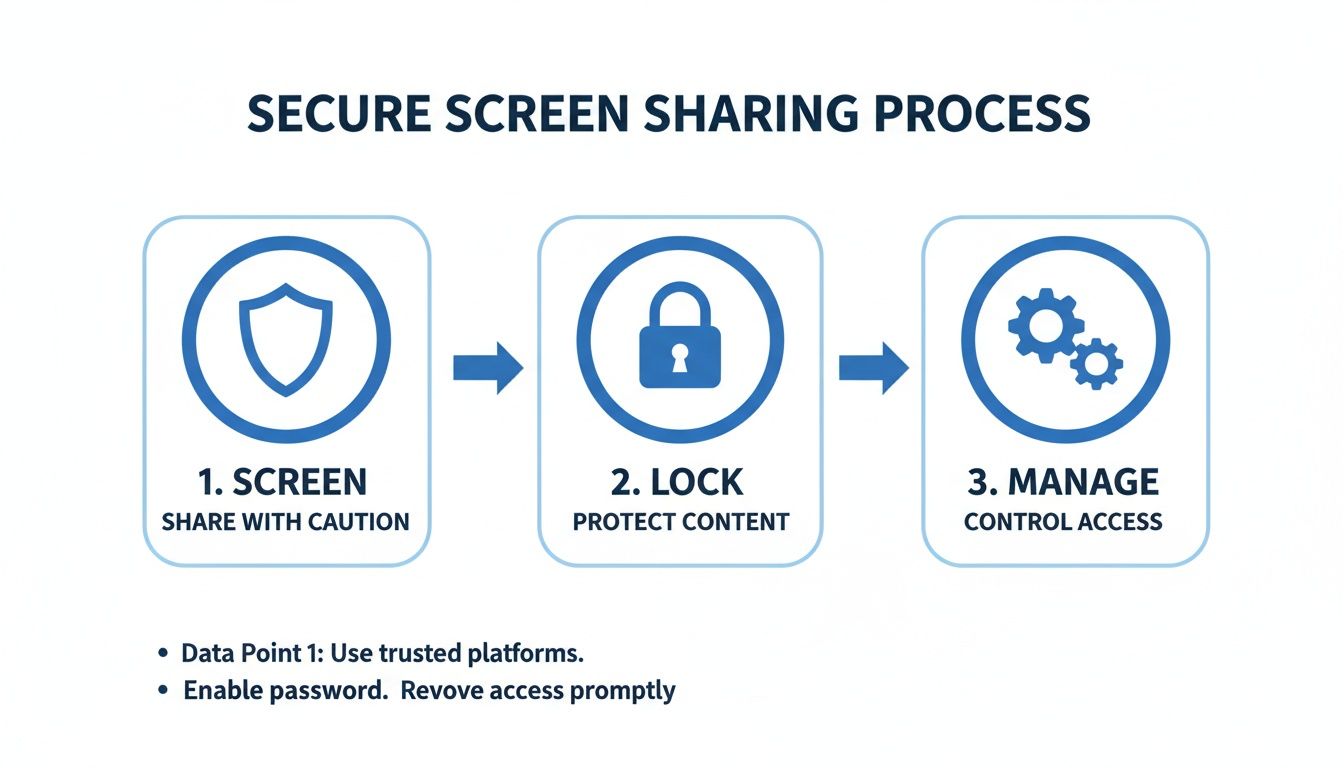
The key takeaway here is that real security involves multiple layers: screening who gets in, locking the meeting once it starts, and actively managing permissions. You can't just rely on encryption alone.
Think about a teacher running a virtual class. They can use the built-in webinar tools and share their screen, then pull up the virtual whiteboard to solve a math problem with students. After the class, the educator can easily share the recording. You can find more tips on this in our guide on how to record webinars.
By choosing a platform with bundled webinars, a small business can save $50-$100 per month, easily covering the cost of their entire video conferencing subscription. It’s a direct and immediate impact on your bottom line.
Your Top Screen Sharing Questions, Answered
Let's cut right to it. I've spent years helping people run video meetings, and the same questions about screen sharing come up time and again. Here are straight answers to the most common sticking points, based on real-world experience.
Can Others See My Private Notifications?
We've all had that moment of panic: you're sharing your screen, and a personal notification pops up for everyone to see.
The short answer is yes, they absolutely can if you share your entire desktop. The simplest fix is to get into the habit of enabling your computer's "Focus Mode" or "Do Not Disturb" before you start the meeting. It's a lifesaver.
For an even more foolproof approach, share a specific application window instead of your whole screen. This is a pro-level move that guarantees your private messages, email alerts, and other pop-ups stay completely hidden from view.
What Is the Difference Between Screen Sharing and a Webinar?
Think of it this way: screen sharing is a single tool in your toolbox, while a webinar is the entire project you're building.
You'll almost certainly use screen sharing during a webinar, but a true webinar platform offers so much more. It's an all-in-one event machine that handles things like:
- Custom registration pages
- Automated email reminders for attendees
- Managed Q&A and polling features
One of the biggest differentiators you'll find is a platform that bundles full webinar hosting into its standard video conferencing plan. This is a massive cost-saver, as you're not paying for two separate services. A small business, for instance, could easily save hundreds of dollars a year with an all-in-one solution.
How Can I Ensure My Video Call Is Stable?
Screen sharing is hungry for bandwidth, and a choppy presentation can derail your whole meeting. The most reliable way to get a stable connection is to plug an Ethernet cable directly into your router. It's old-school, but it works.
If you're stuck on Wi-Fi, run a quick pre-flight check:
- Close every application and browser tab you don't absolutely need.
- If the connection still feels sluggish, turn off your own video camera while you're sharing your screen. This frees up a surprising amount of bandwidth.
- Using a lightweight, browser-based platform can also make a big difference, as it doesn't tax your computer's resources like a heavy desktop app can.
Is It Safe to Share Documents With Sensitive Information?
It can be, but only if you're using a platform built with security as a priority, not an afterthought. You should be looking for non-negotiable features like end-to-end encryption (E2EE), which essentially scrambles your data so that no one but you and your attendees can decipher it.
For anyone in fields like healthcare or finance, this isn't just a best practice—it's a requirement. HIPAA compliance, for example, is mandatory when handling patient information.
The level of security you get often comes down to the plan you choose.
Security Features: How the Platforms Compare
| Platform | Bank-Level Encryption | HIPAA Compliance |
|---|---|---|
| AONMeetings | Included in all plans | Included in all plans |
| Zoom | Available, requires E2EE enabled | Available on specific plans |
| Microsoft Teams | Available, data encrypted | Available on specific plans |
As you can see, some platforms make you pay more or navigate complex settings for top-tier security. Others, like AONMeetings, include this protection as a standard feature, giving you peace of mind that sharing sensitive financial reports or patient records is fully protected right out of the box.
Ready to see what an integrated, secure platform can do for you? AONMeetings delivers HIPAA-compliant video conferencing and built-in webinars with unlimited meeting times and bank-level encryption, all starting at just ₹179/month. Try it today and discover how much you can save.
