
So, what does it really mean for a video conferencing platform to be "HIPAA compliant"? It’s much more than just a secure app. Think of it as a complete ecosystem built to protect patient privacy during virtual visits. This system involves a few critical pieces working together: secure software with end-to-end encryption, a formal legal contract known as a Business Associate Agreement (BAA), and clear, enforceable internal policies for your entire staff.
Without all three, you're not just missing a feature—you're missing the whole point and leaving your practice vulnerable to serious compliance violations.
What HIPAA Compliant Video Conferencing Really Means
Let's ditch the technical jargon for a moment. Imagine you need to send sensitive patient files across town. Using a standard, off-the-shelf video app like FaceTime or the free version of Zoom is like writing that information on a postcard and dropping it in the mail. Anyone could potentially intercept it along the way.
Now, contrast that with a true HIPAA compliant video conferencing platform. That’s like hiring a bonded, armored truck to make the delivery. It’s a closed, secure system from start to finish. This "armored truck" approach relies on several layers of protection, not just one, ensuring every telehealth session is private and legally sound.
The Three Core Pillars of Compliance
True compliance isn't just about the software; it's about meeting the standards of the HIPAA Security Rule. This rule breaks down into three fundamental types of safeguards, and your video conferencing strategy needs to address all of them.
- Technical Safeguards: This is all about the technology itself. The absolute non-negotiable feature here is end-to-end encryption. This essentially scrambles the video call into an unreadable code that only the participants can decipher, locking out anyone trying to eavesdrop. A vendor's ability to offer AES 256-bit encryption as an added feature of their secure plans is a key indicator of their commitment to security.
- Administrative Safeguards: These are the human-focused policies and procedures you put in place. It includes training your team on secure practices, defining who has access to what data, and, most importantly, having a signed Business Associate Agreement (BAA) with your video platform vendor. A practical example is creating a policy that explicitly states when a session can be recorded (e.g., only with patient consent documented in the EHR).
- Physical Safeguards: This safeguard covers the physical security of the hardware and locations where electronic Protected Health Information (ePHI) is accessed. For telehealth, this means policies for securing clinic laptops and phones, as well as ensuring your vendor uses protected, secure data centers to host their service.
If you're looking for a deeper dive into the regulations governing patient data, this practical guide to HIPAA compliance is a great place to start. Getting a firm grip on these rules is the first step to building a truly secure virtual practice.
More Than a Tool—It’s a Business Strategy
Adopting a compliant video platform isn't just an IT decision anymore; it’s a core business strategy. When the public health emergency hit, telemedicine usage shot up, with 47% of eligible patients giving it a try. While things have settled since then, a significant portion of patients have come to expect virtual care options. In fact, for 15% of them, data security is a primary concern.
As the global video conferencing market has grown beyond $11.47 billion, secure platforms have become the industry standard, not the exception.
A video platform isn't compliant just because it has encryption. True compliance is a partnership between your practice and your vendor, defined by a signed BAA and reinforced by your own internal security protocols.
Ultimately, choosing a HIPAA compliant video conferencing solution sends a clear message to your patients: you take their privacy seriously. That commitment builds trust, which is an invaluable asset for any healthcare practice.
The Three Pillars of Video Conferencing Security
When you’re vetting a platform for HIPAA compliant video conferencing, the HIPAA Security Rule can feel overwhelming. I find it helps to break it down into three core areas: Technical, Administrative, and Physical Safeguards.
Think of it this way: if one of these areas is weak, your entire security posture is compromised, putting Protected Health Information (PHI) on the line. A truly compliant solution has to be strong across all three. Let’s walk through what that looks like in the real world.
Technical Safeguards: The Digital Locks
Technical Safeguards are all about the technology itself—the digital locks and keys a platform uses to protect PHI during a virtual visit. The absolute non-negotiable here is end-to-end encryption (E2EE).
Imagine E2EE as sealing your video call inside a digital vault. Only you and your patient have the keys to open it. This means that even the vendor providing the service can't peek inside your conversation. It’s completely private. All reputable vendors provide strong encryption as an added feature in their paid, healthcare-focused plans.
Encryption is a deal-breaker. If a vendor can’t confirm they use, at a minimum, AES 256-bit encryption for data both in transit and at rest, you should walk away. They aren't a serious option for healthcare.
Beyond just encryption, look for these other critical technical controls:
- Access Controls: This is about controlling who gets into the virtual room in the first place. A practical example is using a virtual waiting room, which forces the clinician to manually admit the patient, preventing accidental entry. Other features include unique meeting passcodes and the ability to lock a session once it starts.
- Audit Logs: You need a clear, unchangeable record of who accessed PHI, when they did it, and what they did. These logs are your best friend when it comes to accountability or, in a worst-case scenario, investigating a breach.
- Automatic Timeouts: This simple feature is a lifesaver. It automatically logs a user out after a certain period of inactivity, which is a huge help in preventing someone from accessing PHI on a computer that was left unattended.
Ultimately, a HIPAA compliant platform must be built on a foundation of strong cybersecurity. This is a core part of protecting patient data and a key principle of Cybersecurity in Health IT.
Administrative Safeguards: The Human Element
This is where your practice’s policies and procedures come into play. A vendor can give you all the right tools, but the Administrative Safeguards are about ensuring your team uses them correctly. This is about people and process.
For instance, a platform like AONMeetings comes with webinars included in its paid plans. Your administrative policies are what define the rules of engagement—dictating that webinars are for patient education only, not for group therapy where PHI could be exposed. It’s up to you to draw those lines. This is a great value proposition, as it allows for community outreach without extra software costs.
Here are the key actions you’re responsible for:
- Staff Training: Every single person on your team who uses the telehealth platform needs to be trained on your security policies. This isn't a one-and-done event; it should be regular, documented, and updated.
- Risk Analysis: You need to periodically take a hard look at your workflows and identify where PHI might be at risk. A practical example is reviewing whether patient reminders sent via email contain any PHI beyond the appointment link and time. Once you find those weak spots, you have to put measures in place to fix them.
- Contingency Planning: What happens if your system goes down or you suspect a data breach? You need a clear, written plan that outlines exactly who does what to contain the situation and recover.
Physical Safeguards: Securing the Hardware
Finally, we have the Physical Safeguards. This pillar covers the physical security of the devices and locations where PHI is accessed or stored. With telehealth, this responsibility is split between your practice and your video conferencing vendor.
On your end, this means securing the laptops, tablets, and smartphones used for virtual visits. Simple policies like requiring screen locks, enforcing strong passwords, and having the ability to remotely wipe a lost or stolen device are all physical safeguards. It also means clinicians must conduct telehealth sessions from a private room where conversations can't be overheard.
Just as important is the physical security of your vendor’s data centers. Any vendor worth your time will use top-tier data centers that have strict physical access controls, 24/7 surveillance, and environmental protections. This ensures the servers holding your data are shielded from theft, fire, or any other physical threat.
How to Choose the Right HIPAA Compliant Video Vendor
Choosing the right platform for your practice is one of the most critical decisions you'll make when offering telehealth services. While the market for HIPAA compliant video conferencing is booming, not all vendors are built the same. Your entire selection process should hinge on one foundational document: the Business Associate Agreement (BAA).
A BAA is the legally binding contract that holds your vendor accountable for protecting patient data. Without a signed BAA from your video provider, your practice simply isn't compliant—no matter how impressive the software's security features are. But a BAA is just the first step.
This guide will show you how to look beyond the marketing claims to evaluate vendors on the security controls, real-world value, and genuine commitment to safeguarding Protected Health Information (PHI) that truly matter.
The BAA Is Your Legal Bedrock
Before you even glance at a feature list or pricing page, your first question must be: "Will you sign a BAA?" This is completely non-negotiable. Any vendor serious about serving the healthcare community will not only sign a BAA but will feature it prominently in their healthcare plans.
When you get your hands on the BAA, don't just file it away. Look for specific language that covers:
- Permitted Uses of PHI: The agreement must explicitly state the vendor will only use patient data to provide the video service and for no other purpose.
- Breach Notification Obligations: It should legally require the vendor to notify you of any data breach without unreasonable delay, so you can take action.
- Subcontractor Compliance: The BAA needs to ensure that any third parties the vendor uses (like cloud hosting providers) are also bound to the same HIPAA standards.
If a vendor hesitates, tries to charge you extra for a BAA, or downplays its importance, consider it a major red flag. Thank them for their time and move on.
Comparing Popular HIPAA Compliant Video Platforms
Once you've confirmed a vendor will sign a BAA, the next step is to dig into what you're actually getting for your money. It's easy to be drawn to a low monthly fee, but true value is about the complete package, not just the sticker price. This table offers a price comparison and a look at the value propositions of popular options.
| Feature | AONMeetings | Zoom for Healthcare | Doxy.me (Pro) |
|---|---|---|---|
| Starting Price | Starts at ₹179/user/mo | Starts at $199/user/yr (approx. $16.58/mo) | Starts at $35/provider/mo |
| Webinars Included | Yes, in all paid plans | Requires a separate, costly add-on | Not a primary feature |
| End-to-End Encryption | Yes, AES 256-bit | Yes, AES 256-bit | Yes, AES 256-bit |
| Encrypted Recordings | Yes, with all plans | Yes, with all plans | Available on higher tiers |
As you can see, a platform's value proposition becomes much clearer when you compare what's included. A vendor like AONMeetings, which bundles advanced features like webinars included and encrypted recordings into all paid plans, offers enterprise-level tools at a price accessible to solo practitioners and small clinics alike. This prevents you from being nickel-and-dimed for essential functions or forced into expensive tiers just to get one or two key features.
Essential Security Features Beyond the BAA
A signed BAA proves a vendor is willing to be legally accountable, but it doesn't tell you how well their platform is actually designed to protect you and your patients. For that, you need to look at the technical and administrative controls baked into the software.
This flowchart gives you a high-level view of the different security layers you should be assessing.
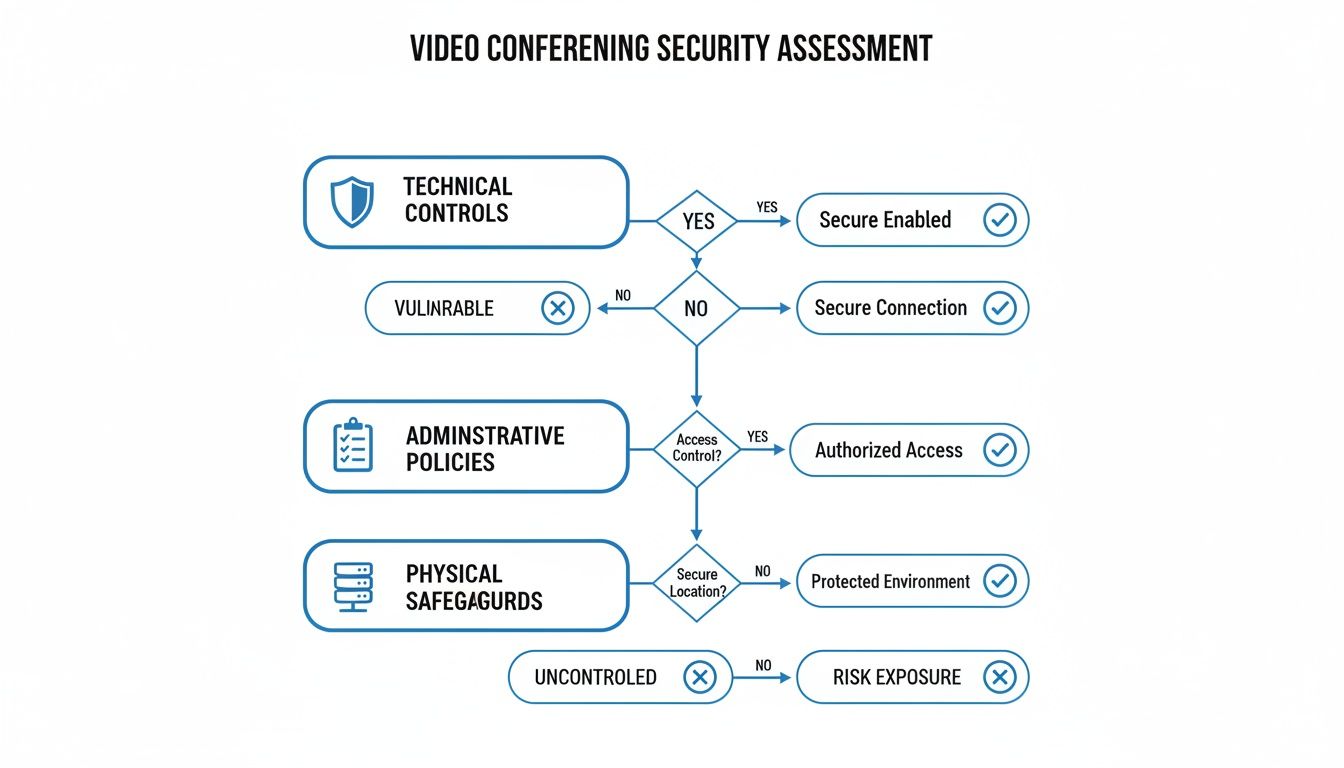
The main point here is that real security is a combined effort. It requires strong technical safeguards working hand-in-hand with smart administrative policies and physical security.
Here are some of the most important technical features you should look for:
- End-to-End Encryption: Every compliant vendor must offer encryption as an added feature of their BAA-backed plans. The gold standard is AES 256-bit encryption for data both in transit and at rest.
- Virtual Waiting Rooms: This is a must-have. It lets you control exactly when a patient enters the virtual exam room, preventing them from accidentally popping into another patient's session.
- Meeting Locks: Once your patient has joined, you should have the ability to "lock" the meeting. This prevents anyone else—even someone with the link—from entering.
- Encrypted Recording and Storage: If you plan on recording sessions (with patient consent, of course), you have to ensure those recordings are encrypted and stored in a HIPAA-compliant environment.
The healthcare video conferencing market is projected to reach $15,200 million by 2025. But with that growth comes increased risk—a record 725 healthcare data breaches were reported in 2023 alone. Choosing a vendor with robust, user-friendly security isn't just about compliance; it's about protecting your patients' trust.
By carefully vetting the BAA, analyzing the true value proposition, and confirming these essential security features, you can confidently choose a platform that truly supports your practice. For a closer comparison of leading solutions, you might find our deep dive on HIPAA compliant video conferencing platforms helpful.
Setting Up Your Platform for Maximum Security
Choosing a HIPAA compliant video conferencing tool is a great first step, but the real work starts when you configure it. An out-of-the-box setup is almost never optimized for the strict privacy demands of healthcare. Getting the settings right is what turns a compliant platform from a simple tool into a secure fortress for your patient data.
This isn't about optional tweaks; it's about taking deliberate action. Your administrator needs to lock down specific features, manage who can do what, and enable protective settings by default. Think of these configurations as essential administrative safeguards that are your responsibility under HIPAA.
Start with the Principle of Least Privilege
The single most important concept to apply during setup is the principle of least privilege. It’s a simple idea: each user should only have access to the exact information and features they need to do their job, and nothing more. A practical example is that a receptionist, a therapist, and a billing specialist all have different roles, so they should have different levels of access.
For instance, a lead therapist acting as the administrator should be the only one with the keys to the entire kingdom—full permissions. Other therapists only need to host sessions and see their own schedules, not change system-wide security settings.
By assigning roles with minimal permissions, you drastically reduce the risk of accidental data exposure. A user can't misuse a feature they can't access. This straightforward but powerful step is a cornerstone of a secure telehealth environment.
A Practical Example: A Small Therapy Practice
Let's walk through a practical example of how a small therapy practice could configure a new HIPAA compliant platform, like AONMeetings, for top-notch security. The goal is to build a secure, efficient workflow that protects PHI at every single touchpoint.
Step 1: Create User Roles
First, the clinic owner or IT admin gets into the system’s dashboard and defines clear roles:
- Administrator Role: This person can access all settings, manage users, and view billing information. This is reserved exclusively for the practice owner or a trusted manager.
- Therapist Role: This user can schedule and host meetings, access their own recordings, and message patients. They can’t change security settings or see another therapist's data.
- Front Desk Role: This role allows for scheduling appointments for all therapists and sending reminders, but blocks them from joining sessions or accessing any recordings.
Step 2: Enforce Strong Access Controls
Next, the administrator sets up global security settings that apply to everyone, creating a strong baseline of security:
- Password Policy: Set a minimum password length of 12 characters with a mix of uppercase letters, lowercase letters, numbers, and symbols. You should also enforce a password change every 90 days.
- Waiting Room by Default: Make the virtual waiting room mandatory for all meetings. This simple feature prevents unauthorized entry by forcing the therapist to manually admit each patient.
- Meeting Passcodes: Require a unique, automatically generated passcode for every session, adding another layer of security.
Securing Sessions and Data
With user roles and access controls locked in, the focus shifts to protecting the data generated during telehealth sessions. This is where features like encryption as an added feature and secure storage become absolutely critical.
On a platform such as AONMeetings, all video streams are automatically protected with AES 256-bit encryption, a military-grade standard that works behind the scenes. Your active role comes in managing how session recordings are handled. The administrator needs to configure the account to ensure all recordings are automatically encrypted and stored in the platform’s secure cloud, not on vulnerable local computers.
Patient reminders also need careful attention. The system should send notifications with a secure meeting link, but you must ensure it never includes PHI—like the reason for the visit or a diagnosis—in the text of an email or SMS reminder. If you ever need to share documents or other sensitive information, it's best to learn how to share your screen securely within the encrypted session itself.
Finally, don't overlook the value proposition of your chosen platform. Many tools nickel-and-dime you for essential features. AONMeetings, however, includes features like webinars included in its standard plans. A smart administrator can use this for patient education webinars, confident that the core platform is already configured for secure communication. For a small practice, this bundled value provides enterprise-grade security and features at a much lower price point, starting at just ₹179 per user per month.
Common Mistakes That Lead to HIPAA Violations
Even if you've invested in the best HIPAA compliant video conferencing tool on the market, the biggest compliance risks often come down to simple human error. The truth is, the technology is only half the battle. How your team actually uses it day-to-day is where the real vulnerabilities lie. Most breaches aren't the work of sophisticated hackers; they're the result of small, preventable mistakes made during a busy workday.
Let's walk through some of the most common—and costly—errors I've seen practices make. More importantly, we'll cover the straightforward "Do This Instead" plan for each one, giving you the practical examples you need to protect your patients, your data, and your practice.
Mistake 1: The Coffee Shop Call on Public Wi-Fi
Practical Example: A therapist needs to conduct an urgent session but is between appointments and decides to use the free Wi-Fi at a local cafe. This is one of the riskiest things you can do. These open networks are a playground for anyone with basic snooping tools, making it shockingly easy for them to intercept your data stream and get a look at sensitive PHI.
Do This Instead: Treat your connection like a vault. Always use a secure, password-protected network for patient calls. If you absolutely have to work on the go, turn your phone into a secure mobile hotspot. This creates a private, encrypted tunnel for your data, shielding it from prying eyes on public networks.
Mistake 2: Leaving the Digital Front Door Unlocked
Practical Example: To make things "easy," a clinic posts a single, reusable "office hours" link on its practice’s social media or in a general newsletter. In reality, this is like leaving the clinic's front door wide open. A public link is an open invitation for anyone to join a session, potentially leading to a chaotic "Zoombombing" incident and a serious data breach.
Do This Instead: Treat every meeting link like a key to a private exam room. You must send unique, password-protected links directly to patients through a secure channel, like your patient portal or the secure messaging feature built into your telehealth platform. This is the only way to ensure only the intended patient can get in.
A private meeting link shared publicly is no longer private. The convenience of a single, reusable link is never worth the immense risk of a HIPAA violation. Every session deserves its own unique, secure entry point.
Mistake 3: Hitting 'Record' Without Explicit Consent
Practical Example: A clinician records a session to review their notes later but forgets to ask the patient for permission first. This is a major HIPAA violation. Patients have an absolute right to know if a session is being recorded, why it's being recorded, and how that file will be stored and used. Simply forgetting to ask won't hold up in an audit.
Do This Instead: Build a consent check into your pre-session workflow so it's impossible to miss. Before you even think about recording, verbally confirm with the patient that they agree to it and document that consent in your clinical notes. Better yet, use a platform that automatically displays a prominent, clear notification to all participants the moment a recording starts.
Mistake 4: Forgetting the Room Around You
HIPAA compliance doesn’t stop at your screen. Discussing PHI during a video call where others can overhear—whether it's family at home or colleagues in a busy office—is a privacy breach. The Physical Safeguards of HIPAA are just as important in a telehealth setting as they are in a physical clinic. To see how these and other rules apply in more detail, review these helpful virtual meeting best practices.
Do This Instead: Find a private room and shut the door. It’s that simple. Using a quality headset is also non-negotiable, as it keeps the patient's voice out of the open air. If you can't avoid a shared space, use a physical privacy screen for your monitor and be absolutely certain your conversation can't be overheard.
HIPAA Video Conferencing Frequently Asked Questions
Jumping into the world of HIPAA compliant video conferencing can feel a bit overwhelming. Even for seasoned pros, a few tricky questions always seem to pop up when setting up or fine-tuning virtual care services. We get it.
This FAQ is designed to give you clear, no-nonsense answers to the most common questions we hear from practices just like yours. Our goal is to slice through the jargon and get you the practical information you need to move forward with confidence.
Do I Really Need a BAA If My Tool Is Encrypted?
Yes, absolutely. This is probably the single biggest point of confusion, and getting it wrong is a major compliance risk.
Think of it this way: encryption as an added feature is like the armored truck carrying your patient data—it’s the technical safeguard that protects it while it's on the move. But the Business Associate Agreement (BAA) is the legally binding contract that holds the driver of that truck accountable. It’s the legal proof that they’ve agreed to protect the contents.
Without a signed BAA from your video conferencing vendor, you are not HIPAA compliant. Period. A vendor that takes healthcare security seriously will always be ready and willing to sign a BAA.
A platform’s security features, like encryption, are promises. A Business Associate Agreement turns that promise into a legal obligation. You can’t have one without the other and still be compliant.
Can I Use a Free Video App for Telehealth?
The short answer is a hard no—at least, not anymore. During the COVID-19 public health emergency, the government relaxed the rules, which allowed for the temporary use of common apps. That grace period has officially ended.
Today, using a free, consumer-grade app like the standard versions of Skype, FaceTime, or Google Meet for telehealth puts your practice at serious risk for steep fines.
These free versions almost always fail on three key points:
- They won't sign a BAA.
- They often lack guaranteed end-to-end encryption.
- They don't have the required access controls and audit logs that HIPAA demands.
You have to use a paid, business-tier plan that is specifically designed for healthcare and comes with a signed BAA. Trying to cut costs with a free tool is a gamble that could cost you dearly in the long run.
What Are Must-Have Versus Nice-to-Have Features?
Knowing the difference between non-negotiable and value-added features is the key to picking the right platform without overpaying. The "must-haves" are your ticket to compliance, while the "nice-to-haves" are all about improving your workflow and the patient experience.
Platform Feature Comparison
| Feature Category | Examples & Importance |
|---|---|
| Must-Haves | Signed BAA, end-to-end encryption, access controls (like waiting rooms and passcodes), and audit logs. These are the absolute, non-negotiable foundations of a compliant telehealth setup. |
| Nice-to-Haves | EHR integration, virtual backgrounds, screen sharing, automated reminders, and webinar hosting. These features can make your life easier but aren't strictly required for compliance. |
This is where you can find real value propositions if you look closely. Many platforms will charge extra for features like webinar capabilities. However, a platform like AONMeetings rolls webinars included into its standard plans, which, according to our price comparison, start at just ₹179 per user per month. For a smaller practice, getting enterprise-level tools on a budget is a huge win. Plus, their built-in encryption as an added feature means every interaction, from a one-on-one therapy session to a group patient education webinar, is kept secure.
Is It My Job to Train Staff on Secure Platform Use?
Yes, it is 100% your responsibility. HIPAA's Administrative Safeguards rule is very clear: the covered entity (that’s your practice) must train every single member of the team on the policies and procedures that protect patient health information (PHI). This includes proper use of your video platform.
A practical example of this is training that covers exactly how a clinician enables the virtual waiting room, how they should verify a patient’s identity before starting a session, and what the protocol is for recording a session (always with documented consent). Buying a compliant tool is just step one; ensuring your team uses it correctly is what truly protects your patients and your practice.
Ready to simplify your telehealth with a secure, affordable, and feature-rich platform? AONMeetings offers everything you need for HIPAA compliant video conferencing, including unlimited meeting times and built-in webinars, all in one straightforward plan. Start delivering exceptional virtual care today by visiting https://india.aonmeetings.com.
