
Practice management software acts as the central nervous system for any professional practice, connecting all the administrative and business operations that, while often unseen, are critical for keeping the doors open. It's the digital backbone ensuring your entire team—from the front desk to the lead practitioners—works in perfect harmony.
What Is Practice Management Software Really
Think of your practice as an orchestra. Your doctors, lawyers, or therapists are the star musicians, each a master of their craft. But who ensures they all start on time, play in the right key, and create a cohesive performance? That's the conductor.
Practice Management Software (PMS) is that conductor for your business. It's the operational command center that handles the entire client journey, from the moment they first book an appointment to the day their final invoice is paid.
This goes far beyond just replacing a paper calendar with a digital one. It’s about creating an intelligent, automated system that takes repetitive, time-consuming tasks off your team's plate. Instead of your staff spending hours making reminder calls, manually entering client data, or chasing down billing paperwork, a PMS handles it all quietly in the background. A practical example is a dental office administrator who, instead of calling 20 patients to confirm hygiene appointments, can rely on the PMS to automatically send personalized SMS reminders two days before. This frees up your skilled professionals to focus on what truly matters: providing outstanding client care.
The Shift From Manual to Automated
The move toward these systems isn't just a trend; it's a fundamental shift in how successful practices are run. You can see this clearly in the market’s explosive growth. The global practice management system market, valued at roughly USD 17.02 billion in 2025, is expected to surge to USD 43.57 billion by 2035. North America is leading the charge, holding a 46.8% revenue share, which underscores just how vital efficiency has become in the professional services world.
In certain fields, these tools are even known by different names that reflect their core function. For example, many in the legal world refer to them as Law Firm Automation Software, highlighting their power to automate everything from case management to billing cycles.
Practice Management Software at a Glance
The real value of a PMS snaps into focus when you look at a side-by-side comparison of daily tasks. It systematically replaces clunky manual processes with clean, automated workflows.
Here’s a quick look at how a PMS can completely change the way your practice operates.
| Operational Area | Before PMS (Manual Process) | After PMS (Automated Workflow) |
|---|---|---|
| Scheduling | Phone tag, paper calendars, manual reminders | Online booking, automated SMS/email reminders, centralized calendar |
| Billing | Manual invoice creation, paper superbills, mail | Automated invoicing, electronic claim submission, payment tracking |
| Client Data | Physical files, scattered spreadsheets, risk of loss | Secure, centralized digital records with role-based access |
| Reporting | Manual data collection, difficult to analyze trends | Instant reports on revenue, appointments, and staff performance |
Beyond just efficiency, a core feature of any reputable PMS is its dedication to security. Most platforms come equipped with bank-level encryption to ensure all sensitive client information is locked down and protected from unauthorized access. This means that a client's payment details or personal health information are scrambled into unreadable code, safeguarding them from potential data breaches.
The Core Features That Drive Practice Efficiency
To really get what practice management software is all about, you have to look under the hood. It’s so much more than a glorified digital calendar. Think of it as the central nervous system for your entire operation, with interconnected features designed to handle the most common headaches—from the moment a client books an appointment to the final payment.
Each part of the system is built to solve a real-world problem, creating a simple, repeatable workflow: schedule the appointment, automate the communication, and bill for the service.
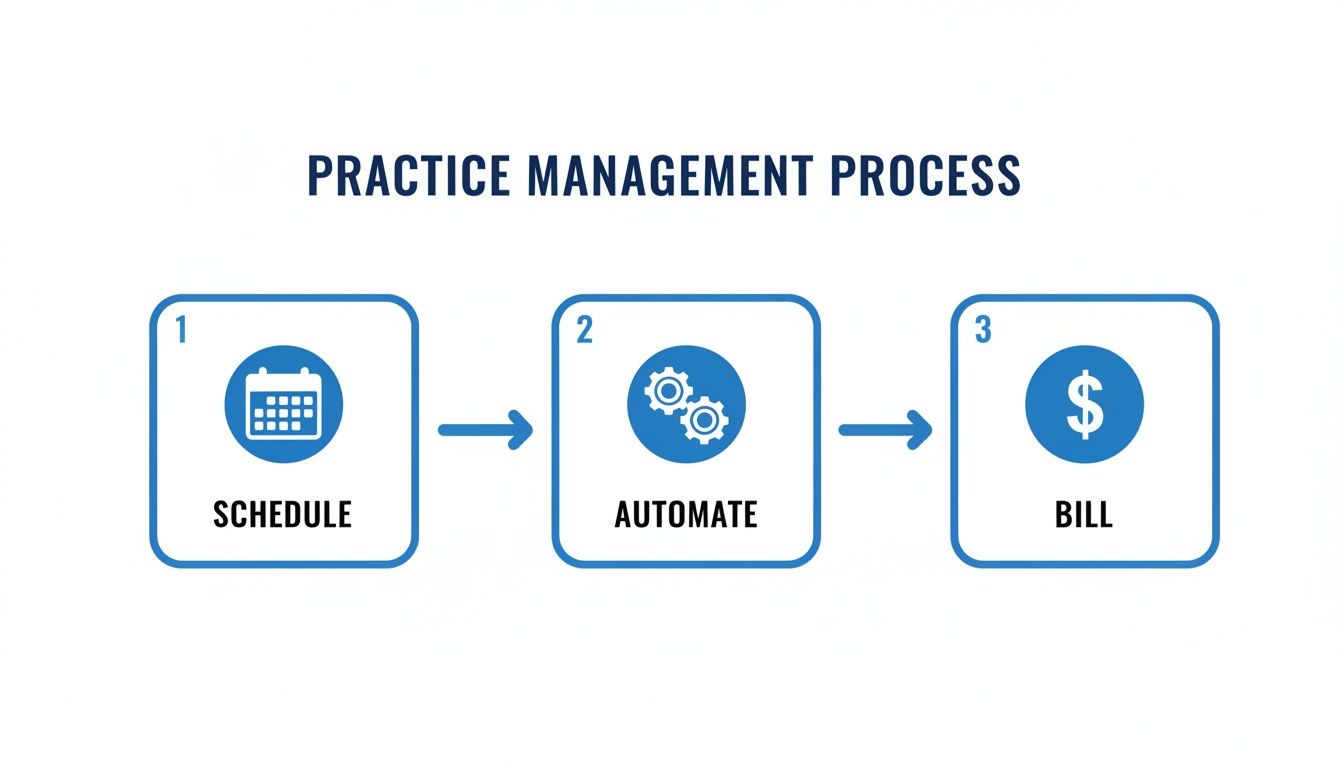
This loop is what makes a practice run smoothly. It turns appointments into automated tasks and, ultimately, into revenue.
Patient Scheduling and Automated Reminders
The first touchpoint for any patient or client is scheduling an appointment. A good PMS turns this from a time-consuming manual task into a simple, automated process. Instead of staff spending hours on the phone playing schedule-tag, clients can book their own appointments 24/7 through a secure online portal. For example, a new therapy client can visit a counselor's website at 10 PM, view available slots, and book their initial consultation without any staff intervention.
But the real game-changer here is tackling no-shows. Automated SMS and email reminders are a standard feature in any modern PMS, and they work wonders for cutting down on missed appointments and keeping your schedule full.
A simple automated reminder can reduce patient no-shows by as much as 36%. That's a direct impact on your practice’s bottom line, all while optimizing your providers' time.
This feature alone often provides a huge return on investment by recapturing billable hours that would have otherwise vanished.
Billing and Invoicing That Actually Works
Let's be honest: billing is often the biggest administrative nightmare for any practice. Practice management software confronts this head-on by automating the entire revenue cycle. It gets rid of the clunky, paper-based systems and replaces them with a fast, digital workflow.
For instance, in a medical practice, the software can generate a superbill right after an appointment, convert it into an electronic claim, and fire it off to the insurance payer in minutes. The system doesn't stop there; it tracks the claim's status and flags any rejections or denials, so your staff can fix them right away. This can shrink the time it takes to get paid from weeks or months down to just a few days.
It’s no surprise that software solutions now command over 66% of the revenue share in the U.S. market. This isn't a niche trend; it's a clear, industry-wide shift toward using digital tools to manage financial and operational complexity. You can learn more about these market trends and their impact on healthcare.
Reporting and Analytics for Better Decisions
You can't fix what you don't measure. One of the most powerful features of any good practice management software is its reporting and analytics engine. With just a few clicks, a practice manager can pull detailed reports on the key numbers that show the health of the business.
This gives you concrete answers to critical questions. For example, a chiropractic clinic can run a report to see that "spinal adjustments" are their highest-grossing service, while "nutritional counseling" has the highest no-show rate, allowing them to adjust their strategy accordingly. You can:
- Identify your most profitable services by looking at revenue breakdowns.
- Spot bottlenecks in your workflow by analyzing patient wait times.
- Track staff productivity and appointment volume to manage resources better.
Some systems offer incredible value propositions, such as included webinar hosting. This allows a practice to generate new revenue by offering paid online workshops on topics like "Intro to Mindfulness" or "Small Business Tax Tips," turning an operational tool into a profit center. Tying all of this together is encryption, which ensures that every piece of sensitive patient and financial data is kept secure, both when it's stored and when it's transmitted during these webinars.
How Different Industries Benefit from PMS
When you hear ‘practice management software,’ you probably think of a doctor's office. That's a common starting point, but the reality is that these platforms are incredibly useful well beyond the world of healthcare. At their core, they solve a universal problem for any professional service: how to manage clients, organize operations, and get administrative work done without the chaos.
Think about a busy law firm. They aren't just juggling appointments; they're managing complex cases. A good PMS lets them tie every single document, court deadline, and client email directly to the right case file. For a practical example, a paralegal can log 45 minutes of research for the "Smith v. Jones" case, and the software automatically adds that billable time to the client's next invoice. Every minute spent on research or a client call gets logged and billed, ensuring nothing slips through the cracks.
Value Beyond the Basics
The best modern platforms do more than just help you manage what you already have. They open up doors to new sources of revenue. This is where a simple organizational tool evolves into a real engine for growth.
A key value proposition to look for is integrated tools that expand your service offerings. Imagine a wellness clinic that wants to reach more people without leasing more office space. With a PMS that has built-in webinar hosting, they can start offering paid group workshops on stress management or nutrition. Suddenly, the software isn't just an expense; it's actively bringing in money. These kinds of integrated tools work much like the best online teaching platforms, blending scheduling, communication, and content delivery all in one place.
Customized for Specific Needs
A great practice management system is like a chameleon, adapting to the unique pressures and workflows of different fields. It’s not a one-size-fits-all solution.
- For Therapists and Counselors: These professionals depend on a PMS to make booking appointments seamless for a roster of recurring clients. More importantly, it provides a confidential, fortified space for sensitive psychotherapy notes, which is absolutely essential for maintaining patient privacy and compliance. A practical example is the software automatically separating administrative booking data from legally protected process notes.
- For Consulting Firms: Here, the focus is on projects. A PMS helps consultants map out project timelines, track every deliverable, and handle tricky invoicing, whether it's based on a monthly retainer or billable hours. It keeps everyone on track and the financials crystal clear.
One feature that's non-negotiable, no matter the industry, is encryption. Whether you're storing sensitive legal strategies or confidential therapy records, strong encryption means that data is completely unreadable to anyone without authorization. For example, if a therapist's laptop is stolen, the encrypted patient files on it would be inaccessible, protecting both the client and the practice from a major data breach.
From law offices to therapy practices, professionals are finding that the right software does more than just organize—it helps them run a more secure, efficient, and profitable business.
Choosing the Right PMS for Your Practice and Budget
Picking the right software to run your practice feels like a huge decision, and honestly, it is. But you can make it a lot less daunting by breaking the process down. The first big choice you’ll face is whether to get a standalone system or a fully integrated one.
Think of a standalone PMS as your front-office specialist—it handles scheduling and billing, and that’s about it. An integrated EHR/PMS, on the other hand, does all of that plus it manages all your clinical records. For almost any modern practice, going with an integrated system is the smarter move. It saves your team from the headache of double-data entry and reduces the risk of errors.
Understanding the Price vs. the Real Value
When you start comparing options, it's easy to get fixated on the monthly price tag. But the true value of a practice management system isn't just about the subscription fee; it's about what it does for your bottom line and efficiency.
For example, a strong value proposition is the inclusion of features with a clear return on investment, like included webinars. This might seem like a small perk, but it allows you to host paid group consultations or educational events, opening up a whole new revenue stream. For example, a financial advisor could host a paid webinar on "Retirement Planning in Your 30s" for 50 attendees at $20 each, generating $1,000 in revenue using a tool already included in their PMS subscription.
It’s also crucial to ask about the total cost of ownership. The sticker price is just the beginning. A seemingly cheap plan of $50/month can quickly become expensive if it has a $1,000 setup fee and charges $200/hour for support.
A critical factor in your decision should be data security. Regardless of price, any system you consider must include robust, bank-level encryption to protect sensitive client data both when it's stored on a server (at rest) and when it's sent over the internet (in transit).
This is completely non-negotiable. It’s the bedrock of client trust and regulatory compliance.
Comparing Software Tiers and Costs
Practice management software isn’t a one-size-fits-all solution, and vendors price their products accordingly. A solo practitioner just starting out has vastly different needs than a large, multi-provider clinic, and the software options reflect that.
Let's look at a price comparison. A solo therapist might find a simple, cloud-based PMS like SimplePractice or TherapyNotes for around $75 per user, per month. This typically covers essentials like online scheduling, automated reminders, and basic invoicing.
On the other hand, a bustling medical clinic with several providers will need a much more powerful, integrated EHR/PMS like athenahealth or Kareo. The cost could be closer to $400 per provider, per month, but that investment gets you advanced features like electronic insurance claim submissions, deep financial reporting, and a full-featured patient portal—all tools that are vital for managing a complex operation at scale.
To help you see where your practice might fit, we've put together a quick comparison of the typical software tiers you'll encounter.
Practice Management Software Price and Model Comparison
The right software tier depends entirely on your practice's size, complexity, and growth plans. This table breaks down what you can generally expect to find at each level.
| Software Tier | Typical Price Model | Core Features Included | Best For |
|---|---|---|---|
| Solo Practitioner Starter | $50 – $150 / user / month | Scheduling, basic invoicing, client notes | Individual therapists, consultants, coaches |
| Small Group Practice | $150 – $350 / provider / month | All starter features plus insurance billing, patient portal | Small clinics, legal teams, group practices |
| Multi-Provider Clinic Suite | $350 – $700+ / provider / month | Full integration, advanced analytics, custom workflows | Hospitals, large clinics, established firms |
By weighing your must-have features against these common pricing brackets, you can zero in on a solution that gives you the tools you need to run your practice smoothly without breaking the bank. It's all about finding that sweet spot between functionality and budget.
How Integrations Turn Your Software Into a Command Center
A practice management system really shows its value when it plays well with others. Standalone software can only get you so far. The best systems don't just sit on their own; they act as a central hub, connecting all the other tools you rely on to create one smooth, efficient workflow.
A good way to think about it is like a smartphone. The phone's operating system is the foundation, but the real power comes from the apps you install and how they work together. Your PMS is that foundation.

This isn't just a nice-to-have feature anymore; it’s what the market demands. The numbers back this up, with integrated solutions projected to hold a massive 61.88% revenue share of the practice management market by 2025. This shows a clear move away from piecemeal solutions and toward single platforms that tie everything—from scheduling to billing to clinical care—together.
PMS vs. EHR: Understanding the Key Partnership
One of the most important handshakes your software will make is with an Electronic Health Record (EHR) system. People often confuse the two, but their roles are distinct.
Think of it this way: your PMS runs the business, handling the front-desk tasks like appointments and billing. The EHR holds the clinical story, managing patient charts, diagnoses, and treatment histories. For any modern practice, getting these two systems to communicate seamlessly isn't just an option; it's a necessity.
When the PMS and EHR are properly connected, the entire patient experience improves. A new appointment scheduled in the PMS can automatically create a new patient file in the EHR. Later, when a doctor adds notes to that file, the correct billing codes can be sent back to the PMS without anyone having to type them in again.
Real-World Examples of Smart Integrations
Let's look at how this works in day-to-day operations. These connections are all about eliminating busywork and turning multi-step processes into a single click.
A practical example is telehealth. Instead of using one program for scheduling (like Calendly), another for video calls (like Zoom), and a third for billing (like QuickBooks), an integrated PMS brings it all together. A provider can launch a secure, HIPAA-compliant video session right from the appointment slot in their calendar. No more copying and pasting messy meeting links into emails.
Other essential integrations you'll see include:
- Patient Portals: Giving clients a secure, self-service way to book appointments, complete intake forms, and see their own health information.
- Payment Gateways: Letting you collect payments instantly and securely, whether it’s through an invoice or directly on the patient portal.
- Lab and Imaging Services: Allowing providers to order tests and have the results flow directly back into the patient's digital chart.
For practices with staff working from different locations, having these integrated systems is non-negotiable. If you're managing a distributed team, you might find our guide on the best collaboration tools for remote teams helpful.
By linking these different services, a practice management system becomes more than just an organizational tool. It becomes the true command center for your entire practice.
Data Security and Compliance in Your PMS
When you choose a practice management system, you're handing it the keys to your clients' most sensitive information. Protecting that data isn't just good practice—it's a legal and ethical obligation. That’s why security and compliance features aren't just nice-to-haves; they are absolutely non-negotiable.

Think of it like building a digital fortress. A strong PMS uses several layers of defense to keep your practice’s data locked down tight.
The Non-Negotiable Role of Encryption
At the heart of any solid security plan is encryption. It’s essentially a secret code that scrambles your data, making it completely unreadable to anyone who doesn't have the specific key to unlock it. Any PMS worth considering will use robust, bank-level encryption like AES-256 to protect data in two key states:
- At Rest: This refers to data that's just sitting on a server or a hard drive. A practical example: if a hacker gains access to the cloud server where your data is stored, the encrypted files would be gibberish without the decryption key, rendering the stolen information useless.
- In Transit: This is data zipping across the internet. End-to-end encryption shields information from being snooped on as it travels between your system and your client's device.
A perfect real-world example is when a patient fills out an intake form online. End-to-end encryption ensures their social security number and medical history are protected from interception as that data travels from their browser to your PMS.
HIPAA Compliance and Role-Based Access
For any practice handling health information, ensuring strict HIPAA compliance is the name of the game. This federal framework dictates exactly how Protected Health Information (PHI) must be stored, managed, and transmitted. A modern PMS should give you all the tools you need to meet these standards without a headache. And if you're using video, be sure to check our guide on HIPAA-compliant video conferencing platforms to keep every part of your operation secure.
A critical piece of compliance is controlling who can see what. This is where role-based access controls come in. You can set specific permission levels for each staff member. For example, your front-desk coordinator can view schedules and billing information but is blocked from accessing sensitive clinical notes.
This is backed up by audit logs, which act as an unchangeable digital ledger of every action taken within the software. These logs show exactly who accessed what data and when, giving you a powerful tool for accountability and total peace of mind.
Your Questions About Practice Management Software Answered
Diving into practice management software can feel overwhelming, and it's natural to have questions. We get them all the time. Here are some straightforward answers to the most common queries we hear from practitioners just like you.
What Is the Difference Between Practice Management Software and an EHR?
This is easily the biggest point of confusion, but the distinction is simple when you think about your practice's workflow.
Practice Management Software (PMS) is the front office. It runs the business side of things—scheduling appointments, handling billing, and generating reports on your practice's financial health. It's all about administrative efficiency. A practical example is using the PMS to track which insurance claims are still unpaid.
An Electronic Health Record (EHR), on the other hand, is the exam room. It’s purely clinical, managing patient charts, tracking medical histories, and documenting treatment plans. For example, a doctor uses the EHR to record a patient's vital signs and prescribe medication.
While they used to be completely separate systems, most modern solutions integrate them. This creates one smooth workflow, connecting the front office to the exam room so you aren't stuck entering the same patient information twice.
How Much Does Practice Management Software Typically Cost?
There's no single sticker price, as costs depend heavily on the size and needs of your practice. Here’s a price comparison to give you a realistic idea:
- For a solo therapist: A solid, cloud-based system like TherapyNotes will likely run you $50–$150 per user, per month.
- For a small clinic: An all-in-one, integrated EHR/PMS like Kareo can range from $200 to $700+ per provider, per month.
A word of advice: don't just look at the monthly fee. A key value proposition to evaluate is what's included. Keep an eye out for features that provide a return on your investment, like included webinars, which can help you turn your software into a tool for generating new revenue. For instance, a small investment in a plan with webinars could pay for itself after one successful online event.
When you're comparing options, remember this: robust, bank-level encryption isn't a premium feature—it's a requirement. Protecting your client's data is non-negotiable, and any reputable platform must include it, regardless of the price point.
Does My Practice Need Built-In Telehealth?
For almost any practice operating today, the answer is a firm yes. Having telehealth integrated directly into your practice management software isn't just a convenience; it's a huge workflow advantage.
When telehealth is built-in, you can schedule, manage, and launch a virtual session all from the same dashboard. A practical example: a psychiatrist finishes a virtual session, and with one click, the system automatically generates a bill with the correct telehealth service code, ready to be sent to the patient or insurer. This completely gets rid of the need to juggle different platforms, which saves your staff time and cuts down on the kind of small administrative errors that frustrate both your team and your patients.
Ready to upgrade your practice with secure, reliable, and affordable video conferencing? AONMeetings offers HIPAA-compliant virtual meetings with built-in webinar capabilities, all without contracts or hidden fees. Start hosting unlimited-length meetings today by exploring our plans.
