
You’re probably reading this because your team has a recurring meeting that eats time, drifts off course, and somehow still ends with, “Let’s revisit this next week.” Everyone attended. Nobody’s clear on the decision. The notes are patchy. Sensitive topics may have been discussed on a platform that wasn’t built for them. Then the same cycle repeats.
That’s usually not a people problem. It’s a team meeting agenda problem.
A solid agenda does more than list topics. It decides what the meeting is for, who needs to speak, what information must be ready, how long each discussion gets, and what happens after the call ends. In healthcare, that can mean a cleaner clinical review with tighter privacy controls. In education, it means fewer rambling faculty calls and better handoffs. In business, it means less status theatre and more decisions.
Why Most Team Meetings Fail Before They Start
Most bad meetings are already broken before anyone joins.
The failure starts when the invite says “weekly sync” and nothing else. No decision to make. No owner for each topic. No pre-read. No signal about whether this is a problem-solving call, a quick checkpoint, or a client-facing review. People arrive cold, talk in circles, and fill the silence with updates that could have lived in chat.

I’ve seen this in three common forms:
- The business meeting that tries to do everything. Sales wants pipeline review, product wants feedback, finance wants approvals, and nobody leaves with a firm next step.
- The education staff call with no pacing. Ten minutes go to admin details, then one urgent student issue takes over the remaining time.
- The healthcare review with weak structure. Clinical teams discuss serious cases, but the order of presentation, decision ownership, and documentation path are unclear.
A meeting agenda fixes that by forcing a choice. What is the point of this meeting, today, with these people?
Structure beats enthusiasm
Teams often assume good intent will save a vague meeting. It won’t. Skilled people still need a structure.
Lean Six Sigma has been built around disciplined meeting practices for decades. Over 80% of Fortune 500 companies have adopted Lean Six Sigma principles, and the methodology, which began at Motorola in 1986, helped GE deliver over $12 billion in savings by 2000, with structured agendas helping cut project cycle times by up to 50% in sectors such as manufacturing and healthcare, according to the Lean Six Sigma Green Belt material at SweetStudy.
A meeting without a real agenda usually turns into a live inbox. Everyone brings a topic. Nothing gets finished.
Platform friction makes weak agendas worse
Even a decent agenda falls apart when the tool adds pressure. Time caps make teams rush the wrong topics. Weak access controls make people cautious in healthcare and education settings. Separate webinar tools create extra cost and extra admin for training sessions, all-hands meetings, and public briefings.
That’s why the meeting setup matters as much as the document. If you’re coordinating remote participants and trying to avoid the usual call friction, this guide on how to make a teleconference call is a practical starting point.
A useful team meeting agenda respects time, but it also respects context. The meeting should fit the work, the risk level, and the people in the room.
Laying the Groundwork for a Purposeful Agenda
A strong agenda starts before you write the first bullet.
If the purpose is fuzzy, the agenda will be fuzzy too. The fastest way to improve meetings is to define one clear objective and build everything around it.
Start with one outcome
“Discuss Q3 marketing” is not a meeting objective.
“Choose the Q3 channel mix and assign owners for launch tasks” is. It tells attendees what success looks like. It also makes it easier to decide who needs to be there.
Use one of these outcome labels for every main item:
- Decision. The group must choose something.
- Discussion. The group needs input or alignment.
- Info. Someone needs to brief the team.
That small label matters. The Data-Driven Meeting Protocol found that sharing an agenda with clear objectives and pre-reads 24 to 48 hours in advance boosts participant preparation by 70%, and 80% of teams report higher decision quality when each item includes a desired outcome. That guidance appears in the IdeaData meeting toolkit.
Choose attendees by contribution, not habit
A recurring mistake is inviting everyone who might care.
That creates long meetings with passive listeners. Instead, divide people into three groups:
- Decision-makers who must approve or choose.
- Contributors who hold needed facts, risks, or implementation details.
- Observers who can read the summary later unless their participation is essential.
In practice, this changes the tone fast. A clinic operations meeting might need the medical lead, practice manager, and compliance contact. It probably doesn’t need every clinician. A school leadership meeting may need the principal, admin lead, and department chair, not the full faculty.
Assign prep work before the call
An agenda is not the prep. It’s the wrapper around prep.
Give people a reason to open the invite and act before the meeting:
- Ask one person for the numbers. If a budget item is on the agenda, one owner should attach the current figures and note the decision required.
- Ask another person for the risk view. In a healthcare or education context, someone should flag privacy, policy, or student/patient impact.
- Ask for short written updates. If people can write their status in advance, you save live time for blockers and decisions.
Practical rule: If a topic needs data, the data should arrive before the meeting, not during a screen share scavenger hunt.
Keep the pre-read short and usable
A pre-read shouldn’t feel like homework. It should remove surprises.
Good pre-reads usually include:
- A one-line objective
- Context in a few sentences
- Any attached dashboard, memo, or slide
- What attendees need to decide or prepare
If your team works remotely, technical quality matters too. A simple audio issue can sink a tightly planned call. This walkthrough on how to stop echo on mic is worth sending to frequent presenters before important sessions.
Write the opening line last
This sounds backward, but it works.
Once you know the decision, the participants, and the prep, the top line of the agenda becomes obvious. It usually reads something like this:
“Objective: Review telemedicine follow-up workflow, decide on the revised handoff process, and assign implementation owners.”
That sentence does more work than a page of vague bullets. It sets the standard for the entire team meeting agenda.
How to Structure and Time Your Agenda for Peak Productivity
A meeting can have a clear purpose and still waste time if the pacing is wrong.
The most reliable fix I’ve used is simple time-boxing. Not rough estimates. Actual limits. If the team knows the top issue gets the largest block and every other item must fight for the remaining space, conversations become sharper.
Use the 40 30 20 10 rule
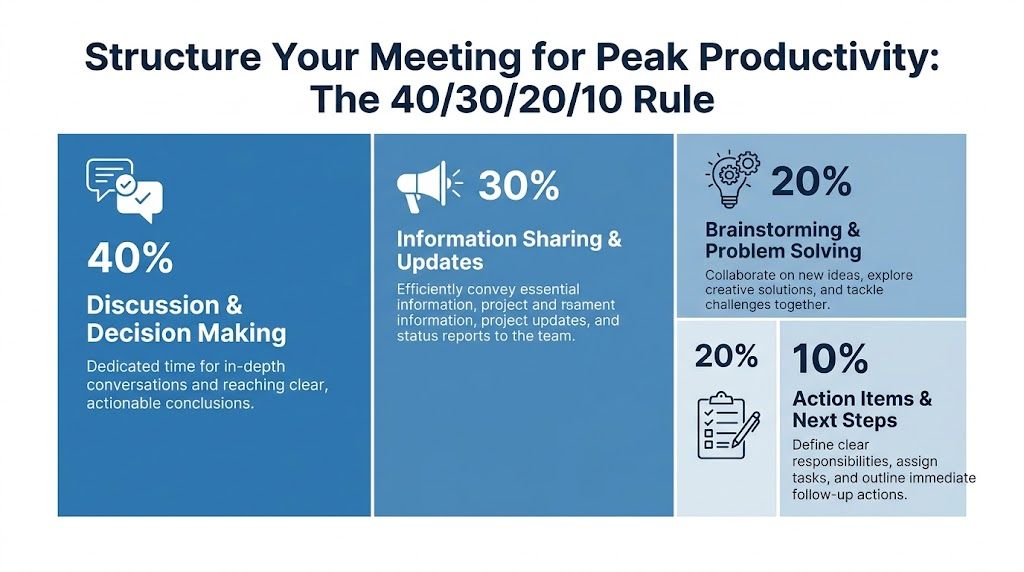
The 40/30/20/10 Rule works because it forces priorities into the calendar itself.
For a 60-minute meeting, that means:
- 40% for the highest-priority item. 24 minutes.
- 30% for secondary priorities. 18 minutes.
- 20% for lower-priority updates or information sharing. 12 minutes.
- 10% for wrap-up and action items. 6 minutes.
According to Scribbl’s meeting management guidance, this rule can improve meeting outcome success rates by 25% to 40%, and teams using it achieve 35% faster decision-making.
That matters most in meetings where one issue drives the session. A product decision. A clinical workflow change. A parent communication policy. A launch approval. If everything gets equal time, the important thing gets rushed.
A practical agenda template
Here’s the format that works across business, education, and healthcare:
| Agenda element | What to include |
|---|---|
| Meeting objective | One sentence with the desired end state |
| Attendees | Only required participants |
| Roles | Facilitator, note-taker, timekeeper |
| Item list | Topic, owner, time box, outcome type |
| Supporting material | Links to docs, dashboards, or slides |
| Action log | Owner, deadline, follow-up path |
A live example for a 60-minute operations meeting:
| Time | Item | Owner | Outcome |
|---|---|---|---|
| 0 to 5 min | Confirm objective and decision needed | Facilitator | Info |
| 5 to 29 min | Resolve top blocker in client onboarding | Ops lead | Decision |
| 29 to 47 min | Review secondary workflow updates | Team leads | Discussion |
| 47 to 59 min | Quick updates that weren’t covered in writing | Assigned owners | Info |
| 59 to 60 min | Confirm owners and deadlines | Note-taker | Action |
Roles stop meetings from drifting
A team meeting agenda needs role clarity, not just topic clarity.
Three roles matter most:
- Facilitator keeps the group on the item and protects the clock.
- Note-taker captures decisions, not every spoken sentence.
- Timekeeper calls out when a topic has one or two minutes left.
When one person tries to do all three, quality drops. In smaller teams, rotate the roles weekly.
Cost matters more than people admit
Bad meetings waste salary cost, but meeting software can also inflate the bill. Consequently, price comparisons matter.
The publisher information for AONMeetings states that plans start at ₹179 per user per month and include unlimited meeting time, built-in webinars, bank-level encryption, screen sharing, whiteboards, document sharing, and recordings. It also notes a 30-day money-back guarantee. The same publisher brief says Teams and Zoom often require navigating feature limits or higher tiers for comparable workflows.
Because the provided material does not include verified prices for Zoom Pro or Microsoft Teams Business Basic, the only accurate comparison is qualitative for those columns.
2026 Video Conferencing Value Comparison (Per User/Month)
| Feature | AONMeetings (Starting Plan) | Zoom (Pro Plan) | Microsoft Teams (Business Basic) |
|---|---|---|---|
| Starting price | ₹179 per user/month | Pricing varies by plan | Pricing varies by plan |
| Meeting time limits | Unlimited meeting time | Plan-dependent | Plan-dependent |
| Webinars included | Yes | May require separate setup or tier | Often depends on broader Microsoft stack |
| Encryption | Bank-level encryption | Security features vary by configuration | Security features vary by configuration |
| Browser-based join | Yes | Available in many cases | Available in many cases |
| Recordings | Included | Plan-dependent | Plan-dependent |
| Breakout rooms | Available on advanced tiers | Available on supported plans | Available on supported plans |
If your team runs client demos, internal town halls, and training webinars, having webinars included changes the economics. You’re not stitching together one tool for team meetings and another for audience-facing sessions.
For teams formalizing meeting discipline inside broader operational systems, this piece on Process and Performance Management adds useful context on how meeting cadence connects to execution quality.
What works and what doesn’t
What works
- One dominant topic that gets the biggest time block.
- Visible timers so everyone can see the limit.
- Written updates before the call to reduce verbal reporting.
- A short wrap-up focused on owners and deadlines.
What doesn’t
- Equal time for all topics. It signals weak priorities.
- Open-ended “project updates”. These expand to fill the hour.
- Saving action items for later. Later often means never.
- Treating webinar planning as separate from agenda planning. If the meeting may become a wider training or stakeholder session, that should shape the structure from the start.
A team meeting agenda earns its keep when the schedule reflects the primary priority, not the order in which people thought of topics.
Sample Agendas for Your Most Common Meetings
Templates only become useful when they fit real work. Below are four agendas I would use.
Each one keeps the objective visible, names owners, and leaves enough room for decisions instead of status monologues.
Weekly team sync
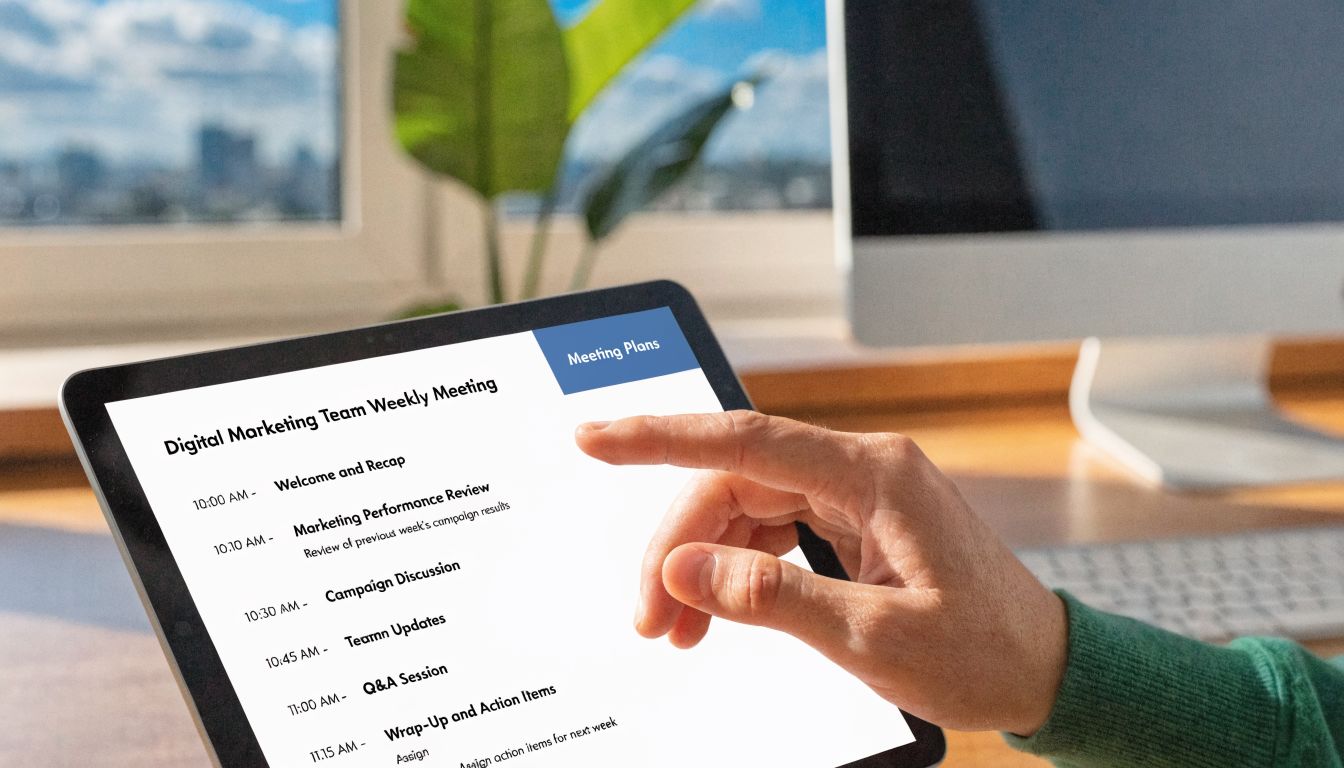
This meeting should remove blockers, not replay everyone’s week.
Objective: Surface urgent roadblocks, confirm priorities, and assign support.
Duration: 30 minutes
- 0 to 3 min. Confirm top team priority for the week.
- 3 to 15 min. Round-robin updates. Each person gives a structured 2-minute update: accomplishment, challenge, resource needed.
- 15 to 24 min. Discuss the top shared blocker.
- 24 to 28 min. Confirm decisions and owners.
- 28 to 30 min. Park off-topic items for another thread or meeting.
This works well for startups, agency teams, and faculty groups. It fails when updates become storytelling.
Project kickoff meeting
Kickoffs go wrong when the team leaves with enthusiasm but no clarity.
Objective: Align on scope, roles, milestones, communication path, and first actions.
Duration: 60 minutes
| Time | Topic | Owner |
|---|---|---|
| 0 to 5 min | Project objective and success definition | Project sponsor |
| 5 to 15 min | Scope and exclusions | Project manager |
| 15 to 25 min | Roles and decision rights | Team lead |
| 25 to 40 min | Milestones, dependencies, risks | PM and workstream owners |
| 40 to 52 min | Communication plan and reporting cadence | PM |
| 52 to 60 min | First action items and deadlines | Note-taker confirms |
For external-facing teams, add a line for demo readiness if client webinars or stakeholder briefings are part of rollout. That avoids rebuilding the communication plan later.
HIPAA-compliant clinical case review
This meeting needs more discipline than a general operations call. Sensitive details, limited time, and documentation quality all matter.
Objective: Review selected cases, agree on care or workflow adjustments, and document follow-up owners.
Duration: 45 minutes
- 0 to 3 min. Confirm participants and meeting rules for confidential discussion.
- 3 to 8 min. Review case list and triage order.
- 8 to 28 min. Present priority cases with structured data, observations, interpretation, and implications.
- 28 to 38 min. Agree on action steps for each case.
- 38 to 45 min. Confirm documentation, follow-up dates, and responsible clinicians or staff.
What works here is consistency. Each case should follow the same order. Presenting data visually helps. Wandering into side debates does not.
Post-project debrief
A debrief should not become a blame session. It should become an operating lesson.
Project management texts from Gido and Clements emphasize postproject evaluation around technical performance, budget performance, and schedule performance, with agendas explicitly reviewing whether the work scope, budget, and schedule were met, as reflected in the project management text hosted at vdoc.pub.
Objective: Review performance against scope, budget, schedule, and change handling. Capture lessons and process fixes.
Duration: 50 minutes
- 0 to 5 min. Reconfirm project goal and major deliverables.
- 5 to 15 min. Technical performance review. What met requirements, what changed, what slipped in quality.
- 15 to 25 min. Budget review. Where estimates held and where they didn’t.
- 25 to 35 min. Schedule review. Milestones hit, missed, or resequenced.
- 35 to 44 min. Lessons learned and recurring issues.
- 44 to 50 min. Assign process improvements and archive documentation.
The best debriefs don’t ask, “Who caused the problem?” They ask, “What part of the system made this predictable?”
These examples aren’t rigid scripts. They’re working shapes. A team meeting agenda should bend to the work, but it still needs enough structure to protect the decision.
Supercharge Your Agenda with Virtual Meeting Best Practices
A good agenda on paper can still fail once the call begins.
Hybrid and remote meetings create extra friction. People talk over each other. Side comments disappear. Someone with key context can’t get in because the in-room group has momentum. Sensitive discussions feel risky if controls are weak. Follow-up gets messy when notes live in three different places.

Run the agenda inside the meeting, not beside it
A practical fix is to make the agenda visible during the call.
Screen share the agenda itself. Keep the active item highlighted. Put the decision question in writing. When a team sees the live agenda, people self-correct faster. They know what’s in scope and what belongs in the parking lot.
This matters even more in webinars and training sessions. If attendees can see the flow, they stay oriented. If the host jumps between tabs, decks, and chat without a visible structure, attention slips.
Use platform features to support the agenda
The tool should make the meeting easier to run, not harder to rescue.
AONMeetings is one example of a platform aligned to this workflow. The publisher brief states that it offers browser-based access, built-in webinars, recordings, whiteboards, document sharing, meeting lock, breakout rooms, searchable recordings, smart meeting summaries, and bank-level encryption. For teams handling healthcare reviews, education sessions, and business demos, those features map directly to agenda execution.
That means you can do things like:
- Use screen sharing for pre-read dashboards and case summaries.
- Send people into breakout rooms when one item needs smaller-group work.
- Lock the meeting once required attendees join for sensitive discussions.
- Rely on encryption for confidential topics that shouldn’t sit on a casual consumer app.
- Capture recordings and summaries so decisions don’t depend on one person’s handwritten notes.
- Run webinars from the same platform when the agenda shifts from internal planning to external presentation.
This collection of virtual meeting best practices is useful if your team is still tightening the basics.
Make hybrid meetings easier for neurodiverse teams
A lot of meeting advice ignores how differently people process information.
According to MyMeet.ai’s discussion of team meeting agenda templates, 71% of meetings are considered unproductive, and in hybrid environments, structured 2-minute updates plus AI summaries can boost engagement and retention by 30% to 50% for neurodiverse teams.
That lines up with what many team leads already see in practice. Some people need the question in writing. Some need a turn order. Some contribute better in chat than by interrupting live conversation.
Three adjustments help a lot:
- Round-robin updates. Give each person the same structure: accomplishment, challenge, resource need.
- Pre-materials in advance. Let analytical thinkers review before the live discussion.
- Anonymous or chat-based idea collection. Useful for quieter contributors and mixed seniority groups.
If only the fastest talkers shape the meeting, the agenda is failing part of the team.
Use AI carefully, not blindly
AI features help most with the boring but necessary parts. Summaries, searchable transcripts, action-item capture, and quick recap generation all reduce follow-up drift. For readers comparing tools and workflows, this overview of an AI Meeting Assistant gives a broader look at how teams are using those functions.
Still, there’s a trade-off. AI can summarize what was said, but it can’t always detect what was left unresolved, politically sensitive, or intentionally deferred. Human review still matters, especially in healthcare, compliance-heavy education settings, and executive business meetings.
The team meeting agenda remains the control mechanism. The tool should support it. It shouldn’t replace judgment.
Turning Your Agenda into Consistent Action and Results
A team meeting agenda works when it changes behavior after the meeting, not just during it.
That means the agenda has to survive contact with real work. The objective must be clear enough to guide the discussion. The time boxes must be strict enough to force priorities. The platform must be secure enough for sensitive conversations and practical enough for recordings, webinars, and follow-up. Then someone has to turn the outcomes into owned actions.
The follow-up is part of the agenda
Action tracking often becomes an afterthought. That’s where momentum dies.
The agenda should already contain a place for:
- Decision made
- Owner
- Deadline
- Open risk or dependency
- Where follow-up will happen
When that’s built in, the summary becomes easy to circulate. If it isn’t, every meeting ends with a scramble.
AI helps if the meeting already has discipline
AI can speed up recap work, but it can’t rescue a messy call.
The 2026 hybrid-work trend discussed by PerformYard says AI tools can automate summaries of past recordings, pre-populate agendas, assign action items, increase engagement by 40% with live Q&A prompts, and cut total meeting time by 25% when sessions are intentional and outcome-focused.
That last condition matters most. Intentional and outcome-focused. If the meeting had no clear objective, the summary will document confusion faster.
The real standard
A useful team meeting agenda should pass four tests:
- Can someone explain the meeting goal in one sentence?
- Does each topic have an owner, a time limit, and an outcome type?
- Did the meeting platform support privacy, participation, and clean follow-up?
- Did the team leave with named actions and dates?
If the answer to any of those is no, the agenda needs work.
The good news is that this is fixable. Teams don’t need perfect facilitation. They need repeatable discipline. Once that’s in place, meetings get shorter, decisions get clearer, and the hidden cost of “just one more call” starts to drop.
If your team needs a more structured and secure way to run meetings, webinars, and follow-up in one place, AONMeetings is one option to evaluate. The platform’s published details include plans starting at ₹179 per user per month, unlimited meeting time, built-in webinars, bank-level encryption, recordings, and a 30-day money-back guarantee, which makes it a practical low-risk way to test a better meeting workflow.
