
When you start looking at virtual event platforms, the list of features can feel endless. Some are basic, like streaming and chat, while others get into advanced territory with deep analytics and complex security protocols. The truth is, the "right" set of features depends entirely on what you're trying to accomplish—a small team huddle has very different needs than a large-scale public conference.
It helps to think of it like building a house. You can't start without a solid foundation, walls, and a roof. These are your non-negotiable, core features. But to make it a home—a place where people want to gather and interact—you need the right layout, windows for light, and comfortable furnishings. Those are the advanced, value-add features that create a truly memorable experience.
This guide will walk you through the most important features, explaining what they do and, more importantly, why they matter. We’ll cover everything from the bedrock of security to the tools that spark audience engagement, helping you decide what's essential for your specific world, whether that's healthcare, education, or corporate marketing.
The 4 Pillars of a Modern Platform
To cut through the noise, I find it helps to group all these features into four main pillars. Each one addresses a critical part of running a successful virtual event.
Security & Compliance: This is your foundation. It’s all about protecting your data and your attendees. Features like end-to-end encryption act like a digital armored car for your content, while compliance certifications (like HIPAA) are non-negotiable for industries handling sensitive information.
Engagement & Interactivity: These are the tools that stop your audience from multitasking. Think of features like live polls, Q&A sessions, and breakout rooms as the virtual equivalent of raising a hand, leaning over to a colleague, or gathering in a small group to brainstorm. They turn passive viewers into active participants.
Streaming & Analytics: This pillar covers both the delivery of your event and how you measure its success. Flawless HD streaming and screen sharing ensure you look professional, while post-event analytics tell you exactly what resonated with your audience and what didn't.
Cost & Value: It's easy to get fixated on the price tag, but true value is about what you get for your money. Are essential tools like webinar hosting included, or are they expensive add-ons? Some platforms, like AONMeetings, build enterprise-grade capabilities into their standard plans with clear pricing, while others can surprise you with hidden fees.
This explosive growth in features isn't just a trend; it's a reflection of a massive market shift. The global virtual event platform market is projected to hit USD 17.60 billion in 2026 and surge to an estimated USD 41.12 billion by 2035. You can dig into more of the data behind this growth over at Precedence Research.
Keeping these pillars in mind makes it much easier to evaluate your options. A hospital hosting a medical seminar will naturally put security first and foremost. A marketing team launching a new product, on the other hand, will likely be laser-focused on engagement and analytics.
Building a Foundation of Trust with Security and Compliance
When people join your virtual event, they're trusting you with more than just their time. In a world where data breaches are front-page news, security isn't just another feature on a long list—it's the very foundation of your event's credibility. Protecting attendee information isn't optional. It's everything.
Think of it this way: without solid security, your event is like shouting sensitive information across a packed room. Anyone could be listening. With robust security measures in place, it’s like passing a sealed, confidential note directly to the right person. That’s the simple idea behind powerful tools like end-to-end encryption (E2EE).
This is why security sits at the base of any good virtual event platform. It’s the pillar that holds everything else up.
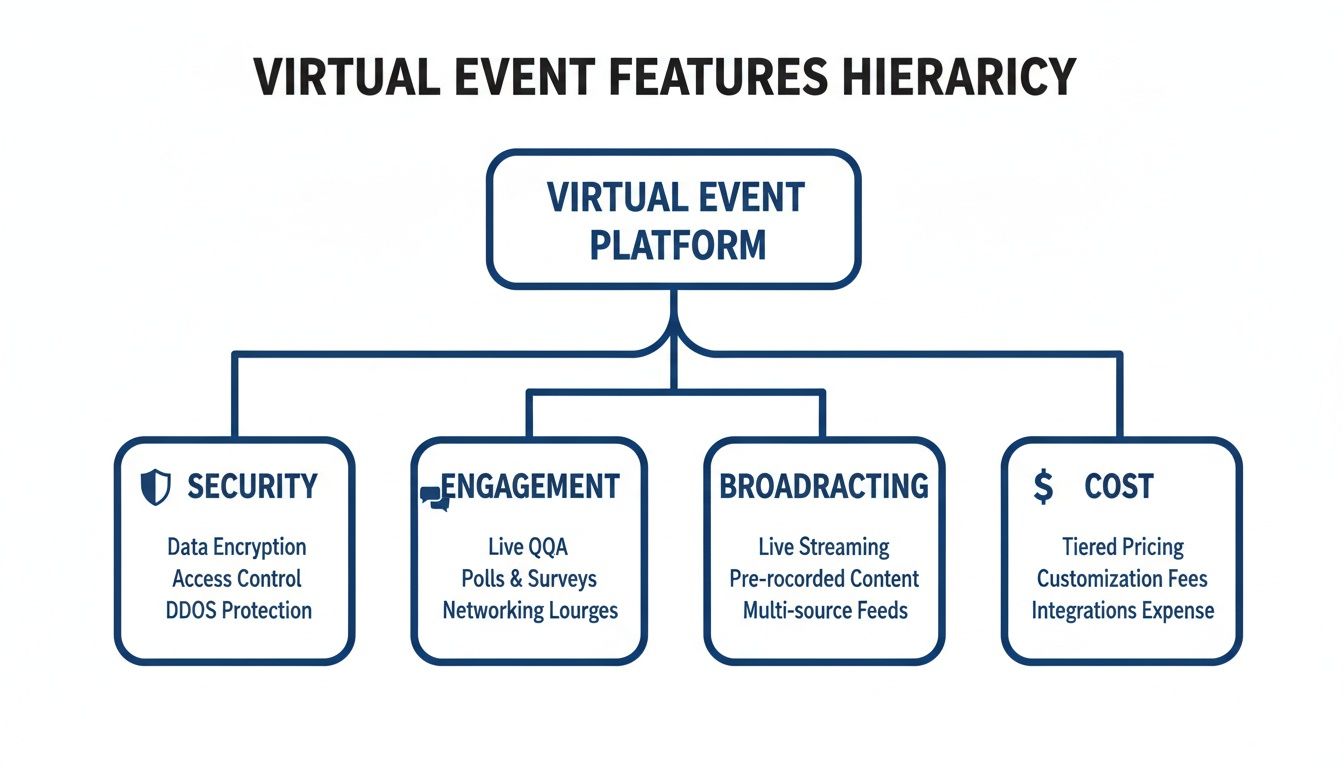
Without that secure foundation, fancy engagement tools and slick broadcasting features start to feel flimsy. Trust is what gives them value.
Encryption: The Digital Bodyguard for Your Data
Encryption works like a digital bodyguard for your data stream. It scrambles every bit of video, audio, and shared content into an unreadable code the second it leaves a device. Only people with the right "key"—your intended attendees—can unscramble it. This makes your event virtually impenetrable to eavesdroppers.
Imagine a corporate board meeting discussing sensitive financial projections or a legal team reviewing a confidential case. They need absolute certainty that their conversation stays private. That's what "bank-level encryption" delivers—a security standard so high that financial institutions rely on it to protect their most critical assets.
This kind of security is no longer a "nice-to-have." For many organizations, it's a primary factor in their buying decision. In fact, large enterprises are expected to make up 55.3% of the event management software market by 2025. This market, valued at USD 7.2 billion in 2025, is projected to surge to USD 14.7 billion by 2034, driven largely by the need for secure, reliable platforms.
Meeting Strict Compliance Rules in Specialized Fields
In industries like healthcare or finance, security gets even more serious. It's not just about best practices; it's about following strict legal regulations. A perfect example is HIPAA (Health Insurance Portability and Accountability Act), which governs how patient data is handled in the United States.
For any virtual meeting involving Protected Health Information (PHI), using a HIPAA-compliant platform isn't just a good idea—it's a legal requirement. It’s about creating a digital space that respects and legally protects patient privacy.
To get this right, a platform needs specific controls built in. These aren't optional add-ons.
- Secure Waiting Rooms: Stop uninvited guests cold by making the host manually admit each attendee.
- Meeting Locks: Once everyone has joined, the host can lock the meeting room to prevent anyone else from getting in.
- Access Controls: Give hosts granular control over who can view or manage sensitive information.
- End-to-End Encryption: Ensures that all data, including video, audio, and chat, is scrambled and unreadable to unauthorized parties.
AONMeetings provides these critical HIPAA-compliant features right out of the box and is willing to sign a Business Associate Agreement (BAA) to formalize that commitment. You can learn more about finding the right fit in our guide on HIPAA-compliant video conferencing platforms. This makes enterprise-level security accessible without the typical enterprise price.
So, What's the Real Value of Security?
It all boils down to trust. When your attendees feel confident that their data is safe, they're more likely to register, participate actively, and engage honestly. This has a direct and powerful impact on your event's success and your organization's reputation.
For anyone serious about building that trust, understanding frameworks like SOC 2 Compliance is key to verifying a platform's commitment to data security and privacy. While many providers treat high-level security as a costly upgrade, AONMeetings includes bank-level encryption and webinar hosting in every single plan. You get total peace of mind without worrying about hidden fees, whether you're a solo consultant or a sprawling hospital network.
Turning Attendees into Participants with Interactive Features
Once you've locked down security, the real work begins: keeping your audience from tuning out. We've all been there—one eye on the presentation, the other tempted by an overflowing inbox. That's virtual fatigue in a nutshell.
The only way to win that battle for attention is to stop talking at your audience and start inviting them into the conversation. This is where a great set of interactive features makes all the difference.

Just broadcasting a video feed isn't an event; it's television. To make an experience feel live and memorable, you have to give people a way to connect. These features are the digital versions of raising a hand, breaking into small discussion groups, or walking up to the microphone at a town hall. They give everyone a voice and a reason to stay plugged in.
Fostering Connection with Breakout Rooms
One of the most powerful tools for genuine interaction is the breakout room. Think of them as setting up small, private tables within your main event. Instead of one massive, faceless audience, you can split people into focused groups for collaborative workshops, brainstorming, or just simple networking.
For instance, a corporate trainer could take a 50-person session and instantly create ten groups of five, each tackling a specific case study. Or a professor might use breakout rooms for peer review, letting students work together on assignments in real-time. It’s how you turn a one-way lecture into a hands-on workshop, which is proven to help people learn and remember more.
Giving Everyone a Voice with Live Polls and Q&A
Sometimes the simplest tools are the most effective. Live polls and Q&A sessions are the easiest way to open up a two-way street between the speaker and the audience. A quick poll is like asking for a "show of hands"—it lets you instantly check the pulse of the room, test what people know, or even let the audience vote on what to cover next.
A well-run Q&A feature, on the other hand, gives every single person a direct line to the experts on stage. When people can get their specific questions answered, they feel seen and heard. That simple feeling of being valued is what transforms a passive viewer into an invested participant.
These tools do more than just collect feedback; they build a sense of community and shared purpose.
Interactivity is not a gimmick; it's a core strategy for making virtual events more effective. By turning attendees into active participants with tools like gamification, quizzes, and live Q&A, you can make your message more memorable and achieve your event goals.
The catch? Many platforms know how valuable these features are and charge a hefty premium for them. Finding a solution that includes them right out of the box is a huge win.
Price and Value Comparison of Interactive Features
The cost for good engagement tools can be all over the map. Some providers bundle them into their plans, while others treat them as expensive add-ons—a common tactic, especially with webinar software.
| Interactive Feature | AONMeetings (Included in All Plans) | Typical Competitor (Zoom, Teams) | Value Proposition |
|---|---|---|---|
| Breakout Rooms | Yes, available on higher-tier plans | Often requires a specific business plan or add-on | Facilitates deep collaboration without extra cost on relevant tiers. |
| Live Polls & Q&A | Yes, included standard | Usually standard, but webinar Q&A can cost more | Enables audience participation in all meetings and webinars included in every plan. |
| Collaborative Whiteboards | Yes, included standard | Standard on most platforms | Provides a shared canvas for brainstorming at no extra charge. |
| AES 256-bit Encryption | Yes, included standard | Typically standard, but not always on free tiers | Secures all interactive sessions, ensuring data privacy during collaboration. |
As you can see, AONMeetings focuses on delivering real value by building these essential engagement tools—along with bank-level encryption—into its core plans. You can host engaging classes or fully interactive webinars without juggling multiple subscriptions or paying for pricey add-ons.
This approach makes it possible for anyone, from individual teachers to large companies, to create dynamic and professional virtual experiences affordably.
What’s Really Powering a Flawless Virtual Event?
Beyond all the slick user interfaces and engagement tools, there's a powerful engine running the show. This is the behind-the-scenes technology—the streaming architecture, AI assistants, and software connections that make everything feel effortless. Without a solid technical foundation, even the best-planned event can fall flat.
It’s the difference between a natural, back-and-forth conversation and a frustrating, laggy video call. A truly great event depends on technology that feels completely invisible, letting your content and speakers shine without any awkward pauses or glitches.
Real-Time Interaction Starts with Low-Latency Streaming
One of the most important technical features is low-latency streaming. Latency is just a technical term for the delay between when a speaker says something and when the audience actually hears it. High latency is what causes that awkward dead air after a speaker asks a question, forcing them to wait several seconds for a response to pop up in the chat.
Low-latency streaming is what makes a virtual Q&A session feel like a real conversation. It closes that time gap, allowing for immediate, natural interaction between presenters and attendees.
This isn’t just about the crispness of the video; it's about the quality of the human experience. When the stream is choppy or delayed, the whole event feels disjointed. This is often caused by common network issues like jitter. If you're curious about the technical side, you can learn What Is Jitter in Networking.
How Core Tech Affects Price and Value
While some platforms charge a premium for their underlying tech, others build it right into their core offering, giving you much better value. Things like included webinars, robust encryption, and ready-to-go integrations directly impact how cost-effective a platform really is.
| Technology Feature | AONMeetings (Included in All Plans) | Typical Competitor (Zoom, Teams) | What This Means for You |
|---|---|---|---|
| Low-Latency Streaming | Yes, optimized for real-time interaction | Generally low, but can vary by plan/network | Ensures all meetings, webinars included, are interactive and conversational. |
| AI Summaries & Transcripts | Yes, included on higher-tier plans | Often a paid add-on or requires a higher tier | Turns event recordings into a searchable knowledge base, extending their value long after the event ends. |
| AES 256-bit Encryption | Yes, bank-level encryption standard on all plans | Standard on most paid plans | Secures all streaming data and AI-generated content, protecting your sensitive information. |
| API for Integrations | Yes, available for custom workflows | Requires specific business or enterprise plans | Lets you connect to your CRM, marketing, and payment tools for a unified event process. |
Using AI for Smarter Event Management
The next piece of the puzzle is artificial intelligence. Think of AI-driven features as a smart assistant for your event, automating tasks that used to take hours of manual work. The biggest game-changer here is the ability to generate instant meeting summaries and searchable transcripts.
After a two-hour webinar, you can have a concise, bulleted summary of the key topics, action items, and decisions ready to go. Even better, you can search your entire archive of recorded events for every time a specific keyword was mentioned. This instantly transforms your recordings from static video files into a valuable, searchable knowledge library.
Connecting Your Tools with Smart Integrations
A great virtual event platform doesn't work in a silo. Integrations, which are handled through an Application Programming Interface (API), act like universal travel adapters. They allow your event platform to "talk" to the other software you rely on every day, like your CRM, email marketing tools, or payment processors.
For example, a simple integration can automatically add every event registrant to your marketing email list or sync attendee data with your sales CRM. This seamless connection streamlines your entire workflow—from registration to post-event follow-up—saving you time and eliminating data-entry errors. For small businesses trying to get the most out of their software stack, this is a huge win. You can see how these features come together in our guide on the best video conferencing for small business.
This kind of powerful, integrated technology is no longer a "nice-to-have." The virtual events platform market is projected to grow from USD 14.75 billion in 2026 to USD 25.64 billion by 2032. That 9.5% CAGR is being driven by the demand for these very features. Platforms like AONMeetings are ahead of the curve, making these advanced capabilities affordable and accessible.
How to Compare Platform Costs and Find the Best Value
Let's get right to the question on every event organizer's mind: what is this really going to cost me? When you're shopping for a virtual event platform, that initial price tag you see is often just the tip of the iceberg. To figure out the true value, you have to dig deeper and uncover the hidden costs that can derail your budget.
It’s a common playbook in the industry. You see an affordable monthly fee, but the moment you need a professional tool—like hosting a webinar or running a meeting longer than an hour—you're suddenly hit with expensive add-ons and forced upgrades. This is where you separate a simple price from genuine value.
Exposing the Hidden Costs in Platform Pricing
Have you ever noticed how many platforms split their services into "meetings" and "webinars"? This isn't an accident. It's designed to make you pay for two separate products or push you into a pricey enterprise plan. Then there are the infamous time limits on basic tiers, like the 40-minute meeting cap that makes any serious professional event impossible.
Even features as fundamental as security can be dangled just out of reach. While basic encryption might be standard, the kind of bank-level encryption you need for sensitive conversations in healthcare or finance often costs extra. These little charges for core virtual event platform features add up, turning what looked like a bargain into a budgeting nightmare.
The real cost of a platform isn’t the monthly fee; it’s the total amount you have to spend to run your event without limitations. An all-in-one solution that includes webinar hosting, unlimited meeting durations, and top-tier encryption from the get-go gives you predictable costs and far greater value.
This is exactly where a platform like AONMeetings stands out. Instead of a maze of add-ons, you get a full suite of professional tools under one clear, predictable price. No more financial surprises, just the freedom to plan your event.
A Practical Scenario for an Independent Educator
Let's put this into a real-world context. Imagine you're an independent educator running weekly online classes and a monthly paid webinar to generate income.
With a typical platform: You sign up for a meeting plan, only to find it cuts you off after 40 minutes, forcing an immediate upgrade. When it's time to host your webinar, you discover that's a completely separate, expensive "Webinar" add-on. Your monthly cost just doubled, or even tripled.
With AONMeetings: Your single plan comes with unlimited meeting time right out of the box. And the best part? Full-featured webinar hosting is included in that same plan. You can run all your classes and webinars without ever hitting a paywall or a time limit.
That’s the difference between a low price and high value. One looks good on the surface, but the other actually saves you money and delivers a much better return.
Virtual Event Platform Price and Feature Comparison
To see what this value looks like side-by-side, let's compare a standard AONMeetings plan against the typical business plans from major competitors. The table below isn't just about price; it’s about what your money actually gets you.
| Feature | AONMeetings | Zoom (Typical Business Plan) | Microsoft Teams (Typical Business Plan) |
|---|---|---|---|
| Unlimited Meeting Duration | Included in all plans | Requires paid plan; free tier is limited | Requires paid plan; free tier is limited |
| Webinars Included | Yes, included in all plans | Separate, costly add-on purchase required | Requires a premium license (Teams Premium) |
| Bank-Level Encryption | AES 256-bit encryption included | Standard on paid plans | Standard on paid plans |
| Breakout Rooms | Included on higher-tier plans | Included on paid plans | Included on paid plans |
| Base Price Point | Low, transparent pricing | Moderate, with required add-ons | Moderate, often bundled with Microsoft 365 |
The takeaway here is pretty clear. While other platforms offer great tools from providers like Zoom or Microsoft Teams, they often make you pay extra for the features you need most. AONMeetings decided to build essentials like webinars included and bank-level encryption directly into its core plan.
For anyone trying to make an informed decision, our detailed virtual event platform comparison goes even deeper. It's all about helping you find a solution that gives you all the virtual event platform features you need without forcing you to compromise on your budget. Ultimately, you want a partner that supports your growth, not one that penalizes you for it.
Your Top Platform Questions, Answered
When you're shopping for a virtual event platform, the sheer number of features can feel overwhelming. What's a ‘must-have’ versus a ‘nice-to-have’? It’s easy to get lost in the technical jargon.
Let's cut through the noise. Here are plain-English answers to the questions we hear most often, helping you connect the dots and choose a platform with confidence.
What Is The Most Important Feature For a Healthcare Provider?
For anyone in healthcare, this is non-negotiable: rock-solid security with full HIPAA compliance. This isn't just a feature on a checklist; it's a fundamental legal and ethical requirement to protect sensitive patient health information (PHI). A security lapse during a medical webinar or consultation can have devastating consequences.
You have to look for platforms that offer end-to-end encryption, secure access controls, and are willing to sign a Business Associate Agreement (BAA). Picture a telehealth appointment where a doctor discusses a diagnosis with a patient—that conversation has to be just as private as if they were in the same room.
At its core, this is all about trust. A platform like AONMeetings was built with HIPAA-compliant security from the ground up. This means everything from one-on-one telehealth sessions to large medical training webinars stays private and compliant, without forcing you into an expensive enterprise plan. It makes top-tier security accessible for everyone, from independent clinics to large hospitals.
How Can I Host Webinars Without Paying Extra?
One of the biggest pricing traps we see is how platforms handle meetings versus webinars. Many big-name providers sell them as separate products. You sign up for a meeting plan, and the moment you need to host a large-audience webinar, you’re forced to buy an expensive add-on or upgrade to a much higher tier.
The secret to keeping your budget predictable is finding a unified platform where webinars are already included in your standard plan. It’s a huge cost-saver and keeps your tech simple.
Here’s a common scenario:
A small business uses a platform for its daily team meetings. When it's time to launch a new product to 200 people, they suddenly find out their plan won’t work. They're stuck buying a separate webinar license, which often costs more than their entire meeting plan did.
With AONMeetings, webinars are included in every single plan. That same business owner can go from a quick team sync to a major public webinar without ever changing their subscription or paying an extra rupee. This all-in-one model gives you incredible value and no surprise bills.
Are AI Features Like Meeting Summaries Really Necessary?
While you might not need them for every single call, AI features like automated summaries offer a massive return on your time, especially for busy professionals. These tools simply automate the grunt work that happens after your event is over, turning your recordings into genuinely useful assets.
Imagine finishing a two-hour client strategy session and getting an instant, bulleted summary with all the key decisions and action items. Better yet, think about searching a year's worth of team meetings for every time a specific project name was mentioned.
This is what saves you countless hours of re-watching videos and scrubbing through notes. It makes your old event content more valuable by turning a simple video archive into a searchable knowledge base you can actually use.
What Does Bank-Level Encryption Actually Mean?
"Bank-level encryption" is just a clear, simple way of describing a very powerful security standard: AES 256-bit encryption. The best way to think of it is as a digital bank vault for your conversations. It scrambles all video, audio, and shared files into an unreadable code that only participants with the right key can decipher.
This is what stops anyone from snooping on your calls. It ensures that sensitive discussions—whether they involve patient data, company secrets, or financial details—stay completely private from start to finish. For any organization that cares about security, this is an absolute must-have virtual event platform feature.
Ready to experience professional virtual events without the friction and hidden costs? AONMeetings offers a secure, all-in-one solution with unlimited meeting times and webinar hosting included in every plan. Discover the difference at https://india.aonmeetings.com.
