

The call starts well. Your client can see the demo, your team is finally aligned, and then the timer runs out. Everyone drops. You send a new link, half the room rejoins, and the energy is gone.
That is the moment many owners realize free video tools are not free. They cost momentum, polish, and trust. For teams selling services, teaching classes, running consultations, or managing remote staff, video conferencing for small businesses has become a basic operating tool, not a nice extra.
That makes the adoption gap surprising. Only 28% of small companies under 250 employees use video conferencing regularly, according to Digital PR Studio’s roundup of video conferencing statistics. Larger organizations use these tools far more often. Small firms are leaving a lot on the table, especially when modern platforms can run in a browser, avoid hardware-heavy rollouts, and support everything from client demos to webinars.
The Frustrating Limits of Free Video Conferencing
A small accounting firm books a prospect call. A tutoring center schedules a paid group lesson. A clinic sets up a remote consultation. In each case, the meeting matters because someone is evaluating your business while the call is happening.
Free tools tend to fail at exactly that moment.
The first problem is obvious. Time limits cut off calls when the discussion is getting useful. The second problem is less obvious. Rejoin links, missing recordings, weak admin controls, and clunky guest access make a small business look improvised.
That matters more than most owners expect. Clients do not separate the call experience from the quality of your service. If they struggle to join, wait while your team fixes permissions, or lose the thread after a dropped session, they often assume your operations work the same way.
Where free plans usually break down
- Longer conversations: Sales demos, onboarding calls, classes, and case reviews often need room to breathe.
- External guests: Clients and partners do not want to install extra software or create accounts.
- Basic professionalism: Waiting rooms, branded presentation, cleaner join flows, and recordings often sit behind paid tiers.
- Sensitive conversations: Generic free plans can create uncertainty around privacy, controls, and compliance.
A lot of small businesses live with these problems longer than they should because they think professional video is for larger companies. It is not. The key question is whether the platform fits a small team's budget and workflow.
Free software is fine for occasional internal chats. It is a weak foundation for revenue-generating calls.
The missed opportunity is bigger than convenience. If your business relies on trust, recurring appointments, training, or remote collaboration, better video infrastructure can improve how customers experience your company from the first meeting onward.
Why Your Business Needs More Than a Free Tool
A proper video platform earns its keep in three places. It makes your business look organized. It saves time every week. It opens up services you cannot run well on a stripped-down plan.

The category itself is no longer niche. The global video conferencing market is projected to reach $41.62 billion in 2026, and 94% of businesses report improved output with its use, according to Fortune Business Insights on the video conferencing market. Small businesses do not need every enterprise feature, but they do need the core capabilities that make calls dependable.
Professionalism shows up in small details
A free link with generic settings works for an internal catch-up. It does not always work for a customer-facing interaction.
A more complete platform lets you control the experience. Waiting rooms reduce awkward early joins. Unlimited meeting time removes pressure. Branded elements, custom hold music, and cleaner moderator controls make the meeting feel intentional.
A startup founder pitching an investor, for example, benefits from a meeting room that looks prepared instead of borrowed. A consultant running discovery calls can send one simple browser link and know the session will not stop halfway through.
Efficiency matters more than feature count
Owners often compare platforms by the longest checklist. That is the wrong lens.
What matters is whether the system removes friction from work you already do. Searchable recordings help when someone misses a call. Team chat cuts down on scattered follow-ups. Calendar integrations reduce scheduling errors. Screen sharing and document sharing stop people from bouncing between tools.
If your staff spends part of every week resending links, hunting notes, or explaining how to join, that is real operational drag.
Built-in webinars change the value equation
Many small firms overspend without realizing it. They buy one product for meetings and another for webinars, workshops, training sessions, or lead-generation events.
A platform that includes webinars changes the economics. A coach can run free intro sessions without adding another subscription. A clinic can host patient education events. A tutoring business can deliver group classes and revision sessions from the same account. A SaaS startup can run demos, onboarding workshops, and feature briefings without assembling a stack of separate tools.
Price matters, but value matters more
A free plan costs less up front. A fragmented setup often costs more over time.
Compare the practical trade-off:
| Setup | What it looks cheap on | What you often give up |
|---|---|---|
| Free meeting tool | Monthly bill | Time, polish, longer sessions, admin control |
| Low-tier paid plan | Entry price | Webinar access, compliance options, better support |
| All-in-one paid platform | Higher visible subscription | Fewer add-ons, fewer handoffs, cleaner client experience |
The best video conferencing for small businesses is not the platform with the biggest brand name. It is the one that covers your workflow without forcing extra purchases later.
Must-Have Features for Small Business Success
A small business does not need a bloated platform. It needs the right set of tools, built for daily use. When I help owners choose video conferencing for small businesses, I usually sort features into four buckets: collaboration, presentation, control, and protection.
Collaboration tools your team will use weekly
Start with the basics people touch in almost every meeting.
- Screen sharing: Non-negotiable for demos, proposals, support calls, and training. If you sell software, review documents, or walk clients through numbers, your platform lives or dies on how smoothly this works. If you want a simple walkthrough of the mechanics, this guide on how to share your screen covers the practical steps.
- Whiteboards: Useful when a conversation is still fuzzy. A tutor can sketch a math problem. A contractor can map a project timeline. A consultant can turn a messy discussion into a visible plan.
- Document sharing: Good platforms let the meeting stay the meeting. You should not have to stop and email files mid-call.
A practical example: a design studio reviews a homepage draft with a client. The account manager shares the screen, the designer marks revisions on a whiteboard, and the final document gets shared before the call ends. No separate follow-up just to recreate what everyone already discussed.
Presentation features that help you look established
Clients notice the room before they hear your pitch.
Virtual backgrounds are helpful when your office doubles as a storage area or spare bedroom. Brandable interfaces matter for agencies, consultants, and software companies that want a more polished feel. Waiting rooms with music can make a meeting feel calm and organized rather than abrupt.
These details sound minor until you compare two calls. One starts with confusion, background clutter, and someone saying, “Can you all hear me?” The other starts cleanly, with a controlled entry, clear visuals, and a room that reflects the business.
If the meeting is part of your service delivery, presentation is not cosmetic. It is operational.
Management tools that save hours later
This category gets overlooked during buying decisions and appreciated later.
Recordings and search
Recording meetings is useful. Searchable recordings are far better. A manager can pull the exact moment a decision was made. A tutor can send a lesson replay. A clinic admin can review a non-clinical onboarding session with staff.
Smart summaries are also practical for small teams. Not everyone can attend every call. Good summaries reduce repeat meetings.
Moderator controls
The host should be able to lock meetings, manage entry, mute noise, assign presenters, and handle breakout rooms without fumbling through menus. These controls matter most when the meeting includes guests, students, or larger groups.
Calendar and notifications
A system that ties into the calendar your team already uses removes avoidable mistakes. SMS notifications and automatic reminders are useful when clients are less technical or often join from mobile devices.
Security is not optional
For most businesses, encryption should be a baseline requirement, not a premium extra. If you discuss contracts, financial details, internal planning, or customer information, you need a platform that treats privacy seriously.
Look for end-to-end protection where appropriate, meeting lock options, waiting rooms, and admin controls that limit who can join and what they can do once inside.
A simple buying checklist
Before you commit to any platform, check for this mix:
- Unlimited meeting time: Better for demos, consultations, and classes.
- Webinars included: Strong value if you market, train, or teach.
- Browser-based joining: Easier for guests and lower friction for first-time users.
- Encryption and access controls: Essential for trust.
- Recordings and summaries: Useful for accountability and follow-through.
- Whiteboards and screen sharing: Core tools, not add-ons.
Many products look similar on a pricing page. They feel very different in real use. The right platform disappears into the background and lets your business run the conversation.
Understanding Security and Compliance
Security gets discussed in vague language. Owners hear terms like encryption, HIPAA, secure rooms, or compliance-ready, but few vendors explain what those mean in plain business terms.
The easiest way to think about encryption is this: the meeting data should travel in a form that outside parties cannot casually read or intercept. For a small business, that matters whether you are discussing a patient matter, reviewing a student record, or sharing product plans with a client.

What a non-technical owner should check
Do not get lost in vendor jargon. Ask practical questions.
- Who can join the meeting? Waiting rooms, meeting locks, and host approval reduce accidental access.
- How is the meeting protected? Strong encryption should be standard, especially for external calls.
- Can hosts control participants? Mute, remove, limit screen sharing, and manage recordings.
- What happens to recordings? Know where they are stored, who can access them, and how long they remain available.
- Does the vendor support your compliance needs? This matters for healthcare, education, legal, and financial use cases.
A local clinic does not need to become a cybersecurity shop. It does need a platform that supports secure defaults and gives staff a setup they can use correctly every day.
HIPAA is where mainstream tools often get expensive
Healthcare is the clearest example. Many small clinics, therapists, and telemedicine providers start with a mainstream meeting app because it is familiar. Later they discover that the version they chose is missing the compliance safeguards they need, or that the compliant route requires upgrades and administrative overhead that were never obvious at sign-up.
That gap is becoming more visible. There has been a notable rise in demand for browser-based, no-contract compliant tools, according to VDO Communications on video conferencing solutions for small businesses. That makes sense. Smaller regulated businesses want secure access without enterprise purchasing complexity.
Why browser access matters for regulated use
A browser-based system can be a practical advantage for compliance-sensitive workflows.
A therapist can send a secure join link to a patient who is not technical. A clinic can reduce support calls about app downloads. A tutoring business serving minors can simplify joining for parents and students across different devices.
The easier the join experience, the less likely users are to improvise with less secure alternatives.
Compliance fails when the secure option is too cumbersome to use.
Common mistakes small businesses make
Assuming “encrypted” solves everything
Encryption is necessary, but it is not the whole story. Access controls, host permissions, storage rules, and user behavior matter too.
Buying on brand recognition alone
Popular does not always mean cost-effective or compliance-ready for your use case. Large vendors often design pricing and governance around larger organizations.
Leaving security settings at default
Even a good platform can be misused. Turn on waiting rooms where needed. Restrict recordings appropriately. Train staff on who can share screens and when to lock a meeting.
A simple compliance mindset
For regulated sectors, choose the platform as if an auditor or a worried client will ask you to explain your setup. You should be able to answer clearly:
- How meetings are protected.
- Who can access them.
- How recordings are handled.
- Whether the platform supports your legal and sector requirements.
If you cannot explain those four points, the setup is not ready for sensitive work.
Decoding Video Conferencing Costs and Pricing
The listed price of a video platform is rarely the full price. Small businesses usually discover that after they have already rolled out the tool.
One vendor includes meetings but charges extra for webinars. Another offers a low entry plan but puts recordings behind a higher tier. A third has the features you need for healthcare or education, but only after a compliance upgrade. The result is a familiar problem. The cheap option becomes the expensive one.
Start with total cost, not entry cost
A software-only model is usually the best fit for smaller firms because it avoids room-system hardware and lets teams join from standard laptops, desktops, or phones. That matters because software-only video conferencing architecture eliminates hardware costs, and predictable per-user licensing lets small businesses scale incrementally, as explained by Data Projections on choosing the best type of video conferencing.
That is the good news. The catch is licensing and add-ons.
If your business only needs simple internal meetings, entry pricing may be fine. If you need client-facing reliability, webinars included, recordings, branding, and strong security, the number on the pricing page can change quickly.
Where the hidden costs usually appear
Here is where owners get surprised:
- Webinar add-ons: The plan covers meetings, but marketing events or classes require a separate purchase.
- Recording storage: You can record, but long-term access or larger storage pools cost extra.
- Compliance upgrades: HIPAA-oriented or more regulated use may require a more expensive plan.
- Participant tiers: One price for smaller meetings, another when your audience grows.
- Support levels: Fast support often sits behind premium plans.
- Branding features: Customization may be restricted to upper tiers.
For a tutoring center, webinar inclusion is not a luxury. It may be central to how classes are delivered. For a startup, recordings and branded rooms help with demos and sales. For a clinic, stronger security and compliance options are not optional.
Price comparison in practical terms
The author brief asks for price comparisons, and the most honest way to do that is to compare models rather than invent competitor pricing details beyond the provided materials.
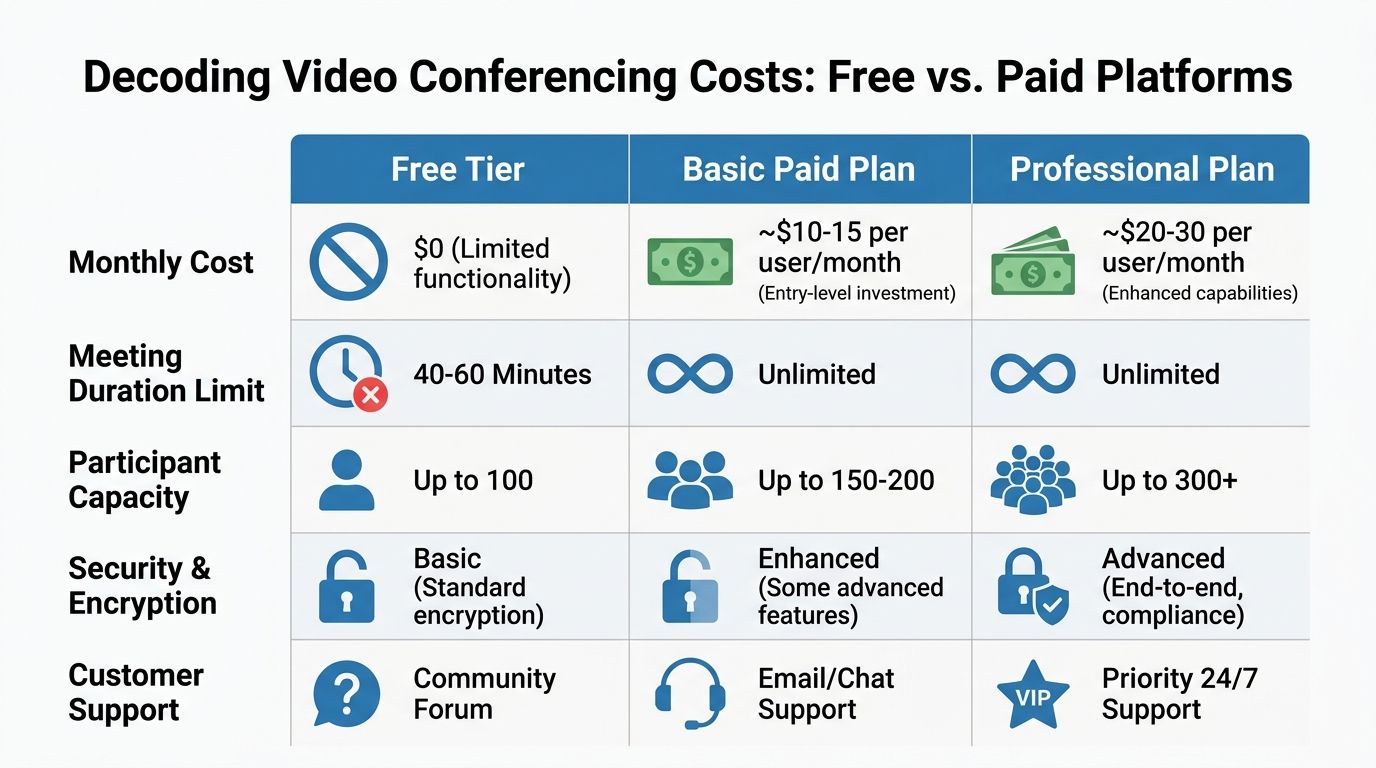
| Pricing model | Up-front appeal | Common trade-off | Best fit |
|---|---|---|---|
| Free tier | No monthly bill | Limits on duration, support, branding, and advanced security | Casual internal use |
| Basic paid plan | Lower monthly spend | May exclude webinars, advanced controls, or compliance features | Small teams with simple needs |
| Professional all-in-one plan | Higher visible monthly fee | More to evaluate up front | Businesses that need meetings, webinars, recordings, encryption, and cleaner client delivery |
The infographic above reflects that broad pattern. It is useful because it mirrors what small teams run into in the market. Lower entry cost often means tighter limits. Broader capability usually means a higher plan, separate add-ons, or both.
What value looks like
A cost-conscious owner should ask four questions before choosing any platform:
Do I need webinars included
If your business runs workshops, training, lead generation sessions, open houses, classes, or product launches, this one question can reshape your budget. Buying a meeting platform plus a separate webinar tool often costs more than choosing one platform that bundles both.
Will guests join in a browser
Every extra install step increases drop-off. Browser joining reduces support burden and makes external meetings smoother.
Is encryption standard or upgraded
If encryption is treated like a premium feature, look carefully at what the base plan protects.
Can I grow without rebuilding the stack
A team of three may become a team of ten. A tutor may add group sessions. A clinic may add providers. A startup may host launch webinars. The best pricing model lets you scale without replacing the tool six months later.
The cheapest platform is the one you do not outgrow and do not have to patch with extra subscriptions.
A realistic small-business lens
For small businesses, affordability is not about paying the lowest possible amount. It is about avoiding waste.
Paying one transparent subscription for meetings, webinars, encryption, and recordings can be a better deal than paying less for a plan that forces workarounds. Once staff time, missed opportunities, and add-on purchases enter the picture, “free” and “basic” often lose their shine.
Implementation Steps and Best Practices
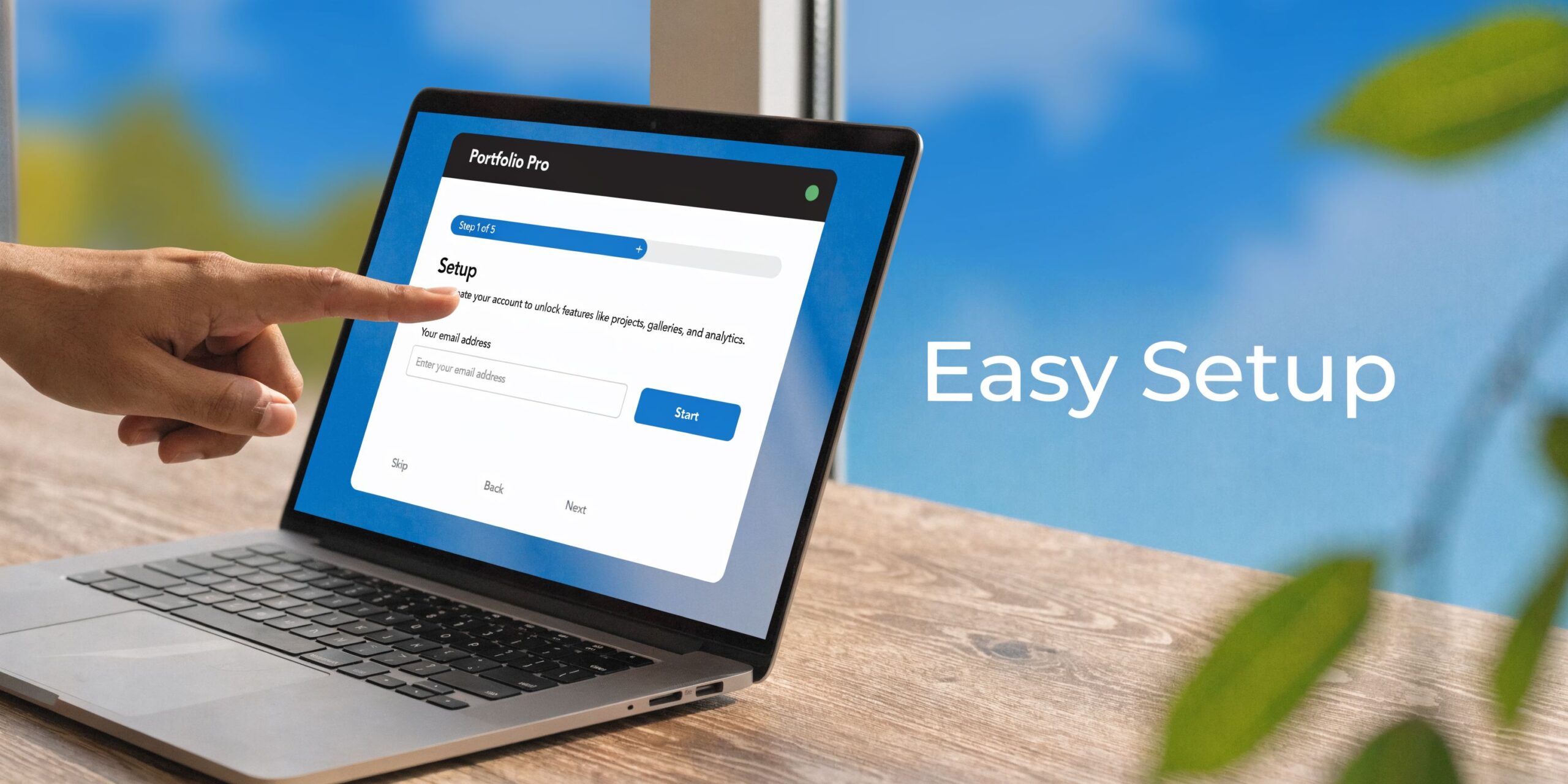
Buying the platform is the easy part. Getting people to use it well is where small businesses either gain value or end up with another neglected subscription.
A simple rollout that works
Keep the first rollout narrow. Do not launch every feature on day one.
- Set up core accounts first. Start with owners, managers, clinicians, teachers, or anyone who regularly hosts meetings.
- Connect calendars early. If scheduling is messy, adoption suffers fast.
- Create two or three meeting templates. For example, one for client calls, one for internal team meetings, and one for webinars or classes.
- Standardize host settings. Decide in advance on waiting rooms, recording defaults, screen sharing permissions, and chat behavior.
- Run one internal practice session. Test screen sharing, audio, participant entry, and recording before your first client-facing use.
- Train for the common actions only. Joining, hosting, sharing a screen, muting noise, locking a room, and finding recordings. That is a sufficient starting point for many teams.
If you want a practical checklist for meeting etiquette and smoother sessions, this guide on virtual meeting best practices is a useful companion.
Low-cost setup improvements that clients notice
A lot of guides say “improve your lighting” and stop there. That advice is too vague. RingCentral’s video conferencing setup guide points to a real gap in practical guidance for low-cost hardware setups. Small businesses need specifics.
Use the window before you buy lights
Face a window when possible. Do not sit with the window behind you. Backlighting turns even a good camera into a silhouette machine.
If there is no good daylight, place a desk lamp behind your screen and bounce the light off a wall if it feels harsh.
Raise the camera to eye level
A stack of books under a laptop can fix this in ten seconds. Eye-level framing looks more confident and more flattering than a low angle pointing up at your chin.
Audio beats camera quality
A basic headset or a quiet USB microphone usually improves call quality more than an expensive webcam. Clients will forgive average video faster than they will forgive echo and muffled speech.
Clean the background
You do not need a designer office. You need a non-distracting one. A plain wall, tidy shelf, or simple virtual background works well. Remove clutter that signals chaos, especially in sales calls and consultations.
Small hardware choices with true payoff
If you do buy gear, buy for your use case.
- Solo consultant or therapist: Prioritize a stable headset and a camera that handles indoor light well.
- Tutor or coach: Add a second screen if possible so you can see participants while presenting.
- Small group in one room: Use a wider camera angle and better room audio before spending on anything decorative.
A professional call setup is mostly about framing, sound, and simplicity. Not expensive gear.
Habits that improve every meeting
A polished meeting often comes down to repeatable habits:
- Join early: Open the room a few minutes before guests arrive.
- Name the purpose fast: Clients relax when they know the meeting structure.
- Share only what you need: Close unrelated tabs and desktop clutter.
- Assign follow-up before ending: Do not let action items disappear into the recording.
Video conferencing for small businesses works best when the platform is simple and the host is prepared. Fancy features help. Basic discipline helps more.
Putting It All Together Real-World Scenarios
A therapist starts the day with remote sessions. Privacy matters, but so does ease of use. Patients should not be troubleshooting downloads from a parking lot or waiting room. A browser-based platform with strong encryption, reliable guest access, and compliance support gives the practice a setup that feels secure without feeling burdensome. The business value is simple: fewer technical distractions, more confidence in the process, and a service model that can extend beyond the clinic walls.
A tutoring center has a different problem. Free meeting tools are manageable for one-on-one sessions but frustrating for group classes. The lesson gets interrupted. Students drop and rejoin. Parents question whether online delivery is worth paying for. A platform with unlimited meeting time, whiteboards, screen sharing, recordings, and webinars included turns the same online class into something far more durable. The tutor can run revision sessions, parent briefings, and promotional intro classes from the same system instead of patching together separate tools.
A startup founder faces another challenge. Product demos often involve outside stakeholders, some technical, some not. The founder needs clients to join instantly, see a polished room, and stay focused on the presentation rather than the software. Browser-based access helps. Branding options help. Searchable recordings help when a prospect wants to revisit a feature walkthrough internally. The result is not just a smoother meeting. It is a stronger sales environment.
What these examples have in common
Each case points to the same lesson. The right platform should match the work.
- Therapist: Security and compliance first.
- Tutor: Unlimited time, whiteboards, recordings, and webinar delivery.
- Startup founder: Fast guest access, strong presentation, and follow-up assets.
What does not work
What usually fails is the half-step approach.
A clinic tries to repurpose a generic consumer meeting tool for sensitive appointments. A tutor relies on a free plan designed for occasional use. A startup chooses a platform because investors have heard the name before, then pays extra to make it do what the business needs.
Those choices are understandable. They just tend to create more friction than they remove.
The best platform is the one that fits your revenue activity, not the one with the loudest brand.
Small businesses rarely need sprawling enterprise software. They need secure, dependable video conferencing that supports how they sell, teach, advise, and serve.
Choosing the Right Platform for Your Growth
The strongest video conferencing for small businesses does four things well. It keeps meetings reliable. It protects sensitive conversations with solid encryption and controls. It includes the features small teams use, especially recordings, screen sharing, and webinars. It does all of that without burying the true cost behind upgrades.
That matters whether you are launching a clinic, building a tutoring business, or setting up a young startup. If you are still putting the broader business foundation in place, this guide on how to start a small business is a useful planning resource because communication systems should be part of your operating model from the start.
Most owners do not need the most famous platform. They need the one that fits the business they are running now and the one they expect to run next year. If webinars are part of your growth plan, review what matters in best webinar software for small business and treat webinar capability as part of your core communications stack, not a side purchase.
Free plans are fine for casual use. Growing businesses need clearer value than that. Look for transparent pricing, browser access, included webinar capability, dependable recordings, and security that does not require an enterprise-sized budget.
If you want a platform built for secure meetings, built-in webinars, unlimited meeting time, and straightforward pricing, take a look at AONMeetings. It is designed for small businesses, educators, clinics, and growing teams that need professional video without the usual hidden costs.
