
Data protection compliance stops being an abstract policy issue when the money becomes visible. Since GDPR took effect in May 2018, regulators have imposed €7.1 billion in cumulative fines as of January 2026, up from €5.88 billion a year earlier, a 21% year over year increase in penalties alone, according to StationX's privacy statistics summary.
For a small or mid-sized business, that matters for a simple reason. Privacy risk now sits in the same category as tax, payroll, and contract risk. If your company handles patient records, student data, customer accounts, support tickets, webinar registrations, payment details, or employee files, you're already in the zone where poor handling creates legal exposure and operational drag.
Teams often don't fail because they never heard of GDPR or state privacy laws. They fail because they can't answer basic questions quickly: What personal data do we have? Why are we storing it? Who can see it? Which vendor receives it? When does it get deleted? If those answers live in five spreadsheets and two people's heads, your compliance program isn't stable.
Why Data Protection Compliance Is Non-Negotiable
The strongest reason to take data protection compliance seriously is that enforcement and exposure are no longer confined to a few large enterprises. Privacy law has become part of normal business operations.
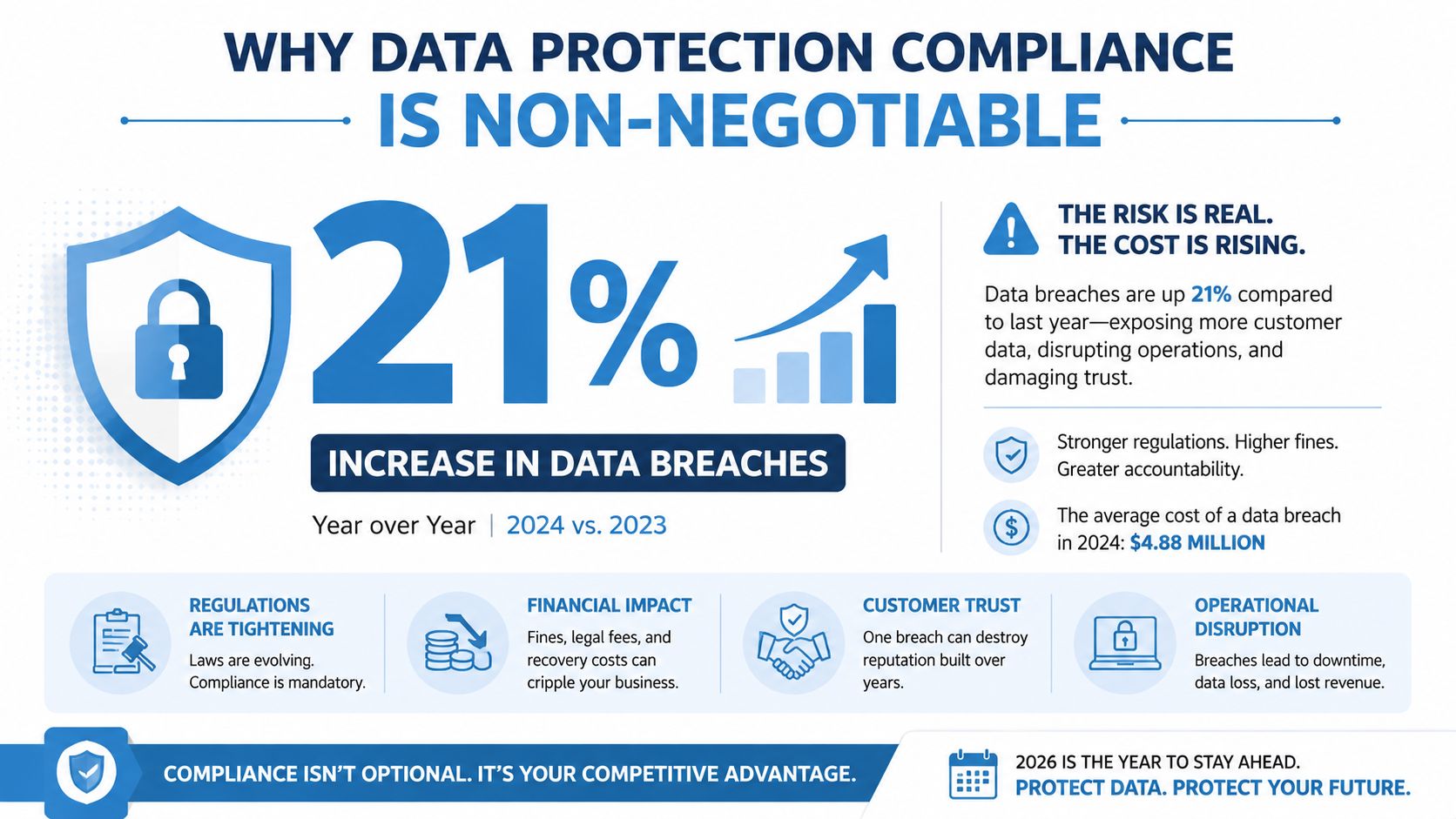
By the end of 2024, privacy laws covered 6.3 billion people, equal to 79% of the global population, and by the beginning of 2025 there were 144 countries with data and consumer privacy laws in force, according to Usercentrics' data privacy statistics guide. That means a business doesn't need a European headquarters to face privacy obligations. A clinic serving overseas patients, a coaching platform enrolling international students, or a SaaS company with remote users can all trigger multi-jurisdiction requirements.
Compliance is now a financial control
The legal side gets attention first, but the budget impact often lands harder. The same Usercentrics summary reports that the global average cost of a data breach reached USD 4.88 million in 2024, while the average U.S. breach cost climbed to USD 10.22 million in 2025. Those figures make one point very clear. Data protection compliance isn't just about avoiding fines. It's about reducing the cost and chaos that follow weak controls.
Practical rule: Treat privacy work as risk reduction tied to real operations, not as a policy-writing exercise.
A good compliance program also closes a blind spot many SMBs ignore. Deletion matters as much as collection. If retired laptops, servers, or backup drives still contain personal data, your risk doesn't disappear when the device leaves daily use. That's why physical and digital disposal controls belong in the same conversation as consent banners and privacy notices. For a grounded overview of that issue, this guide on secure data destruction for businesses is worth reviewing with whoever owns IT asset disposal.
What changes in practice
When compliance is mandatory, three business habits usually change:
- Teams collect less data: Forms, registrations, and onboarding flows stop asking for fields nobody uses.
- Access gets narrower: Staff keep the permissions needed for their role, not broad shared access "just in case."
- Retention becomes deliberate: Data gets deleted on schedule instead of lingering in old folders, inboxes, and cloud apps.
That shift improves more than legal posture. It makes investigations faster, vendor reviews cleaner, and customer trust easier to defend.
Decoding Major Data Protection Regulations
Many owners still think of privacy law as a list of separate rulebooks. In practice, you need a scoping method more than a memorized list of acronyms. Independent legal overviews show that data protection rules now span more than 160 jurisdictions globally, as noted by DLA Piper's data protection coverage. That's why generic "GDPR plus CCPA" summaries often fall short.
The easiest way to think about scope
Think of privacy law like sales tax and professional licensing combined. The rule that applies isn't determined only by where your company is registered. It can also depend on where your customers live, where your staff work, where your vendors process data, and where your systems store records.
If your online tutoring business is based in one country but enrolls students in another, the student's location can matter. If your telehealth team serves patients across borders, the patient relationship and storage setup can matter. That's the practical meaning of extraterritorial scope. A law may reach your business even if your office does not sit inside that jurisdiction.
Major Data Protection Regulations Compared
| Feature | GDPR (EU) | CCPA/CPRA (California) | LGPD (Brazil) |
|---|---|---|---|
| Core focus | Broad protection of personal data and individual rights | Consumer privacy rights and business obligations around personal information | Broad protection of personal data with rights and controller duties |
| Who should pay attention | Any business handling data tied to people in the EU in relevant circumstances | Businesses with California consumer exposure that meet applicability thresholds | Businesses handling data tied to people in Brazil in relevant circumstances |
| Practical trigger | Offering goods or services, employment, vendors, or data processing tied to EU residents | California consumer relationships, disclosures, selling or sharing concerns, service provider arrangements | Operations, customers, vendors, or processing activities tied to Brazilian data subjects |
| What matters most day to day | Lawful basis, transparency, rights handling, security, retention, vendor controls | Notice, consumer rights workflows, contract language, vendor oversight, deletion and disclosure handling | Lawful basis, transparency, rights requests, security, contracts, governance |
| Common SMB mistake | Copying a template notice without mapping actual processing | Treating it as only a website cookie issue | Assuming it's covered automatically by a GDPR policy |
What SMBs should actually do
Start with a jurisdiction matrix, not a policy template. Build a simple working document with these columns:
- Market served: Where customers, patients, students, or employees are located
- Data subject type: Consumer, patient, student, staff member, contractor
- Data location: Which systems and vendors hold the data
- Operational trigger: Sales, care delivery, support, payroll, marketing, webinar registration
- Local requirement check: Notice, rights response, contracts, representative, filing, transfer issue
Cross-border privacy work gets manageable when you narrow it to business lines, user location, and vendor geography.
If you're dealing with decommissioned devices, storage media, or regulated disposal workflows in the U.S., local implementation details matter too. Teams that operate in the Southeast may find this overview of understanding Georgia ITAD regulations useful when aligning disposal practice with broader privacy controls.
The Core Principles of Data Protection
Laws vary. The operating logic behind them doesn't vary as much. If your team understands the core principles, you'll make better decisions even when a new state law, vendor, or workflow enters the picture.
Collect only what you can justify
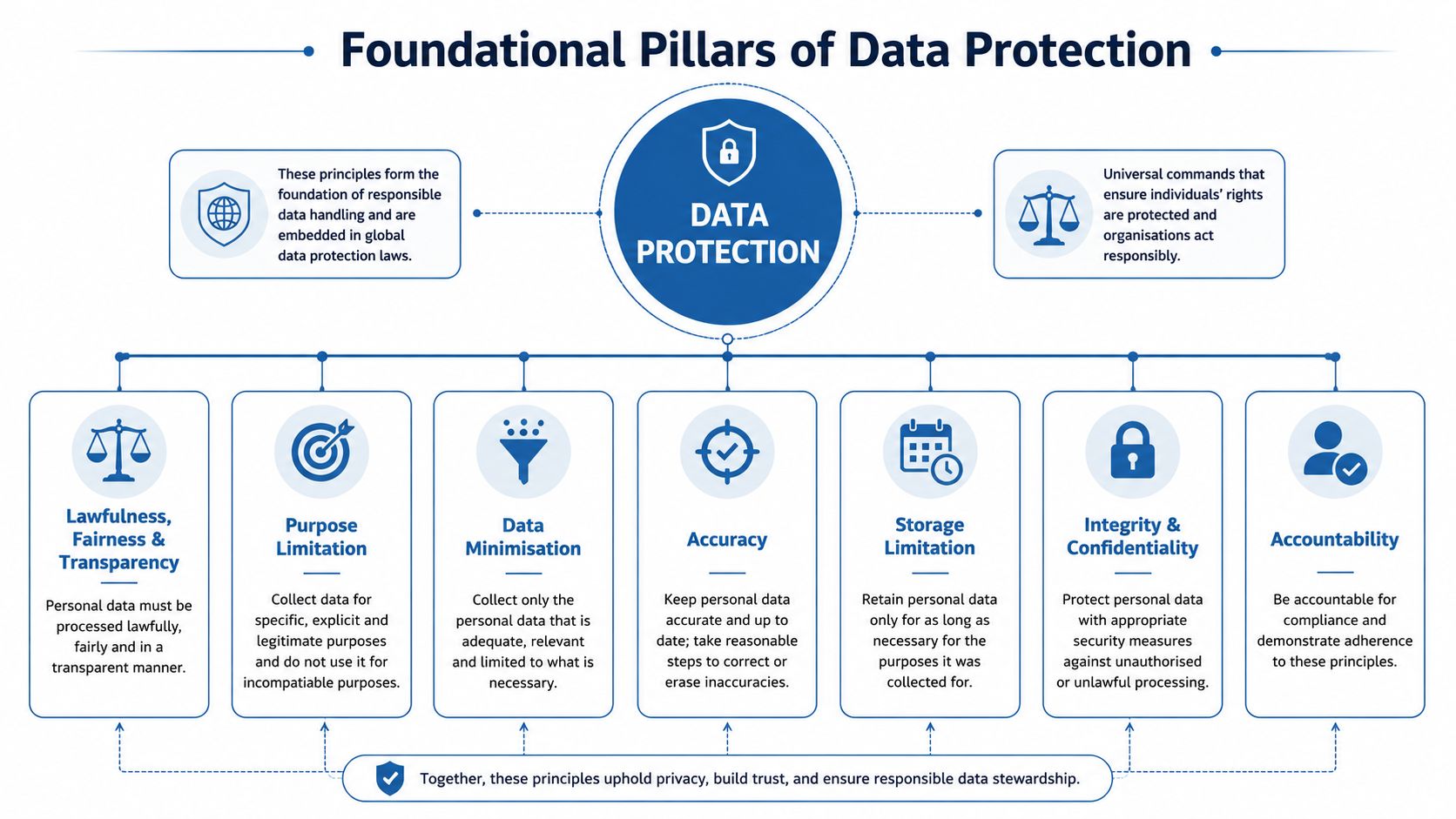
Data minimization is the easiest principle to explain and one of the hardest to enforce. Pack for a three-day trip, not a six-month relocation. If your webinar signup only needs a name and email address, don't ask for birth date, home address, employer size, and phone number unless each field has a clear purpose someone owns.
Purpose limitation sits right next to that. If you collected an email to send appointment confirmations, that doesn't automatically mean the sales team can drop the person into a promotional campaign. One purpose doesn't create unlimited reuse rights.
Keep records accurate and short-lived
Accuracy sounds administrative, but it's operational. Wrong records create wrong actions. A clinic with outdated contact details may send sensitive information to the wrong recipient. An education provider with stale guardian information may mishandle student communications.
Storage limitation is where most small organizations drift. Nobody schedules deletion, so old files remain in Google Drive, Microsoft 365, CRM exports, inbox archives, and USB backups. Data protection compliance gets easier when records have an end date.
The safest personal data is often the data you never collected or already deleted.
Protect confidentiality and prove accountability
Integrity and confidentiality mean your controls should match the risk. That includes access restrictions, encryption, authentication, device controls, and secure sharing habits. A shared admin login is convenient until you need to investigate who downloaded a file.
Transparency means people should understand what you're doing with their data. Not in legalese. In plain language.
Accountability is the principle many teams underestimate. You must be able to show your choices, not just claim them. That usually means documented decisions, role assignments, approval records, and review dates.
A simple way to turn these principles into daily habits:
- For forms: Remove optional fields that nobody uses.
- For files: Assign owners to folders containing personal data.
- For apps: Review who has admin rights and why.
- For retention: Put deletion dates on exports, recordings, and archives.
- For notices: Rewrite privacy explanations in normal business language.
Your Practical Roadmap to Data Protection Compliance
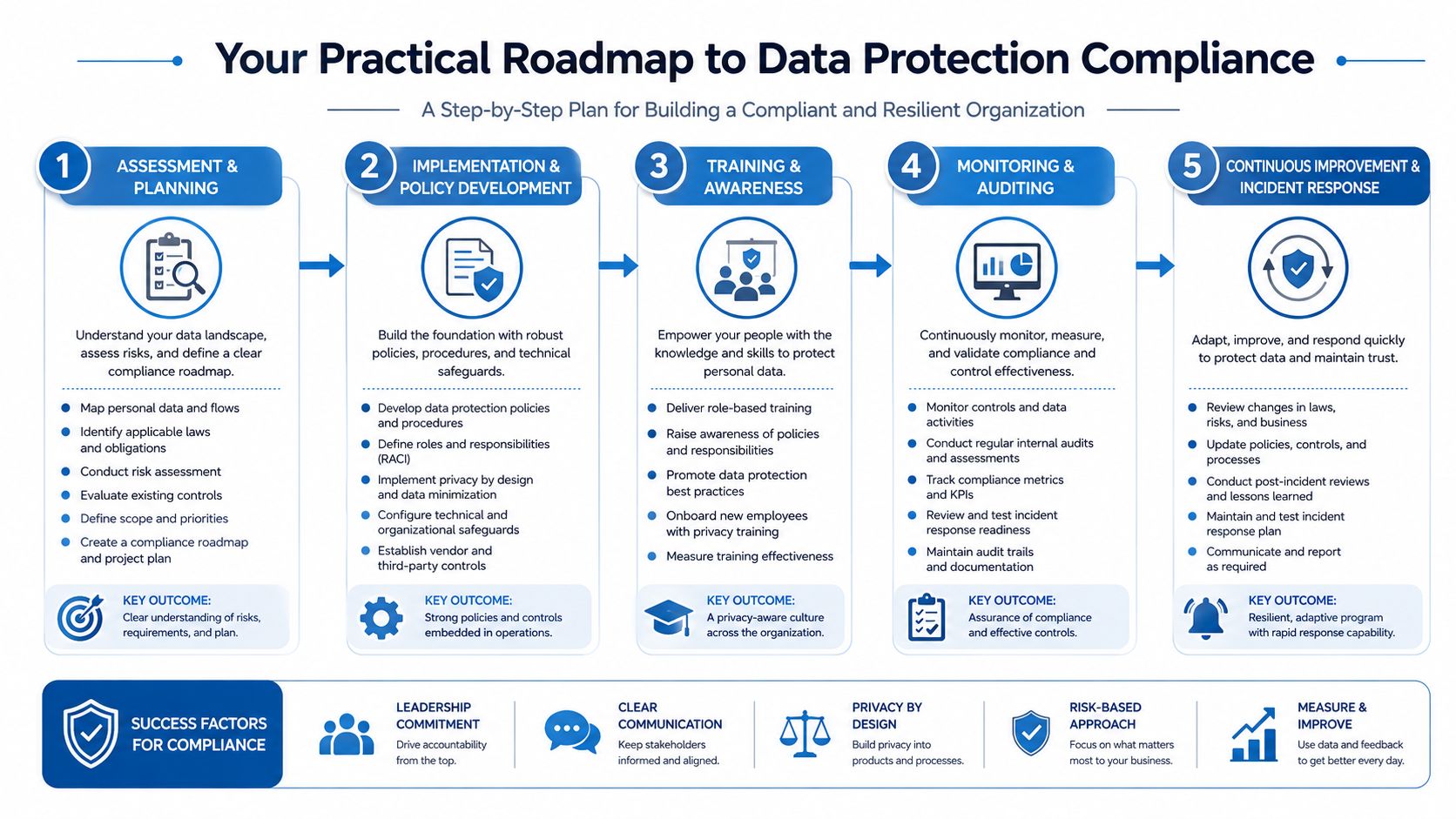
Most SMBs don't need a massive privacy transformation project. They need an ordered plan. The sequence matters because weak foundations create expensive rework later.
Start with data mapping
Data mapping plus access-control hardening is the technical backbone of compliance because regulators expect organizations to inventory what personal data they collect, where it's stored, who can access it, why it's processed, and when it's deleted. That inventory then drives role-based access controls, encryption, and retention limits, as explained in BitSight's GDPR compliance checklist.
Don't begin with policy templates. Begin with a worksheet and a working session.
List your major systems first: CRM, EHR, LMS, help desk, billing, email platform, cloud storage, meeting platform, HR system. For each one, capture the data categories, business purpose, users with access, linked vendors, and retention approach. This can be a spreadsheet at the start. It just needs an owner and a review date.
Then move through the controls in order
Map the highest-risk workflows first
Focus on the processes where sensitive data moves fastest. For healthcare, that may be telehealth visits, appointment reminders, intake forms, and recordings. For online education, it may be enrollment, class recordings, payment collection, and parent communications.Set access by role
Access control should follow job function, not seniority or convenience. Billing staff rarely need full clinical notes. Tutors don't need finance exports. Marketing shouldn't have unrestricted access to support attachments.Apply encryption where data lives and moves
Encryption is an added feature only in marketing language. In practice, it's a baseline control. Use it for stored files, backups, device storage, and transmission wherever your tools support it. If a vendor can't explain its encryption model clearly, treat that as a procurement warning.
Field note: Unknown data flows and over-broad permissions cause more compliance pain than missing policy language.
Write the minimum viable policy set
Most SMBs need a practical set of documents, not a policy library nobody reads. Start with a privacy notice, retention policy, incident response plan, access management procedure, vendor review checklist, and data subject request workflow.Review vendors before renewal time
Ask where data is stored, how deletion works, what audit information they provide, what subcontractors they use, and whether contract terms fit your regulated environment.
Make training specific to real tasks
Generic annual privacy training doesn't change much. Scenario-based training does.
A receptionist should know how to verify identity before sharing records. A teacher should know whether session recordings are permitted and where they can be stored. A sales rep should know what not to export into a personal spreadsheet. A moderator running a virtual session should know how waiting rooms, participant permissions, and screen-sharing restrictions reduce exposure. For practical meeting hygiene, this guide to virtual meeting best practices gives teams a usable starting point.
Test your response before you need it
Run one tabletop exercise. Pick a realistic event: a lost laptop, a mistaken email, an unauthorized download, or a vendor outage affecting access to personal data. Then answer five questions:
- Who owns the incident
- How you contain it
- What evidence you preserve
- Who decides on notifications
- How you document remediation
That's the difference between having a plan and having a file called "incident response final v3."
Compliance in Practice Sector-Specific Guidance
General privacy advice breaks down fast in regulated sectors. Healthcare and online education are good examples because both collect sensitive information, rely on third-party tools, and work under time pressure.
Telemedicine clinic example
A small clinic runs virtual follow-ups, appointment reminders, intake paperwork, and billing support across a distributed team. The legal problem isn't only whether the clinic has privacy policies. The operational problem is whether staff can control where patient information appears.
The weak version looks familiar. Front-desk staff use a consumer chat tool for scheduling. Clinicians store downloaded intake forms locally. Recordings sit in a shared folder. Several people log in with the same admin credentials because it's quicker.
The stronger version is tighter and simpler:
- Meeting access is controlled: Waiting rooms, host approvals, and moderator controls prevent unexpected participants.
- Encryption is enabled: Session content and stored materials are protected where the platform supports it.
- Contracts match the workflow: The clinic uses vendors willing to support healthcare-specific obligations such as appropriate contractual terms.
- Audit trails exist: Admin actions, file access, and deletion events can be reviewed later.
If your team is evaluating remote care tools, this roundup of HIPAA-compliant video conferencing platforms is a practical starting point for comparing meeting controls against healthcare requirements.
Online tutoring and coaching example
An online education business has a different risk pattern. Class links get forwarded. Session recordings accumulate. Tutors share screens constantly. Parent and student information often travel through email, chat, registration forms, and payment systems.
The common mistake is to treat security as a classroom etiquette issue instead of a compliance issue. A forwarded link can expose student participation. Broad recording access can expose minors' information. Uncontrolled screen sharing can reveal other students' files or internal notes.
For this kind of organization, the right tool choices matter almost as much as the policies. Platforms should support waiting rooms, moderator permissions, role-based controls, secure recordings, and webinar-style delivery when the audience is large or mixed. Price matters too. SMBs don't need enterprise procurement cycles to get these features. They do need clarity on what's included, how permissions work, and whether encryption and webinar capability come standard or as paid add-ons.
When a company can't trace who accessed a record, who shared a link, or where a recording ended up, the investigation cost rises before any regulator gets involved.
That operational friction is the hidden cost many teams miss. Compliance is often framed as documentation, but weak inventories, weak access controls, and weak audit trails usually create the bigger business headache. In California, privacy violations can cost up to $7,500 if intentional, as noted in New Hampshire Business Review's discussion of privacy compliance costs.
Essential Tools and Templates for Compliance Management
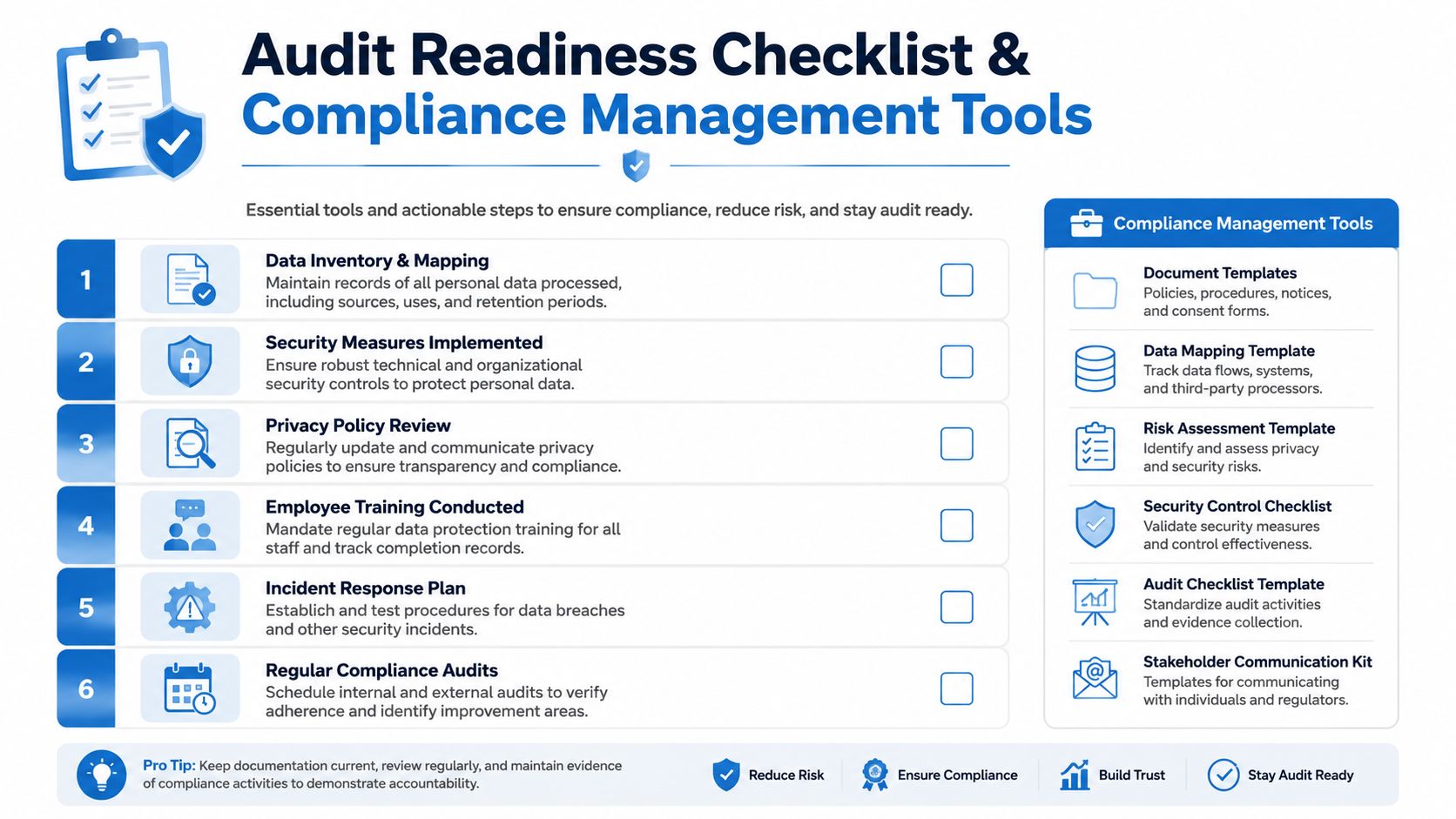
A small business can run a defensible privacy program with a few controlled documents and the right workflow tools. The goal is not to build a privacy department in miniature. The goal is to make routine decisions repeatable, traceable, and easy for staff to follow, especially in healthcare clinics, training businesses, and online education teams where sensitive data moves through everyday operations.
The basic toolkit
Start with five working documents. Keep them simple enough that someone will update them under time pressure.
- Data inventory template: system name, data categories, purpose, owner, access group, vendor, retention period
- Vendor review checklist: data location, encryption, deletion process, support model, subcontractors, contract terms
- Rights request log: request type, date received, identity verification, deadline, outcome
- Incident log: what happened, who found it, containment steps, evidence preserved, follow-up actions
- Retention schedule: record type, trigger event, storage location, deletion method
These templates do more than satisfy documentation requirements. They expose gaps early. A clinic usually finds duplicate patient data across intake forms, calendars, and video platforms. An online course provider often finds that recordings, chat logs, and attendance data are kept longer than anyone intended. Once those gaps are visible, the fix is usually cheaper than teams expect.
A short policy statement also helps if it matches an internal process. For example: "We keep personal data only for as long as needed for the purpose it was collected, contractual obligations, legal requirements, and approved retention schedules." That works in a privacy notice, but it only holds up if staff can point to the retention table behind it.
Price comparison that reflects reality
Most SMBs end up choosing between three models:
| Approach | What you get | Trade-off |
|---|---|---|
| DIY with spreadsheets and existing apps | Low cash outlay, fast setup, flexibility | Version control slips, ownership gets blurry, reviews are easy to miss |
| Consultant-led compliance project | Strong legal input and cleaner documentation | Higher upfront cost, weaker day-to-day adoption after handoff |
| Targeted platforms for high-risk workflows | Built-in controls for meetings, storage, consent, or access management | Requires tighter vendor review and discipline on configuration |
The cheapest option on paper is not always the cheapest to run. I see this often with smaller healthcare and education teams. They save money by stitching together generic tools, then spend more staff time answering access questions, tracing records, and cleaning up inconsistent settings.
For regulated meetings, classes, and webinars, AONMeetings is one example of a platform SMBs may review. It starts at ₹179 per user per month and includes unlimited meeting time, webinar hosting, screen sharing, recordings, and bank-level encryption. That matters if your alternative is buying one platform for meetings, another for webinars, and a third process for controlling recordings and participant access.
Configuration matters as much as price. If staff present documents, dashboards, or student records during live sessions, define host permissions before the session starts, limit what can appear on screen, and train staff on basic controls. This guide on secure screen sharing steps for hosted sessions shows the kind of operational instruction teams need. Clear instructions prevent the avoidable mistakes that create most internal privacy incidents.
What SMBs should do is choose one template owner, one review cadence, and one tool standard for each high-risk process. That is how compliance stays manageable without an enterprise budget.
Conclusion Maintaining Compliance as an Ongoing Process
Data protection compliance isn't a one-time cleanup. It behaves more like financial controls or quality management. New vendors appear. Teams change tools. Staff roles expand. Old data accumulates unless someone owns deletion. Regulations also keep widening across markets, which means "we handled this last year" doesn't hold for long.
The good news is that SMBs don't need an enterprise privacy department to make real progress. They need an inventory of their data, tighter access, usable retention rules, vendor discipline, encryption where it matters, and a response plan people can execute under pressure. That's manageable.
The strongest programs are usually the least theatrical. They use plain-language notices, realistic procedures, narrower permissions, and tools chosen for control rather than novelty. They also review their setup regularly instead of waiting for a complaint, outage, or breach to force the issue.
Start with one business process this month. Map it. Limit access. Set deletion rules. Review the vendor behind it. Then move to the next one. That's how data protection compliance becomes sustainable.
If your team needs secure meetings, healthcare-ready workflows, webinar capability, and straightforward pricing without enterprise procurement friction, AONMeetings is worth a look. It fits the practical compliance approach described above: fewer tools, clearer controls, encryption built in, and a setup small and mid-sized organizations can maintain.
