
The caller has already formed an opinion before anyone picks up. If they hit silence, a harsh repeating loop, or muffled audio that sounds like it came from an old speakerphone, that opinion usually isn't generous.
Hold audio is frequently treated as an afterthought. It's common to upload an available file, hope it plays, and move on. That's a mistake. Custom hold music sits right at the intersection of brand perception, caller retention, and queue experience. It isn't just filler. It's part of the service.
Beyond Silence Your First Brand Touchpoint
A caller reaches your office, hears dead air for two seconds, then a clipped music loop kicks in at the wrong volume. Before your team answers, the system has already said something about how the business operates.
That is why hold audio deserves more respect than it usually gets. It shapes the first live impression during a delay, and delays are exactly when people start judging competence. I have seen this play out in healthcare groups, law firms, service businesses, and sales teams. The pattern is consistent. If the audio sounds careless, callers assume other parts of the experience may be careless too.
Hold music also has a measurable business job. It supports caller retention, reinforces brand tone, and reduces the urge to hang up when the queue is longer than expected. That makes it part of customer experience design, not a throwaway phone setting. Teams that review effective call management strategies usually focus on staffing and routing first. They should. But the audio between those steps still affects whether the caller stays long enough to reach a person.
What callers hear
Callers do not judge hold audio by asking whether the song is popular. They judge it by how the wait feels.
A medical practice usually needs calm, low-distraction audio with clear spacing for messages. A real estate office can use something warmer and more upbeat. A financial advisory firm usually benefits from a more restrained tone. The wrong choice creates friction fast. I have heard excellent businesses undermine trust with audio that felt dated, tinny, or wildly off-brand.
The practical standard is simple.
Practical rule: Hold audio should confirm the call is still connected, reduce tension, and sound consistent with the business the caller intended to reach.
That same standard applies outside a traditional phone queue. Video waiting rooms and conference lobbies serve a similar function for remote appointments, client briefings, and intake calls. Teams that run scheduled remote conversations should treat waiting-room audio and phone hold audio as one experience, especially if they already manage hosted meetings and bridge calls through tools like this guide to making a teleconference call.
The modern expectation
People waiting on hold are not looking for entertainment. They want reassurance that the system works, the brand feels credible, and the wait will not be painful.
That raises the bar. Good custom hold music should fit the brand, play back cleanly, and loop in a way that does not make a 90-second wait feel like five minutes. It should also be deployed on a platform that handles the wider interaction well. In AONMeetings, for example, waiting-room and call-handling features sit inside a secure environment with moderator controls and encrypted communications. That matters because callers and attendees judge the whole experience together, not one isolated setting.
There is also a cost angle that gets missed. Custom hold music is usually inexpensive compared with the cost of missed calls, abandoned leads, or callers who start the conversation irritated. The return is not mysterious. Better caller retention, stronger brand consistency, and fewer avoidable drop-offs are the outcomes worth tracking.
The strongest setups usually share three traits:
- They match the business context. A pediatric office, an IT support desk, and a private wealth firm should not sound interchangeable.
- They avoid short, irritating loops. Repetition makes wait time feel longer.
- They are measured, not guessed. Teams should look at abandonment rates, average hold time, and caller feedback after changes to the audio.
Sourcing Your Hold Music Legally and Affordably
Most businesses start with the wrong question. They ask, "What song should we use?" The better question is, "What audio can we use legally, consistently, and without creating a support problem later?"
That's where many custom hold music articles fall short. Fusion Connect's guidance highlights a major legal risk that often gets skipped: hold music can involve public performance and synchronization rights, which are separate from buying a song or streaming it. A business can create compliance problems by using music it doesn't have the right to play in that context (Fusion Connect hold music PDF).
Three sourcing paths with different trade-offs
In practice, organizations typically choose from three options:
- Royalty-free library tracks
- Custom-commissioned music
- AI-generated music
Each can work. Each can also go wrong.
Royalty-free libraries are usually the safest starting point for smaller teams because the workflow is simple. You browse, license, download, edit, and upload. The catch is sameness. If your brand cares about distinctiveness, a stock ambient track may solve the legal problem while doing very little for identity.
Custom composition gives you the cleanest brand fit. You can ask for the exact mood, pacing, instrumentation, and length you want. The downside is complexity. You need a real brief, a clear contract, and explicit usage rights.
AI-generated audio is tempting because it's fast. It can also produce output that feels generic, uneven, or legally unclear depending on the tool and license terms. If you go that route, read the usage terms carefully and keep a copy of them.
Royalty-Free Music Provider Comparison 2026
| Provider | Typical Pricing Model | Business License Cost (Approx.) | Best For |
|---|---|---|---|
| Epidemic Sound | Subscription | Varies by plan | Teams that want a broad library and frequent refreshes |
| Artlist | Subscription | Varies by plan | Businesses that want simple browsing and polished production music |
| Stock music marketplaces | Per-track license | Varies by track and license scope | Teams that need one track and don't want an ongoing subscription |
| Custom composer | Project fee | Depends on brief and rights | Brands that need a distinct sonic identity |
| AI music platform | Subscription or generation-based | Depends on platform terms | Fast experimentation with careful license review |
The pricing difference matters, but license clarity matters more. A cheap track with unclear rights isn't cheaper if your team has to replace it after rollout.
Use music you can document. Save the invoice, license terms, and exported file in the same folder. Six months later, that admin discipline matters more than the track selection process.
What works for different business types
A small support team usually gets the best balance from a royalty-free track with a clear commercial license. A private clinic may prefer commissioned audio because a calmer, customized piece can better match patient expectations. A marketing agency might test AI-generated concepts first, then commission a polished final version once the mood is clear.
If you're also reviewing queue design and caller flow, this overview of effective call management strategies is worth reading because it frames hold audio as one piece of a larger call-handling system.
The bottom line is simple. Don't rip audio from streaming services. Don't assume "purchased" means "licensed for hold use." And don't choose based on cost alone if the result will sound generic or expose the business to avoidable rights issues.
Preparing Your Audio File for Flawless Playback
The fastest way to ruin a good track is to upload the wrong file version. Most playback problems aren't caused by the music choice. They're caused by format mismatch, bad looping, uneven volume, or a file that sounded fine on laptop speakers but falls apart through a phone system.
Before touching the audio editor, check the destination platform's requirements. CTM notes that implementation starts with verifying file constraints because vendors and VoIP systems vary. It also gives a concrete example: Microsoft Dynamics 365 allows phone music files up to 20 MB and recommends choosing audio that "loops well," while WAV is commonly accepted (CTM hold music sourcing guide).
Start with the destination, not the source file
That point sounds basic, but teams skip it all the time. They download a high-quality stereo file, trim it, upload it, and only then discover the system rejects the format or mangles playback.
Use this simple workflow:
- Check accepted file types: Many systems accept WAV. Some also accept MP3, but WAV is still a frequent safe choice.
- Review file size limits: If the platform has a cap, export with that constraint in mind.
- Confirm looping behavior: A track that ends abruptly or restarts awkwardly will annoy callers fast.
- Test on real devices: Laptop playback isn't enough. Listen through desk phones, mobiles, and browser-based calling if your setup supports them.
A visual checklist helps when someone else on the team is preparing the file:
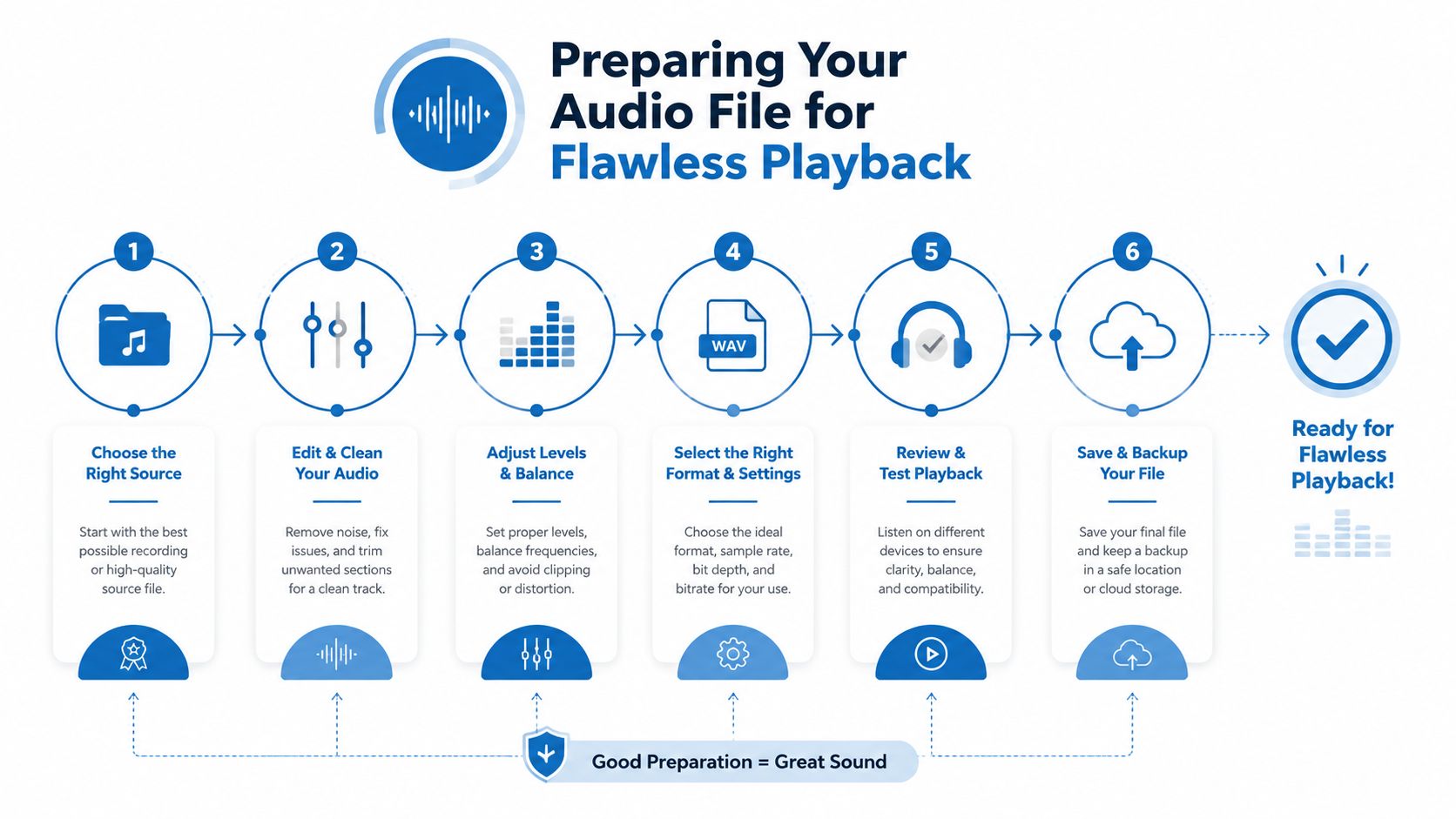
A practical editing workflow
Audacity is usually enough for this job. You don't need a studio stack to make hold audio usable.
Open the source track and listen for three things first: overly bright highs, sudden dynamic jumps, and awkward intros. Phone systems are unforgiving. A long cinematic build may sound polished in headphones and useless on hold.
Then clean the file in this order:
- Trim the intro
Remove dead air and any slow opening that delays the actual sound. - Normalize the volume
Keep the level steady so callers aren't startled when messages or transfers happen. - Shorten or extend intelligently
Edit the track to suit the queue rather than forcing the queue to suit the track. - Create a clean loop
Fade the end gently if needed so the restart isn't obvious. - Export the final version
Name it clearly with version control, such as final-hold-music-v1.wav.
What sounds professional and what doesn't
A few patterns show up again and again in failed deployments:
- Too much stereo width: It can collapse poorly on some endpoints.
- Over-compressed audio: Everything sounds loud, flat, and fatiguing.
- Message mismatch: The spoken prompt is much louder than the music bed.
- Unedited stock tracks: The song has a dramatic ending that makes the loop feel broken.
Clean, moderate, and predictable wins. Hold audio isn't a branding showcase in the same way an ad spot is. It's service design.
If you're adding spoken messages, record them with the same care. Use a quiet environment, keep delivery calm, and avoid overproduced effects. The goal is credible, consistent playback that callers barely notice because nothing feels wrong.
Uploading Custom Music to AONMeetings and Other Platforms
Uploading the file is the easy part. Uploading the right file to the right setting, testing the actual caller experience, and deciding whether music alone or music plus messaging performs better is where the essential work sits.
That matters because most discussions of custom hold music stop at branding. Branded Bridge Line points out the bigger unanswered question: not just whether you can customize the audio, but which version performs best, especially for support queues and sales teams where abandonment matters directly (Branded Bridge Line custom hold music page).
A straightforward platform workflow
The basic upload flow is similar across most systems:
- Find the relevant admin setting: Look for terms like Music on Hold, Waiting Room Audio, Queue Audio, or Audio Settings.
- Upload the tested file: Use the final exported version, not the raw source.
- Assign it to the right location: Some systems let you set audio by queue, room, department, or event type.
- Preview the playback path: If the platform offers preview, use it. If not, run a real test call.
- Document the version in use: This avoids confusion when someone replaces the file later.
This is how that kind of interface appears in practice:
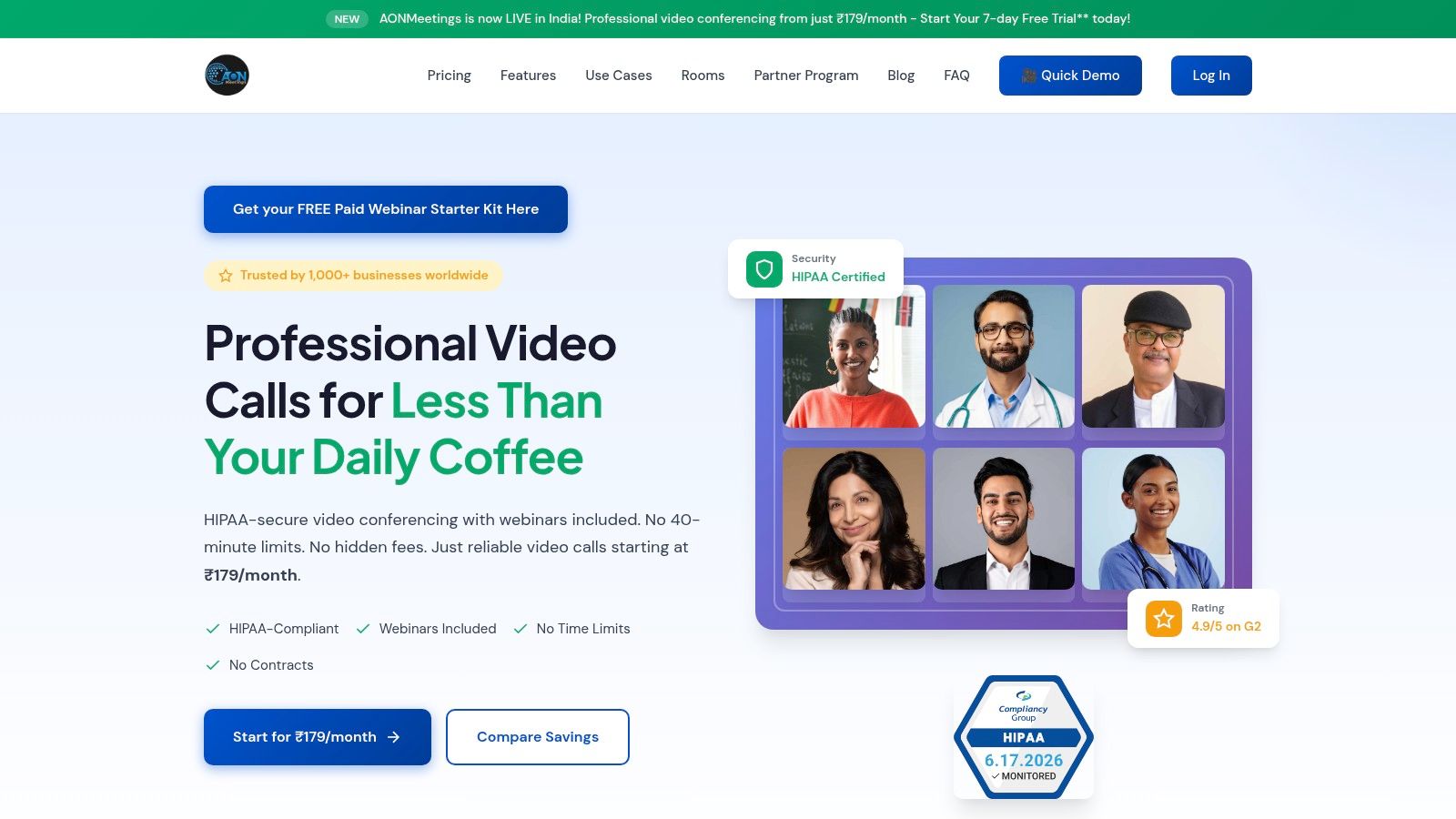
Using one platform as a practical example
On platforms that support waiting-room and conference audio customization, the setup usually sits inside meeting, branding, or room-level controls. In AONMeetings, custom hold music appears as part of a broader conferencing setup that also includes webinars, waiting rooms, and bank-level encryption. That's useful when hold audio isn't isolated from the rest of the experience, such as healthcare intake calls, online classes, or moderated client sessions where the caller may move from waiting room to live meeting without changing systems.
The value proposition there isn't just the upload itself. It's that the audio feature sits alongside built-in webinar hosting, live streaming options on higher tiers, recordings, and access controls in the same environment. For teams comparing tools, that bundled model can be more practical than stitching together one service for meetings and another for queue or waiting-room polish.
What to check immediately after upload
Don't trust the dashboard alone. Place test calls and listen end to end.
Use a short post-upload checklist:
- Mobile test: Check whether the audio becomes thin or distorted on a mobile network.
- Desk phone test: If your staff still use handsets, listen there too.
- Browser test: For conferencing platforms, test in-browser waiting rooms.
- Transition test: Verify the move from hold or waiting room into the live conversation isn't jarring.
A clean upload that performs badly on one endpoint still counts as a bad deployment. The technical setting is only done when the caller experience sounds intentional across the devices people use.
Best Practices for an Effective Hold Experience
A caller has already decided to trust your business. Then they hit hold, hear a harsh loop restart after 30 seconds, and start wondering whether the rest of the experience will feel just as careless.
That moment shapes retention more than many teams expect. Hold audio is not background decoration. It is part of service delivery, and it affects brand perception, caller patience, and whether people stay on the line long enough to become revenue.
Good hold experiences sound controlled and intentional. The music fits the business. The loop point is hard to detect. Any spoken insert arrives at a sensible interval and at the same perceived loudness as the music. In practice, the target is simple: reduce irritation during the wait without making the caller feel marketed to.
Design around real wait conditions
Start with average queue length, but do not stop there. I usually look at the longest common wait windows too, because a track that feels acceptable for a short queue can become punishing during a busy period.
A clinic, law firm, or financial services team usually benefits from restrained pacing and low-drama instrumentation. A sales queue can carry slightly more energy, but it still needs to be easy to hear repeatedly. Personal taste is a poor filter here. Tolerance matters more than originality.
This summary graphic captures the essentials:
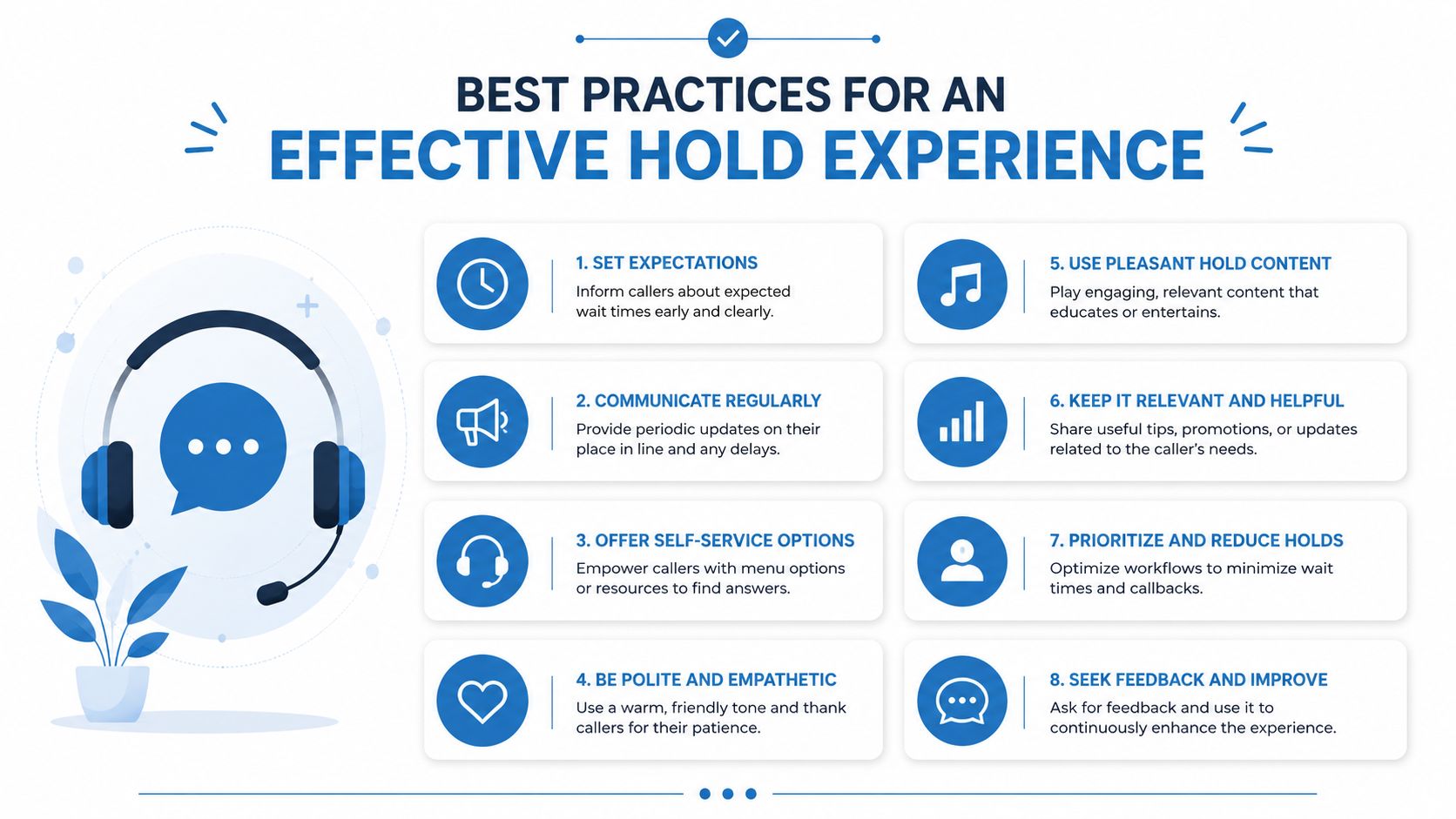
Two trade-offs matter in almost every deployment:
- Brand fit: Choose music that supports the business tone without demanding attention.
- Loop length: Short tracks cost less and are easier to source, but callers notice repetition faster.
- Message spacing: Frequent inserts can reassure callers, but too many break the rhythm and feel automated.
- Volume control: Music and voice prompts should sit at a similar level so callers do not adjust volume mid-wait.
Balance cost, legal risk, and caller tolerance
Many businesses make avoidable mistakes. They spend heavily on a custom composition for a queue with low call volume, or they save money by using music they do not have the right to broadcast on hold.
Both choices can be expensive.
If your hold volume is modest, a properly licensed stock track is often the better ROI. It gives you predictable cost and lower legal exposure. A fully custom piece makes more sense when hold time is high, brand control matters, or the audio will also be used across phone systems, waiting rooms, and conferencing environments such as AONMeetings. In those cases, one approved asset can cover more than one touchpoint and justify the higher production spend.
Music-only also has a cost logic. It is faster to produce and simpler to maintain. Music plus messages adds scripting, voice recording, editing, and periodic updates when hours, offers, or workflows change. Use spoken messages when they reduce support load or help callers prepare for the conversation. Do not add them just to fill space.
Decide whether spoken prompts are actually helping
Short informational messages work best when they answer a question the caller is likely to have while waiting.
Useful inserts include:
- Queue reassurance: Let callers know they are still connected.
- Preparation prompts: Ask them to have account details, referral information, or order numbers ready.
- Operational guidance: Point them to hours, billing steps, or self-service options.
- Light brand reinforcement: Keep it factual and brief.
Promos are where hold systems often go wrong. Repeating sales copy every few seconds makes the wait feel longer, not shorter.
If you record prompts internally, direct the speaker like you would a receptionist, calm, paced, and clear. Poor delivery makes even a good script sound cheap. Teams producing their own prompts should review basic pacing and microphone technique before recording. This voice acting guide is a useful starting point.
Measure performance, not preference
The test is caller behavior.
After rollout, track hold abandonment, average wait time, and any change in caller complaints after switching music or message cadence. I have seen businesses keep a track because the leadership team liked it, even though frontline staff were hearing comments about repetition within days. A simple before-and-after review usually catches that quickly.
For teams using conferencing and waiting-room tools alongside telephony, consistency matters too. If your phone hold experience is calm and professional but your virtual waiting room feels chaotic, the customer still experiences one broken journey. The moderation and etiquette standards in these virtual meeting best practices help keep that handoff coherent.
What usually fails
Three problems show up repeatedly. Teams choose music for themselves instead of for callers. They use loops that reveal the restart too quickly. They treat hold audio as a one-time upload instead of an asset that should be reviewed against retention, complaints, and brand fit over time.
The best setups are usually the least distracting. They respect the caller, stay legally clean, and hold up under repetition.
Troubleshooting and Frequently Asked Questions
Most hold music failures are operational, not mysterious. The file is wrong, the loop is wrong, the volume is wrong, or the team never tested it on the devices callers use.
Cebod Telecom's guidance is useful here because it shifts attention to the metric that matters most: caller retention. It recommends A/B-style testing of different messages or music and tracking retention rates after changes, while also warning that quick loops and distorted audio can increase abandonment risk (Cebod Telecom music on hold guide).
Common problems and fixes
The file won't play
Check format compatibility first. Re-export in a commonly accepted format such as WAV if your platform supports it. Then confirm the file isn't over the platform's size limit.
The audio sounds distorted
Distortion often comes from an export setting mismatch, aggressive compression, or a source file that was already poor. Go back to the editor, reduce processing, and test again through the actual call path.
The music is too loud or too soft
Normalize the track and compare it directly against any spoken prompt. The listener shouldn't reach for the volume control when the message plays.
The loop feels irritating
That usually means the edit point is obvious or the track is too short for the queue pattern. Rebuild the loop rather than hoping callers won't notice.
There is echo or weird room sound during prompts
If the issue appears in recorded announcements or live waiting-room audio rather than the music file itself, fix the input chain and room acoustics. This guide on how to stop echo on mic is a practical reference.
FAQ
Can I use a popular song from the radio?
Usually, that's the wrong assumption. Buying or streaming a song doesn't automatically give your business the rights to use it as hold music.
How often should I update my hold music?
Update it when there's a reason. A rebrand, a new service mix, seasonal messaging, or caller feedback are all good triggers. Random changes create extra work without much upside.
Should every department use the same track?
Not necessarily. A sales queue, patient line, and technical support line often benefit from different messaging and mood.
Does custom hold music interfere with encryption?
No. Audio customization and call security are different layers. If your platform uses encrypted communications, that security posture applies to the interaction while the hold or waiting-room audio remains a separate configuration choice.
How do I know if the change worked?
Track caller retention after deployment, then compare versions. If one setup produces fewer drop-offs and fewer complaints, keep refining from there.
If you're reviewing meeting and waiting-room audio as part of a broader communications stack, AONMeetings is one option to evaluate. Its plans start from ₹179 per user per month and include unlimited meeting time, built-in webinars, bank-level encryption, screen sharing, recordings, and, on advanced tiers, features such as custom hold music, live streaming, and brandable interface controls. For teams that want hold customization inside the same secure platform they already use for client calls, classes, consultations, or webinars, that bundled setup can simplify rollout and ongoing administration.
