
An electronic signature, or eSign, is a legally binding way to get consent or approval on electronic documents, replacing a handwritten signature in virtually any process. Use of e-signatures has moved from niche to normal, with global transaction volume growing from 89 million to 754 million in five years, and businesses save an average of $28 per agreement when they use them instead of paper-based signing (electronic signature adoption data).
If you run a small clinic, this probably sounds familiar. A patient intake form gets printed at the front desk, scanned after signing, emailed to billing, then filed somewhere nobody can find quickly when a question comes up. If the patient is remote, the process gets worse. Someone emails a PDF, the patient prints it, signs it, takes a photo, and sends back a blurry image.
That’s why so many owners ask what is esign, and whether it’s secure enough and legal enough to trust. The short answer is yes, if you use it properly. The longer answer is more useful, especially if you deal with patient consent, enrollment paperwork, service agreements, or webinar registrations where speed and proof both matter.
Moving Beyond Paperwork What is eSign
A patient books a telehealth visit for the same afternoon. Your front desk still needs a consent form, a privacy acknowledgment, and payment approval. With paper, that means printing, scanning, emailing, waiting, and often calling the patient back because one page was missed or the photo is unreadable. With eSign, the same forms can be sent, signed, and stored from a phone or laptop in minutes.
An eSign is a way for someone to show agreement on an electronic document. That agreement might be a typed name, a drawn signature, or a click on an approval button inside a signing flow. Its key benefit is straightforward. It removes the paper handoff that slows down care, enrollment, billing, and follow-up.
For a helpful plain-English outside perspective, this guide on What Is eSign is useful because it frames eSign as a business workflow tool, not just a legal term.
For a small clinic owner, eSign works a lot like replacing a paper clipboard with a tracked digital front desk. Staff do less chasing. Patients complete forms sooner. You get a clearer record of who signed and when.
That matters even more if you serve people remotely. In HIPAA-conscious telemedicine and online education, forms are part of the service experience, not just office paperwork. If your video platform, scheduling, intake forms, and signatures live in separate expensive tools, the process gets harder to manage and more expensive to maintain. An integrated platform such as AONMeetings can keep those steps in one place, which is often more practical for smaller organizations than paying for a standalone e-signature product on top of everything else.
Why small organizations care
A clinic, tutoring center, therapy practice, or training business usually wants three outcomes:
- Less admin work: Staff spend less time printing, rescanning, renaming files, and asking whether a form came through.
- Lower document cost: E-signatures reduce the handling costs that pile up around paper forms, postage, storage, and rework.
- Faster completion: Patients, parents, students, and clients can sign from a browser or phone as soon as they receive the document.
Practical rule: If a form regularly gets stuck because someone has to print it first, it is a strong candidate for eSign.
Used well, eSign is not just a digital version of ink. It is a simpler way to run approvals inside the systems you already depend on, with better speed, easier recordkeeping, and fewer avoidable delays.
Electronic vs Digital Signatures Explained
Many people get confused. They hear “electronic signature” and “digital signature” used like they mean the same thing. They’re related, but they’re not identical.
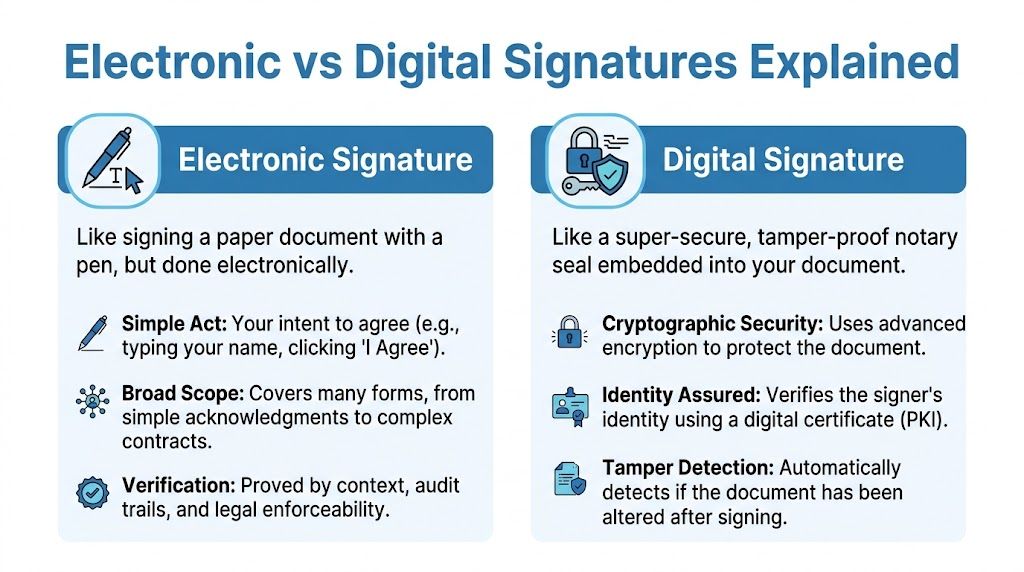
Think of it this way. An electronic signature is the broad category. A digital signature is the security-heavy version inside that category.
The simple mental model
An electronic signature is like signing a clipboard at reception. You are indicating intent. That intent may be shown by typing your name, drawing your signature, or clicking “I agree.”
A digital signature is more like signing in front of a notary who also seals the paper in a tamper-evident pouch. It still captures your agreement, but it also adds technology that helps verify identity and detect changes to the document.
Side-by-side comparison
| Type | What it means in plain language | Common example | Main strength |
|---|---|---|---|
| Electronic signature | A person agrees electronically | Typing your name into a form | Fast and convenient |
| Digital signature | An electronic signature with cryptographic protection | Signing through a secure certificate-based platform | Better tamper detection and verification |
Here’s the key sentence most readers need: all digital signatures are electronic signatures, but not all electronic signatures are digital signatures.
Where confusion usually starts
People often assume a scanned image of a handwritten signature is the same as a secure digital signature. It isn’t. A pasted image can still be part of a valid workflow in some contexts, but by itself it doesn’t give you the same built-in proof that a cryptographically protected system does.
That distinction matters more in sensitive settings:
- Healthcare forms: You want proof of who signed and whether anything changed.
- School enrollment documents: You want records that are easy to retain and produce.
- Business contracts: You want a clean audit trail if a dispute appears later.
A good way to think about it is this: eSign answers “Did the person agree?” Digital signature also helps answer “Can we prove the document stayed intact?”
If you’re choosing a system, don’t stop at “can it collect signatures?” Ask how it verifies the signer, how it stores records, and how it shows whether the file was altered after signing.
How eSignatures Guarantee Security and Verification
Security sounds complicated because vendors love technical language. The actual idea is simpler than it seems.
A secure e-signature system doesn’t just place a name on a PDF. It creates evidence around the signature. That evidence is what gives owners peace of mind.
PKI in plain English
The technical term you’ll hear is Public Key Infrastructure, or PKI. Don’t let that scare you off. The easiest analogy is a wax seal mixed with a fingerprint.
When a document is signed through a PKI-based system, the platform creates a unique cryptographic hash of the document. You can think of that hash as the document’s digital fingerprint. According to this explanation of how PKI-based e-signatures work, if a single bit changes after signing, the hash becomes invalid, which gives compliant systems 100% detection of tampering.
What happens during signing
A secure signing workflow usually looks like this:
- The document is prepared: A form, contract, or consent record is uploaded.
- The signer is invited: The person gets a link by email or another secure method.
- The system records the signature event: It captures the act of signing and ties it to the document.
- The platform seals the record: The cryptographic hash helps show whether the file was changed later.
- An audit trail is stored: You keep a history of key actions tied to that document.
For clinic owners, the useful takeaway is simple. You don’t need to manually inspect whether a PDF was altered. The system should help you know.
Why encryption matters too
A secure signature process isn’t only about proving the document stayed intact. It’s also about protecting the document while it moves and while it sits in storage. That’s where encryption comes in.
If the document contains sensitive information, such as patient data, encryption helps keep unauthorized people from reading it. That’s one reason secure signing is especially relevant for medical practices, counseling providers, and educators handling private records.
If you're comparing broader communication stacks, this overview of video conferencing for small businesses is useful because it shows how document workflows fit into a wider secure communication setup.
The safest process is not “sign, download, and hope.” It’s “sign inside a system that records, protects, and preserves the transaction.”
Another practical benefit is speed. The same PKI-based process that improves verification can reduce signing cycles from days to minutes in secure workflows, which is why remote intake and consent collection feel so much smoother once a clinic leaves paper behind.
The Global Laws That Make eSignatures Binding
Security matters, but legality is what makes a signature usable in practice. If a signed document can’t hold up when challenged, it’s not doing much for your business.
In the United States, the foundation is the ESIGN Act, signed into law in 2000. It established that electronic records and signatures are legally valid for virtually any use, which was a major shift after years of state-by-state inconsistency. This history of the ESIGN Act and electronic signature law is helpful because it shows how electronic signatures moved from fragmented rules to broad legal acceptance.
What U.S. law actually requires
The practical checklist comes from the enforceability standards tied to ESIGN. The law says an electronic signature can’t be denied legal effect solely because it’s electronic. For enforceability, the signing process needs to capture four essentials, as summarized in Adobe’s ESIGN Act guidance:
- Intent to sign: The person must mean to sign.
- Consent to electronic records: The person agrees to do business electronically.
- Association with the record: The signature must be linked to the document.
- Record retention: The record must be retainable and reproducible.
Those four points are why a proper e-signature workflow is more than dropping a signature image into a file. The system must preserve context.
Why this feels reassuring in practice
If you own a clinic, “intent” might look like a patient checking a consent box and completing a signing step. “Consent to electronic records” means the patient agrees to receive and sign the document electronically. “Association” means the signature is tied to that exact consent form, not floating separately. “Retention” means you can retrieve the document later in readable form.
That’s what turns a click into evidence.
Legal reality: An e-signature isn’t magic. It works because the platform captures the surrounding proof, not just the mark on the page.
Beyond the United States
For international work, things get more nuanced. The European Union uses eIDAS, and India recognizes electronic signatures under the IT Act 2000. The broad lesson is that legal acceptance exists in multiple regions, but you shouldn’t assume every jurisdiction treats every signing method exactly the same.
That matters if you serve overseas patients, enroll international students, or sign vendor agreements across borders. Domestic validity is one thing. Cross-border enforceability often depends on whether your process matches local expectations around identity, records, and signature method.
The safest mindset
A small organization doesn’t need to memorize legal jargon. It needs a habit:
- Check whether the signer clearly agreed.
- Keep documents in a readable format.
- Preserve audit history.
- Use stronger identity verification for sensitive records.
- Be careful with cross-border documents.
If you remember those points, you’re already thinking more clearly than many teams that treat signing like a basic PDF feature instead of a legal workflow.
eSignatures in Action Across Industries
Theory helps, but the value of eSign becomes obvious when you watch it solve an ordinary task.
A telemedicine clinic collecting consent
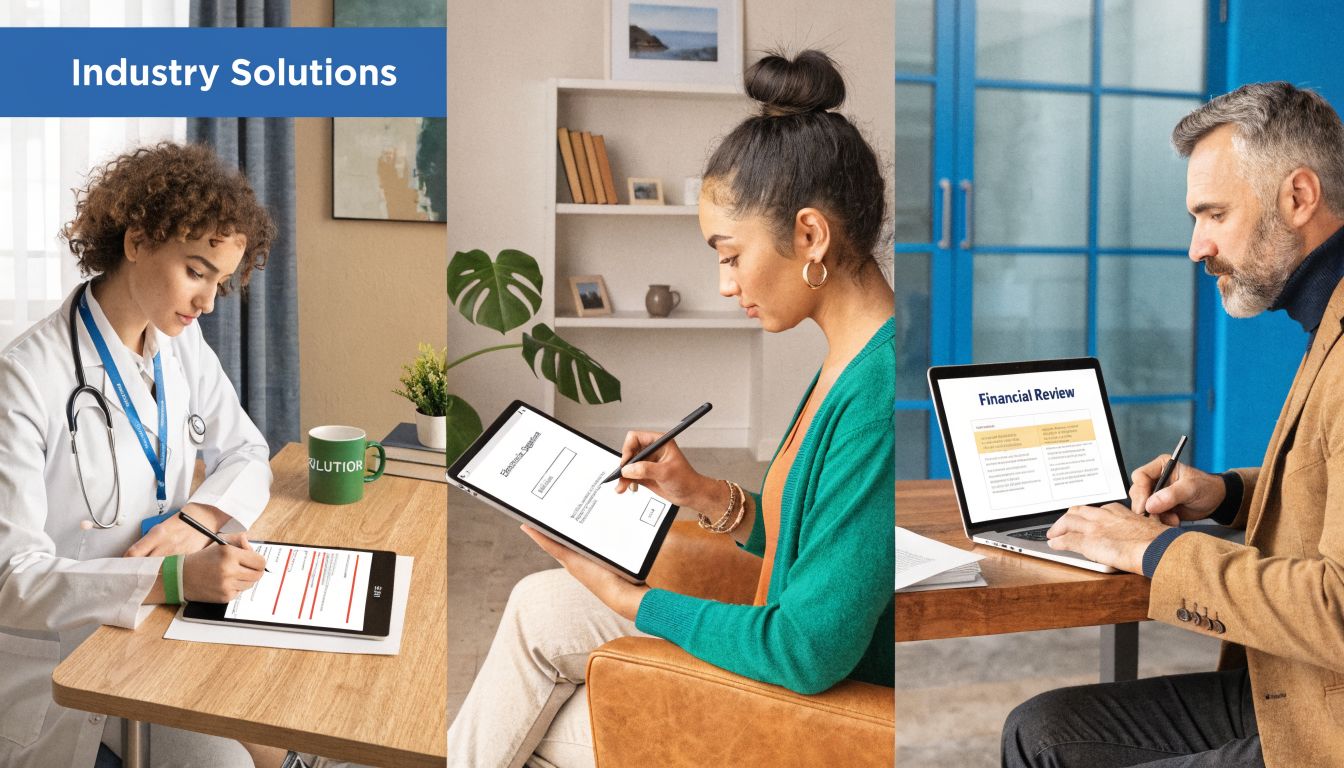
A patient books a virtual appointment for later that afternoon. Before the visit, the clinic sends an intake packet and consent form electronically. The patient signs from a phone, and the clinic gets a timestamped record before the consultation begins.
Healthcare has extra rules, making standard ESIGN compliance alone insufficient. Healthcare workflows also need safeguards like tamper-evident audit trails and encryption for protected health information, and 78% of healthcare providers cite compliance fears as a barrier to adoption according to this review of HIPAA and ESIGN requirements.
For clinics exploring secure remote operations, this guide to HIPAA-compliant video conferencing platforms gives a useful picture of how signing and patient communication often need to work together.
An educator running enrollment online
A tutoring center hosts a parent information webinar for a new test-prep program. At the end of the session, parents receive digital enrollment forms and policy acknowledgments. Instead of asking families to print and return paperwork, the center gets approvals while interest is fresh.
That’s one of the strongest but least discussed benefits of eSign. It removes the gap between “I’m ready” and “I finished the paperwork.” In education, that gap is where many enrollments stall.
A small business closing a deal faster
A consultant finishes a discovery call with a new client. The proposal is approved, but the service agreement still needs to be signed. If that contract is sent electronically, the client can review and approve it the same day instead of waiting for office time.
The same pattern applies to property and lease-related business documents. If your work touches physical space, legal terms still matter, and practical resources like this primer on commercial lease agreements in Ontario can help you understand what belongs in the contract before you send it for signature.
A strong e-sign workflow doesn’t just digitize the signature. It shortens the distance between conversation and commitment.
Choosing Your eSignature Solution and Comparing Costs
The right question isn’t only “Which tool can capture a signature?” It’s “Which setup gives me the best value for the work I already do?”
Standalone signing tools can work well if signatures are your only concern. But many small clinics, coaches, educators, and service businesses also need meetings, webinars, screen sharing, secure communication, and document handling in one place. When those pieces are split across multiple subscriptions, costs and complexity stack up quickly.
What to compare
Before you pick a platform, compare these categories:
- Signing workflow: Can people sign easily from a browser or phone?
- Security features: Does the service offer encryption, audit trails, and sensible access controls?
- Related tools: Do you also get meetings, recordings, webinars, or document sharing?
- Pricing model: Are you paying separately for communication and signatures?
- Fit for your industry: Does it support healthcare, education, or business use cases cleanly?
Here’s a simple comparison frame.
eSignature Platform Cost Value Comparison 2026
| Feature | Standalone eSign Provider (e.g., DocuSign, Adobe Sign) | Integrated Platform (e.g., AONMeetings) |
|---|---|---|
| Core purpose | Focused mainly on document signing | Combines communication and workflow tools |
| Signature collection | Yes | Yes, as part of a broader workflow |
| Meetings and calls | Usually separate | Included |
| Webinar hosting | Usually separate add-on or another platform | Included |
| Encryption | Varies by product and plan | Included as part of the platform offering |
| Cost structure | Multiple subscriptions can be required | Single platform approach can simplify costs |
| Best fit | Teams that only need signature software | Clinics, educators, trainers, and SMBs that need signing plus live interaction |
The price comparison that matters most for many organizations is not just line-item software cost. It’s total stack cost. A platform that includes meetings and webinars can replace separate tools, especially if you regularly run consent calls, parent orientations, demos, or training sessions.
If you want a broader market lens before choosing, this virtual event platform comparison is useful because it highlights how webinar and meeting features affect overall value, not just event delivery.
Decision shortcut: If your team collects signatures after calls, demos, classes, or consultations, an integrated platform often makes more financial sense than a standalone signer plus separate meeting software.
Frequently Asked Questions About eSignatures
Can an e-signature be forged
Any agreement process can be abused if the workflow is weak. A paper signature can be copied. A pasted signature image can be reused. That’s why the safer question is whether your system captures enough proof.
A stronger e-signature workflow adds identity checks, document association, audit history, and tamper detection. Those layers make disputes easier to resolve than a plain ink scribble on paper.
How long does an e-signed document stay valid
The signature itself doesn’t usually “expire” just because it is electronic. What matters is the underlying agreement, the retention rules that apply to your industry, and whether you can still retrieve the document in readable form.
For a clinic owner, that means keeping records in an organized, accessible system instead of letting signed files scatter across inboxes and desktops.
What if technology changes later
This is a fair concern. The practical safeguard is record retention. Store signed records in formats you can reproduce clearly, and use platforms that preserve audit details alongside the document.
If a dispute comes up later, a readable file plus a clear audit trail matters more than fancy terminology.
Is a U.S. e-signature valid in another country
Not automatically. While the U.S. ESIGN Act provides broad domestic validity, it doesn’t have automatic mutual recognition with the EU’s eIDAS or India’s IT Act 2000, which can lead to enforceability disputes in 41% of cross-border contracts according to this overview of cross-border e-signature rules.
For international business, the practical takeaway is simple:
- Check the destination country: Local rules may require a different signing standard.
- Review identity requirements: Some jurisdictions expect stronger signer verification.
- Don’t assume “electronic” means universally accepted: It often is accepted, but not always in the same way.
- Use region-aware workflows: India, for example, may involve Aadhaar-based expectations in certain contexts.
Are e-signatures only for contracts
No. They’re also useful for consent forms, employee acknowledgments, intake paperwork, onboarding packets, education forms, internal approvals, and webinar-related registrations where confirmation matters.
In many small organizations, the first successful use case isn’t a contract. It’s a routine form that staff are tired of chasing.
The Future is Signed Securely and Digitally
E-sign isn’t just a digital replacement for pen and paper. It’s a cleaner way to capture consent, protect records, and move work forward without the delays that paper creates. When the workflow includes proper security, encryption, audit trails, and legal basics like intent and retention, e-signatures give small organizations something they rarely get from paperwork. Speed and proof at the same time.
The bigger shift is toward connected digital workflows, where meetings, webinars, records, and signatures happen together instead of across disconnected tools.
If you want that all-in-one approach, AONMeetings is worth a look. It combines secure meetings, built-in webinars, document sharing, recordings, and bank-level encryption in one platform, with plans starting at ₹179 per user per month. For clinics, educators, and small businesses, that means you’re not paying separately for a video platform, a webinar tool, and another service just to handle approvals. You get unlimited meeting time, webinar hosting, straightforward pricing, and a setup that’s easier to manage day to day.
