
Your sales lead asks for a cleaner pipeline. Finance wants a predictable software budget. The dean of an online program wants admissions, outreach, and follow-up in one place. A clinic administrator cares less about dashboard aesthetics and more about who can access records, how data moves, and whether staff will use the system every day.
That’s the context behind zoho crm vs salesforce. This isn’t a feature beauty contest. It’s a decision about operating model, cost structure, and how much friction your team can absorb before the CRM becomes shelfware.
Most comparisons stop at surface claims. They compare logos, broad feature categories, and list prices. That misses the part that matters. Total cost of ownership isn’t just subscription fees. It includes setup effort, training burden, admin complexity, paid add-ons, reporting work, integration sprawl, and the ongoing drag of a platform that asks more from your team than your team can realistically give.
Choosing Your Business Growth Engine
A CRM becomes part of your company’s muscle memory. Sales reps live in it. Managers judge pipeline health through it. Support, marketing, admissions, or outreach teams often end up touching it too. Once you commit, switching later is possible, but it’s rarely painless.
That’s why the right question isn’t “Which CRM is best?” It’s which CRM matches your business shape. A small private practice, a fast-growing B2B startup, a coaching business running webinars, and a multi-country enterprise don’t need the same thing. They don’t even define success the same way.
For some teams, the winning platform is the one people adopt quickly, with low admin overhead and pricing that doesn’t punish growth. For others, the better choice is the platform that can model complex approvals, support large-scale customization, and plug into a much broader app ecosystem.
Practical rule: If your team needs a CRM to start producing value fast, usability and bundled functionality matter more than theoretical power. If your business runs on deep process complexity, configurability matters more than convenience.
Healthcare and education make this choice even sharper. They often need strong access control, dependable encryption, operational simplicity for non-technical staff, and a clean way to connect the CRM to meetings, student consultations, telehealth workflows, or webinar-based outreach. A cheaper tool that fits those realities can outperform a more powerful platform that requires specialist support just to stay manageable.
At a Glance Who Is Each CRM For
A 40-person services firm, a private clinic, and a university admissions office can all buy the same CRM and end up with very different results. The license line item is only the start. The bigger question is which platform your team can keep clean, adapt to daily work, and support without adding hidden admin cost.

At a high level, Zoho CRM fits organizations that want lower operational overhead and more built-in value per dollar. Salesforce fits organizations that expect process complexity, have stronger technical support, and are prepared to spend more time configuring the system around the business.
| Business need | Zoho CRM | Salesforce |
|---|---|---|
| Tight software budget | Strong fit | Often harder to justify |
| Fast time to adoption | Strong fit | Usually slower without setup work |
| Mixed-skill users across sales, support, or outreach | Strong fit | Better with admin guidance |
| Deep process design and custom objects | More constrained | Strong fit |
| Large third-party ecosystem | Smaller | Strong fit |
| Predictable administration for lean teams | Strong fit | Often heavier |
| Healthcare and education teams with limited technical bandwidth | Often practical | Best when complexity is already high |
Zoho CRM for lean teams that need usable coverage
Zoho makes the most sense for SMBs and operationally lean teams that want the CRM to work without turning into a separate IT project.
That matters in education and healthcare. A training business may need lead capture, follow-up sequences, counselor handoffs, and event-based outreach. A clinic may need a system staff can learn quickly, permission carefully, and maintain without depending on an outside consultant for every workflow change. In both cases, the winning tool is often the one that reduces setup decisions, limits app sprawl, and stays manageable after the initial rollout.
Zoho usually fits that profile better. The product is often easier for non-specialist users to adopt, and the broader Zoho suite can reduce the number of extra tools a small organization has to buy and connect. For buyers focused on TCO, that bundling can matter more than feature depth on paper.
Salesforce for organizations with process complexity they cannot simplify
Salesforce earns its keep in environments where complexity is not optional. Large B2B companies, multi-entity organizations, and institutions with layered approvals often need a CRM that can model exceptions, custom processes, and integrations across many systems.
A good example is a distributed organization with regional teams, role-based approvals, custom reporting requirements, and established finance, service, or marketing systems already in place. In that setting, the extra administrative load may be acceptable because the business gains more control over data structure, workflow design, and cross-functional coordination.
This is the key trade-off. Salesforce can support more specialized operating models, but many smaller teams pay for that flexibility before they fully use it.
Where each platform tends to fit best
Zoho is usually the better choice for:
- Small and mid-sized businesses that need a lower-cost CRM with solid out-of-the-box coverage
- Healthcare practices and education teams that value usability, controlled access, and simpler administration
- Companies that want to keep software sprawl down by using adjacent business apps from the same vendor
Salesforce is usually the better choice for:
- Enterprises or fast-scaling companies with dedicated admins, consultants, or internal ops teams
- Organizations with approval-heavy sales processes, complex data models, or significant integration requirements
- Teams that treat the CRM as a configurable platform, not just a sales system
The short version is practical. Zoho is often the safer operational fit for teams that need adoption, control of costs, and less day-to-day friction. Salesforce is often the better strategic fit for organizations whose revenue model depends on customization, governance, and scale.
Core Features and Daily Usability Compared
The biggest difference in zoho crm vs salesforce shows up on an ordinary workday, not in a demo. It shows up when a rep logs a call, updates a deal, checks the next-best lead, and tries to build a report before a team meeting.
What a Tuesday morning feels like
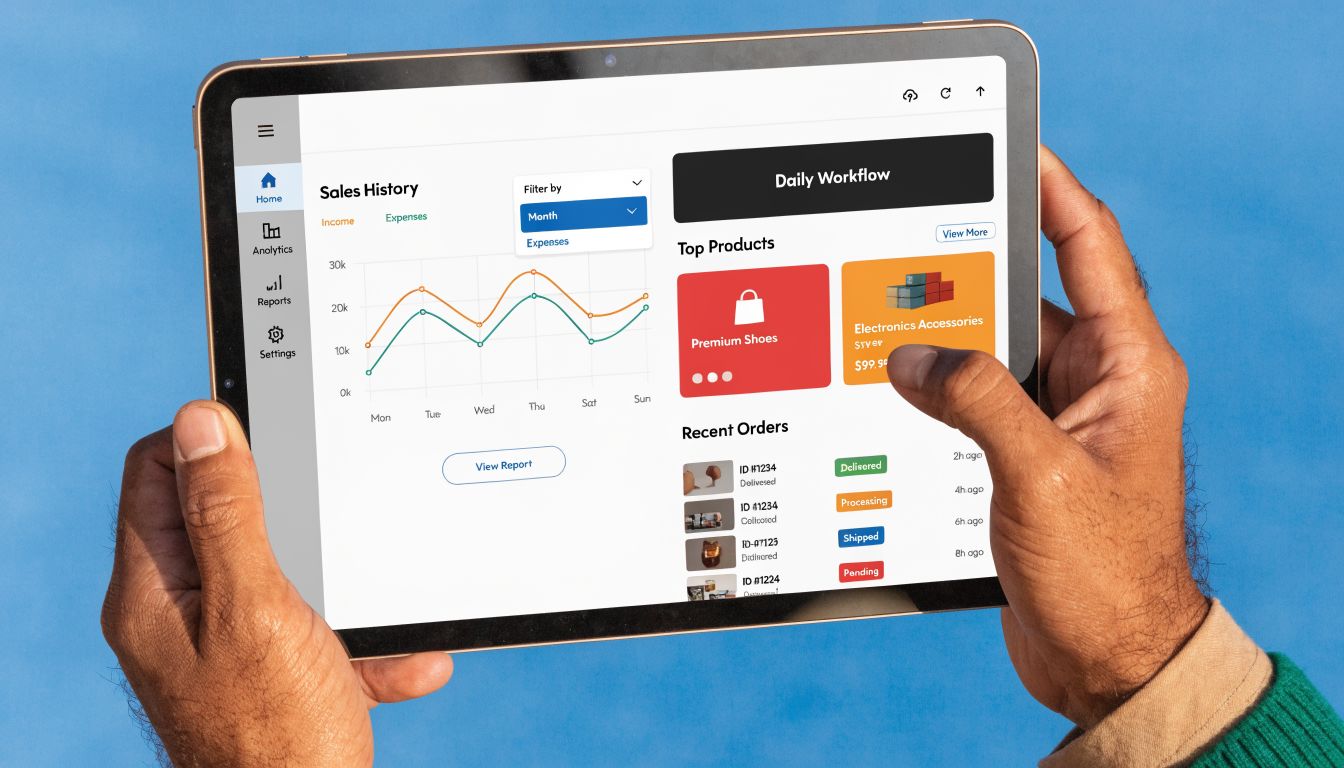
Zoho tends to feel lighter. Its interface is generally easier to use, and common actions are easier to reach without much setup. For sales teams, that matters because a CRM only helps when reps keep it current. Zoho also includes built-in telephony, sales signals, and a drag-and-drop kanban pipeline, which can make activity logging and deal movement more natural inside the core product, as summarized by Monday.com’s Zoho vs Salesforce comparison.
Salesforce takes a different path. It offers deeper analytics, richer KPI customization, and stronger reporting flexibility through Einstein-backed dashboards, but teams often need more configuration to get the environment exactly where they want it. That’s the benefit and the cost. A well-configured Salesforce setup can be excellent. A partially configured one can feel heavy.
Reporting and manager visibility
Managers often underestimate how much reporting style affects adoption. Zoho is usually easier for teams that want prebuilt reporting and quick visual pipeline reviews. A sales manager can often get to a practical answer quickly: what’s stalled, who hasn’t followed up, and where conversion is dropping.
Salesforce serves teams that need more than quick visibility. It’s stronger when leadership wants customizable dashboards for different stakeholders, layered KPI views, and analytics that can stretch across departments. That power helps larger organizations, but smaller teams sometimes end up paying for reporting sophistication they won’t fully use.
A CRM should shorten the path from question to answer. If a manager needs a specialist every time they want a new report, the platform is creating dependence, not clarity.
Integrations and operational sprawl
If your CRM needs to connect to many third-party systems, Salesforce has a clear edge. Monday’s comparison notes 5,000+ apps for Salesforce versus 900+ for Zoho, which is a meaningful difference for businesses with broad software estates or niche tool requirements.
Zoho’s narrower integration footprint isn’t automatically a weakness. For many SMBs, healthcare groups, and schools, fewer moving parts can be a benefit. A more curated environment often means fewer sync failures, fewer custom connectors, and fewer points of administrative confusion.
Here’s how that plays out in practice:
- Small business example: A services firm using email, telephony, basic automation, and webinar follow-up may get enough native capability from Zoho without extending the stack.
- Enterprise example: A global sales organization with finance tools, CPQ needs, support workflows, and multiple regional systems is more likely to benefit from Salesforce’s wider app ecosystem.
- Education example: An admissions team may prefer the platform that staff can learn faster, even if it means fewer advanced integration paths.
Built-in value and security expectations
Zoho’s appeal comes partly from what’s included in core plans. Native telephony and sales signals reduce the need for immediate add-ons. That often translates into a simpler operating environment for smaller teams.
Salesforce’s appeal comes from depth. If your process needs custom objects, advanced app combinations, or highly customized dashboards, that depth matters more than an out-of-the-box shortcut.
Security-conscious buyers also evaluate encryption in transit and at rest, role-based access, and auditability. Both platforms are enterprise software products used in regulated and sensitive environments, so encryption is part of the broader operational conversation, especially in healthcare and education. But encryption alone doesn’t solve process risk. The more important issue is whether your team can configure permissions, data handling, and workflows correctly and maintain them over time.
The Ultimate Cost and Total Ownership Breakdown
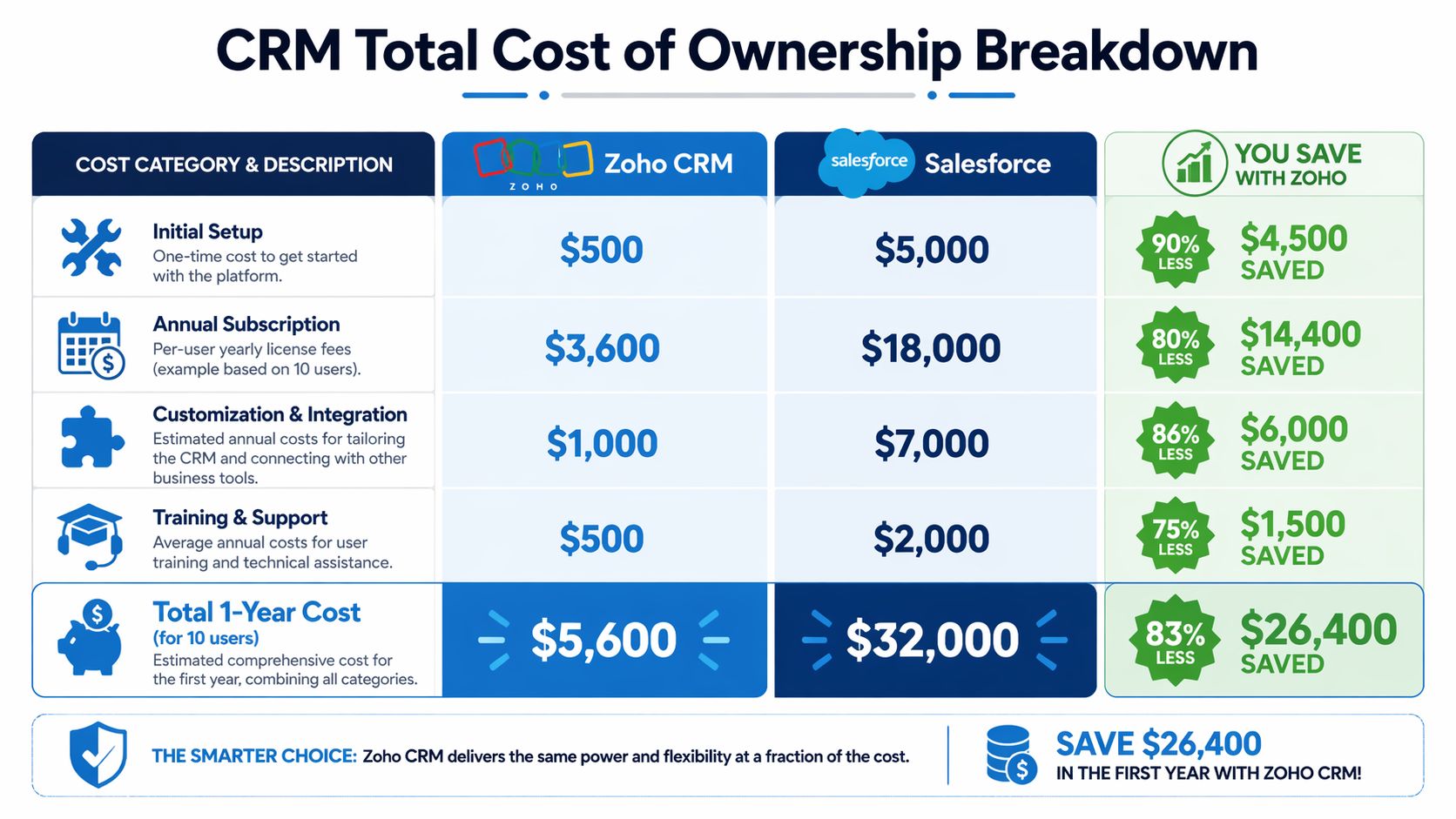
A 40-person clinic, a regional college, and a fast-growing services firm can all make the same mistake. They compare license prices, approve the cheaper annual quote, and discover six months later that the actual bill sits in setup time, admin support, training, and process rework.
That is why CRM cost should be treated as total cost of ownership, not subscription price.
Price comparison before the hidden costs
Earlier pricing references already established the basic point. Zoho usually enters at a far lower per-user cost, while Salesforce starts from a much higher license baseline at comparable business tiers.
That gap matters, but the more important question is what each platform asks from your organization after purchase.
| Cost lens | Zoho CRM | Salesforce |
|---|---|---|
| License profile | Lower starting cost | Higher starting cost |
| Early-stage adoption | Easier to justify for smaller teams | Harder to justify unless process complexity is already high |
| AI and automation packaging | More often included in plan value | More likely to involve premium tiers or added spend |
| Budget pressure as headcount grows | Usually rises at a slower pace | Usually rises faster, especially with added products or specialist support |
Where TCO actually grows
The biggest cost differences tend to show up after implementation begins.
Salesforce often demands more design discipline up front. That can be the right trade-off for a complex sales operation with multiple business units, approval chains, and specialized workflows. For SMBs, healthcare groups, and education teams, that same flexibility can create a different result. More time spent defining fields, permission structures, automation logic, and reporting rules before users see value.
The next layer is staffing. A highly configurable CRM often pulls in admin time that smaller organizations did not budget for. Sometimes that means hiring a dedicated Salesforce administrator. Sometimes it means paying a consultant whenever routing logic, referral workflows, admissions stages, or compliance-related forms need to change.
Those are not edge cases. They are normal operating costs in a more customized environment.
Zoho usually carries a lighter operating burden. Teams can often handle routine changes internally, especially if their sales process is still maturing or their reporting needs are straightforward. That does not mean Zoho is always cheaper in every scenario. It means the platform is less likely to force specialist overhead early.
The hidden budget lines buyers miss
Three cost categories are routinely underestimated:
- Implementation time: A longer rollout delays adoption and pushes back ROI.
- Internal admin capacity: Someone has to maintain fields, automations, integrations, and permissions.
- Training drag: If the interface or workflow model is harder for non-technical staff to absorb, the cost appears in slower usage and lower data quality.
Healthcare and education feel these costs quickly because CRM work is rarely isolated. Staff already split time across scheduling, communications, case tracking, admissions, student support, or referral coordination. If changing a workflow requires outside help, every update becomes a project.
That is where lower-friction software produces economic value. A system that local teams can adjust themselves often costs less over three years, even if the feature checklist looks shorter on day one.
What this means in practice
A multi-site healthcare provider may care less about maximum customization than about keeping intake changes, provider assignment rules, and outreach follow-up manageable without recurring consulting fees. A college admissions office may prefer the CRM that staff can update between recruitment cycles without opening tickets or waiting on a technical owner.
SMBs face the same logic from a different angle. They usually need predictable costs, faster onboarding, and fewer platform dependencies. A CRM that requires a broader support structure can erase the value of advanced capability that the business may not use for years.
The same cost logic applies to surrounding tools. CRM budgets are tied to meetings, follow-up, and internal coordination. A small team reviewing software spend should assess connected systems too, including video conferencing for small business, because communication tools often expand the actual operating cost more than the CRM quote suggests.
Operating insight: License cost is only one line item. The larger expense often comes from how many people, approvals, and outside specialists are required to keep the system usable.
The Risk of “Future-Proofing”
A common buying error is purchasing for an imagined future org chart instead of the current operating model.
Some companies do need enterprise-grade process depth immediately. Salesforce can justify its cost if the business already has complex approvals, cross-functional dependencies, and the internal capacity to manage a heavily configured system. But many buyers adopt that level of infrastructure too early.
If your team is still standardizing pipeline stages, improving data entry habits, or teaching managers how to use reports consistently, lower operational friction usually beats theoretical headroom. In that situation, a simpler CRM often produces better execution, cleaner data, and lower TCO.
Scalability Customization and AI Capabilities
A 40-person services firm can outgrow a simple deal tracker in a year. The trigger usually is not lead volume. It is the accumulation of exceptions: multiple teams touching the same account, approvals that differ by region, handoffs between sales and operations, and managers asking for reports that reflect how the business runs. That is where Zoho CRM and Salesforce begin to separate on total ownership cost, not just feature count.

Breadth of platform versus containment of complexity
Salesforce gives larger organizations more room to model unusual processes, connect niche business systems, and support teams that want the CRM to coordinate work across departments. That flexibility matters if revenue operations, service, finance, and leadership all expect the CRM to reflect different rules, permissions, and reporting structures.
The trade-off is operational drag. More options create more design decisions, more testing, and more long-term maintenance. A business with no experienced admin often feels this within months, especially after the first round of custom fields, automations, and manager-specific dashboards.
Zoho takes a narrower approach. Its ecosystem and customization model are usually sufficient for standard sales processes, moderate automation, and small to mid-sized organizations that want one vendor for adjacent business apps. For many SMBs, that narrower scope lowers the chance of building a CRM that only one power user understands.
Customization creates value only if the business can maintain it
Salesforce has the higher ceiling. That is useful for organizations with mature process governance and a clear owner for CRM architecture. In those settings, the platform can adapt to the business instead of forcing the business into generic workflows.
Smaller teams should read that as a staffing question, not a product compliment.
Every custom object, workflow, permission set, or integration adds future work. Someone has to document it, test it after changes, train users, and fix it when reporting breaks. Zoho limits some of that sprawl by design. Its lower ceiling can be an advantage for firms that need consistency more than technical freedom.
This point shows up outside the CRM too. Distributed teams often discover that friction appears in handoffs between meetings, notes, tasks, and follow-up tools rather than in the database itself. That is why a CRM review should sit alongside a review of collaboration tools for remote teams, especially if multiple departments are expected to work from the same customer record.
AI value depends on deployment effort and everyday usage
AI claims are easy to overstate. The practical test is simpler. Does the system produce predictions or recommendations that frontline staff will effectively use, and can the company deploy them without a long consulting cycle?
Salesforce’s AI tools make more sense in organizations that already have disciplined data capture, defined stages, and enough process consistency for forecasting models to be trusted. Without that foundation, advanced scoring and prediction can produce polished output that managers question and reps ignore.
Zoho’s AI position is more pragmatic for many SMBs. The appeal is not just lower price. It is the shorter distance between turning a feature on and getting some day-to-day value from it. If a team needs lead scoring, anomaly alerts, or workflow suggestions without adding a specialist headcount line, Zoho is often easier to operationalize.
In education and nonprofit settings, that distinction matters because technical capacity is often tighter than stakeholder expectations. Teams comparing mission-driven CRM stacks may also want to review Salesforce Nonprofit CRM alternatives if they are weighing platform depth against administration burden.
How scalability plays out by business type
SMBs
A growing SMB usually needs faster execution before it needs architectural range. If sales management is still standardizing stages, coaching reps on data hygiene, and building reliable weekly reporting, Zoho often fits better because it reduces setup friction and admin dependency. Salesforce can still work, but the business should budget for stronger internal ownership or outside help.
Healthcare
Healthcare organizations often need more than a sales pipeline. They may require segmented access, structured intake workflows, referral tracking, and coordination across outreach, scheduling, and administrative teams. Salesforce becomes more attractive when those workflows are already formalized and the organization can govern permissions and changes carefully. If the process is still evolving, the platform’s flexibility can turn routine adjustments into recurring project work.
Education
Schools and training providers sit in an awkward middle ground. They may want admissions tracking, counselor follow-up, campaign reporting, alumni communication, and event outreach, but often without enterprise-level CRM staffing. Zoho tends to work well when non-technical users need to make changes quickly. Salesforce tends to work better when the institution already has multiple systems that need orchestration and a team capable of maintaining that structure.
Migration and scaling risk
Migration is where theoretical scalability turns into labor cost. Both platforms require field mapping, deduplication, automation review, role design, and reporting cleanup. Salesforce usually asks for more upfront architecture decisions because it supports more branching logic and more elaborate data models. Zoho migrations are often lighter, but they can still become messy if the business imports poor data and recreates weak processes.
The less obvious risk is redesign frequency. If your sales process, service model, or departmental ownership changes every quarter, heavy customization can produce a cycle of rework that keeps consuming budget after go-live. If your workflows are stable but not specialized, Zoho often keeps that drag lower. If your workflows are stable and intentionally complex, Salesforce’s added configurability can justify its overhead.
The better scaling choice is the platform your team can keep accurate, govern consistently, and adapt without turning every process change into a mini implementation.
Industry Fit for Healthcare Education and SMBs
Generic CRM advice breaks down quickly in regulated or budget-constrained environments. A dental chain, a tutoring business, and a local IT services company may all need lead tracking, reminders, and reporting. But they don’t carry the same risk profile, staffing model, or tolerance for operational drag.
Healthcare needs security plus simplicity
Healthcare buyers often get distracted by checklists and miss the workflow question. Yes, encryption matters. Access controls matter. Auditability matters. In practice, though, the bigger risk is often staff behavior inside a complex system.
A telemedicine clinic, for example, may want the CRM to track inquiries, referral sources, follow-up tasks, and appointment readiness without exposing teams to unnecessary process complexity. The clinic also needs communication tools that fit healthcare expectations. For teams evaluating secure meeting workflows, this roundup of HIPAA-compliant video conferencing platforms is a practical reference point.
For healthcare, the better CRM is often the one that supports secure process design and clear user roles without requiring constant specialist intervention. A smaller practice may lean toward Zoho because it’s easier to operate. A larger healthcare organization with cross-functional process requirements may justify Salesforce if it has the governance capacity to manage it well.
Education rewards adoption over theoretical power
Education teams often have mixed technical ability. Admissions officers, counselors, program coordinators, and outreach staff need a system that feels clear under pressure. If the platform slows them down, they revert to spreadsheets, inboxes, and personal workarounds.
That’s where Zoho often has an edge. Staff can typically get productive faster, and schools that run student information flows alongside webinars, orientation sessions, or counseling follow-ups may value a more bundled operating style.
Salesforce can still be the stronger choice for larger institutions with complex stakeholder management and formal internal operations. But if a school is choosing between “more power” and “more likely to be used correctly,” the second criterion usually matters more.
SMBs should be ruthless about fit
Small businesses don’t need the most powerful CRM. They need the CRM that helps them follow up consistently, report clearly, and avoid software overhead that steals time from sales and service.
Three patterns show up repeatedly:
- Startup or very small team: Zoho is often the safer choice because lower cost and easier setup reduce decision risk.
- Established SMB with steady process discipline: Zoho still fits many of these organizations well, especially when they want one vendor to cover more operating needs.
- Complex SMB moving toward enterprise structure: Salesforce starts to make sense when business logic, integrations, and departmental complexity are rising fast.
Nonprofits and mission-driven education organizations face a related issue. They often want Salesforce’s ecosystem but can’t always justify the total complexity. For teams exploring adjacent options, this guide to Salesforce Nonprofit CRM alternatives offers useful context on where Salesforce fits and where lighter alternatives may be more practical.
In healthcare and education, the most expensive mistake isn’t picking a limited CRM. It’s picking a sophisticated CRM that frontline staff won’t use cleanly.
A Framework for Making Your Final Decision
A strong decision usually comes from honest answers, not broad preferences. If you’re choosing between these platforms, use the questions below and answer them without imagining a future team you don’t yet have.
Question one: what can you actually spend?
Start with a three-year budget view, not a monthly license view. Include subscriptions, training, implementation help, add-ons, reporting support, and admin time.
If your budget is tight and you need predictable operating costs, Zoho usually makes more sense. If your budget can absorb higher licensing and the surrounding support structure, Salesforce stays in contention.
Question two: who will run the system?
This is often the deciding factor.
If your CRM will be owned by a sales manager, operations lead, or founder who has many other responsibilities, simplicity matters. If you have dedicated admin resources or are comfortable using consultants, Salesforce becomes much more viable.
Use this quick filter:
- No dedicated CRM admin: Zoho is usually the safer bet.
- Part-time admin with moderate technical skill: Zoho still has the advantage unless integration complexity is high.
- Dedicated admin or strong implementation partner: Salesforce becomes much easier to justify.
Question three: how many external tools are non-negotiable?
List the apps your business can’t function without. Then ask how tightly they need to connect to the CRM.
If your environment is relatively compact, Zoho’s focused ecosystem may be enough. If your environment is sprawling or highly specialized, Salesforce’s app breadth becomes a strategic asset rather than a nice-to-have.
Question four: how much process complexity is real today?
Don’t buy for a hypothetical empire. Buy for the business you are running now, plus the growth you can reasonably foresee.
A simple guide:
- If your sales stages are still evolving and your team is building discipline, choose the platform that helps adoption.
- If your workflows are stable but not deeply specialized, prioritize value and low overhead.
- If you already have multiple teams, layered approvals, and serious system orchestration needs, Salesforce may be the correct long-term platform.
Question five: what kind of growth are you expecting?
Growth isn’t just more users. It can mean more departments, more exceptions, more territories, and more reporting demands.
Choose Zoho if you want cost control, faster onboarding, and bundled functionality with less day-to-day friction.
Choose Salesforce if your growth path depends on broad customization, a larger app ecosystem, and the ability to shape the CRM around complex operations.
Frequently Asked Questions about Zoho and Salesforce
Which CRM is better for a one-person business or freelancer?
Usually Zoho CRM. A solo operator typically needs quick setup, clear pipeline visibility, and low recurring cost. Zoho’s lower pricing profile and simpler operating model are a better match for that reality than Salesforce’s enterprise-oriented design.
How difficult is it to migrate from Zoho CRM to Salesforce or from Salesforce to Zoho?
Migration difficulty depends less on record count and more on process complexity. If you’ve built custom fields, automations, reports, and role structures integrated into daily work, migration becomes a redesign project, not just a data export.
Moving into Salesforce often requires more architectural decisions because the platform supports more complexity. Moving into Zoho is often operationally lighter, but you still need to clean data, map fields carefully, and decide which old workflows should be rebuilt versus retired.
Can Zoho CRM scale to an enterprise-level business?
It can scale well for many growing businesses, especially those that value a more unified and affordable system. But if your organization needs the broadest ecosystem, deeper enterprise customization, and extensive app extensibility, Salesforce has the stronger ceiling.
Which platform has the stronger AI story for smaller teams?
The practical answer depends on whether you mean “most advanced” or “most usable.” According to SuperAGI’s comparison of Zoho CRM AI and Salesforce AI, Zoho’s Zia reports 95% sales forecasting accuracy, while Salesforce Einstein Analytics can boost sales productivity by 28%. For smaller teams, usable bundled AI often matters more than premium AI breadth.
Is Salesforce always the better long-term choice?
No. It’s the better long-term choice when your business is already complex enough to use what Salesforce does best. If your team mainly needs consistency, visibility, and manageable costs, a lower-friction platform can be the better long-term decision because people keep using it properly.
If your CRM decision also affects how you run client calls, telehealth sessions, online classes, or webinars, AONMeetings is worth a look. It gives teams HIPAA-compliant video meetings, built-in webinars, bank-level encryption, unlimited meeting time, and straightforward pricing, which makes it a practical complement to a cost-conscious operations stack.
