
Video has crossed the line from nice-to-have to default business infrastructure. In 2026, 91% of businesses use video as a marketing tool according to Vidico’s video marketing statistics roundup. That number matters because it changes the question. The question isn’t whether video belongs in your marketing. It’s whether your business is using it deliberately, affordably, and safely.
That matters even more for firms that sell trust before they sell anything else. Healthcare practices, consultants, educators, law-adjacent service providers, and small B2B teams often need to explain a complex service, answer objections, and reassure buyers without dragging every prospect into a live sales call. Video does that faster than text alone. A short demo clarifies a workflow. A webinar answers recurring questions at scale. A recorded walkthrough keeps selling after your team logs off.
The catch is that most advice about video marketing for businesses is too generic. It tells people to “create reels” or “post on YouTube” without addressing key operational issues: cost, workflow, approval cycles, compliance, captions, hosting, and what to do with all the recordings you already have. Good video strategy isn't about chasing every format. It's about turning business conversations into reusable assets without creating legal or budget headaches.
What Is Video Marketing and Why Does It Matter in 2026
Video marketing is the practice of using video to move a buyer toward a business outcome. That outcome might be awareness, trust, lead generation, demo requests, event registrations, or closed deals. In practical terms, it includes product demos, webinars, explainers, customer interviews, onboarding clips, landing page videos, and short edits from longer presentations.
The reason it matters now is simple. Buyers expect to see before they commit. They want to hear a real person explain the service, watch the product in action, and get a feel for the company behind the offer. In sectors where the sale depends on credibility, video shortens the distance between interest and confidence.
A lot of businesses still treat video as a creative side project. That’s usually a mistake. Used well, video becomes a working part of sales and marketing operations.
What video actually does for a business
It helps in three jobs that owners care about:
- Clarify a complex offer: If your service takes more than a paragraph to explain, video can simplify it.
- Build trust before the call: A buyer who’s watched your team speak is usually warmer than one who only skimmed a brochure.
- Scale expertise: One useful recording can educate prospects, support sales reps, and feed future content.
A real estate team is a good example of this logic. Property marketing relies on showing, not telling, which is why resources like the Saleswise blog on real estate video are useful even outside that industry. The same principle applies elsewhere. If buyers need to visualize the experience, video gives them that evidence.
Video works best when it answers a real buying question. “How does this work?” beats “How do we go viral?” every time.
The Strategic Impact and ROI of Video Marketing
Money follows attention, and attention has shifted hard toward video. U.S. digital video advertising spending doubled from $23.5 billion in 2021 to $52.1 billion in 2023, with total spend surpassing traditional TV ads, according to The Social Shepherd’s video marketing statistics. Businesses don’t move budget like that by accident. They do it because video helps them explain, persuade, and convert more efficiently than many other formats.

The strategic advantage starts with compression. A short video can communicate tone, capability, process, and credibility in a way that would take far more space on a page. Buyers don’t just consume information from video. They assess competence through it. They notice whether your explanation is clear, whether your product seems usable, and whether your team sounds prepared.
Where video creates business leverage
Some formats are better than others depending on the problem:
| Business need | Video usually works better than text when you need to |
|---|---|
| New category education | Show the problem and the workflow visually |
| Objection handling | Demonstrate how the product or service behaves in real use |
| Sales enablement | Give reps a consistent explanation they can reuse |
| Brand trust | Put experts, founders, or customers on screen |
| Event-based lead generation | Turn one live session into both immediate and follow-up demand |
Businesses often waste money by overproducing top-of-funnel content and underinvesting in decision-stage assets. A polished brand film may look great, but a sharp product demo or webinar replay often contributes more directly to pipeline quality.
What tends to work and what usually doesn't
What works:
- Demonstrations: Show the service, software, or process in action.
- Webinars: Answer real questions in depth and capture intent.
- Testimonials with substance: Better when the customer describes the problem, the change, and the outcome.
- Landing page video: Useful when the offer is hard to understand from copy alone.
What usually underperforms:
- Generic hype videos: They sound expensive and say very little.
- Platform-first content with no business goal: Posting just to stay active creates noise, not demand.
- Videos with weak openings: If the first moments don’t signal relevance, viewers leave.
- Single-use production: Recording one long session and never repurposing it is wasted effort.
Why ROI improves when video is built into the funnel
Video isn't valuable because it gets views. It's valuable when it reduces friction at specific points in the buyer journey. A homepage explainer can improve first-time understanding. A webinar replay can pre-qualify interest. A recorded FAQ can save your team from repeating the same sales explanation.
Practical rule: Tie every video to one job. If a video has no clear job, it usually becomes a vanity asset.
The most efficient teams don’t ask, “Should we make more video?” They ask, “Where does one good video remove the most repetitive work from marketing and sales?”
Choosing Your Video and Distribution Strategy
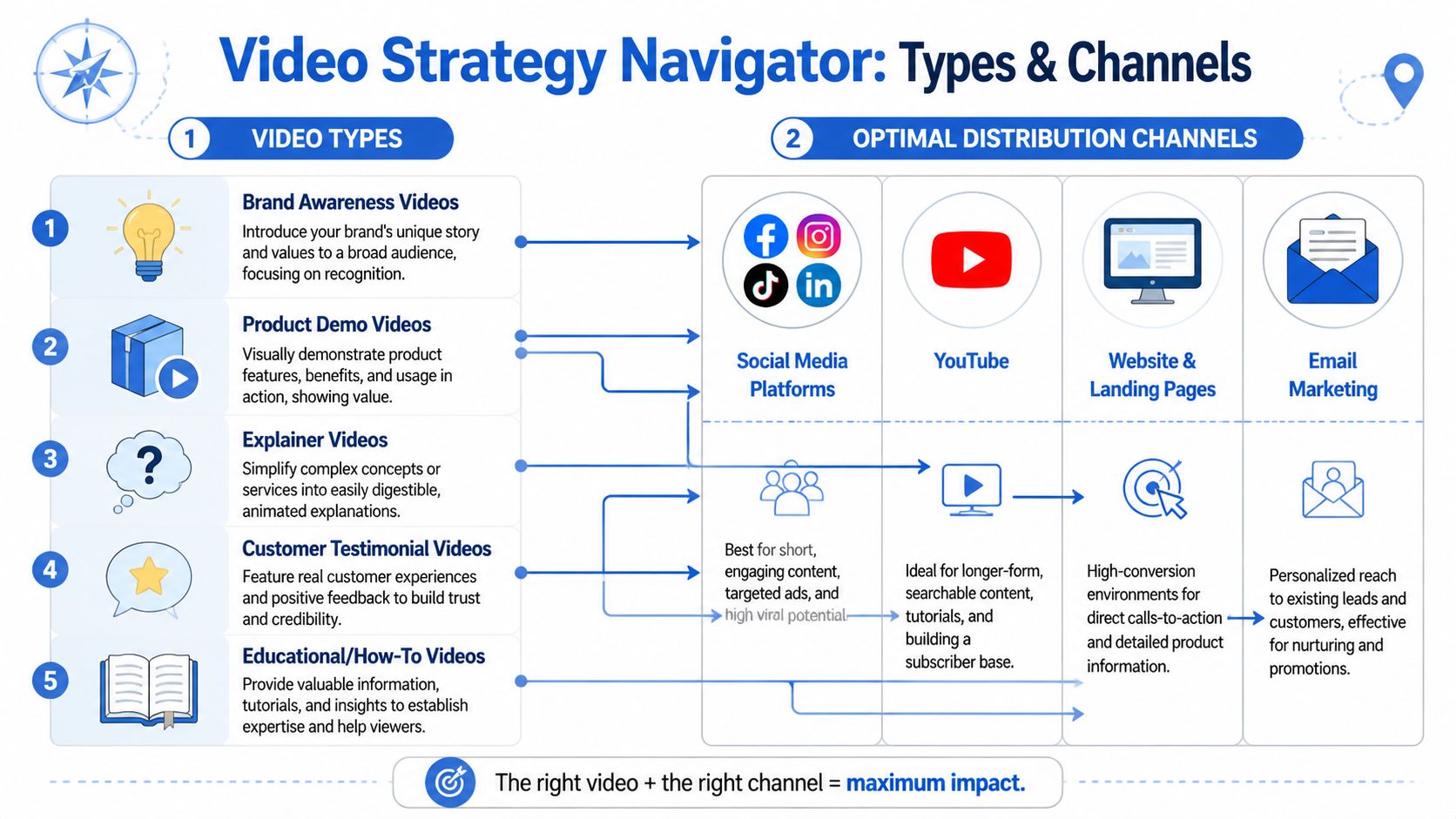
Strategy gets easier when you stop thinking about “content” as one bucket. Different video types do different jobs, and each belongs in a different channel mix. Most businesses get better results when they build around a small set of repeatable formats instead of trying every trend.
Match the format to the business goal
A simple framework helps.
| Video type | Best use | Best fit |
|---|---|---|
| Brand awareness video | Introduce your company and positioning | Early-stage attention |
| Product demo | Show features, workflow, and outcomes | Consideration and sales |
| Explainer | Simplify a service or technical concept | Awareness and education |
| Testimonial | Build trust with proof | Mid to late funnel |
| Educational or how-to | Teach and attract qualified interest | Search, email, community |
A healthcare clinic might prioritize explainers and webinars. A software company may lean harder into demos and tutorial clips. A coaching business might use educational videos and testimonial excerpts. The strategy changes by offer, not by trend cycle.
Choose channels based on buyer behavior
Different channels reward different strengths:
- Website and landing pages: Best when the visitor already has intent; demos, testimonials, and short explainers often carry the most weight.
- YouTube: Strong for searchable, longer-lived content such as tutorials, webinars, and detailed walkthroughs.
- Email: Useful for nurturing leads, reactivating interest, and inviting contacts to webinars or demos.
- Social platforms: Better for short cuts, highlights, hooks, and proof points than for full explanations.
If webinars are part of your plan, it helps to study what makes a platform practical for smaller teams. A guide to webinar software for small business is useful because the wrong setup creates friction before you even promote the event.
A practical selection model
Use this decision process before producing anything:
Identify the question buyers keep asking.
If prospects repeatedly ask how your service works, start with a demo or explainer.Pick the narrowest useful format.
Don’t produce a long webinar when a concise walkthrough would do the job.Choose the primary home first.
Decide whether the video lives on a landing page, YouTube, email sequence, or event registration flow.Plan the secondary cuts.
One core asset can become clips for LinkedIn, email snippets, FAQ answers, or sales follow-ups.
Trade-offs that matter
Many teams default to short-form because it feels easier. Short clips are useful, but they often create curiosity rather than conviction. Longer formats like demos and webinars usually do more for serious buyers because they answer detailed questions.
That doesn’t mean every business needs long videos. It means you shouldn’t confuse platform popularity with sales relevance.
A short video can attract attention. A strong demo closes the understanding gap.
The best distribution strategy is rarely “everywhere.” It’s usually one core channel, one support channel, and one reuse plan.
Implementing Your Video Marketing Plan
Execution is where most video programs stall. Not because businesses lack ideas, but because they overcomplicate production and underplan reuse. A practical system beats an ambitious one every time.

A major gap in current guidance is repurposing. According to Park University’s discussion of the rise of video marketing, SMBs can achieve 2x ROI by extracting short-form clips from unlimited webinar recordings, yet most guides still don’t offer a practical workflow. That gap matters because many businesses already have valuable source material sitting inside recorded calls, demos, trainings, and webinars.
Start with one core asset
The easiest way to build a video engine is to create one substantial piece of content each month or quarter. Good candidates include:
- A live webinar
- A product walkthrough
- A client education session
- A founder Q&A
- A training session with recurring questions
That core asset does the heavy lifting. Everything else comes from it.
Keep production simple
You don’t need a studio to start. You need clarity and consistency.
A workable baseline setup includes:
- Camera: A recent smartphone or webcam is enough if lighting is clean.
- Audio: A basic external microphone matters more than camera upgrades.
- Lighting: Face a window or use a simple desk light setup.
- Framing: Keep the background tidy and distraction-free.
- Slides or screen share: Useful when the value is in process, not personality.
Businesses often overspend on visuals and underspend on preparation. True production quality stems from structure. If the speaker rambles, no editing tool saves the video.
Use a repeatable outline
For most business videos, this sequence works well:
- State the problem quickly.
- Explain what the viewer will learn.
- Show the process, product, or answer.
- Handle one or two common objections.
- End with one next step.
This format works for demos, webinars, landing page videos, and educational clips because it respects the viewer’s time.
Turn one recording into many assets
Here’s where cost control is achieved. One webinar or workshop can become a month of marketing material if the team edits with purpose.
| Source content | Repurposed asset | Best use |
|---|---|---|
| Full webinar | On-demand replay | Lead nurture or sales follow-up |
| Strong answer from Q&A | Short clip | Social or email |
| Key teaching point | Blog post section | SEO and education |
| Product screen share | Demo snippet | Landing page |
| Presenter quote | Graphic or caption post | Social proof |
| FAQ segment | Sales enablement clip | Objection handling |
If you’re documenting live sessions, a walkthrough on how to record webinars can help your team set up a cleaner archive and avoid losing usable material.
Record with repurposing in mind. A webinar becomes more valuable when you know in advance which segments should be clipped later.
Build a low-friction editorial workflow
A practical workflow looks like this:
- Before the event: Write the title, opening hook, and three audience questions you want answered.
- During the event: Mark strong moments, key answers, and sections with reusable soundbites.
- After the event: Trim the full replay, cut short clips, write captions, and assign each piece to a channel.
- One week later: Review what people watched, clicked, or replied to. Then decide what to repeat.
Many teams fail at this specific stage. They publish the replay and stop. Significant value comes after the event, when the material gets turned into shorter, sharper assets.
What to say yes to and what to skip
Good uses of limited time:
- Short product walkthroughs
- FAQ videos
- Webinar excerpts
- Customer education clips
- Recorded sales answers that can be reused
Usually not worth the effort early on:
- Complex motion graphics
- Expensive intro sequences
- Trend-based videos with no shelf life
- Multiple versions of the same video for no clear reason
A useful video plan should lower the amount of repeated explanation your team has to do manually. If you’re still answering the same questions from scratch every week, the content system isn’t working yet.
Secure and Compliant Video Marketing for Key Industries
Most video marketing advice assumes every business can publish freely, collect casual testimonials, and host content anywhere. That falls apart in regulated settings. Healthcare practices, therapy providers, telemedicine teams, and other privacy-sensitive organizations have a different standard. They need marketing that informs and converts without exposing protected information or creating avoidable risk.
That gap is greater than commonly perceived. Banzai’s video marketing strategy guide notes a critical lack of guidance for regulated industries like healthcare, even while 96% of B2B organizations see video boost performance. The practical issue isn’t whether video works. It’s how to use it without creating compliance problems.
Healthcare needs a different playbook
A clinic can use video well without putting patient privacy at risk. The content choices just need discipline.
Better healthcare video examples include:
- Service explainers: What a telehealth consultation includes, what to expect, and how follow-up works.
- Provider introductions: Clinicians explaining their approach, specialties, or treatment philosophy.
- Educational webinars: Condition overviews, prevention guidance, or treatment pathways delivered in general terms.
- Platform demos: Showing how appointments, forms, reminders, and virtual visits work without displaying real patient data.
Weaker choices include informal testimonial collection, unsecured recording workflows, or marketing edits pulled from sessions that were never meant for public use.
In regulated industries, the workflow matters as much as the content. A strong message doesn’t help if the recording process creates exposure.
Education and coaching have their own risks
Education brands, tutors, and coaching centers often focus on content quality and overlook operational control. But recorded classes, student names, chat logs, and shared documents can all create issues if the workflow is sloppy.
Safer use cases include class previews, subject explainers, open-house webinars, study tips, and faculty interviews. Riskier habits include sharing raw class recordings publicly or clipping sessions without checking what appears on screen.
The same applies to small businesses that handle confidential client information. Agencies, consultants, financial service providers, and internal training teams all benefit from secure meeting workflows when turning recorded sessions into marketing assets.
Security features that support safer marketing operations
For businesses with privacy concerns, these features matter:
- Encryption: Bank-level encryption adds a meaningful protection layer for recordings and meetings.
- Waiting rooms and moderator controls: Helpful when hosting live sessions with external attendees.
- Meeting lock: Reduces the chance of unwanted access during events.
- Secure recordings: Essential if sessions may later be edited into reusable material.
- Controlled screen sharing: Prevents accidental display of sensitive information.
- Browser-based access: Useful for reducing login friction while maintaining control.
Security doesn’t replace policy, but it supports it. Teams still need clear rules for consent, naming conventions, review steps, and what can and cannot be clipped for marketing.
Price comparison and value proposition
Platform choice impacts both budget and workflow. Small teams often end up paying more because they need webinars, recordings, and admin controls across separate tools or higher-priced tiers.
Here’s a practical comparison using the verified publisher information and standard market positioning where exact competitor pricing details are not being cited numerically.
2026 Video Platform Cost Comparison Per User Month
| Feature | AONMeetings | Zoom (Pro) | Microsoft Teams (Essentials) |
|---|---|---|---|
| Starting price | ₹179/user/month | Higher-cost paid tier | Higher-cost paid tier |
| Unlimited meeting time | Yes | Varies by plan and add-ons | Varies by plan and use case |
| Webinars included | Yes | Often requires higher tier or add-on | Often tied to broader suite choices |
| Bank-level encryption | Yes | Security features vary by configuration | Security features vary by configuration |
| Recordings | Yes | Yes | Yes |
| Screen sharing and whiteboards | Yes | Yes | Yes |
| Breakout rooms | Advanced tiers | Available in selected plans | Available in selected plans |
| YouTube live streaming | Advanced tiers | Available in selected plans | Available through ecosystem setup |
| Brandable UI themes | Advanced tiers | Limited depending on plan | Limited depending on plan |
| Contracts and hidden fees | No contracts, no hidden fees | Can depend on purchasing route | Can depend on licensing route |
The value proposition isn’t just the entry price. It’s that webinars are included, meeting time isn’t artificially restricted, and security features like encryption are built into the operating model instead of being treated as an afterthought.
For regulated teams and budget-conscious businesses, that combination matters. If your marketing plan relies on webinars, recorded education, demos, and follow-up content, a platform becomes part of your acquisition cost structure. Paying less while getting secure recording and webinar capability can make the difference between a repeatable program and one that stalls after a few campaigns.
Measuring and Optimizing Your Video ROI
If you can’t connect video to business outcomes, the program won’t survive budget review. That’s why measurement has to go beyond views. A view can mean someone watched for a moment and left. A useful metric tells you whether the video helped a buyer understand, trust, click, register, or buy.
The business case for measurement is strong. According to B2W’s video marketing statistics, 87% of marketers report direct sales increases from video marketing. The same source notes that embedding video on a website can boost organic search traffic by 157% and increase conversion rates by as much as 86%.
The metrics that actually matter
Start with a small scorecard.
| Metric | What it tells you | Why it matters |
|---|---|---|
| Watch time | Whether people stay with the content | Indicates topic fit and pacing |
| Audience retention | Where viewers drop off | Shows weak openings or unnecessary sections |
| Click-through rate | Whether viewers take the next step | Measures CTA strength |
| Conversion rate | Whether viewers become leads or customers | Ties video to revenue |
| Replay or completion patterns | Which sections hold attention | Helps shape future edits |
A short video with modest reach can outperform a widely viewed clip if it drives better action. That’s common in B2B and service businesses where intent matters more than scale.
How to improve performance without guessing
Use analytics to diagnose the content, not just report on it.
If retention drops early, the opening is probably too slow or too vague. If people watch but don’t click, the CTA may be weak or misplaced. If a webinar gets registrations but poor attendance, the topic or reminder flow likely needs work.
A practical way to improve webinar performance is to tighten the registration promise, improve reminders, and reduce friction before the session. If your team needs ideas, this guide on how to increase webinar attendance gives a useful operational starting point.
A simple optimization cycle
Use this monthly loop:
- Review one landing page video and one webinar replay.
- Identify where attention falls off.
- Cut one shorter version with a sharper opening.
- Test a different thumbnail, title, or CTA.
- Route the winning version into email, sales follow-up, or social clips.
Don’t optimize everything at once. Change one major variable, then compare performance cleanly.
The businesses that improve fastest aren’t always the ones creating the most video. They’re the ones learning from each recording and tightening the next one.
Frequently Asked Questions About Video Marketing
How much does video marketing really cost for a small business
It can be very affordable if you build around existing expertise instead of custom productions. A recorded webinar, product walkthrough, or FAQ session often produces more business value than a high-end brand shoot. The expensive path is making every video from scratch.
Do I need a professional camera and microphone to start
You don’t need a professional camera to begin. A modern smartphone or solid webcam can work well. Audio matters more. If viewers can hear you clearly and understand the point quickly, the video is usable.
What kind of videos should a service business create first
Start with practical assets: a service explainer, a product or process demo, a short founder or provider introduction, and one webinar or Q&A session. These formats answer real buying questions and give you material to reuse.
How do I add captions and why does it matter
Captions improve accessibility and make videos easier to consume in quiet offices, public spaces, or mobile environments. They also help when viewers skim before deciding whether to keep watching. Add captions during editing or through your hosting workflow, then review them manually for errors.
Is video marketing safe for healthcare and regulated industries
Yes, but only with the right process. Don’t publish anything that exposes protected information. Use secure platforms, obtain proper consent where needed, review recordings before editing, and limit what appears on screen during live sessions.
How often should a business publish video
Consistency matters more than volume. Most small teams do better with one strong recurring format they can sustain than with an aggressive content calendar they can’t maintain. A monthly webinar or regular demo series is often enough to build momentum.
Start Your Video Marketing Journey Today
Video marketing for businesses works best when it solves practical problems. It should explain the offer, build trust, reduce repeated sales effort, and create assets your team can reuse. The businesses that get results usually keep the system simple. They choose a few formats that match buyer questions, record with repurposing in mind, protect sensitive information, and measure outcomes that matter.
For healthcare providers, educators, and small businesses, the bar is higher than “make more content.” The standard is clearer. Create useful videos. Keep the workflow affordable. Protect the data. Use webinars and recordings as long-term assets, not one-time events.
If your team has been postponing video because it felt too expensive, too technical, or too risky, start smaller. Record one useful session. Turn it into a replay, a few clips, and a landing page asset. Then improve from there.
A practical next step is to use a platform built for secure, affordable video operations. AONMeetings gives businesses unlimited meeting time, built-in webinars, recordings, and bank-level encryption starting at ₹179 per user per month. That combination is especially useful for healthcare teams, educators, and SMBs that need compliant workflows and better value without contracts or hidden fees.
