

Your day probably starts before you've finished yesterday's work. A clinician logs in to a full schedule, then gets a patient message that can't wait. A teacher sits down to plan lessons, then a parent email, a student issue, and an admin request land at once. A business owner blocks an hour for strategy, then spends it answering “quick” client questions that weren't quick at all.
That's the trap. You stay busy, responsive, and visibly active, but the work that changes outcomes keeps sliding to tomorrow.
In demanding fields, time management and prioritization can't rely on perfect conditions. You won't get a clean desk, a silent inbox, and an uninterrupted afternoon. You need a system that still works when the day gets cut into fragments. The right approach isn't about squeezing more into every hour. It's about deciding what deserves attention now, what can wait, and what shouldn't be done by you at all.
Feeling Busy but Not Productive
A nurse practitioner once described her day to me in a way I hear from educators and managers too: “I'm moving nonstop, but by 5 p.m. I haven't touched the one thing that mattered most.” That sentence captures the difference between motion and progress.
Busy days create a false sense of productivity. You answered messages. You joined meetings. You handled small fires. You crossed off a dozen low-stakes tasks. But the report stayed unfinished, the care plan review got pushed again, the curriculum update didn't happen, and the business proposal sat in drafts.
What a chaotic day actually looks like
In real workplaces, the problem usually isn't laziness or lack of motivation. It's collision.
- Competing obligations hit at the same time. A teacher can't ignore a student issue just because lesson planning was on the calendar.
- Visible work crowds out valuable work. Email replies feel productive because they're immediate and obvious.
- Urgency spreads fast. One late request can re-order an entire afternoon.
- Mental residue lingers. Even after you switch tasks, part of your attention stays with the previous one.
That's why generic advice often fails. “Just focus on your top goals” sounds fine until a parent calls, a patient portal pings, or a client says something is urgent.
You don't need a prettier to-do list. You need a decision rule for pressure.
The strongest time management and prioritization systems accept a hard truth. Some days won't be fully controlled. You're not trying to become perfectly organized. You're trying to become harder to derail.
What actually changes the day
Useful systems do three things well:
- They reduce decision fatigue. You don't want to renegotiate priorities every time something new appears.
- They protect high-value work. Important tasks need a place in the day before urgency consumes the calendar.
- They create a triage habit. In volatile roles, the question isn't “How do I avoid interruptions?” It's “How do I handle them without losing the whole day?”
That's where practical frameworks matter. Not as theory, but as operating rules.
The Core Principles of Effective Prioritization
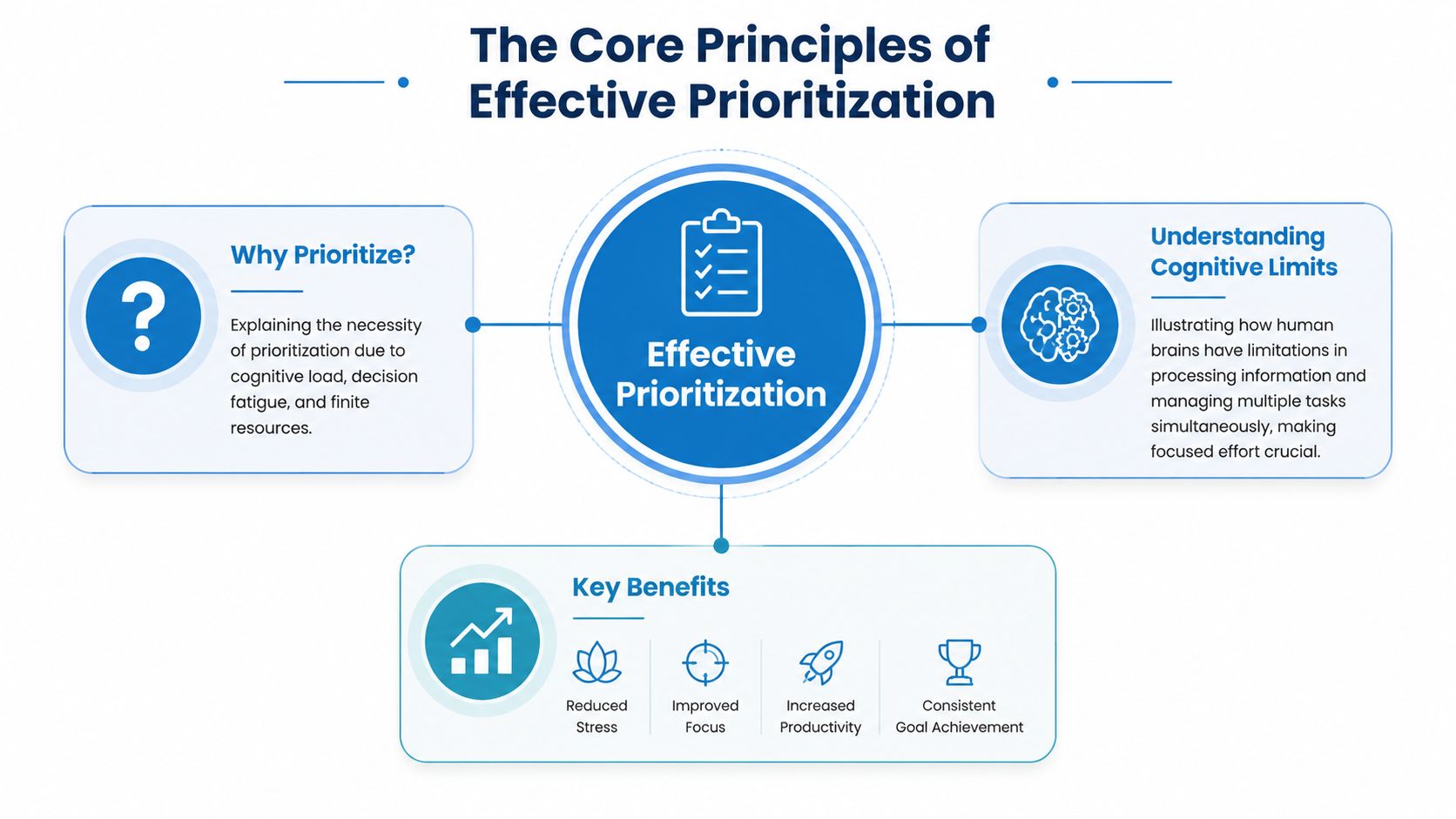
Individuals often struggle with time, not from a lack of effort. They struggle because attention is limited, interruptions are constant, and the brain handles switching worse than we like to admit. A widely cited workplace benchmark is that only 2.5% of people can effectively multitask, which is why structured prioritization methods outperform trying to do everything at once, as noted by Hubstaff's discussion of prioritization and multitasking.
Why multitasking usually backfires
What people call multitasking is usually task switching. You review a chart, answer a message, return to the chart, take a call, then reopen the chart and try to remember where you left off. The cost isn't just time. It's quality.
In practice, this shows up as:
- More re-reading because you have to reload context
- Shallower thinking because your attention never settles
- More avoidable errors on work that needed judgment
- More end-of-day fatigue even when the task list still feels unfinished
That's why strong prioritization isn't restrictive. It's protective.
Urgent and important are not the same
One of the biggest mistakes I see is treating every incoming request as equally deserving. It isn't. Some work is urgent because someone wants an answer quickly. Other work is important because it affects outcomes, deadlines, learning, safety, or revenue.
If you don't separate those two ideas, your schedule fills with other people's urgency.
Practical rule: If a task is noisy but low consequence, it shouldn't outrank quiet work with real impact.
That's also why executive scheduling advice matters more than color-coded calendars. If you need a practical example of protecting decision-making time, Text Lauren's executive calendar advice is useful because it focuses on how the calendar itself enforces priorities.
What effective prioritization looks like in real life
At a practical level, effective prioritization means:
- Choose one high-value task first. Don't let the day start with reactive work unless it's critical.
- Protect a focus window. Even a short uninterrupted block is more useful than a longer block filled with context switching.
- Use a simple sorting rule. If your system is too complex, you won't use it under stress.
- Expect trade-offs. Saying yes to one task means saying no, not now, or not me to another.
People often think time management and prioritization are personality traits. They're not. They're operational choices shaped around cognitive limits. Once you accept that, the goal changes. You stop trying to keep everything moving and start making better decisions about what moves first.
Proven Frameworks for Deciding What Matters
A charge nurse finishes one patient issue, gets pulled into staffing coverage, answers two messages, and then remembers a chart review due by end of day. A department head at a school gets through attendance problems and parent calls before touching the work that prevents the next fire. In jobs like these, prioritization has to work in motion.
Frameworks help because they shorten the decision cycle. Under pressure, that matters more than having a perfect system.
Use the Eisenhower Matrix for sorting overload
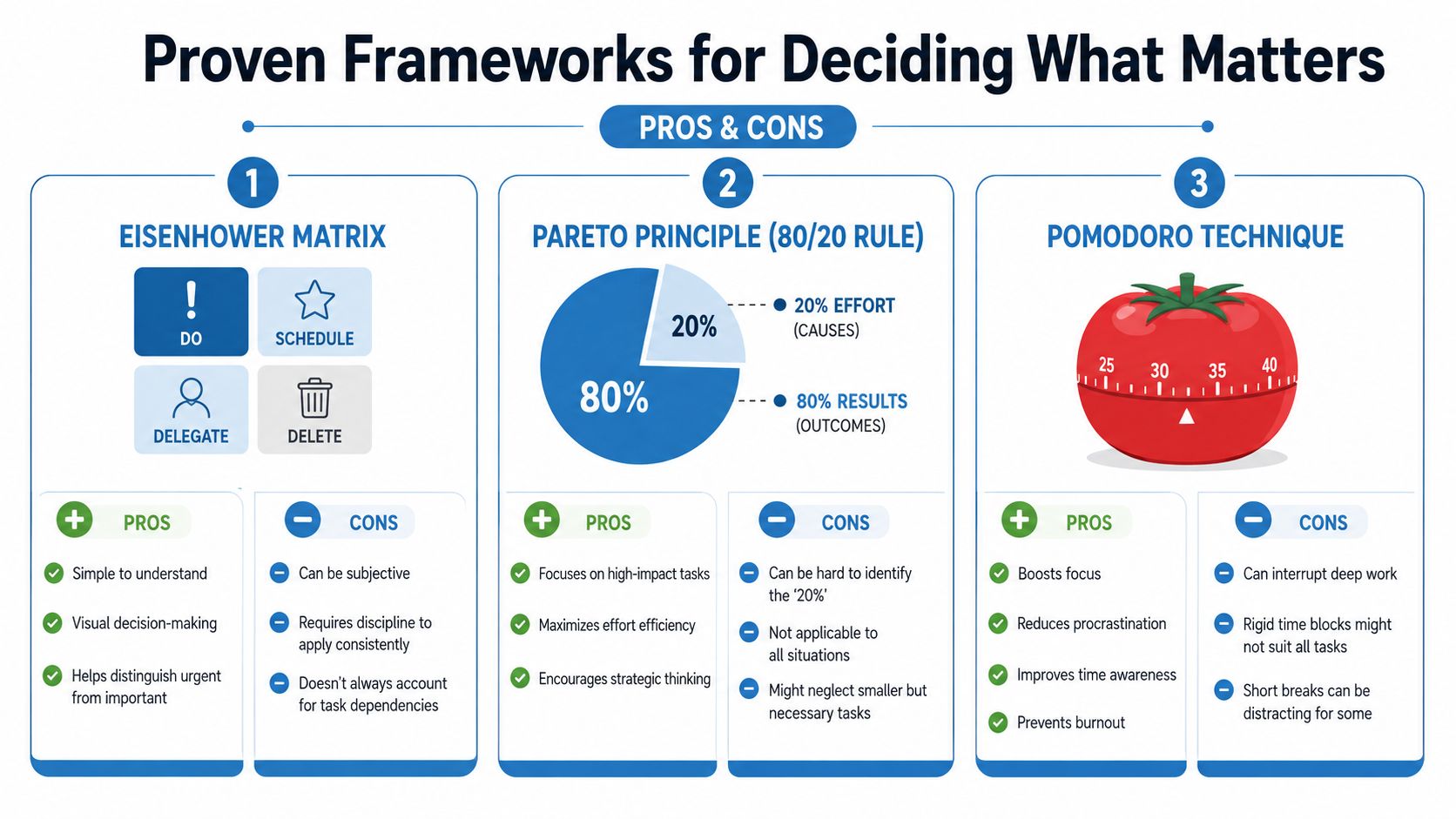
The Eisenhower Matrix is a practical triage tool for crowded, mixed-task days. It separates work into four groups: important and urgent, important but not urgent, urgent but not important, and neither urgent nor important, as outlined in this overview of the Eisenhower matrix.
That sounds simple. Under interruption, simple is a strength.
In healthcare and education, the value of this framework is not theoretical clarity. It helps people distinguish between work that affects outcomes and work that is merely loud. A clinic supervisor may be dealing with a patient complaint, a coverage gap, a vendor email, and next month's training schedule at the same time. The matrix makes the trade-off visible before the day gets hijacked.
| Task type | What to do |
|---|---|
| Important and urgent | Do first |
| Important but not urgent | Put on the calendar with a real time slot |
| Urgent but not important | Delegate, redirect, or contain |
| Neither urgent nor important | Drop |
The second quadrant is where many professionals lose ground. Planning, prevention, documentation improvement, lesson design, staff development, and process fixes rarely shout for attention. They still shape the quality of the week.
Use the Pareto Principle for impact selection
The Pareto Principle, or 80/20 rule, is useful when the issue is not confusion but spread. The question changes from “What is first?” to “What produces the biggest return?”
That distinction matters. Some days you already know what all the tasks are. You just cannot treat them as equal.
A school leader might find that a small number of actions stabilizes the whole building. Filling the toughest coverage gaps early, handling parent escalations before they multiply, and confirming next week's schedule may do more than clearing twenty minor admin items. In a medical office, confirming high-risk follow-ups, fixing one recurring workflow bottleneck, and resolving a staffing handoff may prevent more downstream problems than staying current on every low-level request.
Use this approach when:
- Several tasks are legitimate, but only a few will change the result
- You need to protect limited time for high-return work
- You are planning a week, sprint, or project block
The risk with 80/20 thinking is self-deception. Familiar work often feels productive because it gives quick completion. High-impact work is often slower, harder to measure, and easier to postpone.
Ask which actions reduce future workload, improve outcomes, or prevent repeat problems. Start there.
Use Pomodoro for focus recovery
The Pomodoro Technique is a focus tool, not a prioritization tool. Use it after you decide what deserves attention. The usual format is 25 minutes of focused work followed by a 5-minute break, with a longer break after several rounds, based on the method described by the University of Illinois Chicago's Academic Center for Excellence.
This method is useful in high-interruption jobs because it gives unfinished work a container. You may not get a two-hour quiet block. You can often get one defended 25-minute interval between rounds, classes, meetings, or call coverage. I have seen this work well for teachers doing grading between student needs and for healthcare administrators trying to complete documentation review before the next interruption lands.
It also lowers resistance. “Work on this for 25 minutes” is easier to start than “finish this entire report.”
A practical way to choose among the three:
- Eisenhower Matrix when the problem is overload and mixed urgency
- Pareto Principle when the problem is too many worthwhile options
- Pomodoro when the problem is starting or staying on task
You do not need a complicated stack of methods. In volatile schedules, one sorting framework and one focus framework are usually enough. The system has to hold up on busy Tuesdays, not just on calm days.
Implementing Your System Step by Step
Many attempt to improve productivity by buying a planner, changing apps, or making a longer task list. Start earlier than that. First find out where your time goes.
Researchers found time management to be moderately related to job performance, academic achievement, and wellbeing, and practical guidance includes recording activities in 15-minute intervals for a week or two, then ranking tasks by importance and urgency, as outlined in this time management meta-analysis and guidance summary.

Week one starts with a time audit
Don't optimize guesses. Audit reality.
For one week, track your day in 15-minute intervals. Keep it simple. A notebook, spreadsheet, calendar notes, or task app all work. The point is not detail for its own sake. The point is pattern recognition.
Log what you did, not what you intended to do.
- Record interruptions accurately. “Answered messages” and “handled walk-in issue” count.
- Note energy dips. Some people do their best thinking early. Others are sharper later.
- Separate planned work from reactive work. This reveals whether your calendar reflects your real job.
- Mark unfinished carryover. Repeated rollover usually signals poor prioritization or unrealistic planning.
Choose one framework, not five
After the audit, pick the framework that matches your bottleneck.
If your days get hijacked by incoming requests, use the Eisenhower Matrix. If your problem is spending too much time on low-return work, use the Pareto lens. If you know what matters but keep procrastinating, use Pomodoro to create a starting structure.
That restraint matters. People often overbuild a productivity system and then abandon it because maintaining it becomes another task.
Block your first priority window
Once you know your patterns, place one protected work block on the calendar. Keep it attached to a specific deliverable, not a vague category like “catch up.”
Good examples:
- Healthcare. Review complex patient documentation before the message queue opens.
- Education. Reserve a planning block for next week's assessments before the school day fills with interruptions.
- Small business. Put proposal writing or pipeline follow-up ahead of general admin.
A practical planning rule from the same research base is to avoid filling the entire day with scheduled tasks. Leaving room in the day supports planning and creative thinking instead of forcing every surprise to crash the schedule.
If every minute is pre-allocated, one interruption breaks the whole plan.
At the end of the week, look for one change that would remove recurring friction. Maybe you stop checking email during your best focus window. Maybe you move admin batching to late afternoon. Maybe you stop accepting meetings during the only hour you can think clearly. Small changes create usable systems.
Prioritization in High Interruption Environments
Generic productivity advice usually falls apart for a fundamental reason. It assumes you can control the day. In healthcare, education, and client service, you often can't. A better model is triage.
A stronger approach to time management and prioritization in unpredictable work is deciding what fits a 5-minute gap, what must be deferred, and what should be dropped, a gap often missed in mainstream advice and highlighted in Tufts' discussion of time management under unpredictable schedules.
A triage model for interruptions
When a new demand appears, sort it fast using three questions:
Does this require me now?
If yes, handle it or pause to reroute it immediately.What happens if this waits?
Some tasks feel urgent but have low real consequence if delayed.Can this fit the time available?
A 5-minute gap is for confirmation, routing, or a quick decision. It is not for starting complex work.
That leads to three lanes:
- Do now for true immediacy and short execution
- Defer with intention for important work that needs a real block
- Drop or delegate for low-value tasks that don't need your attention
Clinical work and telemedicine
A telemedicine provider finishes one virtual consult and sees an incoming patient message flagged urgent. There are two minutes before the next appointment. This is not the moment to start a detailed chart review.
A better triage response is:
- confirm whether the issue affects immediate safety
- route staff follow-up if the issue belongs elsewhere
- place the item into the next clinically appropriate review block
In virtual care, meeting discipline matters too. Teams that use clear joining norms, moderator control, and clean handoff rules reduce the chaos that spills from one session into the next. These virtual meeting best practices for remote sessions are useful for designing those handoffs.
Teaching and student-facing roles
A teacher plans to grade essays during prep time, then a student crisis, a parent message, and an admin request arrive. If the teacher treats all three as equal, the grading block disappears and evening work grows.
A stronger sequence is to resolve the student need first if it affects safety or learning that day, acknowledge the parent with a short response and a realistic callback window, and defer the admin task if it doesn't change today's classroom outcome.
That sounds simple. Under pressure, it isn't. The skill is deciding that responsiveness doesn't always mean completion.
Small business and client work
A founder sits down to finish a proposal that could shape next quarter, then a client marks a request urgent. Many owners drop the proposal instantly because revenue feels tied to immediate response.
Sometimes that's right. Often it isn't.
Decision test: If you answer this now, what important work are you choosing to delay?
A fast client acknowledgment can preserve trust without sacrificing the strategic task. “Received. Reviewing at 2 p.m. and will reply with next steps” is often enough. The interruption gets contained instead of taking over.
The goal in high-interruption environments isn't a flawless schedule. It's preserving enough control that critical work still gets done on imperfect days.
How Modern Tools Reduce Time Waste
A nurse starts a telehealth visit three minutes late because one patient cannot open the meeting link. A teacher loses the first part of a parent conference while switching from email to video, then to a separate recording tool. In high-interruption roles, those small delays are not minor. They eat the same time you need for charting, grading, follow-up, and actual thinking.
Tool friction often gets mislabeled as a focus problem. It is usually a workflow problem.
Short focus blocks still matter, especially on volatile days. But a 25-minute work interval only helps if the surrounding systems do not keep breaking it. If meetings start cleanly, recordings are easy to find, and handoffs happen in one place, people protect more usable attention between interruptions.
Where the wrong meeting stack wastes time
The waste shows up in patterns I see repeatedly with schools, clinics, and client-facing teams:
- Slow starts. Extra downloads, login confusion, and failed joins consume the first minutes of the meeting.
- Too many tools. One app for meetings, another for webinars, another for recordings, and another for chat creates missed details and duplicate work.
- Paid add-ons for normal tasks. Teams end up buying extra functions just to run training, share recordings, or manage host controls.
- Security workarounds. In healthcare and education, weak controls create extra approval steps, extra caution, and extra administrative overhead.
For tutoring, coaching, and academic support teams, scheduling is often part of the same time drain. If you manage a high volume of sessions, how to schedule tutoring sessions efficiently is a practical reference for reducing back-and-forth before the meeting even starts.
A practical platform comparison
Teams that run classes, patient conversations, staff meetings, and webinars usually benefit from fewer handoffs, not more features. A platform that keeps meetings, recordings, and collaboration in one workflow reduces setup time and lowers the odds that someone loses the thread halfway through the day. If your team is comparing options, this overview of collaboration tools for remote teams is a useful place to start.
AONMeetings is one example of that all-in-one approach. According to the publisher's product information, it offers browser-based meetings, built-in webinars, recordings, and collaboration features in one platform. Plans start at ₹179 per user per month and include unlimited meeting time, webinar hosting, and bank-level encryption, with higher tiers adding features such as breakout rooms, live streaming, meeting lock, and brandable UI themes.
Here's a simple planning view for evaluating meeting tools.
| Feature | AONMeetings | Zoom (Pro) | MS Teams (Essentials) |
|---|---|---|---|
| Monthly pricing approach | Starts at ₹179 per user per month | Higher-priced business meeting option | Higher-priced business collaboration option |
| Meeting time limits | Unlimited meeting time | Varies by plan | Varies by plan |
| Webinar capability | Built in | Often treated as a separate purchase path | May require additional setup or licensing path |
| Security positioning | Bank-level encryption, HIPAA-compliant use cases | Business-grade controls | Business-grade controls |
| Browser access | Yes | Available in some workflows | Available in some workflows |
| Collaboration extras | Screen sharing, whiteboards, document sharing, recordings | Strong meeting feature set | Strong collaboration ecosystem |
The point is not to chase one perfect platform. The point is to choose tools that remove routine friction on busy days. In a school, that may mean faster parent conferences and easier access to recorded training. In a clinic, it may mean fewer connection failures and less scrambling around compliance requirements.
What to look for before you choose
Do not judge a tool by feature count alone. Judge it by whether it removes repeatable sources of delay.
Prioritize:
- Fast joining
- Reliable recordings with simple sharing
- Built-in webinars if you train, teach, or present often
- Encryption and compliance support for sensitive conversations
- Host controls that help keep meetings on schedule
Under pressure, the best tool is usually the one that asks your team to make fewer decisions before real work can begin.
Your First Steps to Taking Back Control
You don't need a complete productivity overhaul by Monday. You need three actions that change how the next week feels.
First, accurately audit your time. Don't rely on memory. Track the day and find where reactive work is eating your best attention.
Second, choose one prioritization framework that fits your real bottleneck. If your problem is overload, sort tasks. If it's dilution, identify the few tasks that drive the outcome. If it's follow-through, work in protected focus intervals.
Third, tighten the systems around your work. Fewer unnecessary meetings, clearer handoffs, and better tools all protect the time you're trying to reclaim. If webinars, classes, or training sessions are part of your role, it also helps to review practical guidance on how to record webinars so important information doesn't vanish after the live session ends.
Control rarely comes from doing more. It comes from deciding more clearly.
Time management and prioritization aren't about becoming rigid. They're about creating enough structure that important work survives a messy day.
If you need a simpler meeting setup that supports focused work, secure collaboration, and webinar delivery without forcing multiple tools, AONMeetings is worth a look for healthcare teams, educators, and businesses that want browser-based video meetings, built-in webinars, recordings, and bank-level encryption in one platform.
