
A lot of business owners are in the same spot right now. You need video calls for sales meetings, patient consultations, staff training, online classes, or client reviews. But the moment a call includes medical details, contracts, payroll issues, financial discussions, or internal strategy, that call stops being “just a meeting.” It becomes sensitive business communication.
That's where many teams get caught off guard. They compare video platforms by convenience first, then price, then features like recordings or webinars. Security often gets checked later, almost like a bonus feature. In practice, security needs to sit much closer to the top of the list, because a weak meeting setup can expose far more than a dropped connection or awkward interruption.
A secure video conferencing platform isn't only about locking down hackers. It's about controlling who gets in, protecting what's said, reducing accidental oversharing, and making sure your staff can use the system correctly under real conditions.
Why Your Video Calls Need Better Security
At 8:55 a.m., your office manager opens a video call to discuss payroll. At 9:00, a clinician starts a patient follow-up. Ten minutes later, your sales lead joins a contract review with a prospect. Different meetings, same assumption. The people in the room are the only people listening.
That assumption is doing a lot of work.
A video platform now handles conversations that used to happen behind a closed office door. Once those discussions move online, the meeting system becomes part of the way you protect confidential information. If that system is weak, the result can be more than an awkward interruption. It can expose private records, damage client trust, create legal problems, and force a small business to spend time and money cleaning up a preventable mistake.
Security also affects value, not just risk. Many business owners compare platforms by monthly price, then discover that webinars, admin controls, recordings, and stronger protections cost extra. A better path is to choose a platform that includes the tools growing organizations use, with clear pricing and security controls built in from the start. That gives smaller teams access to enterprise-grade protection without turning every useful feature into another add-on purchase.
The problem is bigger than gatecrashers
Unauthorized entry gets attention because it is easy to picture. A stranger joins the meeting. Everyone notices. The host scrambles.
Real-world problems are often quieter than that.
A weak video setup can lead to:
- Stolen sign-ins: Someone uses a reused or compromised password and enters as if they belong there.
- Accidental exposure: An employee shares the entire desktop instead of one document and reveals customer files, messages, or financial data.
- Poor recording control: A sensitive call is saved, downloaded, or shared without clear limits on who can access it later.
- Identity confusion: A face on screen is no longer perfect proof of identity. Teams now have to think about spotting AI-generated video when approvals, instructions, or trust depend on what participants see and hear.
A waiting room feature works like a physical lobby. The host can check who is there before opening the door. That sounds simple, but it matters because video security is often about slowing people down long enough to verify them, not trusting every click that reaches your meeting link.
Smaller companies have plenty at stake
A 20-person firm may assume security problems mostly hit large enterprises. In practice, smaller organizations often have fewer formal controls, less IT oversight, and more pressure to keep tools easy and inexpensive. That combination can create risk. One person reusing a password, one public calendar invite, or one meeting recording saved in the wrong place can turn a normal call into a business problem.
For a smaller company, the stakes are practical. You may not have a legal department, a security team, or spare staff to handle an incident. You need a platform that reduces avoidable mistakes by design, with clear host controls, sensible defaults, and pricing that does not force you to choose between security and useful features like webinars or larger event capabilities.
That is why better security should be part of the buying decision early. It protects the conversation, but it also protects your time, your budget, and your ability to grow without rebuilding your meeting process later.
The Pillars of a Secure Platform
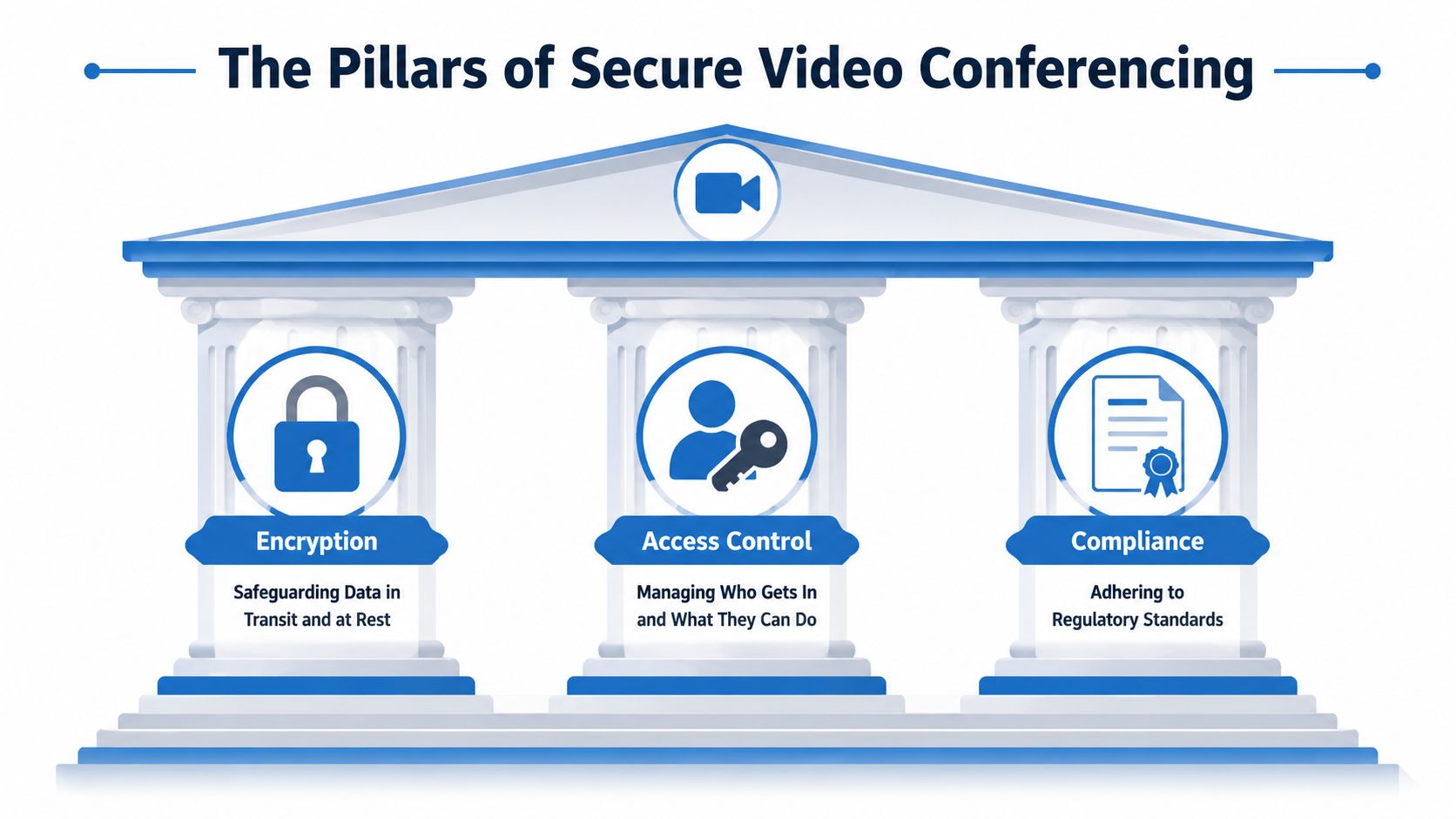
A secure video platform protects a meeting in three different ways at once. It keeps the conversation private, limits who can enter and what they can do, and gives your business a documented way to meet legal and operational requirements. If one of those pieces is missing, the platform can still look secure on paper while leaving a practical gap in daily use.
Those three pillars are encryption, access control, and compliance.
Encryption protects the conversation
Encryption works like sending business information in a locked container instead of an open envelope. The information still travels across the internet, but people who intercept it should not be able to read or hear it.
For video meetings, that protection applies to audio, video, chat, and the signals that set up the call. This matters for more than confidential board meetings. It also matters for routine sales calls, hiring interviews, financial reviews, and customer support sessions, where small details can still expose account data, pricing, or internal plans.
Buyer checklists often mention AES-256 encryption because it signals that the platform treats privacy as a baseline requirement, not a premium extra. That point matters even more for smaller companies that want enterprise-grade protection without paying separately for every serious feature.
Access control decides who gets in and what they can do
A locked conversation is still at risk if the wrong person gets invited inside. Access control handles identity and permissions. It answers two simple questions. Who is this person, and what should they be allowed to do in this meeting?
Useful controls include:
- Multi-factor authentication, which asks for more than a password
- Single sign-on, which ties meetings to your company's identity system
- Waiting rooms, which hold guests for review before entry
- Host and moderator permissions, which limit who can record, remove users, or present content
- Screen sharing controls, so only approved participants can present sensitive material. Clear host settings matter even in routine collaboration, especially during tasks like sharing your screen securely in a business meeting
This pillar protects against common business mistakes as much as outside threats. A public link forwarded to the wrong vendor, a former contractor joining with an old login, or a junior employee recording a meeting they should only attend. Good access control reduces those risks before they turn into an incident.
Compliance proves the platform is managed, not just marketed
Compliance is the governance layer. It shows whether the provider has documented controls, audit practices, data handling rules, and contractual support for regulated use.
That distinction matters because a platform can offer encryption and still fall short for healthcare, finance, legal services, or any business with strict customer data requirements. Security features protect the meeting itself. Compliance helps prove that the provider handles the surrounding responsibilities in a disciplined way.
For a business owner, this is also where total value starts to matter. Some vendors charge extra for the features larger teams eventually need, such as webinars, stronger admin controls, or support for regulated workflows. A better option is a platform that includes those capabilities in straightforward pricing, so you are not forced to choose between budget control and a security model your company can grow with.
Decoding Essential Security Features
A secure video platform is easier to judge when you stop looking at the feature list as marketing and start looking at it like a building plan. You want to know which lock is on the front door, which cabinet holds sensitive files, and which rooms can be opened only by staff.
In-transit encryption and end-to-end encryption solve different problems
A business call has several layers. One layer starts the meeting and routes participants to the right session. Another carries the voice, video, and screen sharing itself. According to Pexip's guide to video meeting encryption, platforms commonly use TLS to protect signaling, SRTP with AES-256 to protect media, and DTLS to exchange keys securely.
In practical terms:
- TLS for signaling: protects the meeting setup details, such as who is joining and how the session connects
- SRTP with AES-256 for media: protects the live audio, video, and shared content while they travel across the network
- DTLS for key exchange: helps the system create a protected session without exposing the keys that secure it
That is strong protection in transit. It keeps outsiders from listening in as data moves between devices and servers.
End-to-end encryption goes a step further. It is designed so the service provider has far less ability to inspect the meeting content itself. For highly sensitive conversations, that can be the right choice. But there is a practical cost. Server-side features such as cloud recording, live transcription, or certain workflow tools may be limited because the platform cannot process media in the usual way.
A simple rule helps here. If you are discussing acquisition plans or legal strategy, maximum content privacy may matter most. If you are running customer training or staff briefings, you may need recording, transcripts, attendance tracking, or webinar tools just as much as encryption. The right platform should let you choose the security model that fits the meeting, instead of forcing an expensive upgrade when your needs expand.
Access controls prevent ordinary business mistakes
Many real incidents are not caused by elite hackers. They start with a forwarded invite, the wrong person sharing a screen, or a guest joining before the host is ready.
The strongest platforms reduce those mistakes with controls that work like physical office habits:
- Waiting rooms work like a lobby. People can arrive, but they stay outside the meeting until the host admits them.
- Meeting locks work like closing the conference room door once everyone expected is seated.
- Restricted screen sharing keeps presentation rights with the right person instead of letting any participant put sensitive material on display.
- Moderator controls let hosts mute participants, remove attendees, and keep order quickly when a meeting changes direction
These controls matter in ordinary work, not only in a crisis. A finance team reviewing forecasts, a clinic discussing patient information, and a sales leader presenting pipeline numbers all need clear limits on who can speak, share, record, and invite others. If your staff present often, they should know how to share your screen securely during business meetings, because accidental exposure is one of the most common video call failures.
Storage and recording security matter after the call ends
A live meeting lasts an hour. A recording can sit in storage for months.
That changes the risk. A platform may protect the conversation while it is happening, then leave the recording open to broad internal access, weak permission settings, or poor retention controls. For many businesses, that stored file is more sensitive than the meeting itself because it can be replayed, downloaded, forwarded, and searched later.
Ask direct questions:
- Where are recordings stored?
- Who can view, download, or delete them?
- Are permissions tied to user roles?
- Are access logs available for review?
- Can retention rules be set by department or use case?
This is also where total value becomes easier to see. Some vendors treat recordings, webinars, transcripts, and admin controls as separate add-ons. That pricing model can push growing companies into awkward trade-offs between budget and security operations. A better path is a platform that includes the features businesses use, with pricing that is easy to understand, so enterprise-grade controls do not become a patchwork of extra fees.
Navigating Compliance for Healthcare and Business
Healthcare buyers hear “HIPAA-compliant” so often that the phrase can start to sound like a sticker on the box. It isn't. It's a mix of legal obligations, technical controls, and operational discipline.
That distinction matters because a video platform can advertise encryption and still fall short for clinical use.
What HIPAA-oriented video security actually requires
For HIPAA-oriented deployments, a compliant platform needs a Business Associate Agreement, role-based access controls, multi-factor authentication, secure data storage, and tamper-resistant audit logs, according to Censinet's guide to HIPAA-compliant video conferencing. The same guidance also emphasizes waiting rooms and meeting locks to prevent unauthorized access during telehealth sessions.
Each of those controls solves a different problem:
- Business Associate Agreement: This is the legal agreement that sets responsibilities when a vendor handles protected health information.
- Role-based access controls: A scheduler, clinician, and administrator shouldn't all have the same permissions.
- Tamper-resistant audit logs: If something goes wrong, you need a trustworthy record of who accessed what and when.
- Secure data storage: Protection has to continue after the call ends.
Why this matters beyond healthcare
The lesson isn't limited to clinics and hospitals. Any organization handling confidential information should think this way.
A law office may not need HIPAA, but it still needs clear permissions, reliable logs, and controlled storage. A school may care more about student privacy and parent access. A financial firm may focus on retention, records, and oversight. Compliance frameworks differ, yet the buying logic stays similar: don't confuse a strong encryption claim with a complete governance model.
For healthcare teams comparing tools, it helps to review a more focused list of HIPAA-compliant video conferencing platforms and then test each one against your own workflow. Ask how patients join, how staff authenticate, how recordings are handled, and what logs exist if an incident needs review.
Compliance isn't paperwork layered on top of security. It's the part that proves your security controls can hold up under policy, audit, and real-world use.
A Buyer's Checklist for Secure Video Conferencing
Buying meeting software is easier when you stop asking “Which platform has the most features?” and start asking “Which platform gives us the right controls at a predictable cost?”
That shift matters because pricing can hide as much as the security page does. Some vendors include key capabilities in the base plan. Others turn webinars, recordings, advanced moderation, or compliance-friendly controls into paid extras. The cheapest monthly line item can become the most expensive setup once your team starts adding what it needs.
Questions worth asking every vendor
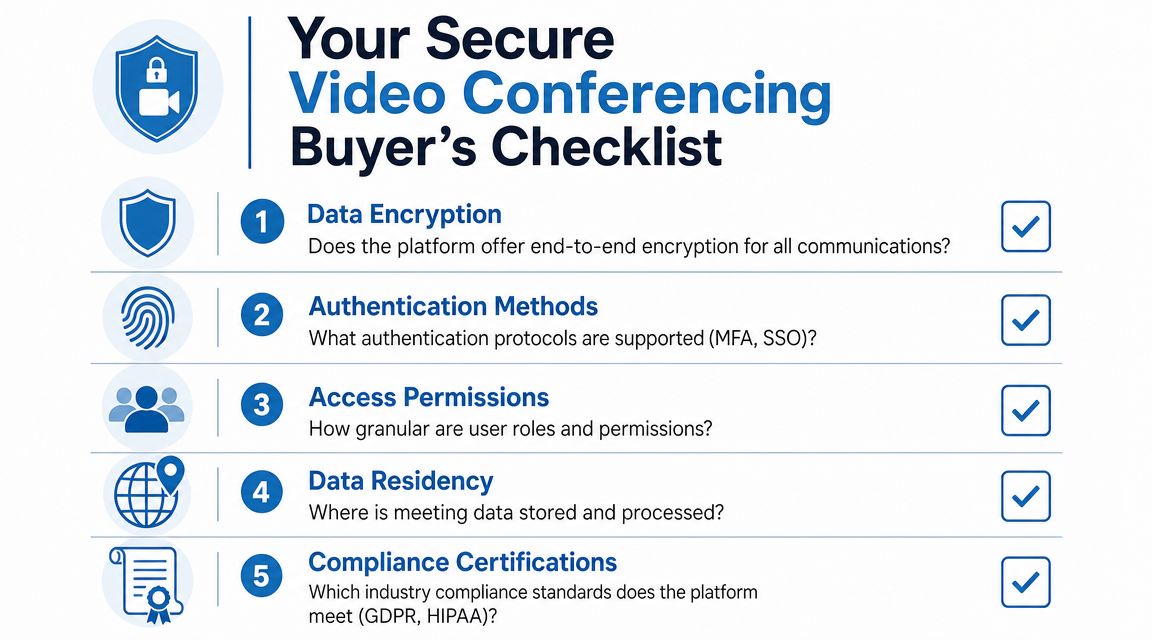
Bring this list into demos and sales calls.
- Encryption model: Does the platform explain how signaling, media, and key exchange are protected in plain language?
- Authentication options: Can you enforce MFA and connect SSO to your existing identity system?
- Guest access control: Are waiting rooms, meeting locks, host approval, and participant removal built in?
- Role granularity: Can you separate host, co-host, presenter, recorder, admin, and viewer permissions?
- Recording governance: Where are recordings stored, who can access them, and can access be reviewed later?
- Compliance support: Does the vendor support the legal and operational controls your industry requires?
- Data handling clarity: Where is meeting data processed and stored, and what control do you have over retention?
- Incident response: If there's a security issue, how does the vendor communicate and support your team?
- Usability: Can patients, clients, or less technical users join easily without creating confusion?
- Total cost of ownership: Which features are included, and which require separate upgrades or add-ons?
Don't forget the business fit
Security fails when users work around it. If a platform is difficult for clients, patients, teachers, or remote staff to join, they'll improvise. They'll reuse links, skip identity steps, or move to unapproved tools.
That's why many small businesses also compare secure platforms against practical daily needs such as browser access, screen sharing, webinar support, and straightforward billing. A useful reference point is this overview of video conferencing options for small business teams, especially if you want to avoid enterprise complexity without giving up core controls.
A simple buyer mindset
Use this test: if a vendor can't clearly explain who can join, what gets encrypted, where data lives, what's included in the plan, and what happens during an incident, keep looking.
How AONMeetings Delivers Security and Value
For buyers who want a concrete example, AONMeetings packages security controls and collaboration features into a simpler pricing model than the common add-on approach. According to the publisher information provided for this article, it offers HIPAA-compliant meetings, built-in webinars, unlimited meeting time, browser-based access, bank-level encryption, waiting rooms, moderator controls, recordings, whiteboards, screen sharing, document sharing, and advanced options such as breakout rooms and meeting lock. Pricing starts from ₹179 per user per month.
That combination matters because many teams aren't choosing between “secure” and “insecure.” They're choosing between a plan that includes what they need and a plan that looks affordable until webinar hosting, advanced controls, or compliance-oriented workflows get added later.
What buyers often compare
AONMeetings is relevant when your checklist includes:
- Transparent pricing: No contracts, no hidden fees, and a stated entry price.
- Webinars included: Useful for clinics running patient education, educators hosting classes, or marketers delivering events.
- Security basics included: Encryption, waiting rooms, meeting lock, and moderator controls.
- Simple access: Browser-based joining can reduce friction for outside participants.
A practical comparison table
Because the brief asked for price comparisons, the safest way to handle that without inventing unsupported competitor pricing is to compare what's transparent versus what needs confirmation from each vendor at quote time.
AONMeetings vs. Competitors Price and Feature Comparison 2026
| Feature | AONMeetings (Pro Plan) | Zoom (Pro Plan) | Microsoft Teams (Essentials) |
|---|---|---|---|
| Transparent published starting price | ₹179 per user per month | Check current vendor pricing | Check current vendor pricing |
| Unlimited meeting time | Included | Verify by current plan terms | Verify by current plan terms |
| Webinars included | Included | Often evaluated separately by buyers as a distinct capability | Often evaluated separately by buyers as a distinct capability |
| Bank-level encryption | Included | Verify current security documentation | Verify current security documentation |
| Waiting rooms | Included | Verify current plan and admin settings | Verify current plan and admin settings |
| Meeting lock | Included | Verify current plan and admin settings | Verify current plan and admin settings |
| Screen sharing | Included | Verify current plan terms | Verify current plan terms |
| Whiteboards | Included | Verify current plan terms | Verify current plan terms |
| Recordings | Included | Verify current plan terms | Verify current plan terms |
| Browser-based joining | Included | Verify current access options | Verify current access options |
| Contracts required | No contracts stated | Check current sales terms | Check current sales terms |
| Hidden fees | No hidden fees stated | Check add-ons and upgrades | Check add-ons and upgrades |
Where the value proposition shows up
The strongest value case isn't only lower entry pricing. It's reducing surprise costs and reducing tool sprawl. If your team needs secure meetings, webinars, recordings, moderator controls, and HIPAA-oriented workflows, bundled access can be easier to budget and govern than mixing multiple products or paying for several upgrades.
That doesn't mean every business should choose the same platform. It means buyers should compare the full operating setup, not just the first price they see on a landing page.
Best Practices to Mitigate Real-World Threats
A secure video conferencing platform helps a lot, but software alone won't solve every risk. People still join from noisy homes, weak networks, shared devices, and rushed workdays. That creates a gap between “secure on paper” and “secure in use.”
One underappreciated example comes from SMU's research on video conferencing privacy, which found that attackers could use “remote acoustic sensing” to infer a user's location from video-call audio cues, with 88% accuracy in tests on popular apps such as Zoom. That's a useful reminder that privacy doesn't begin and end with encryption settings.
Security problems users don't expect
A participant may mute at the wrong time, join from a location with revealing background sound, or forget that audio can still expose patterns about where they are. Another issue is usability. Research summarized in the JMIR telehealth review notes that frequent barriers to video-call care include limited hardware access, network problems, and lack of technology skills, especially for older adults, rural populations, and socioeconomically disadvantaged groups.
If people can't join reliably, they'll switch to less secure workarounds. That's why usability is part of security.
Practical habits that reduce exposure
- Keep links private: Don't post meeting URLs on public pages or open social feeds.
- Use waiting rooms consistently: Treat them like a staffed lobby, not an optional extra.
- Lock meetings after entry: Once expected participants arrive, close the room.
- Limit sharing rights: Only hosts or approved presenters should share screens in sensitive meetings.
- Train staff on environment risk: Background conversations, TVs, street noise, and smart speakers can reveal more than users realize.
- Offer backup access: For telehealth or customer service, a phone fallback helps when video quality collapses.
- Choose tools that less technical users can join without confusion: A secure platform that people can't use safely won't stay secure for long.
If you want a broader operational checklist beyond video meetings, this guide to practical IT security advice for businesses is a helpful companion because it connects meeting security to your wider network, device, and user training policies.
The safest meeting is the one your users can join correctly, your admins can govern clearly, and your business can afford to run consistently.
If you're comparing platforms and want one place to review secure meetings, webinar features, HIPAA-oriented capabilities, and transparent pricing, take a look at AONMeetings. It's a practical option for teams that need browser-based video conferencing with built-in collaboration and security controls, without relying on a patchwork of add-ons.
