
Most advice about a HIPAA email disclaimer starts in the wrong place. It starts with the footer.
That footer matters, but it's the smallest part of the problem. If your team sends protected health information by email, key compliance questions aren't “What disclaimer should we paste under the signature?” They're “Is the message encrypted?” “Do we have the right Business Associate Agreement?” “Who can access the account?” and “Can we prove what happened if something goes wrong?”
A good disclaimer can reduce harm after a mistake. It cannot stop the mistake, and it cannot turn an insecure workflow into a compliant one.
The Truth About HIPAA Email Disclaimers
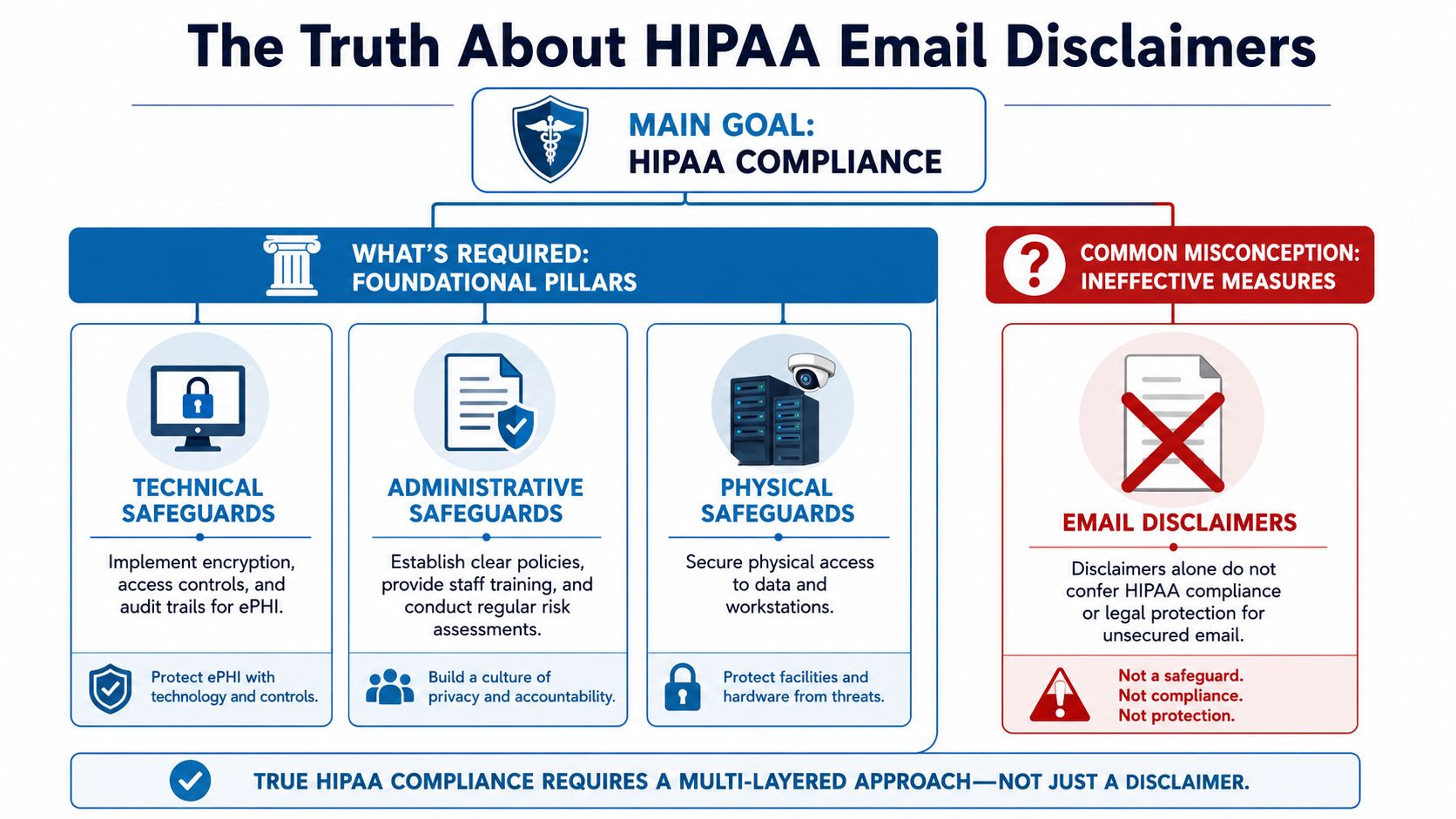
HIPAA email disclaimers get far more attention than they deserve. In practice, the footer is usually the least important part of email compliance.
A HIPAA email disclaimer is not required by HIPAA, and it does not make an email compliant by itself. What matters is whether the organization has set up the controls HIPAA expects: restricted access, staff training, appropriate vendor contracts, and a secure way to send and store PHI, as outlined in this guidance on HIPAA disclaimer requirements and limits.
What the disclaimer does
A disclaimer is a post-error tool. It tells the recipient that the email may contain PHI, that unauthorized use or disclosure is prohibited, and that an unintended recipient should notify the sender and delete the message.
That has value. If a message goes to the wrong person, clear instructions can reduce further disclosure and show that the practice uses a consistent process.
The limit is obvious once you look at the workflow. The disclaimer appears after the message is sent. It does not verify the address, encrypt the content, control who can open the mailbox, or preserve the kind of audit evidence a compliance team may need later.
Practical rule: Use the disclaimer for damage control. Build compliance somewhere else.
Misdirected email remains a real problem in healthcare, and OCR breach reporting has long included incidents caused by email sent to the wrong recipient. The lesson is not “write a longer footer.” The lesson is to reduce the chance of misdelivery and contain the risk when it happens.
Why practices overvalue the footer
Smaller practices often copy whatever language came from an IT vendor, EHR consultant, or another clinic. A long confidentiality notice looks serious, so leadership assumes it carries legal weight far beyond what it can deliver.
Regulators focus on safeguards, not drama in the signature block.
That is the disconnect. A disclaimer may help after a mistake. It does very little to prevent the mistake. For a concise legal framing of that issue, see FaxZen's overview of the legal power of HIPAA disclaimers.
I see the same trade-off in real implementations. Teams spend time debating six lines of footer text while still sending PHI through ordinary email accounts without enforced encryption, documented retention controls, or a signed BAA with the provider. That is backwards.
What helps and what does not
A disclaimer can help in a few narrow ways:
- Warning the wrong recipient: It gives immediate instructions.
- Standardizing outbound communication: Staff use one approved message instead of improvising.
- Supporting policy enforcement: Compliance teams can require a consistent footer across the organization.
A disclaimer cannot do the work that HIPAA cares about most:
- It cannot secure transmission: Encryption and access controls handle that.
- It cannot replace vendor oversight: If a platform touches PHI, the BAA and security setup still matter.
- It cannot cure a bad workflow: Sending PHI through the wrong channel is still a problem, even with a polished footer.
This is why I tell clients to treat the disclaimer as a minor control, not a primary one. A plain footer on a secure platform is far safer than a dramatic legal notice attached to an insecure process. If a practice uses a platform such as AONMeetings for patient communication, the actual compliance value comes from the secure environment, the auditability, and the vendor agreement structure, not from the disclaimer pasted at the bottom.
Drafting a Disclaimer That Reduces Risk
Once you stop treating the disclaimer like a magic shield, it gets easier to write one that helps. The most effective versions are visible, explicit, and action-oriented. They should state that the email may contain PHI, prohibit unauthorized use, and tell an unintended recipient to notify the sender and delete the message, as outlined in this guidance on effective HIPAA disclaimer wording.
Keep it readable
The biggest drafting mistake is over-lawyering the footer. Dense wording gets ignored. If the wrong person receives the email, you want immediate action, not confusion.
A useful HIPAA email disclaimer usually includes three parts:
- Confidentiality notice: Tell the reader the message may contain protected health information.
- Use restriction: Say unauthorized review, use, or disclosure isn't permitted.
- Misdelivery instruction: Tell the unintended recipient exactly what to do.
A disclaimer should read like an instruction, not a courtroom argument.
Practical templates you can actually use
General outpatient communication
This version fits routine external email where PHI may appear in the body or attachment.
This email and any attachments may contain protected health information intended only for the person or entity addressed. If you are not the intended recipient, please do not read, use, share, or forward this message. Notify the sender and delete the email and any attachments immediately.
Why it works: it's short, direct, and tells the unintended recipient what to do without burying the instruction.
Appointment scheduling and administrative outreach
This version works for front-desk teams, referrals, and scheduling staff.
This message may contain confidential patient information intended only for the recipient listed above. If you received this email in error, please notify the sender and delete it. Do not copy, use, or disclose the contents to anyone else.
Why it works: the language is plain enough for routine use and avoids unnecessary legal clutter.
Sensitive clinical follow-up
This version is better when results, treatment details, or other sensitive PHI may be included.
This email may contain protected health information and confidential medical information intended only for the authorized recipient. Unauthorized review, use, disclosure, or distribution is prohibited. If you received this message by mistake, contact the sender and delete the email and any attachments immediately.
Why it works: it adds a firmer restriction while staying readable.
Small wording choices matter
A few practical drafting points make a real difference:
- Put it in the footer automatically: Staff shouldn't have to remember it.
- Use normal language: “Delete this email” works better than overly formal phrasing.
- Avoid vague verbs: Say “notify the sender and delete the message.”
- Don't let it run forever: If the disclaimer is longer than the email itself, recipients will likely skip it.
One more caution. If your instruction tells unintended recipients to reply with PHI still attached in the thread, you may create more exposure. In practice, a phone call or a fresh message to a published office contact can be cleaner than encouraging a reply-all chain.
Beyond the Disclaimer What HIPAA Really Requires
If you strip the footer off every message tomorrow, the core compliance obligations would still be there. That tells you where the core weight sits.
HIPAA email compliance depends on safeguards beyond a disclaimer, including access controls, audit controls, integrity controls, authentication, transmission security such as encryption, a signed Business Associate Agreement with your email provider, and workforce training, as summarized in this overview of HIPAA email compliance requirements.

Business Associate Agreements come first
A Business Associate Agreement, or BAA, is the contract that defines how a vendor handles protected health information on your behalf. If your email provider, conferencing tool, cloud archive, or messaging platform handles PHI, the BAA is one of the first things to verify.
In real consulting work, many practices often get tripped up. They assume that paying for a popular tool means the tool is automatically acceptable for healthcare use. That assumption causes problems fast.
A product can be technically capable and still be the wrong fit if the vendor won't sign a BAA or only supports HIPAA-related controls on specific plans.
For teams that need broader policy context, this guide to understanding HIPAA compliance for practices is a useful companion read. It helps frame vendor selection as part of the wider compliance picture, not just a software purchase.
Encryption is not optional in practice
Encryption is the control that protects PHI while it moves and while it sits stored in systems. In plain terms, people often refer to these as data in transit and data at rest.
Here's the practical test:
- In transit: Is the message protected while it travels from sender to recipient?
- At rest: Is stored content protected in mailboxes, archives, backups, and platform storage?
If a practice sends sensitive information through ordinary channels without secure transmission, the disclaimer at the bottom won't help much. The risk has already been created.
The footer is the note on the envelope. Encryption is the lock.
That's why many organizations move some patient communication away from ordinary email and into secure portals, encrypted mail systems, or compliant meeting platforms. If your workflow includes virtual care, file sharing, and follow-up communication, reviewing tools built for secure meetings can help narrow the field. This overview of video conferencing options for small organizations is useful when you're assessing communication tools as part of one security program rather than separate purchases.
Access controls and audit logs prove control
Many breaches don't start with a hacker. They start with ordinary access that was never tightened.
A compliant communication strategy needs to answer basic operational questions:
| Control area | What to check |
|---|---|
| User access | Who can open mailboxes, meeting records, and shared files |
| Authentication | How the system verifies that the user is who they claim to be |
| Audit visibility | Whether you can review who accessed information and when |
| Integrity | Whether records can be altered without detection |
A disclaimer can't answer any of those questions. Your systems and policies have to.
That's why I usually tell practices to rank controls in this order: vendor agreement, encryption, access restrictions, auditability, then message wording. The wording matters, but it sits last because it only has value when the rest of the stack is already in place.
Choosing a HIPAA-Compliant Communication Platform
Once you accept that the footer is only one layer, the buying decision changes. You stop shopping for a disclaimer template and start shopping for a communication system that reduces exposure.
That means comparing more than feature lists. You need to look at whether the platform supports secure workflows, whether a BAA is available, whether encryption is part of the offering, and whether webinar or broadcast functions are included or added as separate cost layers.
What to compare before price
In healthcare, the cheapest monthly fee can become the most expensive option if you have to bolt on other tools or work around compliance gaps.
Use this decision filter:
- BAA availability: Can the vendor support healthcare use contractually?
- Encryption support: Is secure transmission part of the product design?
- Access management: Can admins control hosts, participants, and recordings?
- Webinars included: If you run patient education or staff training, are webinars built in or separate?
- Meeting limits and contracts: Do usage caps or long commitments create friction?
A practice using one tool for telehealth, one for internal meetings, and another for webinars often ends up with more admin burden than expected. Consolidation can reduce policy drift because fewer tools means fewer exceptions to document and train.
HIPAA-Compliant Platform Comparison 2026
| Feature | AONMeetings | Zoom for Healthcare | Doxy.me (Pro) |
|---|---|---|---|
| HIPAA-oriented use case | Supports HIPAA-compliant meetings | Healthcare-specific offering available | Telehealth-focused platform |
| BAA availability | Platform is presented for HIPAA-compliant use | Typically handled through healthcare plan arrangements | Commonly evaluated for telehealth use |
| Encryption | Bank-level encryption included | Encryption features available by plan and configuration | Secure telehealth-focused communication approach |
| Webinars | Built-in webinars included | Webinar functionality may depend on add-ons or plan structure | Primarily focused on patient sessions rather than webinar breadth |
| Meeting time limits | Unlimited meeting time included | Plan-dependent | Platform-specific session model |
| Browser access | Works in browser on any device | Supported across app and browser workflows | Browser-based care delivery is a known strength |
| Contracts | No contracts stated | Contract structure may vary by plan | Subscription model varies |
| Starting price information available here | ₹179 per user per month | Price not provided in the source materials for this article | Price not provided in the source materials for this article |
That last row is important. The only price I can state here from the provided materials is AONMeetings at ₹179 per user per month. I'm not going to invent competitor pricing to make the comparison look cleaner.
What the value proposition looks like in practice
For a small clinic, platform value often comes from what's already included. If webinars, unlimited meeting time, encryption, screen sharing, recordings, and moderator controls are bundled, the practice avoids a lot of piecemeal purchasing.
AONMeetings is one example of that more consolidated model. According to the publisher information provided, it offers HIPAA-compliant meetings, built-in webinars, bank-level encryption, unlimited meeting time, and no contracts, with browser-based access and a starting price of ₹179 per user per month. If you're comparing integrated options, this guide to HIPAA-compliant video conferencing platforms is relevant.
The point isn't that every practice needs the same platform. The point is that healthcare teams should price the whole workflow, not just the meeting room.
If you need secure appointments, staff meetings, patient education sessions, and recorded training, a platform with webinars included may be cheaper than a lower-priced tool that charges separately for each layer.
Practical Implementation and Common Pitfalls
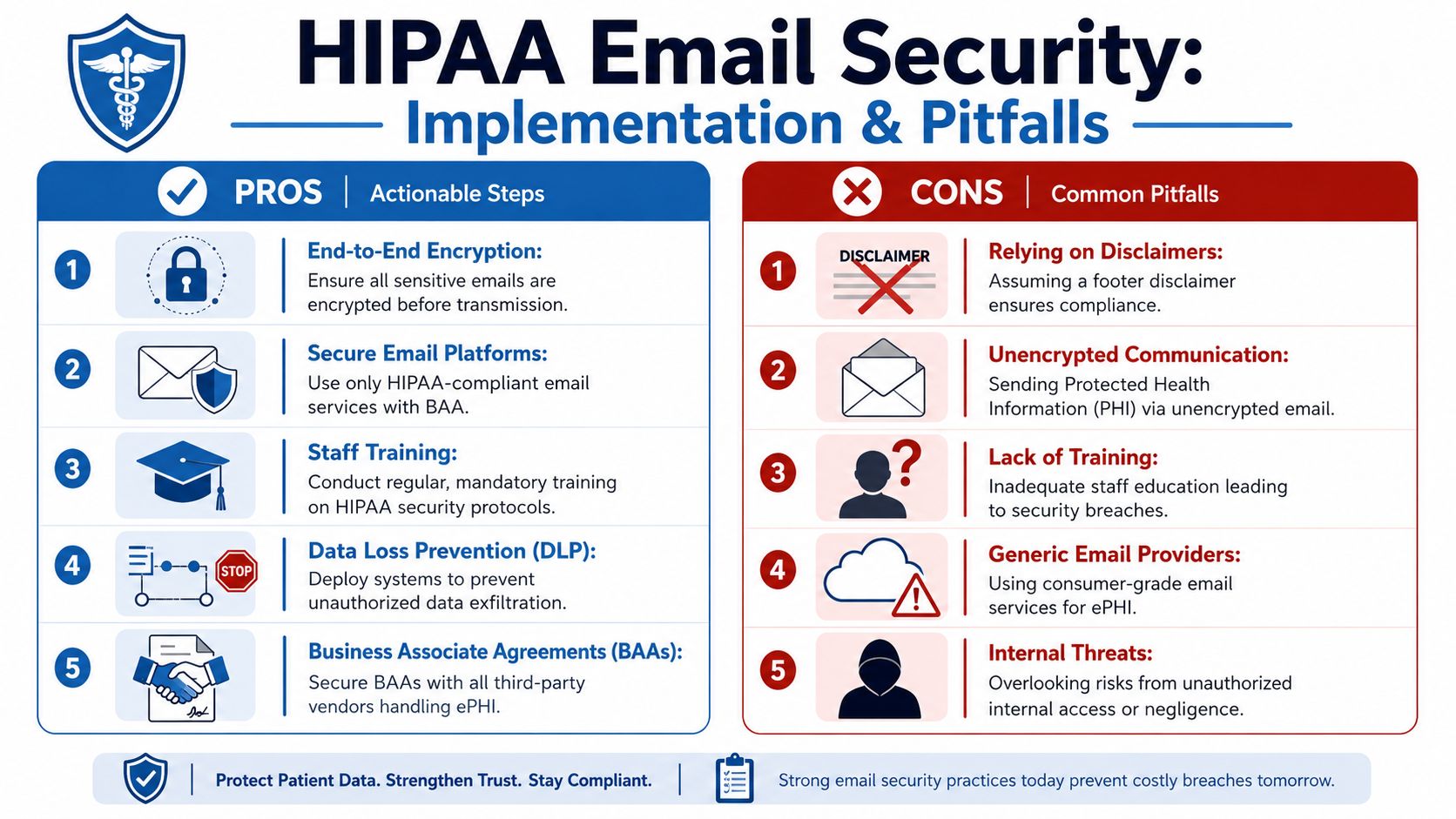
The biggest implementation mistake is treating the disclaimer as the control instead of treating it as a supporting policy statement. In day-to-day operations, the actual work happens in system settings, access rules, and staff behavior.
Set up the process once
Apply disclaimers centrally through Microsoft 365 or Google Workspace administration. Do not leave them to individual users.
That approach solves three practical problems at once:
- Consistency: every message carries the same approved language.
- Missed footers: staff do not have to remember to paste anything in.
- Updates: legal or compliance edits happen in one place, not mailbox by mailbox.
The same standardization should extend beyond email. If a practice uses virtual visits, internal meetings, and patient education sessions, the controls should be built into the platform and the workflow. These virtual meeting best practices are useful because they connect operational steps such as waiting rooms, host controls, and participant verification with privacy expectations.
I see one pattern often. A clinic spends time polishing disclaimer language, then allows staff to use inconsistent tools for scheduling, messaging, and meetings. That is backward. The footer should be the easy part.
A platform such as AONMeetings fits this discussion because it addresses more than message wording. Practices still need the right policies and a BAA where required, but using a healthcare-focused communication platform reduces the number of weak points staff have to manage manually.
Train for the mistakes staff make every week
Common email failures are routine, not advanced attacks.
Training should focus on habits that prevent ordinary errors:
- Check recipients before sending: auto-complete causes wrong-recipient disclosures.
- Keep PHI out of subject lines: subject lines are harder to protect and easier to expose.
- Use the minimum necessary information: email should not become a dumping ground for extra clinical detail.
- Stay out of personal accounts: PHI does not belong in consumer inboxes.
- Confirm vendor agreements first: do not use a cloud tool for PHI until the BAA question is resolved.
Speed is usually the problem. Someone is trying to clear the inbox, the wrong contact appears, and the message goes out before anyone notices.
Training also needs to cover what happens after a mistake. Staff should know who to notify, how to document the incident, and when to escalate it for a breach assessment. Many organizations skip that part, which turns a manageable event into a reporting mess.
Pitfalls that create false confidence
The first pitfall is overvaluing the disclaimer. It may help show intent, remind recipients to handle the message carefully, and support policy consistency. It does not encrypt the email, verify the recipient, or limit downstream access.
The second is ignoring internal exposure. Shared inboxes, forwarded messages, exported attachments, and broad access to stored recordings create risk inside the organization. A polished footer does nothing about that.
The third is letting patient preference become an excuse for weak process. Patients may request email, but the practice still needs a documented method for honoring that request, applying the right safeguards, and deciding what information belongs in that channel.
The clean implementation usually looks plain. Automatic disclaimers. Encrypted email where appropriate. Limited access. Staff training. Secure meeting and communication tools. Periodic review.
That combination reduces risk far more than any footer language ever will.
The Future of Secure Healthcare Communication
Healthcare communication is moving away from scattered tools and improvised workarounds. That's good for compliance and good for operations.
A standalone HIPAA email disclaimer belongs in that future, but only as a small supporting control. The stronger model is integrated communication: secure meetings, controlled messaging, documented vendor agreements, encryption, auditability, and staff workflows that don't depend on memory.
That matters for patient care as much as compliance. When teams use fewer disconnected tools, they spend less time deciding where to send information and less time fixing preventable mistakes. Training gets easier. Administration gets cleaner. Security controls are easier to enforce consistently.
The organizations that handle this well usually stop asking, “What footer should we use?” and start asking better questions:
- Which platform supports our healthcare workflow?
- Where is PHI stored?
- Who has access?
- What happens if someone sends information to the wrong person?
- Can we run patient education, internal training, and appointments in one secure environment?
That's the actual direction of travel. Text alone won't carry the burden. Process and technology will.
If your team needs secure meetings, webinars, and healthcare-ready communication in one place, AONMeetings is worth evaluating as part of your compliance stack. It combines HIPAA-compliant video conferencing, built-in webinars, encryption, unlimited meeting time, and browser-based access, which can simplify operations for practices that want fewer tools and fewer workflow gaps.
