

You've got a webinar idea, a speaker, and a landing page draft. But registrations are soft, sales wants stronger leads, and finance is asking why the platform bill keeps growing. That's where most webinar programs start to wobble. The problem usually isn't the channel. It's weak planning, bloated tooling, and content that sounds useful on paper but doesn't hold attention live.
Marketing with webinars works when you treat the webinar as a system, not a one-off event. The topic, platform, promotion cadence, live delivery, follow-up, and reporting all have to support the same business outcome. If one piece is off, the program feels expensive and inconsistent fast.
Webinars are worth that discipline. They're already a mainstream B2B channel, with 58% of B2B marketers using webinars and a typical 35% to 45% registration-to-attendance rate according to RingCentral's webinar statistics roundup. That kind of attendance reliability is exactly why smart teams build repeatable webinar motions instead of treating each event like a standalone campaign.
Laying the Foundation for Webinar Success
The teams that struggle with webinars usually make the same mistake first. They start with a topic. They should start with a business goal.
A webinar for brand awareness looks different from a webinar for lead qualification. A webinar for sales acceleration should feel different again. If you don't lock that down early, you end up with confused messaging, a mismatched call to action, and reporting that tells nobody anything useful.
Start with one primary outcome
Pick one of these as the lead objective:
- Awareness: Use this when you need reach, category education, or thought leadership. The call to action should be light, such as subscribing, downloading a guide, or watching a related session.
- Pipeline support: This fits mid-funnel education. The webinar should help buyers compare options, understand a process, or evaluate risk.
- Sales enablement: Use this when your audience already knows the problem and wants implementation detail, proof, or a product walkthrough.
For a B2B tech company, a simple planning worksheet might look like this:
| Decision point | Example |
|---|---|
| Primary goal | Qualify mid-funnel leads |
| Audience | IT managers at mid-sized clinics |
| Pain point | Staff needs secure remote consultations without complicated setup |
| Webinar format | Educational session with short workflow demo |
| CTA | Book a requirements review |
| Sales handoff | Follow up only with engaged attendees and high-fit registrants |
That last line matters. A webinar isn't successful because “lots of people came.” It's successful because the right people moved to the next step.
Build for a real audience, not a generic persona
Most audience documents are too broad to help a presenter write better content. A usable persona should tell you what the buyer is worried about when they register.
Take a healthcare clinic as an example:
A clinic operations manager isn't looking for “innovation.” They're looking for fewer no-shows, easier scheduling, cleaner patient communication, and a platform that won't create compliance headaches for the practice.
That changes the webinar angle immediately. “Future of digital care” is too vague. “How clinics can run secure patient sessions without adding admin burden” is specific enough to attract the right registrants and useful enough to keep them engaged.
Match format to intent
Different webinar formats solve different marketing jobs.
- Educational briefing: Best for trust building and top-to-mid funnel demand.
- Panel discussion: Useful when you need credibility through multiple voices.
- Product demo: Strong when the audience is already problem-aware.
- Workshop or training session: Good for deeper engagement and higher-intent follow-up.
- Series format: Better than one-offs when the sales cycle is longer and the topic needs repetition.
Keep the format tight. Don't run a panel if one expert voice would be clearer. Don't force a demo into an educational event if your audience hasn't earned enough trust yet.
Get alignment before production starts
Before anyone opens PowerPoint or Canva, confirm four things with stakeholders:
- Who must attend
- What they should learn
- What action they should take next
- What sales or customer success will do after the event
If you can't answer those in one page, the webinar isn't ready.
Choosing Your Webinar Platform Wisely
Organizations often buy webinar software the same way they buy painkillers. Something hurts, they grab the brand they know, and they sort out the bill later. That's how webinar costs creep up and feature gaps show up at the worst time.
The better approach is to compare total value, not just logo familiarity. In webinar programs, the expensive part often isn't the base meeting license. It's the add-ons, host limits, recording access, branding restrictions, and the fact that webinar functionality may sit behind a separate product tier.
What to compare before you commit
Look at these criteria side by side:
- Whether webinars are included: Some tools separate meetings and webinars. That matters if your team runs both every week.
- Security and encryption: If you work in healthcare, finance, education, or regulated services, encryption and compliance features aren't nice-to-haves.
- Browser access: Join friction kills attendance. Browser-based entry helps external audiences.
- Recording and repurposing tools: Marketing needs replay assets. If recording is awkward, reuse becomes a chore.
- Moderator controls: Chat, waiting rooms, locks, and presenter permissions all affect live event quality.
- Pricing clarity: Monthly cost only tells half the story if webinar hosting is an upsell.
A good shortlist should include both established tools and lower-cost options. If you're comparing smaller-budget choices, LearnStream's roundup on best webinar platforms under $50 is a useful starting point because it frames the decision around practical affordability rather than enterprise branding.
Webinar Platform Cost & Feature Comparison (2026)
| Feature | AONMeetings (Pro Plan) | Zoom (Business + Webinar Add-on) | GoToWebinar (Pro Plan) |
|---|---|---|---|
| Webinar functionality | Included in all plans | Add-on model | Webinar-focused plan |
| Pricing approach | Starts from ₹179 per user per month | Layered pricing | Separate webinar pricing |
| Encryption | Bank-level encryption included | Security features vary by plan and setup | Security features included |
| HIPAA-oriented use case | HIPAA-compliant meetings available | Depends on plan and setup | Often evaluated case by case |
| Browser-based joining | Yes | Available in many cases | Supported |
| Unlimited meeting time | Included | Plan-dependent | Webinar product focused |
| Recording | Included | Commonly available, depends on plan | Commonly available |
| Best fit | Cost-sensitive teams that need meetings plus webinars | Teams already standardized on Zoom | Teams buying a dedicated webinar tool |
One example worth evaluating is AONMeetings, because its plans include meetings and webinars together, along with bank-level encryption, recordings, and browser-based access. For small businesses comparing practical trade-offs, this overview of webinar software for small business is useful because it focuses on included functionality instead of just brand recognition.
Hidden costs change the real decision
A cheap-looking platform can become expensive if you need webinar access, cloud recordings, additional hosts, branding controls, or support upgrades. On the other side, a tool with a slightly higher visible starting price can be the better deal if it removes separate webinar fees and supports both internal meetings and external events in one stack.
Buying rule: If your team hosts demos, customer training, partner sessions, and demand-gen webinars, don't evaluate a platform as a “webinar tool” alone. Evaluate it as part of your full communication stack.
Security isn't a side feature
Encryption should sit on the buying checklist next to price, not below it. If your registrants will discuss patient information, financial workflows, customer records, or internal strategy, you need a platform that treats security as product design, not just a line in the FAQ.
That's also a marketing issue. Secure webinar delivery affects trust, attendance confidence, and whether internal teams will even approve the program. I've seen strong webinar ideas stall because legal or compliance got involved too late and found platform issues that should've been addressed in procurement.
Crafting Content That Captivates and Converts
A webinar doesn't lose attention because the audience “has a short attention span.” It loses attention because the presenter takes too long to become useful.
The strongest benchmark I use for webinar pacing is session length. A cross-platform analysis of roughly 12,400 B2B webinars found that 35 to 45 minutes performed best, with 73% audience retention, compared with 51% for 60-minute webinars, according to Digital Applied's webinar data analysis. That should change how you write your run of show.
Build a simple narrative arc
A webinar doesn't need theatrical storytelling. It does need momentum.
Use this structure:
- Open with the problem
- Clarify why old approaches break
- Teach the framework or method
- Show an example
- Transition into the next step
That format works for educational sessions and product-led webinars because it gives the audience a reason to keep listening. They can tell where the session is going.
Here's a practical example for a clinic operations webinar:
- Opening: manual patient coordination creates avoidable admin strain
- Middle: secure video workflows reduce back-and-forth when setup is simple
- Example: compare a fragmented process with a unified workflow
- CTA: offer a short consultation or implementation checklist
Fix the slides before the rehearsal
Bad webinar slides usually fail in one of two ways. They're either full of text, or they're visually clean but too vague to support the speaker.
Use these rules:
- One idea per slide: If a slide needs a paragraph, split it.
- Show process visually: Use diagrams, screenshots, or simple workflows instead of dense bullets.
- Keep branded consistency light: A strong header bar and color system are enough. Don't turn every slide into an ad.
- Design for listening: Slides should reinforce what the speaker says, not duplicate it.
A before-and-after example:
| Weak slide | Better slide |
|---|---|
| Title plus seven bullets on webinar ROI | One diagram showing promotion, live event, follow-up, and reporting |
| Product features listed in text | Screenshot paired with one use-case caption |
| CTA slide that suddenly says “Book a demo now” | Transition slide that links the educational point to a practical next step |
Make the CTA feel earned
The call to action should match the temperature of the session. If you spent half an hour educating the audience and then switch into a hard close, trust drops immediately.
Don't bolt the offer onto the end. Build toward it so the next step feels like a continuation of the lesson.
A clean transition script sounds like this:
“We've covered the workflow clinics use to reduce setup friction and protect patient information. If you want to see how that looks in a live environment, the next step is a short walkthrough tailored to your team's process.”
That works better than “Contact sales today” because it stays tied to the problem the webinar already solved.
The Ultimate Webinar Promotion Timeline
A strong webinar usually fills because the promotion was disciplined, not because the topic was brilliant. Good teams don't “blast a few emails.” They run a calendar.
One operating model I trust is a 4-week promotion cycle with key email pushes at T-28, T-14, and T-7 days, with the heaviest promotion in the final week. That same framework sets practical benchmarks of 30% to 50% registration conversion from warm traffic and 15% to 25% from cold traffic, based on EasyWebinar's webinar marketing guide. Those numbers are useful because they force you to evaluate audience quality instead of treating all traffic as equal.
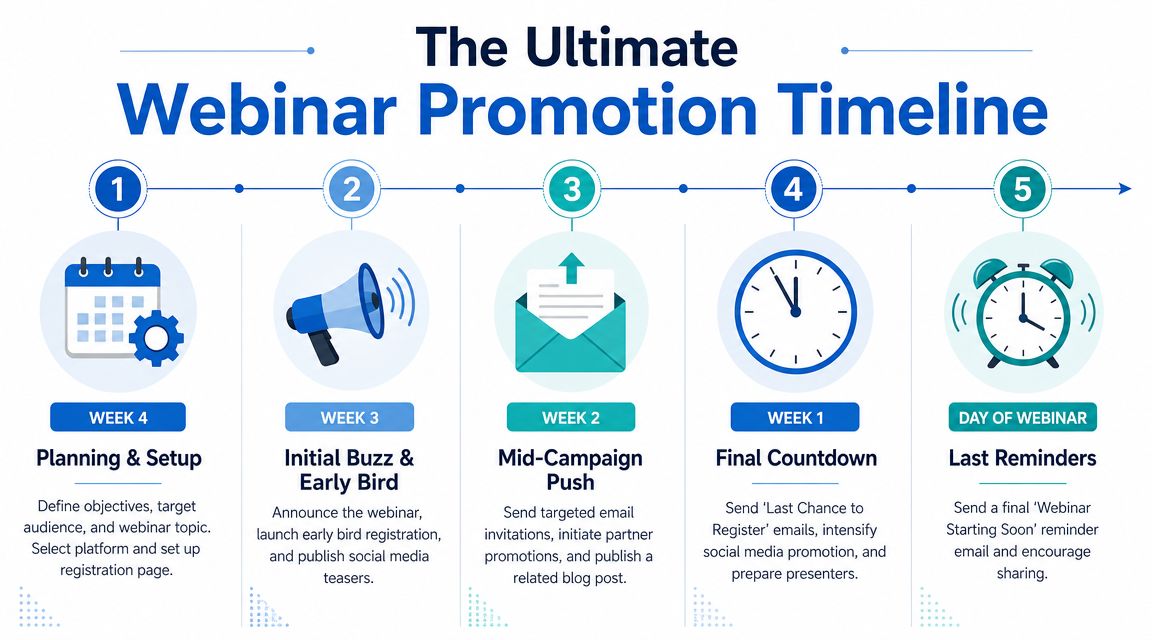
Week-by-week promotion cadence
Week 4 planning and setup
Build the registration page first. Don't start email promotion until the page is clear on three points: who it's for, what attendees will learn, and what happens after the event.
Checklist for this week:
- Landing page copy: Lead with pain point, not speaker biography.
- Registration form: Ask only for fields your follow-up process will use.
- Tracking setup: UTM tags, CRM source tagging, and calendar confirmation.
- Speaker prep: Get a title, abstract, and headshot approved early.
Week 3 initial buzz
This is the announcement wave. Send the first email to your house list, publish organic LinkedIn posts, and give partners approved copy if you're co-marketing.
For social, keep the message narrow. A post saying “Join our webinar next month” is weak. A post saying “We'll show how clinic teams can run secure virtual visits without adding admin overhead” gives people a reason to click.
Week 2 targeted push
Segmentation holds significant importance.
- Warm audience: Send a sharper invitation based on prior content consumption, previous attendees, existing leads, or customer interest.
- Cold audience: Focus on the business problem and speaker credibility. Don't assume they know your brand.
- Partner channel: Ask partners to send their own note to their audience instead of just reposting your graphic.
If you need more ideas for improving turnout, this guide on how to increase webinar attendance is worth reviewing because it focuses on practical registration and reminder habits.
Final week and day-of reminders
The final seven days usually decide whether the room feels full or thin. Increase frequency, but tighten the message.
Use a sequence like this:
- T-7 reminder: Reframe the value. Tell people what practical question the session will answer.
- T-3 social post: Share a speaker clip, one key takeaway, or a preview slide.
- T-1 email: “Tomorrow” reminder with clear timing and what attendees will leave with.
- Day-of email: Short and functional. Time, join link, one-line reason to show up live.
The final reminder should remove friction, not sell harder.
What doesn't work is over-designed hype. Webinar promotion performs better when the copy sounds concrete and useful.
Driving Live Engagement and Action
The live session is where webinar marketing stops being a campaign and becomes a conversation. This is the part teams often underrate. They spend weeks on registration and almost no time planning how the actual room will feel.
I've seen solid attendance numbers collapse into poor outcomes because the presenter read slides, the moderator ignored the chat, and the CTA landed like a surprise invoice.
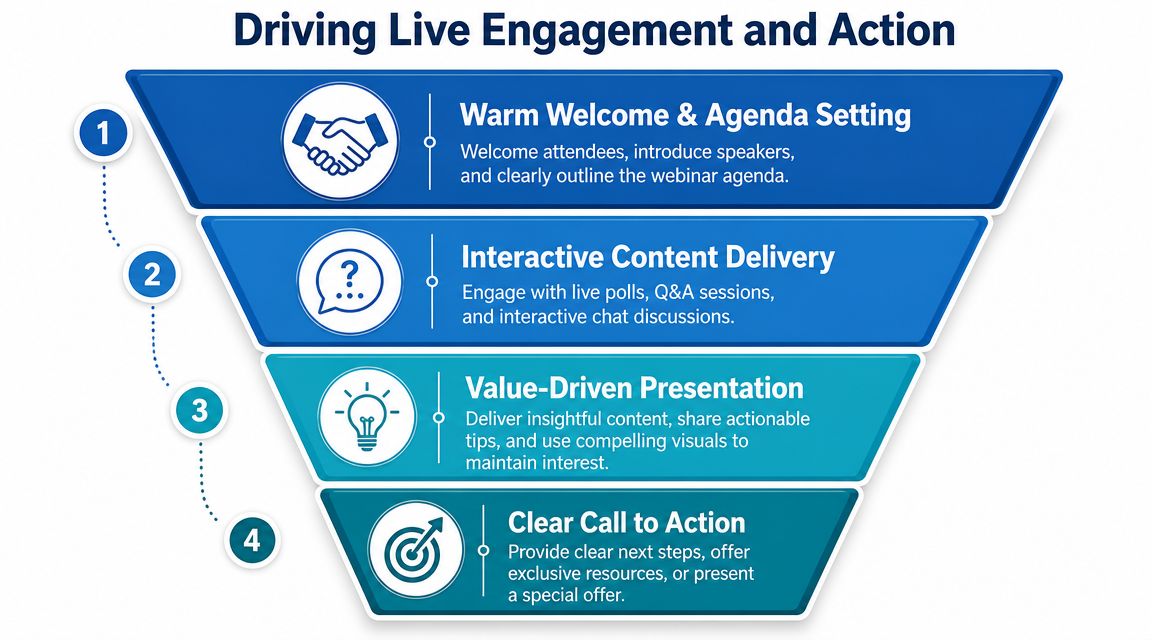
What a well-run live webinar looks like
The strongest live webinars feel guided, not improvised.
A practical run of show often includes:
- Opening minute: Welcome people by naming the problem they came to solve.
- Early interaction: Launch a simple poll or ask a chat question to get the room moving.
- Middle section: Deliver the core lesson without too many detours.
- Final segment: Use audience questions to reinforce buying signals and objections.
- Close: Offer a next step that matches the trust level you've built.
If the audience is quiet, don't panic and fill the silence with more slides. Ask narrower questions. “What's your biggest challenge?” is broad. “Are you dealing more with no-shows, platform confusion, or compliance concerns?” gives people an easy way in.
Handling common live problems
A technical glitch doesn't ruin a webinar. Panic does.
If the speaker's audio drops, the moderator should immediately acknowledge it in chat, keep attendees informed, and use the moment to restate the key point just covered. If slides lag, the speaker should keep teaching from the idea, not apologize for two minutes. Audiences are forgiving when the team stays calm and useful.
The same goes for low participation. If chat is quiet, switch to direct prompts:
- Ask for a number: “Type 1 if this is your first webinar with us.”
- Offer a choice: “Would you like the checklist or the template after the session?”
- Use Q&A intentionally: Pull one question early so people see that participation gets answered.
Choose the right CTA style
There's a real trade-off between trust building and immediate conversion. Many webinar guides argue that educational sessions shouldn't turn into sales pitches, but the more useful decision is to choose your CTA intensity based on the webinar's purpose, as discussed in Hinge Marketing's take on educational webinars and credibility.
Use different close styles for different contexts:
| Webinar type | Better CTA |
|---|---|
| Educational thought leadership | Download the related guide or register for the next session |
| Practical workshop | Request the template, checklist, or recording |
| Product-aware audience | Book a tailored demo or consultation |
| Customer training | Schedule enablement support or advanced onboarding |
A soft CTA isn't weak if it fits the session. A hard CTA isn't aggressive if the audience is ready for it. The mistake is mismatch.
Your Post-Webinar Strategy for Maximum ROI
The webinar ends. Often, organizations send the recording once, post a vague “thanks for joining” update, and move on. That leaves a lot of value on the table.
In a digitally fatigued environment, promotion alone isn't enough. Success depends on post-event content reuse and multi-touch follow-up, because attention is harder to earn than registration, as noted in Ten Events' discussion of webinar strategy and funnel alignment.
Split the follow-up by behavior
Treat attendees and no-shows differently. They didn't have the same experience, so they shouldn't get the same email.
A simple attendee sequence:
- Email 1: Thank them, share the recording, recap the main takeaway
- Email 2: Send the supporting asset, such as slides, checklist, or guide
- Email 3: Offer the next step based on the CTA you used live
A simple no-show sequence:
- Email 1: “Sorry we missed you” with the on-demand version
- Email 2: Highlight one question the webinar answered
- Email 3: Invite them to a related session or a lower-friction follow-up
Keep both tracks concise. Long recap emails usually underperform because they force the reader to work too hard.
Turn one webinar into a content engine
One recorded webinar can produce weeks of marketing material if you plan the breakdown properly.
Repurpose it into:
- Short video clips: Pull short answers, objections, or examples for LinkedIn and sales follow-up.
- Blog article: Convert the core lesson into a searchable written piece.
- Sales enablement snippet: Use a precise clip to support a common objection.
- Email sequence: Break the webinar into a short educational nurture.
- FAQ asset: Turn live questions into a support or pre-sales resource.
If your team needs a structured framework, these content repurposing strategies are a good reference because they help map one core asset into channel-specific outputs without making every reuse feel repetitive.
Recording quality affects repurposing quality
This gets overlooked. If your platform makes recording clumsy, exports poor audio, or buries files in an awkward backend, your team will repurpose less often. That's one reason recording workflow should be part of platform selection, not an afterthought.
For teams formalizing this process, a practical guide on how to record webinars helps define what to save, how to label it, and how to prepare recordings for reuse.
The replay isn't just a courtesy for no-shows. It's the raw material for your next month of content.
Tie reuse back to the original goal
If the webinar aimed to build trust, use post-event content to extend authority. Publish clips that teach. Send summaries that help. Keep the CTA light.
If the webinar aimed to drive qualified conversations, let the repurposed content do pre-selling. Use clips that answer objections, show workflows, and reduce uncertainty before a sales call.
That's where webinar ROI compounds. The live event creates the conversation. The replay and follow-up keep the conversation working after the calendar invite expires.
Measuring What Matters and Proving Your Success
A webinar program usually gets questioned at the same moment. The event drew solid registrations, the chat was active, and someone in leadership still asks, “Did it produce revenue?” If your reporting stops at sign-ups, that question is hard to answer.
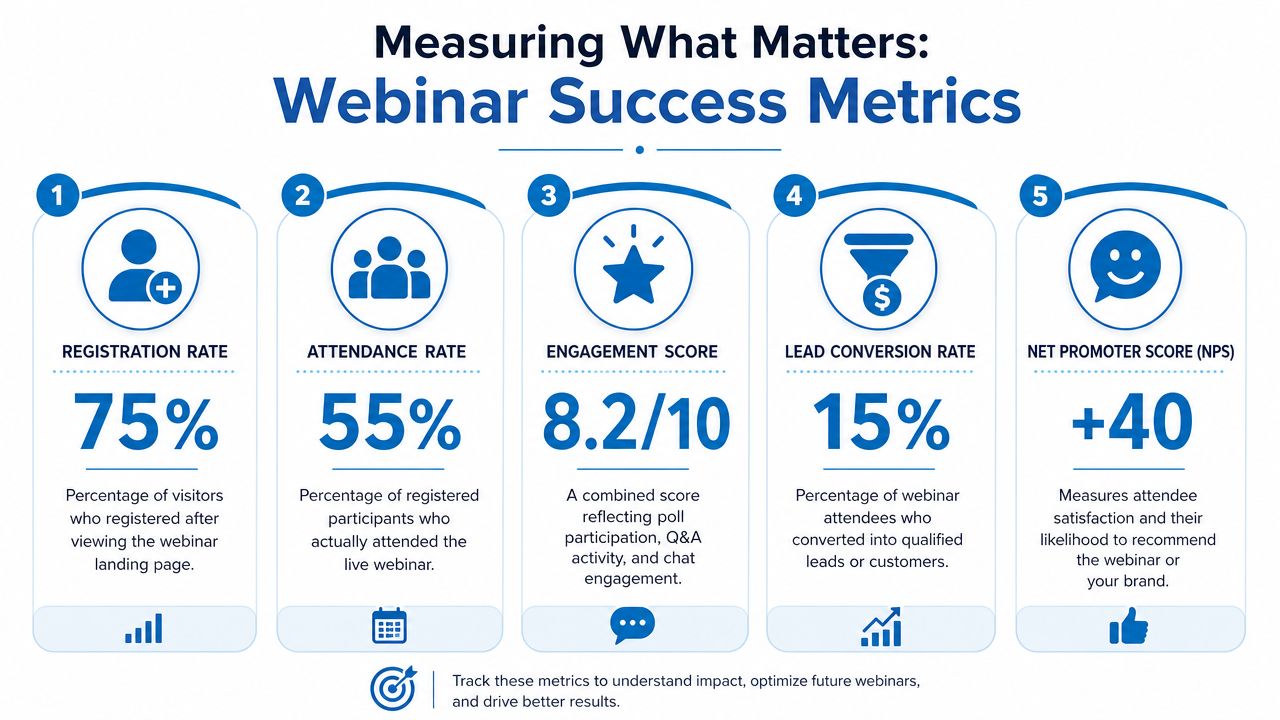
The fix is simple in concept and harder in practice. Track the full path from source to sales outcome, then report it in a way finance and leadership can use. I treat webinar measurement as an operating system, not a recap. That starts with the stack.
If your platform hides attendance logs, makes engagement data hard to export, or charges extra for recordings and reporting, ROI gets harder to prove. A cheaper tool with weak reporting often costs more by month three because the team spends hours stitching together CSV exports from the webinar platform, CRM, ad platform, and email system. Transparent pricing and built-in security features matter here too. Teams in regulated industries cannot defend a webinar program if the platform creates compliance risk or forces them into expensive workarounds later.
Build a dashboard people will trust
A useful webinar dashboard should answer two questions. What happened, and what should the team do next?
Include these fields:
- Registration source: Paid social, email, partner promotion, organic, outbound, or direct
- Cost by source: Media spend, list rental, sponsorship cost, or internal promotion cost
- Attendance rate: Registrants vs. live attendees
- Audience retention: How long attendees stayed and where drop-off happened
- Engagement quality: Poll completions, Q&A submissions, chat relevance, CTA clicks
- Follow-up response: Replay views, reply rates, booked meetings, demo requests, content downloads
- Pipeline movement: MQLs, SQLs, open opportunities, influenced pipeline, closed-won revenue
- Operational notes: Topic, speaker, format, length, platform used, and technical issues
That last line gets skipped too often.
When I review webinar performance, I want to know whether a weak conversion rate came from the topic, the offer, the audience mix, or the platform experience. If attendees dropped early because mobile joining was clunky or audio failed, that is not a content problem. It is a platform and production problem, and it should be reported that way.
Measure efficiency, not just volume
A webinar with 400 registrations can underperform a webinar with 120.
The better session may have lower promotion costs, stronger attendance from target accounts, longer watch time, and more qualified meetings. That is why I recommend adding three efficiency metrics to every report:
- Cost per registrant
- Cost per attendee
- Cost per qualified action, such as a booked meeting or sales-accepted lead
These numbers change budget conversations fast. They also expose where the program is wasting money. For example, LinkedIn lead gen ads may drive a large registration count, but house email often produces stronger attendance and lower cost. Sponsored partners can work well for reach, but I have seen plenty of programs pay for a logo placement that generated weak-fit leads and inflated headline numbers.
What leadership actually needs to see
Do not paste raw platform exports into slides. Summarize performance in business terms.
Show leadership:
- Which audience segments stayed engaged longest
- Which topics produced qualified follow-up, not just clicks
- Which CTA matched the intent of the session
- Which promotion channels brought in the right attendees at an acceptable cost
- Which platform or production issues reduced attendance, retention, or conversion
- What changed from the previous webinar and why
This creates a much better conversation than “attendance was good.”
If the webinar was designed to educate existing pipeline, report influence on opportunity progression. If it was meant to source net-new demand, report meeting creation and sales acceptance. If it served a compliance-sensitive audience, include the operational win of using a platform with encryption and straightforward pricing instead of treating technology as a separate procurement issue. That choice affects margin, reporting quality, and risk.
A strong webinar program gets repeat budget because it can explain results with precision. The team knows which topics attract the right accounts, which channels produce efficient attendance, which CTAs create action, and which platform decisions support ROI instead of eroding it behind the scenes.
If you're reviewing platforms while building that channel, AONMeetings is worth a look for teams that need meetings and webinars in one stack, with built-in webinar access, bank-level encryption, recordings, browser-based joining, and HIPAA-compliant use cases at straightforward pricing.
