

You're probably in the same place most webinar marketers land eventually. The topic is set, the speaker is booked, the deck is half done, and traffic is already being lined up. Then the weak point becomes obvious. The landing page for webinar registration is still a placeholder, or worse, it's a generic event page with too much text, too many links, and a form that asks for everything short of a passport number.
That's where good webinar campaigns usually split. One version gets sign-ups but weak attendance. The other turns the page, the reminders, and the join experience into one connected system. That second version is what produces cleaner pipelines, better attendee quality, and fewer painful post-mortems.
A webinar page isn't a mini website. It's a conversion asset built to push one decision. Industry guidance is consistent on that point: use a single focused call to action, show the topic, date, speakers, and benefits clearly, and keep form fields minimal so people complete registration, as outlined in Zoho's webinar landing page guidance.
Blueprint Your Page for Maximum Registrations
The fastest way to ruin a landing page for webinar campaigns is to start with design before positioning. When teams skip the strategic work, the page ends up saying what the company wants to announce, not what the visitor wants to gain.
Start with three decisions.
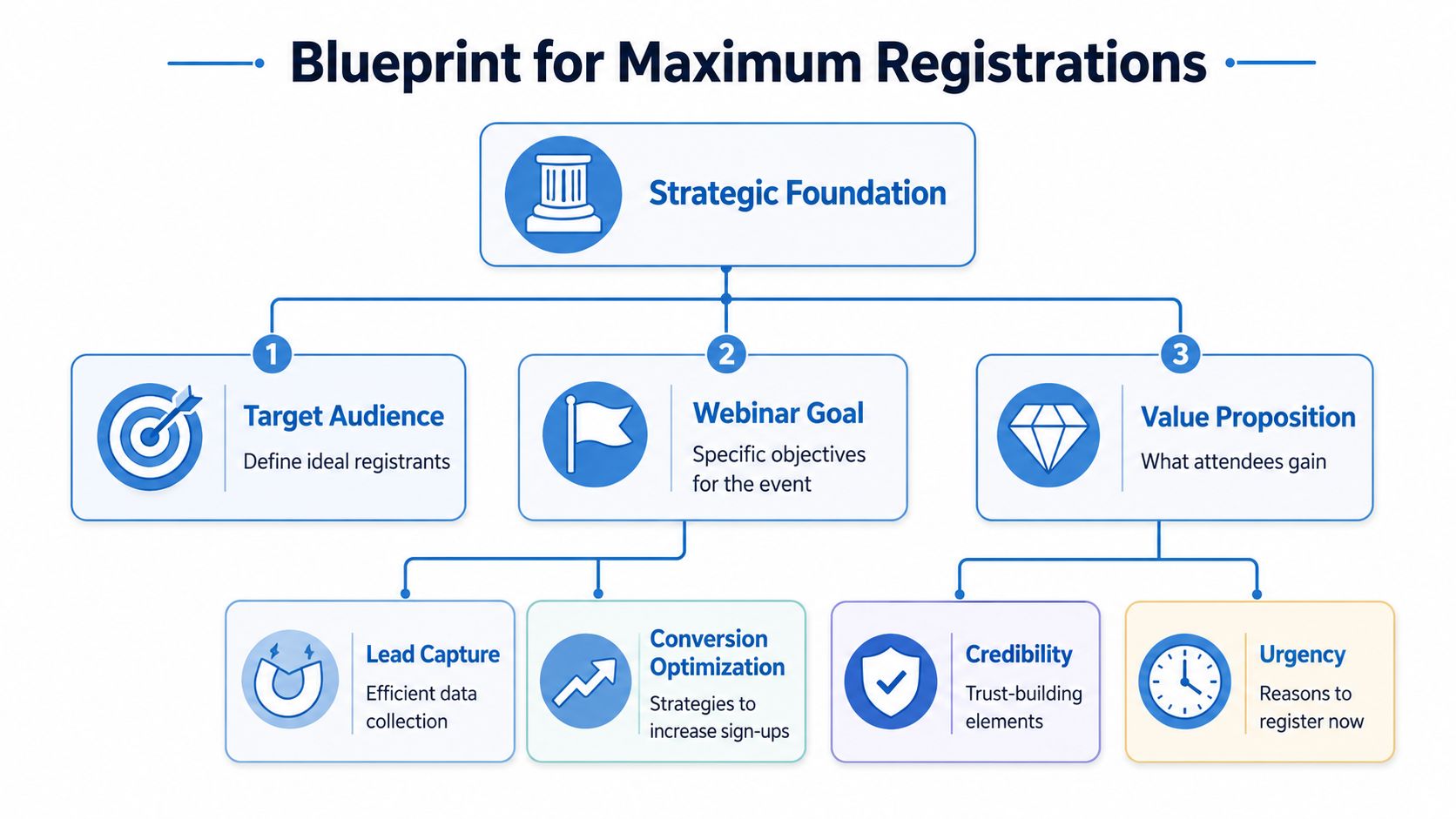
Define who should register
A webinar page works better when it excludes the wrong people as clearly as it attracts the right ones. “Anyone interested in marketing” is too broad. “In-house B2B marketers trying to improve demo-to-pipeline conversion” is usable.
Write out these inputs before touching the page:
- Audience role: job title, function, or buying influence
- Current pain: what's frustrating them today
- Desired outcome: what they want after the session
- Objection to registration: time, trust, relevance, or platform friction
That short prep exercise sharpens everything else. Your headline becomes more specific. Your bullet points become more persuasive. Your speaker bio becomes easier to frame around relevance instead of vanity.
Practical rule: If the visitor can't tell “this is for me” in a few seconds, your registration form doesn't matter yet.
Build a value proposition people can repeat
A strong value proposition is short enough to remember and specific enough to justify attendance. Don't describe the webinar format. Describe the payoff.
Weak:
- Join our webinar on revenue operations
Better:
- Learn how revenue teams can reduce handoff friction between marketing, sales, and customer success
The distinction matters. The first states a topic. The second states a result.
A simple framework that works:
- What the webinar covers
- Who it's for
- What they'll walk away able to do
Example:
“Live session for clinic managers on improving patient communication workflows across teams.”
If you need extra support when you optimise your landing page strategy, it helps to review broader landing page fundamentals and then adapt them to webinar-specific behavior.
Include the non-negotiables above the fold
Most high-performing webinar pages share the same core structure. The exact styling varies, but the essentials don't.
Use this above-the-fold checklist:
- Headline with a clear outcome: say what improves, changes, or gets solved
- Date and time: visible without scrolling
- Speaker identity: names, titles, and a reason to trust them
- Primary CTA: one action only
- Short form or clear register button: don't make users hunt for the next step
Then support that section with:
- Benefit bullets: what attendees will learn
- Expanded speaker bios: short, relevant, credibility-focused
- Who should attend: useful when the topic serves multiple segments
- FAQ or friction reducers: recording availability, duration, access method
A solid planning shortcut is to map the page around the actual webinar flow, not just the registration moment. This guide on how to host a webinar is useful because it forces you to think beyond page copy and into delivery, reminders, and audience experience.
Design Elements That Build Trust and Drive Action
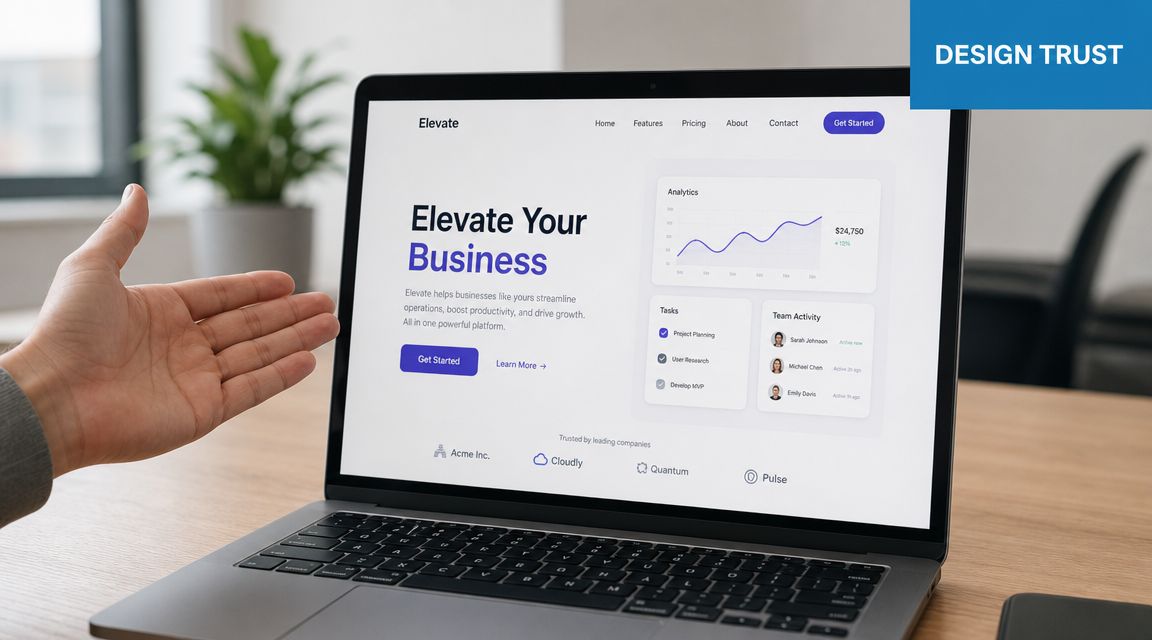
A webinar page can win the click and still lose the attendee. I've seen pages post healthy registration rates, then underperform because the design raised small doubts at the exact moment visitors needed confidence: Is this speaker credible? Will this be easy to join? Will my data be handled properly? Strong design answers those questions fast and keeps the path to registration clear.
According to Google's mobile landing page guidance, mobile users abandon pages that feel slow, cluttered, or hard to use, which is why webinar page design has a direct effect on both conversion rate and attendee quality, not just raw traffic volume. The same principle applies after the form submission. If the registration experience feels reliable from the first screen, people are more likely to trust the confirmation, reminders, and join flow later.
Use layout to control attention
Visitors scan for proof, clarity, and effort level. Design should guide them through those checks in seconds.
A practical hierarchy looks like this:
- Outcome-focused headline
- Date, time, and timezone
- Short value summary
- Registration CTA or form
- Speaker credibility
- Supporting details such as agenda, FAQ, or access notes
Pages lose momentum when visual weight goes to the wrong places. Huge hero art, busy headers, carousel sections, and multiple calls to action pull attention away from the form. I usually remove top navigation on webinar pages unless brand or legal requirements make it necessary. In tests, fewer exits usually beat prettier layouts.
White space helps, but only when it creates order. Empty space around a weak headline does nothing. Empty space around the form, CTA, and proof points makes the next action obvious.
Choose trust signals that reduce hesitation
Trust signals need to match the buying context and the joining experience. A generic badge strip or stock-photo team shot rarely helps. A real presenter photo, a credible title, a recognizable company name, and plain-language access details do.
For higher-consideration webinars, especially in healthcare, legal, finance, and consulting, use trust elements that answer operational concerns:
- Presenter proof: full name, role, and a short line on why their perspective matters
- Brand consistency: the page should look like the company people expect to hear from
- Access clarity: whether attendees join in-browser, need a download, or get a recording
- Security language: short, specific notes on encryption, privacy, and host controls
Platform choice affects page performance. If your webinar stack supports encrypted sessions, waiting rooms, moderator permissions, and browser-based access, say so near the form or in the FAQ. Tools such as AONMeetings help reduce the quiet drop-off that comes from technical uncertainty because registrants know the session will be easy to access and better protected. That improves more than sign-ups. It improves attendance confidence.
One more point from SEO and conversion work: design trust cues should also be readable by search visitors who have no prior brand familiarity. The same clarity that helps paid traffic often helps pages convert with SEO copywriting because intent-driven visitors need fast reassurance, not clever design.
Design for mobile behavior first
Mobile design is usually where webinar pages break. Long speaker sections push the form too far down. Tiny date text gets missed. Form fields become annoying enough to delay the registration until later, and later often means never.
Check the page on a phone and look for friction in these places:
- Headline length: the promise should be visible in one quick glance
- Form length: ask only for what sales, follow-up, or compliance needs
- CTA placement: users should not scroll past decorative content to find the action
- Tap targets: buttons and fields need enough spacing to avoid mistakes
- Load discipline: compressed images and fewer scripts matter on mobile networks
The cleanest mobile pages are often the highest-performing ones. Put the promise, timing, CTA, and a few proof points first. Move long bios, partner logos, and secondary education lower on the page. If a design choice looks polished but delays registration or raises questions about access, it is hurting ROI.
Crafting Compelling Copy That Fills Your Webinar
Design gets attention. Copy earns the registration.
Most webinar pages underperform because they describe the session instead of selling the outcome. Visitors don't care that you've assembled a panel, prepared slides, or booked a respected guest. They care whether the webinar helps them solve a problem worth an hour of their day.
Write headlines around outcomes, not formats
“Register for our upcoming webinar” isn't a headline. It's a label.
A stronger headline does one of three things:
- names the problem
- promises the gain
- frames the session for a specific audience
Use these templates:
- How to [achieve outcome] without [common obstacle]
- What [audience] need to know about [topic]
- A practical session on [topic] for [specific role]
- Reduce [pain point] with a clearer approach to [topic]
Examples:
- How clinic teams can reduce no-show confusion with clearer patient communication
- What B2B marketers need to fix before their next product webinar
- A practical session on secure virtual consultations for care providers
If your team also wants the page to support organic visibility, these principles align well with broader guidance on how to convert with SEO copywriting without stuffing the page with keywords.
Turn agenda points into benefit bullets
Many pages lose momentum. They list topics like an internal meeting agenda.
Weak bullets:
- Introduction to demand generation
- Funnel analysis
- Follow-up process
Better bullets:
- Spot funnel leaks early: identify where webinar leads stop progressing after registration
- Improve handoffs: align marketing and sales on what counts as a qualified attendee
- Tighten follow-up: build a cleaner sequence for no-shows, attendees, and high-intent prospects
The best bullets answer one question: “What do I get from attending?”
Use this formula:
- action verb
- practical outcome
- context
Example:
- Reduce join friction: make it easier for registrants to attend from any device and location
Copy check: Replace every abstract noun with a concrete result. “Optimization” becomes “more completed registrations.” “Engagement” becomes “more people staying to the Q and A.”
Make the CTA specific
Generic CTA labels weaken momentum. “Submit” is administrative. “Register now” is acceptable but often bland. The strongest CTA matches the promise of the page.
Good CTA options:
- Reserve my seat
- Save my spot
- Join the live session
- Get webinar access
If the webinar includes extras, mention them near the button rather than bloating the CTA itself. Practical bonus materials often help. Templates, checklists, worksheets, slide summaries, or a recording window can increase perceived value. If the webinar includes follow-up resources, say so in plain text near the form.
That's also where price framing matters for paid webinars or premium demos. If registration is free, say it cleanly. If it's paid, state what's included and why the fee makes sense. Don't hide the exchange.
Your Technical Toolkit for a Secure Landing Page
A webinar page can look polished and still leak conversions through the backend. Forms break. reminder workflows fail. join links create friction. Security language is missing. The result is predictable. Fewer completions, lower trust, and weaker attendance quality.
Platform choice matters more than most landing page advice admits.
Keep the form short and the stack connected
A high-performing webinar landing page should keep form fields to the basics, typically full name, email, and company, and tracking should cover page views, registration conversion rate, and CTA click-through rate, according to Livestorm's webinar landing page recommendations.
That guidance matches what works in practice. Every extra field needs a reason. “Phone number” can be justified for sales-led demos or SMS reminders. “Industry,” “team size,” and “budget” usually belong later unless segmentation is mission-critical.
Use a simple technical checklist:
- Form field discipline: ask only what you will use
- Confirmation page setup: confirm registration instantly and state next steps
- Calendar integration: reduce no-shows by making attendance easy to plan
- Browser access: avoid forcing downloads when possible
- Tracking readiness: connect analytics before traffic goes live
Compare total value, not just the monthly fee
A cheap webinar tool gets expensive fast when webinars require add-ons, contracts, or separate landing page and security workarounds. That's why price comparisons should look at total operating value, not headline pricing language.
| Feature | AONMeetings | Zoom Webinar | GoTo Webinar |
|---|---|---|---|
| Starting price context | Starts from ₹179 per user per month | Pricing varies by tier | Pricing varies by tier |
| Webinars included | Yes, built into all plans | May depend on webinar plan setup | Webinar product typically sold by plan tier |
| Meeting time limits | No 40-minute limits | Depends on plan | Depends on plan |
| Contracts | No contracts | Varies by plan and billing structure | Varies by plan and billing structure |
| Security positioning | Bank-level encryption, HIPAA-compliant meetings, meeting lock, waiting rooms | Security features vary by plan and configuration | Security features vary by plan and configuration |
| Browser-based joining | Yes | Available depending on workflow and setup | Available depending on workflow and setup |
| Added collaboration tools | Screen sharing, whiteboards, document sharing, recordings | Varies by plan | Varies by plan |
The practical difference is operational. One platform may cover secure meetings, webinars, reminders, browser access, and moderation in one place. Another may require extra setup, extra approvals, or a higher tier before your landing page experience feels complete.
For small teams evaluating platform fit, this overview of webinar software for small business is a useful starting point. One option in that category is AONMeetings, which includes built-in webinars, browser-based access, bank-level encryption, and HIPAA-compliant meeting support across plans.
Security is part of conversion
Security copy usually gets treated like legal footer material. That's a mistake.
For healthcare providers, consultants, education businesses, and client-facing teams, secure webinar delivery helps answer a silent objection: “Is this safe enough for me to register and attend?” Mention encryption near the form, in FAQs, or on the confirmation page. Keep the wording plain. Don't turn it into a compliance lecture.
The same applies to webinar inclusions. If your platform includes recordings, screen sharing, whiteboards, document sharing, moderator controls, and secure waiting rooms, those aren't side notes. They're part of the value proposition because they affect delivery quality after registration.
Beyond the Submit Button From Analytics to Attendance
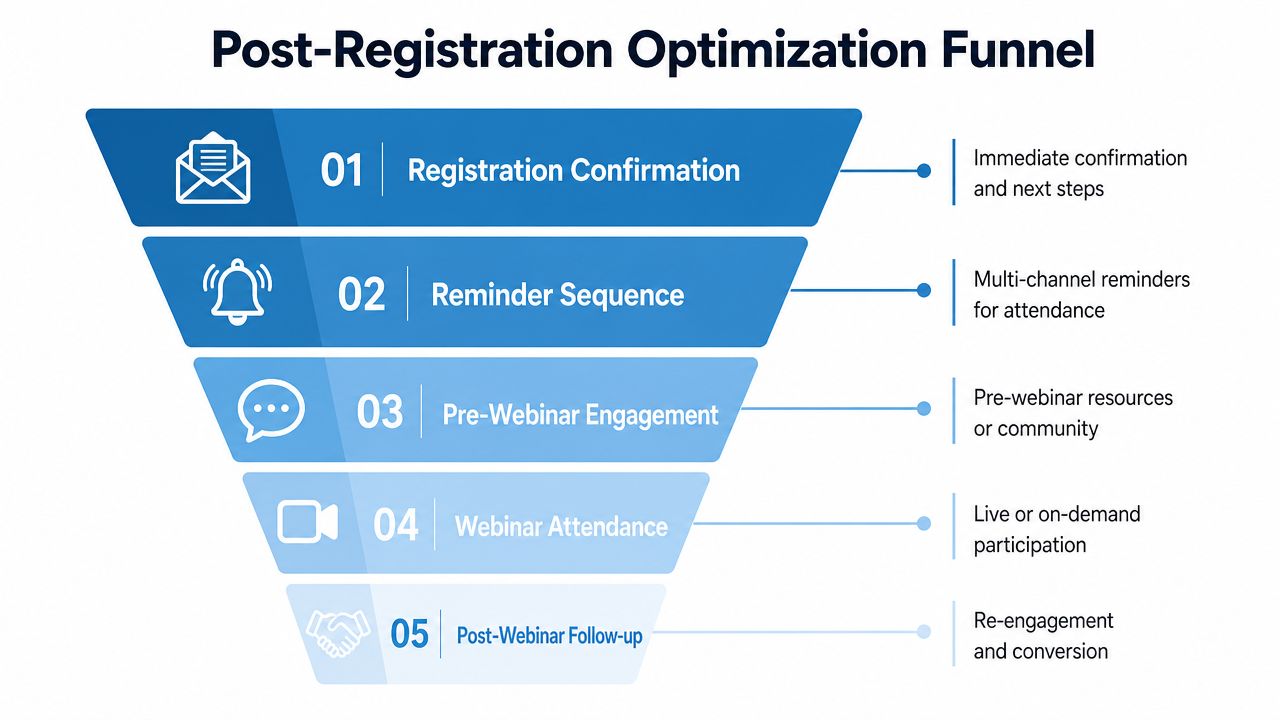
A webinar page can hit its registration goal by noon and still miss revenue targets a week later. The failure usually shows up after the form. Reminders arrive late, calendar holds never get added, the join flow breaks on mobile, or the event link triggers extra friction right before start time.
That is why I judge a landing page for webinar campaigns as one operating system, not one conversion asset. The page gets the lead. The confirmation flow, reminder sequence, join experience, and platform reliability determine whether that lead becomes an attendee, a qualified conversation, or a wasted ad click. Sequel highlights many of these post-signup factors in its review of webinar landing page examples.
Track the right points in the funnel
The handoff between registration and attendance deserves the same scrutiny as the page itself. A healthy funnel usually tracks four things:
- Traffic source quality: which channels bring people who show up
- Form abandonment: where intent drops before submission
- CTA click-through rate: whether your promise and page structure line up
- Registration-to-attendance rate: whether your follow-up process and event setup hold up
Teams often misread performance. Paid social may produce cheap registrations and poor attendance. Partner email may drive fewer sign-ups and better attendee quality. If attendance is weak, start by checking the confirmation page, reminder cadence, sender reputation, and join instructions before rewriting the hero section again.
I use a simple rule. Registrations measure interest. Attendance measures execution.
Test one variable at a time
A/B testing gets messy fast when teams change the offer, layout, and follow-up flow in the same experiment. Keep each test narrow enough to produce a decision you can act on.
A practical order looks like this:
- headline
- CTA wording
- form length
- speaker placement
- confirmation page layout
- reminder sequence wording
The fifth and sixth items matter more than many teams expect. You can raise registration volume with a shorter form and still lower pipeline contribution if the reminder sequence is weak or the join process feels uncertain.
Reminder timing is a good example. ON24's webinar benchmarks and planning guidance consistently reinforce the value of confirmation emails, calendar invites, and timed reminders close to the event because attendance depends on follow-through, not just initial interest. In practice, I've found that a confirmation email, a day-before reminder, and a final reminder shortly before start cover the basics without turning your sequence into inbox clutter.
The join experience also affects ROI. Browser-first access, one-click calendar adds, clear timezone handling, and a stable event room reduce the drop-off that happens in the last hour. Security matters here too. If attendees are pushed through confusing login steps or question whether the session environment is trustworthy, some will not show. Platforms such as AONMeetings help by pairing browser-based access with encrypted delivery and a low-friction attendee experience, which protects both attendance rate and attendee confidence.
If your current process gets plenty of sign-ups but too few live attendees, review your full follow-up system against this guide on how to increase webinar attendance.
Deconstructing High-Performing Page Examples
The easiest way to improve your own page is to critique pages that already get the basics right. Not to copy them blindly, but to notice the decisions underneath the design.
Example one Hootsuite-style clarity
A page in the Hootsuite mold tends to work because it gets to relevance quickly. The headline communicates the subject cleanly, the above-the-fold section gives enough detail to qualify the visitor, and the benefit bullets do most of the selling.
What's working:
- the topic is obvious immediately
- the page doesn't bury the event details
- the offer feels practical, not academic
What I'd borrow:
- a sharper bonus callout if there's a downloadable resource included
- a stronger CTA contrast if the button blends into the palette
Example two Salesforce-style authority
Pages modeled after Salesforce often lean on speaker credibility and structured content. That approach works when the audience needs reassurance that the session won't be superficial.
What's working:
- speaker photos and titles build confidence fast
- the page balances authority with a usable agenda
- the form placement supports quick sign-up once trust is established
What to watch:
- authority-heavy pages can drift into corporate stiffness
- if the copy sounds too broad, people assume the content will be broad too
Example three Slack-style audience fit
Slack-style pages usually perform well when the audience is clearly defined. The copy doesn't try to appeal to everyone. It gives a distinct use case, a recognizable business context, and enough specificity to filter out low-intent visitors.
What's working:
- strong audience targeting
- concise supporting text
- a page structure that supports scanning
My general recommendations often include:
- tighter “who should attend” language
- timezone clarity for distributed audiences
- a post-sign-up flow that feels just as polished as the page itself
The common thread in all three examples isn't visual style. It's alignment. The page promise, the form friction, the reminder flow, and the webinar access experience all point in the same direction.
If you need a platform that supports the full webinar journey instead of just the registration step, AONMeetings is worth a look. It combines secure video meetings and built-in webinars with browser-based joining, bank-level encryption, HIPAA-compliant meeting support, and straightforward pricing that starts at ₹179 per user per month. For teams that care about both conversions and attendance reliability, that combination can simplify the stack and remove a lot of avoidable friction.
