

A lot of companies still treat video meetings like basic utility software. That misses the core business case. A 2022 research summary cited by Zoom estimates that U.S. employers can save about $11,000 per year for each half-time remote worker, while the same source set says 94% of businesses reported a productivity boost from video conferencing and companies cut travel costs by about 30% through video tools (Zoom video conferencing statistics).
Those numbers reframe the conversation. The benefits video conferencing delivers aren't limited to "people can talk face to face." Its primary value lies in faster decisions, lower operating costs, tighter security controls, and cleaner workflows across sales, training, support, and telehealth.
Leaders who get strong results from video conferencing usually do three things well. They choose a platform with the right operational features, they design meeting workflows instead of just scheduling calls, and they treat security as part of the user experience rather than a legal afterthought.
Why Video Conferencing Is a Core Business Strategy
Video conferencing now sits in the same category as email, chat, and cloud storage. It isn't an add-on anymore. It has become a core operating layer for businesses that need to coordinate work across offices, homes, client sites, and field teams.
The strongest reason is simple. Video compresses communication. A team can talk, share a screen, review a document, answer objections, and assign next steps in one live session. That replaces long email chains and cuts the lag between question and answer.
Where the business value actually appears
In operations, the biggest gains tend to show up in five areas:
- Faster issue resolution: Support teams can diagnose a problem live instead of asking customers to send screenshots back and forth.
- Shorter approval cycles: Managers can review a shared document with stakeholders in one call and settle edits on the spot.
- Lower coordination overhead: Project leads can use recurring stand-ups, screen sharing, and recordings to keep distributed teams aligned.
- More resilient service delivery: Healthcare clinics, educators, and consultants can keep serving clients even when travel or office access is limited.
- Better use of specialist time: Instead of flying an expert to a site, teams can bring that person into the exact meeting where their input matters.
Video meetings create value when they remove delay, not when they simply copy an in-person meeting onto a screen.
Why strategy matters more than software alone
A platform can include encryption, webinar hosting, recordings, chat, and waiting rooms. That still won't fix a messy meeting culture. Teams waste money when they use video for updates that should've been asynchronous, or when they split core functions across too many tools.
The practical approach is to map feature to outcome. Recording supports training reuse. Screen sharing supports technical review. Webinars support external education and lead generation. Meeting locks and access controls support regulated conversations. That's how video conferencing moves from software expense to operational efficiency.
Boosting Productivity and Slashing Operational Costs
Travel is the obvious line item, but it is rarely the full business case. The stronger ROI comes from reducing time between discussion and decision, cutting the number of tools staff have to manage, and lowering the administrative load around meetings, training, and customer communication.
Operations teams usually see the payoff in day-to-day workflow first. A manager can review a proposal with finance, sales, and legal in one session instead of stretching approvals across several days of email. A trainer can run the session once, record it, and reuse it for onboarding instead of repeating the same material for every cohort. A support lead can bring in a specialist for 15 minutes instead of booking travel or delaying the issue until everyone is onsite.
Those are labor savings.
They matter because software costs are visible, while coordination costs tend to hide inside payroll. If a team spends less on a meeting license but adds manual note cleanup, separate webinar setup, and more IT support tickets, the cheaper subscription can produce a higher operating cost.
Where cost reduction shows up in practice
The first savings usually come from four areas:
- Less travel for routine interactions. Internal reviews, early-stage sales calls, screening interviews, and vendor check-ins often do not need flights, mileage, or hotel spend.
- Faster approval cycles. Screen sharing, document review, and live clarification reduce revision loops and shorten the time between draft and sign-off.
- Lower meeting admin. Recordings, transcripts, and reusable summaries cut the follow-up work that usually falls on managers, coordinators, or account teams.
- Fewer overlapping tools. One platform handling meetings, webinars, recordings, and secure access controls can reduce renewals, user provisioning, and vendor management.
The fourth point is where procurement teams often miss the actual cost structure.
Price comparison should focus on stack cost, not just seat cost
The verified material provided for this article does not include competitor pricing for Zoom, Teams, GoToWebinar, WebinarJam, or specific AONMeetings plan comparisons beyond the publisher description. The practical comparison, then, is not a made-up monthly price table. It is whether the business must pay for one product or build a stack of separate products to get the workflow it needs.
| Feature | AONMeetings Pro Plan | Zoom Pro Plan + Webinar Add-on | Potential Savings |
|---|---|---|---|
| Core meetings | Included | Typically requires the meeting plan | Savings depend on bundle needs |
| Webinar capability | Included, per publisher description | Often handled through a separate add-on or separate product | Savings come from avoiding a second tool |
| Recording and collaboration tools | Included, per publisher description | Often available, but may vary by tier and add-ons | Savings come from fewer upgrades |
| Browser-based joining | Included, per publisher description | Availability depends on platform workflow | Savings come from lower support friction |
| Encryption and secure meeting controls | Included, per publisher description | Available on major platforms with different admin models | Savings come from reduced compliance overhead |
| Contract complexity | No contracts, per publisher description | May vary by vendor and plan | Savings come from easier procurement and less lock-in |
This is a finance question as much as a feature question. If webinar hosting sits in a separate product, teams usually take on extra setup, another renewal, another admin console, and another set of user permissions. If recordings and transcripts live elsewhere, someone has to move files, control access, and keep retention policies straight. That is operational drag, and in regulated environments it can become a security risk as well.
A realistic operations scenario
Consider a small training company that runs internal meetings, client demos, and monthly webinars. With separate tools for meetings, webinars, and post-meeting summaries, staff have to manage attendee exports, branding, speaker permissions, recordings, and follow-up workflows across multiple systems. None of that work is strategically important, but someone still spends hours on it every month.
A single platform will not solve every process problem. It can, however, remove duplicate admin work and reduce the odds of files, invites, or recordings being handled inconsistently.
Practical rule: Before calling a platform cheaper, calculate the labor hours, security overhead, and support tickets created by every extra tool in the stack.
For teams trying to tighten meeting follow-through as well as software spend, this guide for better meeting decisions is useful because it focuses on summaries, action items, and the post-meeting work that often drives the actual cost.
Enhancing Engagement and Learning Outcomes
Training is where weak video setup gets exposed fast. If people can't interact, ask questions, annotate, or review materials later, the session turns into passive screen time. That's not a conferencing problem. That's a workflow design problem.

Features that improve learning instead of just broadcasting
For education, coaching, and corporate enablement, the most useful features are usually straightforward:
- Screen sharing: Trainers can walk through software, documents, worksheets, or live dashboards.
- Whiteboards: Better for process mapping, brainstorming, and teaching concepts that need visual explanation.
- Breakout rooms: Useful when learners need to practice, role-play, or solve a problem in small groups.
- Chat and file sharing: Participants can ask low-friction questions and grab materials without leaving the session.
- Recording and playback: Learners can revisit the session later, which is especially useful for onboarding and compliance refreshers.
A realistic training scenario
Say a sales manager is teaching a distributed team how to run discovery calls. A lecture format won't do much. A better session looks like this:
- The trainer opens with a short live presentation using screen share.
- Participants review a sample call framework on a shared document.
- Small groups move into breakout rooms to practice objection handling.
- The trainer returns everyone to the main room for feedback.
- The session recording becomes part of the onboarding library.
That workflow creates more engagement because people aren't just watching. They're participating, applying, and reviewing.
A similar principle applies in academic tutoring and customer education. The strongest results come when the platform supports active use of content during the session, then preserves the session as reusable material afterward.
In training, the meeting isn't the product. The learning transfer is.
The Strategic Advantage of Integrated Webinars
Meetings and webinars serve different jobs. A meeting is built for interaction among participants. A webinar is built for controlled delivery to an audience, often with moderated Q&A, registration flow, branded presentation, and reusable recordings.
That difference matters because many teams outgrow standard meetings before they realize it. Marketing teams need product demos. Clinics need patient education sessions. coaching businesses need recurring workshops. Schools need parent briefings and orientation events.

Why integrated webinars reduce cost and friction
The biggest value proposition isn't just "webinars included." It's what inclusion prevents. When webinar delivery sits inside the same platform as your meetings, recordings, chat, and transcripts, your team avoids extra setup, user provisioning, and media transfer steps.
Enghouse/Vidyo notes that modern platforms combining recording and transcription can turn a live meeting into a reusable collaboration asset, while screen sharing and chat improve collaboration without added costs (Enghouse on video conferencing benefits). That same logic applies to webinars. A recorded session can become an onboarding asset, customer resource, or on-demand training module without export gymnastics.
A workflow comparison that operations teams care about
Separate webinar stack
- Schedule meeting in one app
- Manage webinar in another
- Export recording
- Upload elsewhere for replay
- Recreate branding and access settings
- Train staff on multiple admin panels
Integrated webinar stack
- Schedule and host inside one environment
- Keep controls, recordings, and access policies together
- Reuse content faster
- Reduce vendor sprawl
If your team is choosing between live learning formats, this overview of workforce training models helps clarify when a live webinar is the right choice versus a self-paced lesson library.
For small businesses in particular, it makes sense to compare platforms that include webinar capability natively instead of forcing a separate purchase. This roundup of webinar software for small business is useful because it frames the decision around use case and workflow, not just headline features.
AONMeetings is one example of that all-in-one model. Per the publisher description, it includes webinars, recordings, whiteboards, browser-based access, and encryption in the platform rather than treating webinars as a separate bolt-on.
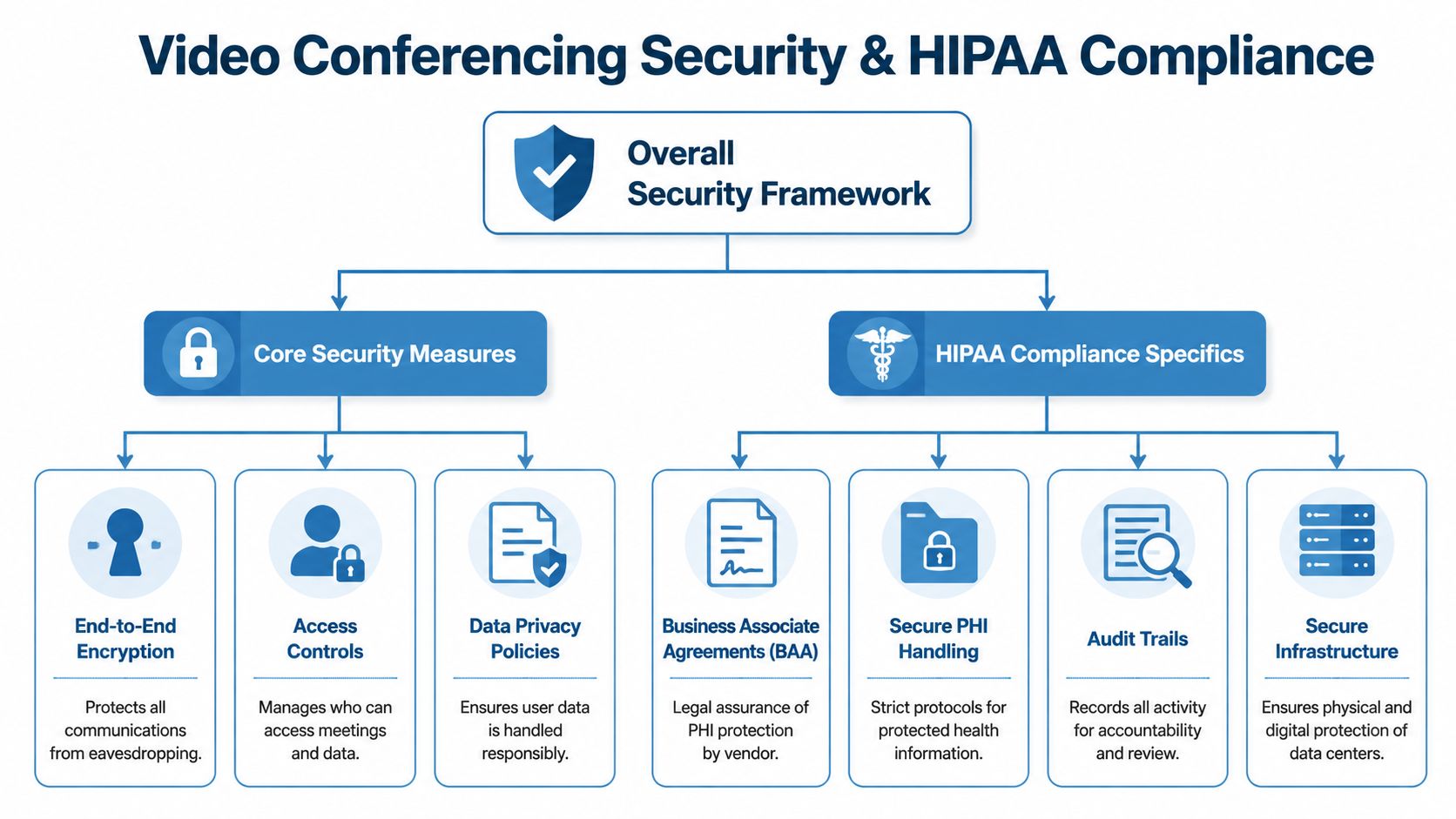
Ensuring Security and HIPAA Compliance
Security gets discussed too vaguely in most software buying conversations. "Secure" can mean anything from encrypted transport to strict role-based controls to contractual compliance obligations. For healthcare, legal, financial, and education teams, that difference matters.
What encryption actually does in practice
When a vendor offers strong encryption, the practical benefit is straightforward. Conversations, files, and meeting data are better protected from unauthorized access while they move through the system. For buyers, that shouldn't be treated as a premium extra. It should be part of baseline risk control.
Just as important are the admin features around the meeting itself:
- Waiting rooms: Let hosts verify who enters.
- Meeting locks: Stop late or unknown participants from joining once everyone expected is present.
- Passwords and join controls: Reduce accidental access.
- Moderator controls: Help hosts remove disruptions and control who can share content.
- Recording permissions: Limit where sensitive information ends up.
What HIPAA compliance means operationally
For healthcare, compliance isn't just about the video stream. It's about the total environment around protected health information. Teams should look for secure handling of session data, clear access controls, auditability, and vendor readiness to support healthcare obligations.
Browser-based access can help here too. If a patient doesn't need to install software, the clinic reduces one common source of failed appointments and support calls. That's especially relevant in telehealth, where usability isn't a convenience issue. It's part of access.
A 2023 JMIR review on video-call telehealth highlights that improving broadband connectivity and usability are key for telehealth to work well, especially in rural and underserved areas. The benefit depends on reaching people who would otherwise be excluded (JMIR review on video-call telehealth).
What works and what doesn't
What works
- Choosing a platform with encryption, waiting rooms, and admin controls enabled by default
- Training staff on meeting locks, participant verification, and recording policy
- Using browser-based joining when participants struggle with downloads
- Standardizing telehealth workflows so staff aren't improvising privacy decisions
What doesn't
- Assuming "encrypted" automatically means compliant for regulated care
- Letting anyone join without verification
- Recording sensitive sessions without clear retention policy
- Ignoring patient-side usability barriers
Teams evaluating healthcare-ready tools can use this reference on HIPAA-compliant video conferencing platforms to compare the controls that matter in real deployments.
Measuring ROI and Justifying the Investment
If you want budget approval, "better collaboration" isn't enough. You need a measurement model that ties platform use to operating outcomes. The good news is that video conferencing is easier to justify than many other software categories because it touches labor, travel, service delivery, and meeting throughput all at once.

Evidence cited by the University of the Cumberlands found users reporting 94% increased productivity and efficiency and 88% increased impact of discussions, which supports the idea that good video workflows improve collaborative throughput rather than merely replacing in-person meetings (University of the Cumberlands on video conferencing benefits).
KPIs that make sense to track
Don't try to measure everything. Track the metrics your team can influence directly.
| KPI | What to measure | Why it matters |
|---|---|---|
| Travel reduction | Spend avoided on in-person meetings that moved online | Direct operating cost impact |
| Meeting follow-up time | Time spent writing notes, assigning tasks, and clarifying decisions | Shows workflow efficiency gains |
| Training reuse | How often recordings are reused in onboarding or support | Captures value beyond the live session |
| Customer resolution speed | Whether issues are solved in one live session versus multiple exchanges | Links video use to service efficiency |
| Sales process friction | How quickly demos, approvals, and stakeholder reviews happen | Shows revenue-side impact qualitatively |
| Attendance reliability | Missed sessions due to technical barriers or login issues | Highlights access and usability quality |
A simple ROI framework
Use a before-and-after model over a defined period. Start with one team or one process.
- Choose a workflow. Examples include patient follow-ups, product demos, weekly project reviews, or new-hire training.
- Capture baseline friction. Look at travel, support tickets, no-shows, manual note-taking time, or delayed decisions.
- Match features to waste. Recording reduces repeat training. Transcripts reduce note-taking. Browser join reduces support burden.
- Review after adoption. Focus on reduced delay, reduced cost, and improved completion quality.
The strongest ROI case usually comes from one workflow solved well, not from a broad promise that every meeting will suddenly become valuable.
Mitigating Common Challenges with Smart Features
Critics of video conferencing aren't wrong about the pain points. Meetings can run too long. Audio can echo. People get fatigued. Calls fail at the worst moment. According to an industry summary, 58% of professionals reported technical issues during calls, yet 89% of remote workers still felt more connected through video meetings (ElectroIQ video conferencing statistics).
That gap matters. It tells you the core format still delivers value, but the operational setup has to improve.
Common problems and practical fixes
- Meeting fatigue: Use recordings, summaries, and transcripts so fewer people need to attend live. Shift status updates out of the meeting when no discussion is needed.
- Poor audio quality: Standardize headset guidance, mute discipline, and troubleshooting steps. If your team struggles with recurring sound issues, this guide on how to stop echo on mic is a practical place to start.
- Security disruptions: Turn on waiting rooms, use moderator controls, and lock meetings once all expected participants are in.
- Participant confusion: Browser-based joining reduces the friction of downloads, updates, and mismatched device setups.
- Content loss after the meeting: Recording and searchable transcripts preserve decisions so teams don't repeat the same conversation.
What doesn't work anymore
Long meetings with no agenda. Mandatory attendance for people who only need the recording. Three separate apps for one customer call. Security settings left open because "it's just internal."
The mature approach is to design meetings like a workflow, not an event. The platform should support that with controls, not fight it.
If you need secure meetings, webinar hosting, browser-based access, and operational features like recordings, summaries, and moderator controls in one place, AONMeetings is worth evaluating as part of your shortlist. The strongest buying decision isn't about picking the flashiest interface. It's about choosing the platform that reduces cost, protects sensitive conversations, and fits the way your team works.
