
You’re probably reading this after sitting through a bad call. Someone joined late and asked for a recap. Two people talked over each other for half the meeting. One person forgot to mute, and everyone got a live soundtrack of keyboard noise, traffic, or lunch prep. Nobody was sure who owned the next step.
That’s why learning how to phone conference well still matters. The mechanics are easy. The execution usually isn’t.
Why Mastering Phone Conferences Matters More Than Ever
A phone conference goes wrong in familiar ways. The invite is vague. The host starts late. The loudest person dominates. Sensitive details get discussed on a line that nobody has vetted for privacy. By the end, the team has spent real time and attention, but nobody feels clearer.
That’s not a technology problem alone. It’s a meeting design problem.

Phone conferencing has always existed to solve a practical constraint: people need to make decisions without being in the same room. The tools have changed, but the management challenge hasn’t. Long before modern apps, Germany’s Gegensehn-Fernsprechanlagen launched in 1936, connecting cities such as Berlin and Leipzig over 100-620 miles of coaxial cable from public post office booths, an early ancestor of today’s business and telemedicine conferencing, as described in TechTarget’s history of video conferencing.
That history matters because it shows the pattern. Every generation gets better tools, but poor calls still fail for the same reasons: weak preparation, weak moderation, and weak follow-through.
The cost of a messy call is operational
A bad phone conference doesn’t just feel annoying. It delays approvals, creates rework, and leaves clients wondering whether your team is organized. In healthcare and education, it can also create privacy and accessibility problems that should never have been left to chance.
If scheduling and prep keep slipping off your plate, it helps to delegate the logistics. Teams that need stronger coordination often benefit from operational support such as how to hire an executive assistant, especially when calendar management and follow-ups are becoming a bottleneck.
Practical rule: If a call needs decisions, it needs a host. If it needs a host, that person needs an agenda, attendee control, and a defined end time.
Why this skill matters in hybrid work
Hybrid work didn’t remove the need for phone calls. It widened the situations where they’re the fastest option. A sales team member joins from a car between site visits. A doctor needs a quick consult. A school administrator needs a parent conference that doesn’t require an app install. A founder needs to pull three people together fast.
In those moments, phone conferencing is still one of the most useful tools you have. The difference between chaos and clarity is usually a handful of habits done consistently.
Choosing Your Phone Conference Method
Not every phone conference setup deserves the same trust. Some are fine for an internal check-in. Some are barely acceptable for anything beyond a casual catch-up. Some are built for regulated, client-facing, or high-volume use.
The easiest way to choose is to match the method to the risk and the meeting type.
What your options really look like
Free consumer tools are attractive because they’re already on people’s devices. Traditional dial-in services feel familiar and simple. Professional browser-based and VoIP conferencing platforms usually give you more control, better security, and fewer surprises once your meetings involve clients, patient information, training sessions, or webinars.
The price gap between old systems and modern platforms is dramatic. AT&T’s Picturephone cost users $160 per month in 1970, equivalent to over $1,200 today, while modern secure conferencing can start at ₹179 per user per month, according to the historical overview in this Picturephone reference.
Phone Conference Service Comparison (2026 Prices)
| Feature | Free Services (e.g., Basic VoIP) | Traditional Dial-In | AONMeetings |
|---|---|---|---|
| Typical use case | Casual internal calls | Audio-first business calls | Professional meetings, secure calls, webinars |
| Cost | No upfront fee, but often limited | Usually paid, often usage-based or provider-dependent | ₹179/user/month |
| Time limits | Often limited on lower tiers | Depends on provider plan | Unlimited meeting time |
| Security | Varies widely | Often basic unless upgraded | Bank-level encryption |
| Compliance fit | Risky for sensitive use | Can require added controls | HIPAA-compliant |
| Join experience | App friction is common | Dial-in only | Browser-based on any device |
| Moderator controls | Basic on free tiers | Limited audio controls | Waiting rooms, meeting lock, moderator controls |
| Recordings | Often restricted or paid extra | Not always standard | Included |
| Screen sharing | Usually available, sometimes limited | Rare or external | Included |
| Whiteboards and document sharing | Often not included in basic plans | Not standard | Included |
| Webinars included | Usually separate or unavailable | Not typical | Built-in webinars included |
| Advanced options | Limited customization | Audio-focused | Breakout rooms, live streaming, multi-camera broadcast, brandable UI |
What works for each situation
If you’re running a quick internal sync with low stakes, a basic VoIP app might be enough. The trade-off is that “good enough” tools often become painful the moment you need recordings, reliable moderation, or a clean join flow for guests.
Traditional dial-in still works when participants need plain telephone access and nothing else. The weakness is that many teams outgrow audio-only systems quickly. They need document sharing, meeting lock, or webinar support, and then they end up stitching together multiple tools.
For client work, healthcare, training, and anything sensitive, the stronger choice is a professional platform with encryption, moderator controls, recordings, and webinar capability in the same product. That combination cuts down on tool switching and reduces the chance that someone improvises with an insecure fallback.
The cheapest tool is rarely the lowest-cost option once missed context, security workarounds, and meeting overruns start piling up.
A simple selection test
Use this quick filter before you commit:
- If the call includes confidential information, pick a platform with encryption and meeting access controls.
- If outside guests are joining, choose something with instant join links and minimal setup friction.
- If you train, present, or sell, built-in webinars included is a real value add, not a nice-to-have.
- If the call may run long, avoid plans with short limits or awkward upgrades.
- If your team needs recordings and summaries, choose one platform that handles both rather than layering separate tools.
Many teams don’t need the fanciest option. They need the one that’s secure, predictable, and easy for guests to join.
Scheduling and Inviting Participants Effectively
It is 8:58 a.m. in London, 1:28 p.m. in Mumbai, and 4:58 a.m. in New York. The call is scheduled for the right hour on paper, but one client has the wrong dial-in, an internal attendee missed the timezone conversion, and nobody is sure which document is being discussed. That meeting was already off track before the first person said hello.
Scheduling is operational work, not calendar admin. In remote and hybrid teams, the invite sets the quality ceiling for the call. In regulated settings such as healthcare, it also sets the risk level. A vague invitation wastes time. A sloppy one can expose confidential information to the wrong people or push participants onto insecure fallback tools.
What every invite should include
Good invites answer the practical questions fast. People should know why the call exists, how to join, what to prepare, and what happens if the primary join method fails.
Include these details every time:
- Exact date and time, with the timezone written out clearly
- Expected duration
- Purpose of the call
- Short agenda
- Join instructions for phone and browser if both are available
- Primary contact if someone cannot join
- Any preparation needed, such as document review, approval input, or case notes
For international calls, list the time in the organizer’s timezone and at least one other timezone that matters to the group. Calendar tools help, but they do not fix ambiguous invites. Write the time plainly.
For mixed phone and browser meetings, add one line that tells people which mode you expect them to use. If a demo or walkthrough is planned, say so, and include any prep links such as this guide on how to share your screen during a meeting. That avoids the common problem where half the group dials in by phone and then cannot follow the visual portion.
A stronger internal meeting invite
Internal calls usually fail for one of two reasons. The purpose is fuzzy, or the prep work is missing.
This format keeps both under control:
Subject: Weekly operations call, Thursday, 3:00 PM IST / 9:30 AM BST
Purpose: Resolve open blockers and confirm owners for this week’s deliverables
Duration: 30 minutes
Agenda:
- Open tasks needing decisions
- Client issues requiring escalation
- Confirm next actions and deadlines
Join: Browser link or direct phone dial-in
Prep: Review the shared tracker before joining
Note: Please join muted if you’re in a shared space
That subject line does real work. It tells people what the meeting is, when it is, and whether they need to care. Busy teams decide which calls deserve attention in seconds.
A cleaner client or patient-facing invite
External participants need clearer instructions and less jargon. They are not inside your systems, and in healthcare or other regulated work they may also be concerned about privacy, device access, or whether they need to install anything.
Use plain language:
Subject: Consultation call confirmation, Tuesday at 2:00 PM IST
Duration: 20 minutes
Joining options:
- Click the meeting link in your browser on desktop, iPhone, or Android
- If preferred, join by phone using the dial-in details below
What we’ll cover: Review your questions, discuss next steps, and confirm follow-up actions
Please note: Join from a quiet place if possible, and keep any relevant documents nearby
For sensitive calls, keep protected information out of the subject line and limit what appears in the body of the invitation. Send only what the participant needs to join and prepare. Diagnosis details, case summaries, or internal account notes do not belong in a broadly forwarded calendar invite.
Scheduling habits that reduce confusion and no-shows
The invite matters, but timing matters too. A well-written invitation sent too late still produces weak calls.
Use a few habits consistently:
- Send the agenda early. Harvard Business Review recommends sending a clear agenda in advance so attendees can prepare and contribute meaningfully, rather than spending the opening minutes figuring out the point of the meeting.
- Schedule for overlap, not convenience. For global teams, rotate difficult time slots instead of pushing the burden onto the same region every week.
- Build in realistic join behavior. If external guests often arrive a minute or two late, account for that in your run-of-show instead of pretending every call starts instantly.
- Use plain timezone labels. “10:00 AM ET / 7:00 AM PT / 3:00 PM BST” is clearer than a calendar abbreviation alone.
- Offer a fallback path. A browser link plus dial-in option prevents one device or network issue from killing the meeting.
- State the decision or outcome you need. Attendance improves when people know whether the call is for review, approval, triage, or handoff.
One more trade-off matters here. Sending every possible attachment with the invite feels helpful, but it often creates version control problems and, in sensitive environments, unnecessary exposure. Link to the current document source when possible and set access permissions before the invite goes out.
One mistake that keeps repeating
Teams often optimize for the organizer’s calendar and ignore the attendee’s first five minutes. That is where bad phone conferences start.
Use a simple standard instead. If a first-time participant cannot understand the purpose, join from the invitation alone, and know what to prepare, the invite is not finished.
Mastering Moderator Controls and Conference Security
A phone conference usually goes off track in the first two minutes, not the last twenty. An unverified caller joins under a generic number, two people start talking at once, someone records without saying so, and the host tries to recover on the fly. By then, the meeting is already costing time and, in regulated work, creating risk.
That is why moderator controls matter. They are not cosmetic platform features. They are the operating tools that keep a call orderly, protect sensitive information, and stop a global team from wasting paid time across five time zones.
Set the frame before discussion starts
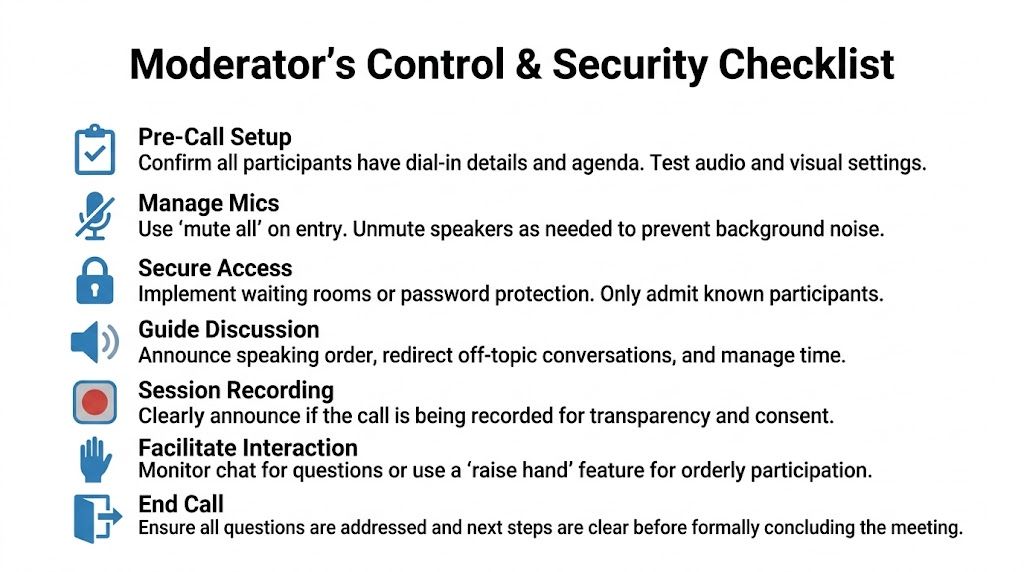
A good moderator opens with control. Confirm who is on the line, state the outcome needed, and explain how people should jump in. On larger calls, I also name the decision-maker and the note-taker if those roles are not obvious.
Time discipline belongs here too. Meetings expand to fill the space you give them, especially on audio where side comments are harder to spot and stop. Treat each agenda block as real. If a five-minute item turns into fifteen, the cost is not just delay. The later items get rushed, decisions get softer, and the people dialing in from another region leave with half the context.
The controls that actually change the call
Conference platforms offer plenty of settings. A handful affect quality every time.
Mute control
Mute-all on entry is the fastest fix for line noise, keyboard clatter, and speakerphone echo. Then unmute intentionally, or ask participants to unmute only when called on.
This is especially useful for all-hands calls, external briefings, interviews, and care coordination calls where participants may join from cars, shared offices, or hospital floors.
Controlled admission
Waiting rooms and host-controlled admission are basic safeguards for any meeting that covers client data, patient information, legal matters, pricing, or personnel issues. Admit known participants first. If a number or name is unfamiliar, verify it before bringing that caller in.
Open dial-in access is convenient. It also creates avoidable exposure.
Meeting lock
Once the expected participants are present, lock the call if your platform allows it. That prevents late accidental joins and blocks unknown callers from appearing halfway through a sensitive discussion.
The trade-off is simple. Lock too early and you may exclude a legitimate attendee who had a connection problem. Lock too late and you increase the chance of interruption. For high-risk meetings, assign one co-host to handle exceptions while the main moderator keeps the discussion moving.
Recording disclosure and permission
If the call is being recorded, say it plainly at the start and confirm whether recording is allowed under your internal policy. In healthcare, HR, finance, and legal work, this should never be casual. Recording can help with documentation and training, but it also increases retention, access-control, and disclosure obligations.
Speaking order
Audio-only meetings need active traffic control. Call on people by name, summarize before changing topics, and stop overlap quickly. Silence from the moderator creates dead air for some participants and an opening for dominant voices to take over.
Security decisions happen during the meeting
Phone conferences feel lower risk than video because they look simpler. That assumption causes problems.
For healthcare teams and any group handling regulated information, use a platform that supports encryption, access controls, and administrative oversight appropriate to your obligations. The U.S. Department of Health and Human Services outlines expectations for protecting electronic protected health information in its HIPAA Security Rule guidance. Audio is still data. If patient details, case notes, or account information are discussed on the line, the moderator has to treat admission, recording, and participant verification as active security tasks.
A practical rule works well here. If the call would be a problem if overheard, forwarded, or joined by the wrong person, set it up like a restricted meeting from the start.
A moderator workflow that holds up under pressure
Use a repeatable sequence:
Before the call
- Confirm which moderator controls are needed
- Test your audio and keep a backup device ready
- Review the participant list for external guests or unknown numbers
- Decide in advance whether the meeting should be locked, recorded, or restricted to named attendees
First minute
- Verify who has joined
- State the goal and the expected end time
- Tell participants how to ask for the floor
- Disclose recording status and any confidentiality reminder that applies
During the call
- Keep speakers one at a time
- Cut tangents early and park side issues
- Summarize decisions before moving on
- Watch for identity or privacy problems, not just audio problems
Close
- Read back actions, owners, and deadlines
- Confirm what follow-up will be shared, and with whom
- End the session cleanly, then stop the recording and close the room
If the call shifts from audio into a visual walkthrough, keep the same discipline. Use host controls for content sharing, not ad hoc screen access. This guide on sharing your screen during a conference is a useful reference when the moderator needs to add visuals without losing control of the session.
What experienced moderators do differently
Experienced hosts do not wait for the meeting to fix itself. They interrupt politely, verify identities without apology, and protect the schedule the same way they protect the participant list.
That combination matters more in hybrid and global teams, where every extra ten minutes multiplies across regions and billing rates. The best-run phone conferences are not the most relaxed. They are the ones with clear controls, clear boundaries, and no ambiguity about who is allowed in, who speaks next, and what happens to the information shared on the call.
Essential Phone Conference Etiquette and Best Practices
Even a strong moderator can’t save a call if the participants treat it casually. Phone conference etiquette isn’t corporate polish. It’s the difference between a fast decision and a slow mess.
Most of the rules are simple. People ignore them because they seem small.

The habits that make everyone easier to hear
Start with the basics:
- Mute when you’re not speaking. Background sound breaks concentration faster than generally realized.
- Say your name before speaking if the group is large or not everyone knows your voice.
- Use a headset instead of speakerphone when possible.
- Don’t multitask loudly. Typing, shuffling papers, and side conversations all come through.
- Speak a little slower than you would in person. That helps non-native speakers and anyone dealing with less-than-perfect audio.
One of the most useful etiquette rules is also the least glamorous: pause for a beat before jumping in. Phone lines don’t give you the visual cues you rely on in a room.
Professionalism includes privacy
People often treat phone calls as automatically safer because they feel simpler. That assumption is dangerous.
For regulated work, security belongs to every participant, not just the host. If you’re discussing medical, educational, HR, legal, or client-sensitive information, don’t join from a place where others can overhear. Use approved tools with encryption. Don’t forward dial-in details casually. Don’t read protected information aloud unless you know who’s on the line.
If your team needs a refresher on habits that improve remote call quality, these virtual meeting best practices are a useful operational checklist.
A phone conference is still a professional setting, even when someone joins from a kitchen table, a corridor, or a parked car.
Accessibility makes the call better for everyone
Accessibility isn’t a side feature. It improves comprehension across the board.
Good participants do a few things consistently:
- They avoid jargon when plain language will do.
- They don’t rush through names, dates, or instructions.
- They summarize decisions aloud before the topic changes.
- They flag when a visual reference is being discussed so others aren’t left guessing.
For hearing-impaired participants or people joining in a second language, these habits matter. So does choosing a platform that can support richer collaboration when a plain phone line isn’t enough.
What not to do
A few patterns almost always damage the call:
- Joining late and asking everyone to repeat the first decision
- Talking while unmuted in a noisy environment
- Interrupting with “quick questions” that derail the agenda
- Using unsecured tools for sensitive topics
- Letting the call end without clear next steps
Phone conferences work best when everyone treats clarity as a shared job.
Troubleshooting Common Phone Conference Problems
Even well-run calls hit technical problems. The key is to diagnose fast, fix the obvious thing first, and avoid turning a two-minute issue into a fifteen-minute detour.
Echo and feedback
Echo usually has a culprit. In many cases, someone is on speakerphone, sitting too close to their mic, or joining the same call from two devices in one room.
A conference call’s audio quality is closely tied to latency. A one-way delay above 650ms causes a 40% increase in interruptions and overlap, and echo is a pitfall in 65% of calls. Using headsets and disabling speakerphone improves clarity, according to this conference calling pain-points guide.
Try this in order:
- Ask everyone to mute except the active speaker
- Have suspected participants disable speakerphone
- Switch the speaker to a headset
- Remove duplicate device joins from the same room
If echo keeps returning, this guide on how to stop echo on mic is a good reference for hosts and participants.
People can’t connect
When someone can’t join, don’t start with a long technical investigation. Start with the invitation.
Check these first:
- Did they receive the latest join details?
- Are they trying the browser link or the dial-in method you intended?
- Are they on a restricted network or device that blocks the method?
- Do they have a fallback path?
For external participants, the easiest recovery is usually to resend the invite with one line of plain instructions and a direct contact point.
Choppy or delayed audio
Delayed audio creates the classic “Sorry, go ahead” loop. If the call starts to feel like people are stepping on each other constantly, suspect latency and unstable network conditions.
The fastest fixes are practical:
- Turn off speakerphone
- Move to a stronger connection
- Close unnecessary apps
- Switch from computer audio to phone, or from phone to browser, depending on which is more stable
Dropped calls and unstable participation
If people keep dropping off, stop pretending the meeting can continue normally. Summarize the last confirmed decision, pause, and re-establish who is still present.
That protects the meeting record and avoids the worst outcome, which is making decisions with half the room unknowingly absent.
When tech breaks, the host’s job is to reduce ambiguity first and restore flow second.
A reliable phone conference setup should do more than let people dial in. It should give you secure access, encryption, moderator controls, recordings, screen sharing, and webinars included without hidden fees or short meeting limits. If you need that combination in one place, AONMeetings offers browser-based, HIPAA-compliant conferencing starting at ₹179 per user per month, with unlimited meeting time, bank-level encryption, and built-in collaboration features for healthcare, education, business, and training teams.
