
Taking effective meeting notes boils down to a simple, three-part rhythm: prepare before, capture what matters during, and clarify the follow-up after. This isn't just passive listening; it's a strategy that injects productivity and accountability into every meeting on your calendar.
Why Better Notes Are Your Secret Productivity Weapon
Let's be real—most meetings feel like a drag. It’s not just you. The data shows that a shocking 72% of meetings are seen as ineffective, and many of us feel buried in meetings, unable to get our actual work done. You can read more about this trend in these recent workplace productivity statistics.
This is where mastering the art of meeting notes stops being a chore and becomes your strategic advantage. The single best way to reclaim that lost time is to get good at turning messy, rambling conversations into a clear, actionable plan.
Redefine Your Approach to Meeting Notes
Good note-taking isn’t about writing down every single word. Think of yourself as a filter, not a stenographer. Your job is to listen for the things that move the work forward.
The goal is to create a single source of truth that answers three questions for anyone, whether they were in the room or not:
- What did we decide?
- What are the next steps?
- Who is responsible for what, and by when?
When you shift your focus from transcribing the conversation to capturing outcomes, your notes transform into a tool for progress. This simple mindset change is the foundation for turning frustrating meetings into genuinely productive work sessions.
The Value of an Integrated System
A pen and notebook have their charm, but modern tools offer a massive upgrade. Imagine a platform that hosts your meeting, records it, creates a searchable transcript, and even drafts a summary for you.
An all-in-one solution like AONMeetings brings all of this together. For a competitive starting price, you get a full suite of features including video conferencing, webinar hosting, and smart note-taking tools. This integration means your discussions, decisions, and action items all live in one secure, easy-to-find place.
Of course, when you're recording sensitive business conversations, security is everything. End-to-end encryption isn't a nice-to-have; it's essential. With AONMeetings, your conversations are protected with bank-level security, so you know everything from client strategy to internal planning stays confidential. That peace of mind lets you focus on the meeting itself, knowing the record is secure.
Better Notes Begin Before the Meeting Even Starts
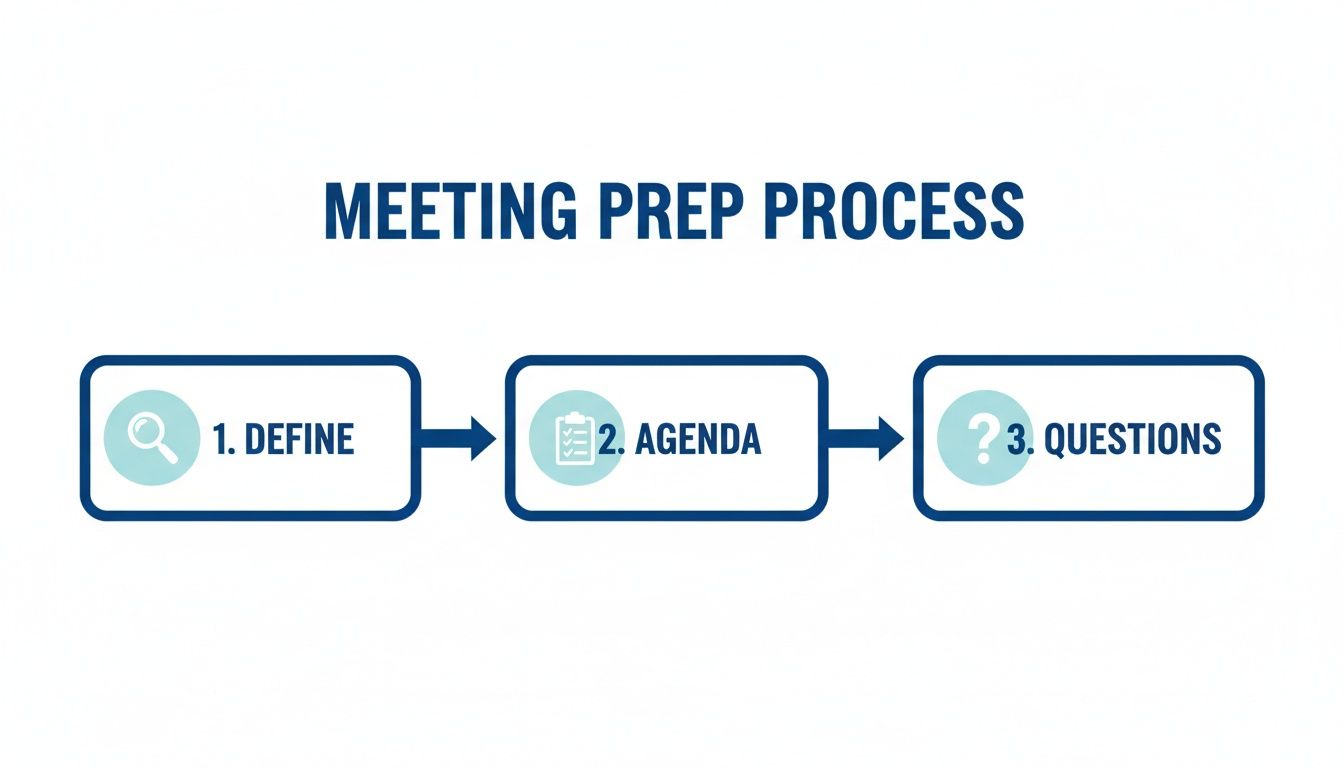
I’ve learned the hard way that walking into a meeting cold is a recipe for useless notes. You end up frantically trying to capture everything and miss the one thing that actually mattered. The good news? Just ten minutes of prep can make all the difference.
This small investment of time shifts your mindset from a passive stenographer to an active leader in the conversation. The key is to get laser-focused on the meeting's purpose. Before you even open your notebook, ask yourself: "If this meeting is a home run, what one decision will we have made?" That question is your north star; it helps you zero in on the signal and ignore the noise.
Define Your Goals and Sketch Out a Plan
It sounds obvious, but a clear purpose is everything. We all know this, yet research shows a huge disconnect between theory and practice. While 72% of us agree that clear objectives are crucial for a good meeting and 67% point to having a solid agenda, a shocking 37% of meetings actually have one. You can read more about these meeting productivity findings if you're curious. This gap isn't a problem; it's a massive opportunity to stand out.
So, how do you bridge that gap? You create a simple note-taking template before you join. This isn’t about building some complex system. It can be as simple as a new digital document or a fresh page in your notebook with a few headings already jotted down.
Here’s a practical example I might use for a project kickoff:
- Meeting: Q3 Marketing Campaign Kickoff
- Date: Oct 26, 2026
- Attendees: Sarah (Lead), Tom (Design), Maria (Content)
- Main Goal: Finalize the campaign theme and assign initial tasks.
- Key Questions I Need Answered:
- What's our primary call-to-action (CTA)?
- Who has the final say on ad copy?
- What's the final budget for our social ads?
This skeleton, especially the "Key Questions" section, primes your brain for what to listen for. It guarantees you leave with the answers you need, turning your notes from a messy transcript into a real tool for getting things done.
Of course, your focus will change depending on your role. As a project manager, I’m listening for deadlines and blockers. A developer on my team might be focused on technical specifications. The point is to tailor your prep to your needs. For more ideas on how to run these discussions effectively, take a look at our guide on virtual meeting best practices. Whatever you do, don't skip the prep.
Live Note-Taking Techniques That Actually Work
The meeting is underway, ideas are flying, and it’s your job to capture it all. The real trick to live note-taking isn't about becoming the world's fastest typist. It's about listening with a purpose and having a system to filter the signal from the noise. This is the skill that turns conversation into action.
Without a solid framework, you risk becoming a simple transcriptionist, mindlessly typing everything you hear. A good system, on the other hand, forces you to process the discussion in real-time, pulling out the crucial decisions and action items as they happen.
Adopt a Proven Note-Taking Method
To prevent your notes from becoming a jumbled mess, you need a system. I've seen many, but two of the most reliable approaches are the Quadrant Method and a smart hybrid of manual and digital tools.
The Quadrant Method is popular for a reason: it's brilliantly simple. Just divide your page or digital document into four distinct sections:
- General Notes: For the big picture—the main discussion points and important context.
- Action Items: This is your money section. Note the task, who it's assigned to, and the deadline.
- Key Questions: Log any questions that pop up, whether they get answered in the meeting or need a follow-up.
- Other Ideas: A parking lot for those valuable but off-topic thoughts you can circle back to later.
Here’s what that looks like in practice. Imagine you're in a project update meeting, and you capture this:
Action Items
- Task: Draft new ad copy for the fall campaign. Owner: Maria. Deadline: Nov 1.
- Task: Finalize Q4 budget allocation for social ads. Owner: Sarah. Deadline: Oct 29.
- Task: Create mockups for the new landing page. Owner: Tom. Deadline: Nov 5.
This clarity means there's absolutely no confusion about who is doing what after the meeting ends. It's a foundational concept that experts stress—your ability to take great notes is directly tied to the quality of the meeting itself. Learning how to run effective team meetings will make the information you're trying to capture infinitely better.
Proper meeting prep is the bedrock of effective live note-taking. When you walk in knowing the purpose, agenda, and key questions, you can focus on capturing outcomes, not just words.
Embrace a Powerful Hybrid Approach
Your method is only half the equation; the tools you use matter just as much. Interestingly, recent data shows a generational divide here: 63% of Baby Boomers prefer to handwrite their notes, while that number drops to just 54% of Gen Z and Millennials. Clearly, a one-size-fits-all approach is a recipe for failure.
This is where a hybrid strategy really shines.
I've found the best workflow is to use a platform like AONMeetings to record the entire session. The peace of mind that comes from knowing you have a complete, searchable transcript is a game-changer. It frees you up to stop typing verbatim and start actively listening.
With the recording running, your handwritten or typed notes transform into a high-level executive summary. You're no longer capturing everything—just the absolute essentials like major decisions and action items. This gives you the best of both worlds: you stay fully present and engaged in the conversation, while a perfect, detailed record is automatically created for later reference.
Plus, with features like end-to-end encryption, platforms like AONMeetings ensure even the most sensitive discussions remain secure, making it a far more robust choice than a basic notes app.
Choosing Your Note-Taking Toolkit
Picking the right tool for meeting notes can honestly make or break your workflow. It dictates how you capture information, who you can share it with, and how easily you can find it later. It's a choice worth thinking about, and your options really boil down to three camps: traditional pen and paper, digital apps, or fully integrated platforms.
There's a certain charm to a simple notebook, I get it. But let's be real—it’s impossible to search, and sharing means snapping a photo of your messy handwriting. Digital apps like OneNote or Notion are a big step up for organization, but they still operate in their own little world, disconnected from the actual meeting. This forces you to constantly jump between your video call and your notes, which is how crucial details get missed.
Frankly, the tool itself is only half the battle. Your success really depends on your system. Learning how to build a note-taking system that actually works will give you a framework for capturing and using information effectively, no matter which tool you end up with.
Comparison of Meeting Note-Taking Tools
To make a smart choice, it helps to see how these options stack up against each other on the things that matter most: cost, features, and security. Remember, a "free" tool isn't a bargain if it puts your data at risk or just makes your job harder.
Let's say you're a marketing team planning a product launch. You need to share notes securely with designers, sales reps, and leadership. A simple text file just won't cut it—it’s too risky. You need a platform with solid access controls and end-to-end encryption to keep sensitive launch details under wraps. This table breaks down the pros and cons of each approach.
| Tool Category | Typical Price Range | Key Features | Security & Encryption | Best For |
|---|---|---|---|---|
| Pen & Paper | ₹100 – ₹1,000 | • Simple, no distractions • Good for memory retention |
• None (physical security only) | Individuals who prefer a tactile, offline method for personal notes. |
| Digital Apps | Free – ₹1,200/year | • Searchable, shareable • Templates, cloud sync |
• Varies; basic to moderate encryption | Teams needing basic digital organization and sharing without advanced security. |
| AONMeetings | Starts at ₹179/user/month | • AI summaries, searchable transcripts • Webinars included |
• HIPAA-compliant, End-to-End Encryption | Professionals and businesses needing a secure, all-in-one meeting and collaboration solution. |
As you can see, what works for a quick brainstorm session might not be suitable for a confidential client meeting. The key is to match the tool's capabilities with your specific needs for collaboration and security.
The Value of an Integrated Platform
The real game-changer is moving to a toolkit that does more than just let you type. An integrated platform like AONMeetings merges your video conferencing, note-taking, and follow-up tasks into a single, seamless environment.
Instead of juggling a recording app, a separate notes document, and your email to share summaries, an all-in-one solution automates the entire workflow. This consolidation prevents valuable insights from getting lost between different apps.
With AONMeetings, you get a full professional suite starting at just ₹179 per user per month. What's really impressive is that every plan includes not just unlimited meetings but also full webinar hosting—something that often costs a premium on other platforms. This means you can run an internal strategy call and a public training session from the same secure, reliable tool.
This unified system is built with security at its core. Every conversation is protected by end-to-end encryption and is HIPAA-compliant, which makes it a solid choice for healthcare, legal, and other regulated industries. It’s an investment that pays for itself by saving time, tightening security, and making sure no action item ever gets dropped.
Of course, even the best platforms can run into a snag. It's always a good idea to be prepared for common glitches, so knowing how to stop echo on a mic is a practical skill that will always come in handy.
Turning Your Notes into Action After the Meeting
The real work often begins after the meeting ends. The notes you've just taken are fresh but raw, and they have a short shelf life. I've found that you have a "golden hour" to act—if you wait longer, critical context gets fuzzy, and the momentum you built completely evaporates.
Getting a summary out quickly is your best defense against the dreaded "So, what did we decide?" email that inevitably shows up a day later. It’s about turning a conversation into a concrete plan that keeps everyone aligned and accountable.
From Raw Notes to a Clear Summary
As soon as you're back at your desk, block off 15 minutes. This is your time to clean up your notes. Go through your shorthand, expand on abbreviated points, and structure the information so it tells a clear story. Your goal isn't to create a transcript, but a sharp, focused summary of decisions and action items.
This is where a tool like AONMeetings can be a huge time-saver. Instead of scrubbing through a video recording to find one specific detail, you can use the searchable transcript. I often just type a keyword like "budget" or a specific person's name, and it instantly takes me to that exact moment in the conversation. It's a game-changer for fact-checking your notes.
A well-crafted meeting summary isn't a transcript; it's a guide. It should give a colleague who missed the meeting everything they need to understand the outcomes and their responsibilities in under two minutes.
Sharing a recap doesn’t have to be complicated. Here’s an email format I use regularly. Notice how it separates decisions from actions, making it instantly scannable. And when you’re discussing sensitive client data or business strategy, sharing it this way via a secure platform is crucial. AONMeetings protects this data with end-to-end encryption, which is something your standard email just doesn't offer.
Example Email Summary
Subject: Summary & Actions: Q4 Marketing Campaign Kickoff (Oct 26)
Hi Team,
Great discussion today. Here’s a quick summary of what we decided and the next steps.
Key Decisions:
- The campaign theme will be "Future-Ready Finance."
- The primary CTA will be "Get Your Free Assessment."
- The social ad budget is confirmed at ₹50,000.
Action Items:
- Draft new ad copy: Maria (Due Nov 1)
- Create landing page mockups: Tom (Due Nov 5)
- Finalize ad spend allocation: Sarah (Due Oct 29)
For full context, you can view the AI-generated summary and searchable recording here in our AONMeetings space.
This format cuts through the noise and gets people moving. And on that note, if you’re looking to repurpose your meetings, our guide on how to record webinars has some great tips for turning discussions into valuable training content.
It’s worth noting that all AONMeetings plans, from the ₹179/month starter option to enterprise solutions, include unlimited meeting recordings and webinars included. This means you can host follow-up sessions to reinforce these new habits, build a stronger meeting culture, and drive real change without worrying about extra costs.
A Few Common Questions About Meeting Notes
Even with a solid plan, you're bound to run into a few practical challenges as you start taking better notes. Let's tackle some of the most common questions I hear from teams who are dialing in their process. Getting these right is what makes the new habits stick.
What's the Best Way to Organize Meeting Notes for the Long Haul?
Finding a specific decision from a meeting six months ago shouldn't feel like an archaeological dig. The secret is consistency. You need a single, central place for everything.
I've seen teams succeed by creating a dedicated folder in a shared drive or a specific section in a digital notebook. The key is a dead-simple naming convention that everyone follows, like "YYYY-MM-DD – [Meeting Topic]".
For instance: "2026-10-28 – Q4 Marketing Strategy." It’s predictable and instantly sortable.
Of course, this is where a dedicated platform like AONMeetings really shines. It handles the organization for you. Every recording, transcript, and AI-generated summary gets filed away in a secure, searchable archive. That key decision from last quarter? Just type in a keyword. It's all protected with end-to-end encryption, so your sensitive information stays that way.
How Detailed Should My Notes Actually Be?
This is the classic Goldilocks problem—too much detail and nobody reads it, too little and the notes are useless. The right amount of detail depends entirely on the meeting's goal. A formal board meeting needs an official record, but a quick daily stand-up just needs the highlights.
A great rule of thumb I always use is to ask myself: "If a coworker missed this meeting, could they read my notes and know exactly what was decided and what they need to do next?" If the answer is a clear "yes," you've nailed it. The goal is clarity, not a word-for-word transcript.
How Can I Take Notes When I'm the One Leading the Meeting?
Trying to run a productive discussion while also typing furiously is a recipe for disaster. You can't do both jobs well. If you're leading, your energy has to be on facilitating, guiding the conversation, and making sure everyone is heard.
If you absolutely have to take notes yourself, just focus on capturing the big-ticket items—major decisions and concrete action items. Better yet, ask another team member to be the designated note-taker for the session.
Honestly, though, the best solution is to let technology handle it. I just announce at the start of the meeting that I'm using AONMeetings to record the session. This frees me up completely to lead with confidence. I know that a full, AI-powered summary and a searchable transcript will be ready for me afterward. It's a game-changer for anyone who runs meetings. This feature, plus webinars included, is standard on plans that start from just ₹179/user/month, which is a huge value compared to other tools out there.
Ready to transform your meetings with less effort? AONMeetings provides secure, AI-powered summaries and searchable transcripts so you never miss a detail. Discover a smarter way to manage your meetings today.
