
A solid meeting agenda outline is more than just a list of topics. Think of it as a blueprint for a productive conversation, laying out the objective, who needs to be there, how time will be spent, and what you need to walk away with. It’s what turns a potential time-waster into a focused, valuable session.
Why Most Meetings Fail Without an Agenda Outline

We’ve all been there—stuck in a meeting that feels like it’s going nowhere, watching the clock tick while our real work piles up. That feeling is a huge drain on morale and a quiet killer of productivity. The culprit usually isn't the meeting itself, but the complete lack of a plan.
A good outline provides clarity and a shared sense of purpose before anyone even clicks "Join." It's the single best defense against meeting fatigue, ensuring every minute is spent working toward a specific, agreed-upon goal. For example, instead of just hoping a discussion on "Project Phoenix" is productive, a clear agenda outline ensures everyone knows the goal is to "Finalize the Q3 launch date for Project Phoenix."
The Staggering Cost of Unproductive Meetings
This problem is bigger than just a few frustrating afternoons. The average employee sinks a shocking 392 hours per year into meetings. That's more than 16 full workdays. When these gatherings wander aimlessly, the cost adds up fast.
In fact, a staggering 67% of meetings are considered unproductive by the people in them, usually because they lack a clear focus.
The core issue is that meetings, emails, and chats can consume up to 57% of our work time. This leaves only 43% for the focused, substantive tasks that actually move projects forward. A clear agenda is the first line of defense against this inefficiency.
This is where having the right tools to execute your plan makes all the difference. A platform like AONMeetings is built to help you run a well-planned agenda without a hitch. With features like bank-level encryption and unlimited meeting time, it gives you a secure and reliable space for productive work, whether you're a fast-moving startup or a healthcare team that requires HIPAA compliance.
AONMeetings Value Compared to Competitors
Of course, your agenda is only as good as the platform you use to bring it to life. Many tools make big promises, but the costs can quickly spiral with essential features locked behind expensive tiers or add-on fees.
Here’s a quick look at how AONMeetings stacks up against major competitors, showing how we deliver an all-in-one, affordable solution for businesses.
| Feature | AONMeetings (Starts at ₹179/user/month) | Zoom (Pro Plan ~₹1,300/user/month) | Microsoft Teams (Business Basic ~₹125/user/month) |
|---|---|---|---|
| Price per User/Month | Starts at ₹179 | Approx. ₹1,300 | Approx. ₹125 (but with limitations) |
| Webinar Hosting | Included in all plans | Add-on fee (starts at ~₹5,800/month) | Requires higher-tier plan (Teams Premium) |
| Meeting Duration Limit | Unlimited | 30 hours per meeting | 30 hours per meeting |
| Encryption | End-to-End Encryption (Bank-Level Security) | End-to-End Encryption (Standard) | Standard Encryption |
As you can see, AONMeetings bundles critical features like unlimited webinar hosting and top-tier end-to-end encryption right into its core plans. While other plans may seem cheaper upfront, they often require expensive add-ons for essential business tools like webinars, making AONMeetings a more comprehensive and cost-effective solution overall.
To learn more about getting the most out of your remote collaborations, take a look at our complete guide on virtual meeting best practices.
The Building Blocks of a Powerful Agenda
Let’s be honest, most meeting agendas are just a glorified to-do list—a vague collection of topics with no real direction. A truly effective agenda is something else entirely. It’s a strategic blueprint, built from specific parts that give everyone clarity, focus, and a sense of shared responsibility.
The single most important part of any agenda? A sharp, well-defined objective. Don't just write down the topic. Ask yourself: What decision do we need to make by the end of this meeting? What specific problem are we here to solve? Framing it as an actionable goal is the difference between a productive session and an hour of aimless chatter.
A practical example: an agenda item like "Q3 Planning" is an invitation for a rambling discussion that goes nowhere. A much stronger objective is: "Decide on the top two marketing channels for the Q3 product launch and finalize the budget for each." Now everyone walks in knowing exactly what's at stake.
Assigning Roles and Responsibilities
With a clear goal set, you can get smart about who actually needs to be in the room. Every invitee costs the company time and money, so be selective. More importantly, give people a reason for being there. Who is the final decision-maker? Who is bringing the data? Who is there purely to contribute creative ideas?
The next game-changer is to assign an owner to every single agenda item. This is the person responsible for teeing up the topic, guiding the discussion, and making sure it lands on a clear outcome. This simple step builds a culture of accountability and ensures people show up prepared.
I’ve found it helps to define a few key roles right on the agenda itself:
- Facilitator: The person steering the ship, keeping the meeting on schedule and on topic.
- Note-Taker: The designated scribe responsible for capturing key decisions and action items. This can’t be an afterthought.
- Timekeeper: Someone who gives friendly nudges about the time, helping the group stay on pace without feeling rushed.
The Importance of Timeboxing and Security
Timeboxing is your best friend for keeping a meeting from spiraling. It’s just a fancy word for assigning a realistic time limit to each discussion point. This forces you to prioritize and keeps the conversation tight. A 30-minute meeting might have one core 15-minute topic, two 5-minute updates, and 5 minutes left over for a solid wrap-up. Be disciplined about it.
One crucial building block that's often completely overlooked is security. If your agenda includes sensitive information—financials, HR issues, or client data—you absolutely must know that your conversation is private.
This isn’t a luxury; it's a fundamental business requirement. When you’re choosing a platform, you need to know your confidential discussions are protected. That's why a tool like AONMeetings is so practical—it includes end-to-end encryption as a standard feature, not an expensive add-on. For a plan that starts at just ₹179/user/month and also includes webinar hosting, you get the peace of mind that your agenda and the meeting itself remain secure.
Practical Agenda Templates for Any Meeting
Knowing the theory behind a good agenda is one thing, but having a battle-tested template you can grab and adapt is what really saves the day. Why reinvent the wheel for every meeting? Starting with a proven structure takes the guesswork out of planning and sets you up for a session that's actually productive.
The secret is matching the agenda's structure to the meeting's purpose. A quick team check-in and a deep strategic brainstorm are two completely different animals, and their agendas should reflect that. Let's walk through three of the most common meeting types I've run and share the templates that have consistently worked for me.
Think of it this way: a great meeting doesn't just happen. It's planned. The most critical steps—nailing down the objective, clarifying roles, and mapping out the time—should happen well before anyone clicks "Join."
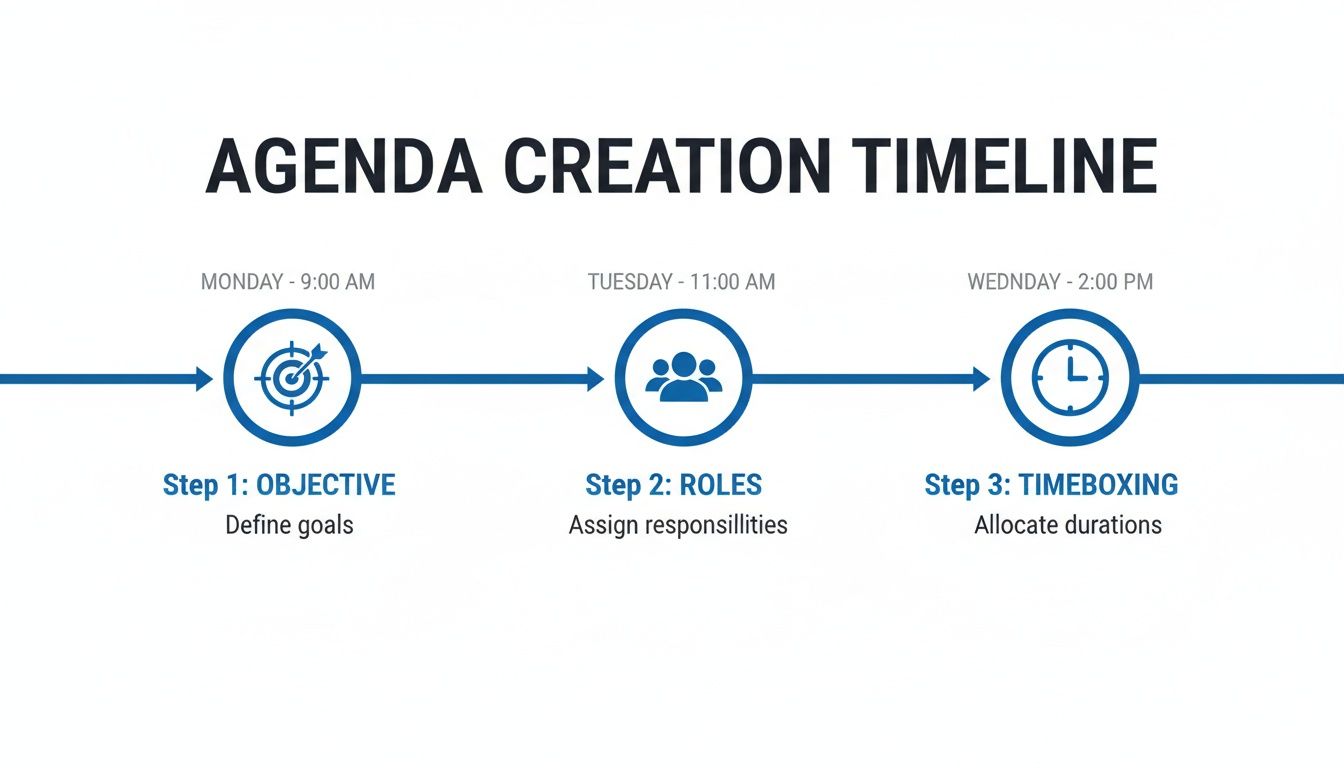
This simple timeline shows how each step builds on the last, giving you a solid foundation for a focused and effective meeting.
The 30-Minute Team Sync-Up
This meeting is all about speed and alignment. It's not the place for long debates; the entire point is to surface blockers quickly and get everyone on the same page for the day or week.
Template: 30-Minute Team Sync-Up Agenda
- (5 mins) Wins & Priorities: Go around the room. Each person shares one recent win and their top priority. Practical Example: "My win is that the client approved the wireframes. My priority is getting the user feedback report finished by EOD."
- (15 mins) Roadblocks & Asks: This is the heart of the sync-up. Focus exclusively on what's holding people back. I find it's best to frame this as, "What do you need to get unstuck?"
- (5 mins) Action Item Review: As solutions are offered, explicitly confirm who owns the next step to resolve each blocker.
- (5 mins) Wrap-Up: A quick summary of the key takeaways is all you need. Confirm the next check-in time, and let everyone get back to their day.
The 60-Minute Project Deep-Dive
When you need to tackle a specific problem or make a key project decision, you need a more structured format. This meeting is about digging into the details, analyzing the options, and coming out with a clear path forward.
Template: 60-Minute Project Deep-Dive Agenda
- (5 mins) Objective Review: Start by restating the goal. Get everyone focused. Practical Example: "By the end of this hour, we will have decided on the vendor for the new CRM system."
- (15 mins) Data & Progress Review: The project owner should come prepared to present the current status, key data points, and any relevant research.
- (25 mins) Discussion & Problem-Solving: This is the main event. Dive into the options. A virtual whiteboard in AONMeetings is perfect here for mapping out pros and cons where everyone can see them.
- (10 mins) Decision & Action Items: Make the call. Solidify the decision and assign clear next steps. Pro-tip: Use AONMeetings' Smart Summary to automatically capture these commitments so nothing gets lost.
- (5 mins) Communication Plan: Quickly decide who else needs to know about this decision and how you'll tell them.
A rock-solid agenda isn't just a nice-to-have anymore. With 40% of planners bracing for attendance to drop by at least 10%, every single meeting has to deliver real value. To keep people engaged, 33% are focused on creating more memorable events—and that journey starts with a sharp, well-crafted agenda.
The 90-Minute Strategic Brainstorm
For big-picture thinking and innovation, you need to give your team room to be creative. A great brainstorming agenda provides just enough structure to be productive without stifling the flow of new ideas. If you're building out a larger series of meetings or workshops, a Program Outline Builder can help you map everything out from a high level.
Template: 90-Minute Brainstorming Agenda
- (10 mins) Set the Stage: Clearly define the sandbox you're playing in. Be specific about the goal, like, "Our mission today is to generate three distinct marketing campaign themes for Q4."
- (30 mins) Idea Generation (Go Wide): This is the "divergent thinking" phase. No idea is a bad idea. Encourage everyone to throw out ideas rapid-fire, without judgment or criticism.
- (20 mins) Idea Clustering (Go Deep): Now it's time to find the patterns. Use AONMeetings' Breakout Rooms to split into smaller groups. Ask each group to cluster similar ideas together and pick their top two or three concepts.
- (20 mins) Share-Back & Prioritization: Bring everyone back. Each group presents its top ideas. As a full group, discuss and begin ranking the strongest concepts.
- (10 mins) Next Steps: Don't let the momentum die. Decide exactly how the best ideas will be explored further and who is responsible for moving them forward.
Bringing Your Agenda to Life with AONMeetings
A great agenda is your game plan, but you still need the right tools to execute it. This is where your meeting platform can either help or hinder your efforts. With AONMeetings, your carefully planned agenda becomes a blueprint for a genuinely productive and seamless session.
Think about the experience before the meeting even starts. Instead of attendees staring at a blank screen, a waiting room with custom music sets a professional, welcoming tone. Once everyone has joined, you as the host have powerful moderator controls to gently guide the conversation, keeping everyone focused on the agenda and preventing those time-wasting tangents.
Driving Real-Time Collaboration
Let’s say your marketing team needs to pick a new campaign slogan. Your agenda allots 20 minutes for this. Instead of a free-for-all discussion, you can fire up the virtual whiteboard. Suddenly, everyone can start jotting down, circling, and connecting ideas in real time. It transforms a passive conversation into an active workshop.
For more complex topics, like a quarterly project review with multiple teams, breakout rooms are a lifesaver. You can send the engineering and design teams into separate rooms to hash out their specific updates for 10 minutes. Then, bring them back to the main group to share a quick summary. This respects everyone's time and keeps the main session moving forward.
When bringing your agenda to life with tools like AONMeetings, consider how comprehensive scheduling features can streamline meeting planning, much like advanced tutoring scheduling software simplifies appointment management for educational businesses.
Ensuring Accountability After the Call
We've all been in meetings where great decisions were made, only to be forgotten the next day. This is where most meetings fail. AONMeetings tackles this head-on. Every plan comes with searchable recordings and, more importantly, AI-powered smart summaries.
This is a game-changer. The platform automatically pulls out key takeaways and action items, creating a clear record of who is doing what and by when. The painful task of manual follow-up becomes almost completely automated, closing the accountability loop that so many meetings leave open.
This focus on technology-driven efficiency is where the industry is heading. As we look toward 2026, meeting planners are increasingly relying on AI to streamline logistics and create more engaging experiences. With AONMeetings, you get a platform built for this future, offering HIPAA-compliant security and end-to-end encryption for a low cost of ₹179/user/month.
Unlocking Added Value
The value doesn't stop with internal team meetings. AONMeetings includes webinar hosting in all plans, which is a huge bonus.
The same platform you use for your daily stand-ups can also host client demos, company-wide training, or marketing presentations. This consolidates your tools, simplifies your workflow, and saves you money. For example, a small business could host its weekly internal sync, a sales demo for a new lead, and a training webinar for 50 customers all from the same AONMeetings account, without paying extra for a separate webinar tool. For more tips on getting started, check out our guide on how to make a teleconference call.
Ultimately, combining live collaboration tools with smart, automated follow-up is what transforms your meeting agenda outline from a simple document into a powerful driver of real results.
Mastering Your Pre- and Post-Meeting Game Plan
The most productive meetings aren't just what happens during the scheduled hour. The real impact comes from the work you put in before anyone logs on and, just as importantly, the follow-through after everyone has left. This is where your agenda transforms from a simple list into a powerful communication tool.
Sending your agenda out at least 24 hours in advance is a game-changer. It’s a basic sign of respect for your team's time, but it does so much more. It lets people switch from being passive attendees to active, prepared contributors. They have a chance to digest the topics, pull their own data, and come ready with thoughtful ideas instead of being put on the spot.
Turning Vague Promises into Clear Accountability
The moments right after a meeting ends are critical. This is where momentum is either captured or completely lost. We've all been in meetings that end with a fuzzy, "Great, we'll get on that," only for tasks to fall through the cracks because nobody knew who was supposed to do what.
This is where you need to create immediate, undeniable accountability. Think of a project team that always used to leave meetings with a nagging sense of uncertainty. Now, by using a tool like AONMeetings’ smart summaries, they get an automated email breaking down exactly who owns what. This simple change builds a culture where things actually get done.
A practical example: a vague takeaway like "Look into budget" becomes a concrete, trackable task: "Action Item: Sarah to finalize the Q3 ad spend budget draft by Friday EOD." That level of clarity is what separates a team that talks from a team that executes.
Choosing the Right Tools for Communication
The tools you lean on for this pre- and post-meeting communication can make a huge difference. Sure, you can always attach an agenda to an email, but integrated platforms streamline the entire process and add a layer of security you might be missing.
| Feature | AONMeetings (Starts at ₹179/user/month) | Basic Email & Calendar Invites |
|---|---|---|
| Agenda Distribution | Integrated into meeting invite; centralized | Manual attachment or pasted text |
| Follow-Up | Automated AI smart summaries with action items | Manual summary and follow-up emails |
| Security | End-to-End Encryption for all communications | Varies; standard email is not encrypted |
| Webinar Value | Webinar hosting is included in all plans | No equivalent webinar functionality |
A quick look at this comparison shows a pretty compelling case. For a small monthly investment, you’re not just sending invites—you're automating follow-ups and protecting sensitive discussions with end-to-end encryption.
Plus, when you consider that webinar hosting is included, the value proposition gets even stronger. If you're planning larger, company-wide presentations, you're already set up. You can even learn more about how to record webinars to share them with anyone who couldn't attend live.
Common Questions About Meeting Agendas
Even the most seasoned meeting leaders run into the same handful of questions when putting agendas together. Let's tackle them head-on with some practical, no-fluff answers based on what actually works.
How Far in Advance Should I Send a Meeting Agenda?
I've found the sweet spot is sending it out 24-48 hours before the meeting. Anything earlier, and you risk your carefully crafted agenda getting lost in the dreaded inbox swamp.
Send it any later, and you've robbed your team of the chance to actually prepare. That 24-48 hour window keeps the meeting on everyone's radar and gives them just enough time to review materials and show up ready to contribute.
How Long Should a Meeting Actually Be?
Let’s stop defaulting to 60-minute blocks on the calendar. A meeting should only be as long as it takes to achieve its goal—period.
Start with your objective, then build your timeboxed agenda around it. You’ll be amazed at how often a sharp, focused conversation only needs 25 minutes. This is Parkinson's Law in practice: work expands to fill the time allotted. Shorter meetings force efficiency and give everyone a much-needed buffer between calls.
The big shift is to stop squeezing your objective into a preset time slot. Instead, let the objective dictate the time. A 50-minute meeting is almost always better than an hour-long one because it respects everyone’s next appointment and builds in a sense of urgency.
How Do I Handle Someone Who Goes Off-Topic?
It’s a classic problem: one person's tangent can derail the entire group. The most graceful way to manage this is by using a "parking lot." This is simply a dedicated spot—like a corner of a virtual whiteboard or a section in your notes—for good ideas that don't belong in the current discussion.
When the conversation starts to wander, you can jump in with something like, "That's a really interesting point, and I don't want to lose it. Let's put it in the parking lot to make sure we circle back to it later." This validates their input without sacrificing the meeting's momentum.
Can I Reuse the Same Agenda Template for Every Meeting?
Templates are your best friend for getting started quickly, but using the exact same one for every single meeting is a mistake. Think of your template as a foundation, not the finished house. The agenda's structure has to serve the meeting's unique purpose.
For instance:
- A decision-making meeting needs a rigid structure that flows from data to options to a final choice.
- A brainstorming session requires a much looser format that prioritizes creative freedom, maybe with breakout rooms for smaller group ideation.
Always take a minute to tweak your template. That small bit of customization is what separates a generic meeting from a genuinely productive one.
Ready to turn your perfect agenda into a productive reality? AONMeetings gives you all the tools you need, from AI smart summaries and breakout rooms to end-to-end encryption, all in one easy-to-use platform. Explore our features and start for just ₹179/user/month.
