
The companies getting the most value from video conferencing no longer treat it as a meeting app. They treat it as operating infrastructure. That shift is visible in the market itself. The global video conferencing market was valued at over USD 10 billion in 2023 and is projected to reach as high as USD 41.62 billion by 2026, with business platforms accounting for 61% of total revenue, according to video conferencing market statistics compiled by ElectroIQ.
That matters because leadership teams are no longer deciding whether video belongs in the business. They're deciding where it sits in revenue operations, hiring, customer support, compliance, training, and executive decision-making.
In practice, video conferencing and business strategy now overlap in very concrete ways. A sales team uses it for demos and webinars. HR uses it to screen candidates and onboard across locations. Clinics use it for follow-ups that require identity, privacy, and documentation controls. Operations teams use it to reduce friction between offices, vendors, and field staff. When the platform is wrong, meetings become noisy, adoption drops, and security teams inherit risk they didn't ask for.
The right question isn't “Which platform has the most features?” It's “Which platform fits the workflows that drive value, and can we govern it properly?” That means looking at ROI beyond travel savings, pricing beyond the headline plan, and security beyond a checkbox that says encryption.
Introduction The New Business Reality
Video conferencing used to sit in the collaboration stack as a convenience. Now it often functions as the digital headquarters for distributed work. Teams sell through it, interview through it, train through it, support customers through it, and in regulated sectors they document sensitive interactions through it.
That change is why so many buying decisions go wrong. Leaders compare camera quality, participant limits, and plan names, then assume rollout will take care of itself. It won't. A platform only creates business value when it matches the work being done inside it.
A board update, a therapy session, a product webinar, and a first-round candidate interview are all “meetings,” but they have different requirements. One may need strict moderator controls. Another may need webinar registration and branding. Another may need HIPAA-aware workflows and stronger identity assurance. Another may work better without cameras on at all.
Practical rule: Buy for workflows first, then evaluate features, then negotiate price.
The strongest implementations usually share three traits:
- They standardize where standardization helps. Teams use one core platform for most meetings, recordings, and admin controls.
- They preserve exceptions for regulated or high-risk use cases. Healthcare, legal, and finance often need tighter policies than general staff meetings.
- They define meeting types. A recurring internal standup should not be configured the same way as a public webinar or a patient consultation.
If you're evaluating video conferencing and business impact seriously, focus on three outcomes: productivity, risk reduction, and adoption. Those are the levers that justify spend and determine whether the platform becomes part of daily work or just another subscription.
Calculating The Real ROI of Video Conferencing
Most ROI conversations start and end with travel reduction. That's too narrow. The business case comes from cycle time, meeting quality, conversion support, and tool consolidation.
The clearest benchmark in the current market is productivity. In 2026, 94% of businesses report that video conferencing has boosted productivity, and newer platforms are using AI features such as real-time sentiment monitoring and gaze-attention algorithms to improve sales and support outcomes, according to AVer's review of video conferencing trends.
Where the return actually shows up
A leadership team should look at ROI across at least four buckets:
- Faster internal execution: project reviews, approvals, and cross-functional decisions happen without waiting for in-person availability.
- Revenue support: sales demos, stakeholder follow-ups, and recorded presentations move deals forward when buying teams are spread across locations.
- Lower platform sprawl: webinar hosting, recordings, chat, and whiteboarding inside one stack reduce the need for separate tools.
- Service quality: support and success teams can catch friction earlier when AI flags frustration or disengagement.
That last point is easy to underestimate. If a support team can detect a difficult customer interaction in real time, managers can intervene earlier. If a sales rep gets coaching on pace, engagement, or handoff timing, meeting quality improves before the call is lost.
A practical ROI model
Don't build the business case on generic claims. Build it on workflow math your finance team will accept.
Use a simple scorecard:
| ROI area | What to measure qualitatively |
|---|---|
| Meeting efficiency | Are decisions getting made in one meeting instead of two or three? |
| Tool consolidation | Can built-in webinars, recording, and whiteboards replace separate subscriptions? |
| Sales acceleration | Are demos easier to schedule, record, and share with absent stakeholders? |
| Support quality | Do managers have better visibility into difficult live interactions? |
| Hiring speed | Can interview panels coordinate faster across offices and time zones? |
Then test the platform in one department first. Sales and customer support are usually the fastest proving grounds because the impact appears quickly in call quality, follow-up quality, and manager visibility.
Teams rarely regret paying for the right controls. They often regret paying for disconnected tools that require extra training, admin, and support.
Webinars belong in the ROI conversation
Many buyers often overlook value. If marketing or customer education runs webinars, a platform with webinars included can materially simplify spend and operations. You avoid bouncing between meeting software, webinar software, separate recordings, and a second admin console.
The same applies to training teams. Internal enablement, partner briefings, and customer onboarding sessions often work better when webinars sit inside the same platform used for regular meetings. Fewer tools usually means fewer support tickets and fewer adoption issues.
Price still matters, but ROI should be framed as total cost of ownership plus business fit, not monthly subscription cost alone.
Transforming Workflows Across Key Industries
The strongest video deployments are never abstract. They solve very specific operational problems. When leaders connect platform choice to day-to-day work, adoption gets easier because teams understand why the tool exists.
Healthcare and telehealth
A clinician's needs are different from a general office user's needs. The session may involve protected health information, identity sensitivity, and documentation expectations. In that environment, browser access, waiting rooms, recording controls, and strong moderator permissions matter more than novelty features.
A practical telehealth workflow looks like this:
- Pre-visit intake: staff send a join link, confirm timing, and control entry through a waiting room.
- Consultation: the clinician uses screen sharing for test results, treatment instructions, or care plans.
- Follow-up coordination: recordings may be restricted, notes may need to be stored carefully, and specialist consults may happen in a separate controlled session.
The operational payoff is consistency. Staff don't need to improvise the process every time.
Sales and client-facing teams
Sales teams need a platform that handles live demos cleanly and makes follow-up easy. Screen sharing, recording, chat, and webinar capability matter because buying committees are rarely all present in the same call.
A common pattern looks like this: an account executive runs the demo, a solutions engineer shares the product, the call is recorded, and the recording is sent to procurement or an executive sponsor who missed the meeting. If the platform also supports webinars, the same sales team can run product launches, training sessions, or customer education without standing up a separate tool.
Video conferencing directly connects with business outcomes. The tool isn't just enabling conversation. It's supporting pipeline movement.
HR and recruiting
Remote hiring lives or dies on structure. HR needs interview links that work without friction, moderator controls for panel interviews, and recordings when policy allows. Recruiters also need a smooth handoff from screening to team interviews to onboarding.
A practical recruiting setup often includes:
- First-round interviews with simple browser join links
- Panel interviews with waiting rooms and host controls
- Candidate debriefs held immediately after the interview using the same system
- Remote onboarding sessions with screen sharing for policy walkthroughs and benefits orientation
Good hiring workflows feel boring in the best way. Candidates join easily, panelists know their role, and HR doesn't spend the morning troubleshooting audio.
Education and training
Educators, tutors, and internal trainers need more than face time. They need breakout rooms, whiteboards, file sharing, and reliable moderation. A live class or workshop becomes more effective when instructors can split participants into small groups, bring everyone back, annotate visually, and share materials inside the same session.
For business training, the same features help with certification reviews, customer onboarding, and recurring team development. The best systems reduce the need to email documents before and after every session.
The practical lesson across all four use cases is simple. Buy the platform that matches the workflow you repeat every week, not the one that looks impressive in a one-time product demo.
Choosing Your Business Video Conferencing Platform
Many organizations often overspend. They compare brand names, skim feature grids, and pick the plan that seems safest. Then they discover the true cost sits in add-ons, admin complexity, and features that are split across tiers.
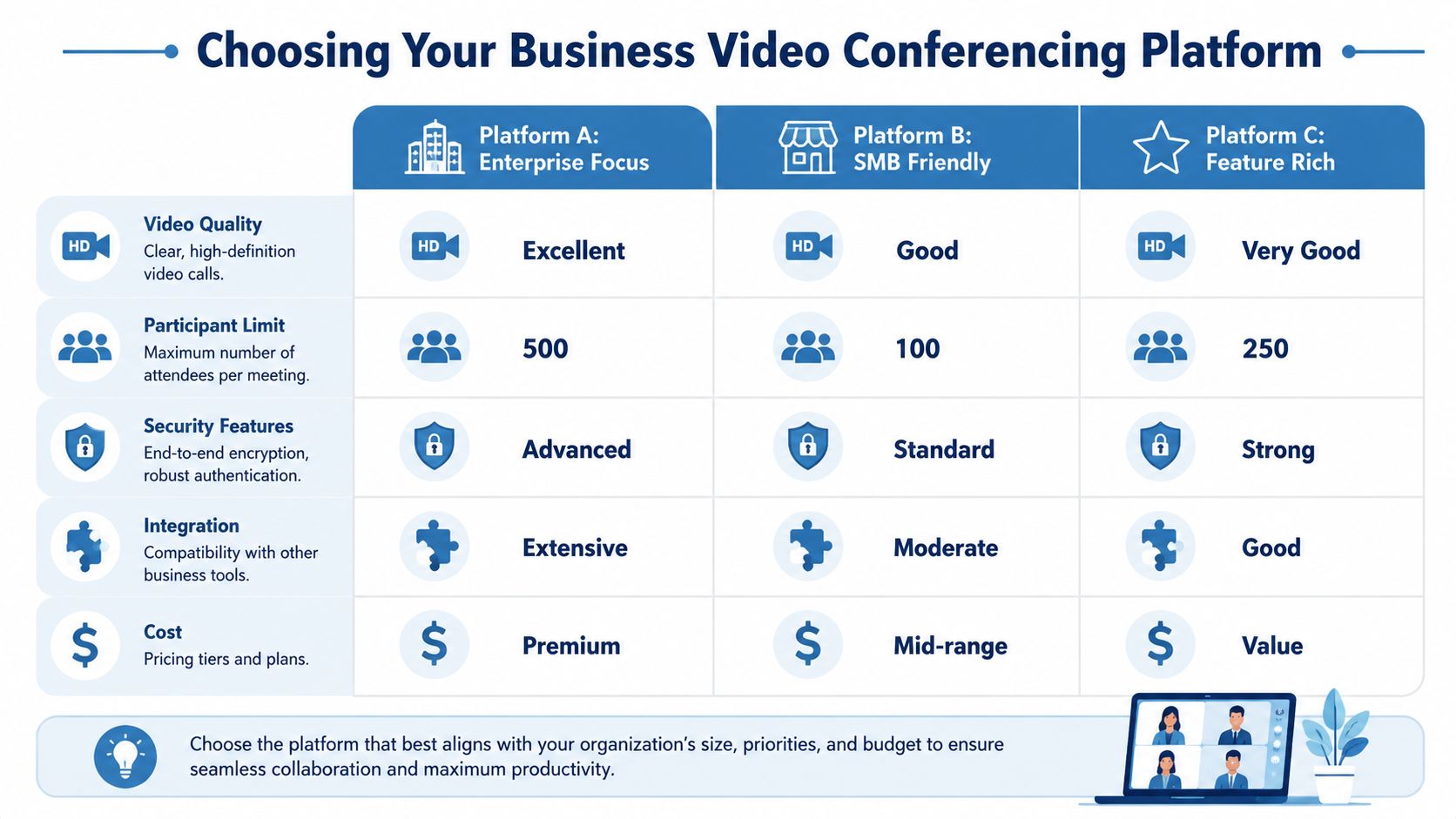
The more useful approach is to evaluate platforms in three layers: must-haves, workflow fit, and pricing structure.
Start with the non-negotiables
If a platform fails these, stop evaluating:
- Encryption: you want strong encryption as a baseline, not as an optional upgrade.
- Reliable screen sharing and recording: these are core business functions, not extras.
- Moderator controls: waiting rooms, host permissions, meeting lock, and participant management reduce operational friction.
- Browser access: download-free join flows improve adoption for clients, candidates, and patients.
- Administrative visibility: IT and operations need policy control, not just meeting links.
After that, evaluate the extras that often carry outsized value:
- Built-in webinars: useful for marketing, training, partner briefings, and customer education.
- Breakout rooms and whiteboards: important for education, workshops, and team facilitation.
- Branding options: valuable when the meeting itself is client-facing.
- Integrations: calendar, CRM, and documentation workflows matter more than flashy interface updates.
Price comparisons that actually matter
Sticker price alone is misleading. A lower entry plan can become expensive once you add webinar hosting, recording access, admin features, longer meeting times, or higher-tier security controls.
Use this comparison frame:
| Feature | Typical Tiered Plan (e.g., Zoom) | All-Inclusive Value Plan (e.g., AONMeetings) |
|---|---|---|
| Core meetings | Often included | Included |
| Webinar hosting | Frequently separate or higher-tier | Included in plan structure |
| Recording | May vary by tier and storage policy | Included |
| Encryption | Included, but advanced controls may vary by plan | Included as a standard feature |
| Breakout rooms and collaboration tools | Sometimes tier-dependent | Often packaged together |
| Pricing model | Multiple tiers and add-ons | Simpler all-in-one pricing |
That last line is where leadership should pay attention. Simpler packaging reduces procurement friction and user confusion. It also makes budgeting easier for small businesses and multi-department teams.
A practical reference point is AONMeetings, which offers plans starting at ₹179 per user per month and includes webinars, unlimited meeting time, recordings, screen sharing, whiteboards, and encryption in its standard packaging, as described by AONMeetings for small business video conferencing. That doesn't automatically make it the right fit for every organization, but it is a useful example of an all-inclusive model versus the common tiered approach.
Evaluate total migration cost
Platform choice isn't just about the next invoice. It's also about migration effort, training overhead, and what happens to old workflows. Organizations moving off legacy Microsoft communications tools should review guidance on managing Skype for Business Online transition before they finalize a replacement plan.
Here's the practical buying checklist I use with leadership teams:
- List your top five recurring meeting workflows. Sales demo, hiring panel, telehealth consult, internal town hall, customer webinar.
- Mark which of those require compliance controls.
- Identify which features are currently handled by separate tools.
- Map every add-on cost that would appear after purchase.
- Run a live pilot with real users, not just IT admins.
Don't ask whether a platform can host a meeting. Ask whether it can host your business process without extra friction.
The best choice usually isn't the platform with the biggest brand presence. It's the one that matches your operating model, keeps pricing understandable, and doesn't force you into extra purchases for standard business needs.
Navigating Security Encryption and Compliance
Security should be treated as architecture, not marketing copy. Too many leadership teams ask whether a platform has encryption and stop there. The better question is how that encryption fits into identity, access, recording control, retention, and compliance obligations.

What encryption means in practice
For business use, encryption should protect the session so unauthorized parties can't easily intercept content in transit. That's the baseline. But secure video operations also require host controls, waiting rooms, user permissions, meeting locks, and clear recording policies.
This matters most when the meeting itself contains sensitive material:
- Healthcare consultations
- Financial discussions
- HR investigations
- Board or legal reviews
- Client strategy sessions
If your team handles regulated data, you also need to evaluate whether the platform's workflows support the compliance framework you operate under. For healthcare teams, that includes HIPAA-related requirements and the operational controls around participant access, data handling, and session management. Organizations comparing options can use a practical benchmark from this guide to HIPAA-compliant video conferencing platforms.
The new threat isn't just interception
In 2026, security goes beyond encryption. Top platforms now use cryptographic watermarking and biometric authentication to provide a real-time verification layer on video feeds, helping defend against deepfake injection in regulated industries, according to TechTarget's coverage of emerging video conferencing security trends.
That changes the security conversation in an important way. The risk is no longer limited to someone listening in. The risk can include manipulated identity inside the call itself.
What leadership should require
A strong security review should include:
- Identity assurance: who is allowed in, and how is access controlled?
- Host governance: can admins lock meetings, restrict features, and set defaults?
- Recording policy: who can record, where files go, and who can retrieve them?
- Compliance fit: does the platform support your regulatory environment?
- Tamper awareness: what protections exist against synthetic or manipulated video?
Security failures in video meetings rarely start with cryptography. They usually start with weak policy, poor defaults, and unclear ownership.
If you're selecting a platform for healthcare, finance, legal, or executive use, encryption is necessary. It isn't sufficient. You need a system that treats authenticity, access control, and auditability as part of the meeting experience.
Driving Adoption and Seamless Implementation
A technically sound platform can still fail if rollout is sloppy. Most user resistance isn't ideological. It's practical. People won't adopt a tool that's hard to join, unclear to use, or inconsistent across teams.

Roll out by meeting type, not by department alone
The most effective implementation plans define how different meeting formats should work. A leadership update needs different defaults than a hiring panel or client demo.
Use a phased model:
- Standardize core settings such as waiting rooms, recording permissions, host controls, and naming conventions.
- Train meeting owners first because managers, recruiters, clinicians, and sales reps shape everyone else's experience.
- Integrate with existing workflows like calendars, CRM notes, onboarding documents, and support processes.
- Document etiquette including camera expectations, recording rules, screen-sharing ownership, and escalation paths.
Teams that need help setting norms can borrow from practical virtual meeting best practices and adapt them to internal policy.
More video isn't always better
This is the part many guides miss. Contrary to the usual assumption, a Carnegie Mellon study found that audio-only groups had more equal speaking turns and better performance, suggesting that video can sometimes reduce collective intelligence in group collaboration, as discussed in Callbridge's analysis of video conferencing and business communication.
That finding matches what many operators see in the field. In some meetings, especially decision-heavy discussions, cameras can increase performative behavior, encourage interruptions, or let dominant voices control the room more easily.
So don't mandate camera-on for every session. Use the right format for the job.
Practical adoption rules that work
- Use audio-first for debate-heavy working sessions: teams often participate more evenly when visual distractions are lower.
- Use video-on for relationship-building moments: hiring interviews, client introductions, coaching conversations, and sensitive one-to-ones often benefit from visual presence.
- Assign moderators in larger meetings: one person runs content, another watches the room and manages participation.
- Keep join flows simple: external guests should enter through a link without unnecessary setup.
- Train people on what not to do: poor screen-sharing habits, noisy rooms, and unclear recording practices damage trust quickly.
The goal isn't maximum camera time. The goal is better decisions with less friction.
Adoption improves when employees feel the platform helps them do their job rather than forcing them into someone else's meeting style.
The Future of Collaboration AI and Immersive Meetings
The next phase of video conferencing and business collaboration is being shaped by AI, not just better cameras. In 2025 and 2026, platforms are integrating real-time translation across 9 languages, AI agents for automated note-taking, and 3D volumetric video calling, according to GetVoIP's review of conferencing trends.
For global teams, real-time translation changes who can participate comfortably. For executives and project leads, automated notes and action items reduce the usual post-meeting drift where nobody is fully sure what was decided. For customer-facing teams, AI assistance can turn meetings into usable records instead of isolated conversations.
Immersive formats such as AR and VR meetings are also moving from novelty toward niche business use. They're not a standard requirement for most organizations yet, but they signal where high-context remote collaboration is heading.
If you're evaluating long-term fit, pay attention to platforms that treat transcription, summaries, and meeting intelligence as part of the workflow. For a closer look at where that's going, this overview of 2026 video transcription insights is a useful companion read.
If you're comparing platforms and want a practical option that combines HIPAA-aware deployment, built-in webinars, browser-based access, and straightforward pricing, review AONMeetings. It's worth shortlisting when you need video conferencing to support real business workflows instead of adding another layer of tool sprawl.
