
You’re probably dealing with a familiar mix of pressure and uncertainty. A clinician wants virtual visits to feel easy for patients. Front-desk staff want fewer no-shows and fewer “I can’t get in” calls. Leadership wants to avoid a privacy mistake that turns into a legal and operational mess. And somewhere in the middle, you’re being asked to choose software.
That’s where many practices get stuck.
Most telehealth buying advice jumps straight to feature lists. It talks about HD video, screen sharing, or EHR integration, then casually labels a platform “HIPAA compliant” as if compliance were a checkbox you can buy. It isn’t. For a clinic manager or practice owner, the fundamental question is simpler and tougher: Will this tool protect patient information, fit our workflow, and make financial sense over time?
That last part gets ignored too often. Small and mid-sized practices don’t buy software in a vacuum. You’re balancing subscription cost, staff time, patient usability, training burden, support quality, and whether one platform can replace other tools you already pay for. If webinars, recordings, messaging, waiting rooms, and secure document sharing are included, that changes the total cost of ownership.
This guide is written for that real-world decision. Not for a procurement committee at a giant health system. For the person trying to choose practical, secure, sustainable hipaa compliant telehealth software without getting trapped by hidden complexity.
Choosing Your Digital Front Door
A clinic manager at a behavioral health practice gets three tabs open on her laptop. One vendor looks polished but expensive. Another seems affordable, but the compliance language is vague. A third promises “healthcare-ready video” without saying whether a BAA is included. She has a simple goal: let patients join visits easily, protect PHI, and avoid buying something her team will resent in a month.
That’s what telehealth software really is for a patient. It’s your digital front door.
If that door is confusing, patients miss appointments. If it’s insecure, your practice takes the risk. If it’s too expensive for what it does, you end up paying for features your team never uses while still needing add-ons for basics like webinars, recordings, or patient messaging.
A practical buying process starts with the patient journey. Think about a follow-up med check, a therapy session, or a specialty consult that includes file sharing. In each case, the platform isn’t just carrying video. It may also carry names, appointment details, chat messages, intake forms, screenshots, and clinical conversation.
That’s why the “what does HIPAA compliant mean?” question matters so much.
For a concrete example of how virtual care becomes part of a real clinical workflow, the remote ADHD evaluation process is a useful reference. It shows how telehealth isn’t just a video call. It’s scheduling, assessment, communication, and protected clinical information moving through a process that has to feel simple to the patient.
What buyers often overlook
Many practices focus first on the clinician experience and forget the patient side. That’s a mistake. If patients must download software, create accounts, or use clunky waiting rooms, staff end up doing unpaid tech support.
A second mistake is comparing platforms only by monthly fee. A lower sticker price can still cost more if it excludes webinars, recordings, or admin controls. If you’re also comparing broader meeting tools used by lean teams, this guide to video conferencing for small business helps frame how usability and value often matter as much as raw features.
Choose software the way a patient experiences it first, then confirm it meets your compliance and administrative needs.
What HIPAA Compliance Means for Telehealth
A clinic manager approves a telehealth tool on Monday because the demo looked simple and the monthly price fit the budget. By Friday, the team is asking harder questions. Will the vendor sign a BAA? Where do chat messages go? Can staff members share one login at the front desk? Those are the questions that decide whether the platform saves time or creates expensive risk.
“HIPAA compliant” in telehealth means the software, the contract, the configuration, and your daily workflow all work together to protect PHI. The platform can support compliance. Your practice still has to run it correctly.
A bank-vault comparison helps here. The vault is the software. The lock schedule is your access setup. The signed service contract is the rulebook for who is responsible if something goes wrong. Staff behavior still matters because a strong vault does not help much if someone hands out keys too freely.
Who owns the responsibility
Your practice is usually the covered entity. The telehealth vendor is often a business associate if it creates, receives, stores, or transmits PHI while providing the service.
That relationship should be documented in a Business Associate Agreement, or BAA. A vendor’s pricing page, healthcare badge, or sales email does not replace that agreement. For small and mid-sized practices, this matters for cost as much as compliance. If a lower-priced plan does not include a BAA, audit logs, or admin controls, the actual cost shows up later in added risk, staff workarounds, or a forced platform switch.
Why telehealth changes the HIPAA question
A video visit feels simple on the surface. Underneath, it can involve appointment reminders, waiting rooms, identity details, chat, file sharing, screenshots, and follow-up messages.
Each piece can carry PHI.
That is why telehealth compliance is broader than securing the video feed itself. HHS explains that HIPAA applies to protected health information in any form, including electronic PHI handled by covered entities and business associates (HHS guidance on HIPAA and telehealth). The Office for Civil Rights also continues to report large healthcare breaches, which is a practical reminder that this risk is not hypothetical (HHS OCR breach portal).
What counts as PHI in telehealth
Clinic teams often assume PHI lives only in the EHR. In telehealth, the meeting platform may handle PHI before, during, and after the visit.
Common examples include:
- video and audio from the visit
- chat messages between patient and clinician
- shared documents, images, and forms
- patient names linked to appointment details
- recordings, if your practice allows them
- call metadata tied to treatment or scheduling
A good rule is simple. If the tool helps deliver care and can identify the patient in that process, treat it like PHI is involved.
Compliance is operational
A secure product can still be used in an unsafe way. Shared logins, weak passwords, broad admin rights, personal devices without controls, and casual recording habits can all create compliance problems.
Smaller practices often get squeezed. Enterprise buyers may have a security team to catch setup mistakes. A 10-provider clinic usually does not. That makes clear defaults, role-based permissions, and practical login protection more valuable than a long feature list. For teams reviewing login controls, Essential MFA security for SMBs is a useful primer on reducing account takeover risk without creating unnecessary friction for staff.
The four questions smart buyers ask early
Before comparing advanced features, ask four basic questions:
Will the vendor sign a BAA?
If the answer is vague, stop there.What data does the platform store, and for how long?
Temporary transmission and long-term storage create different responsibilities and costs.Which settings must your team configure to use it safely?
A platform that is secure only after five admin changes is easy to misconfigure.Can your staff use it without side work?
If front-desk staff start texting links from personal phones or clinicians switch to consumer tools for convenience, the workflow is already breaking down.
The practical takeaway is straightforward. “HIPAA compliant telehealth software” should mean software that fits a compliant, affordable telehealth program your practice can operate. That is the difference between buying a tool and buying a problem.
The Four Pillars of Telehealth Security
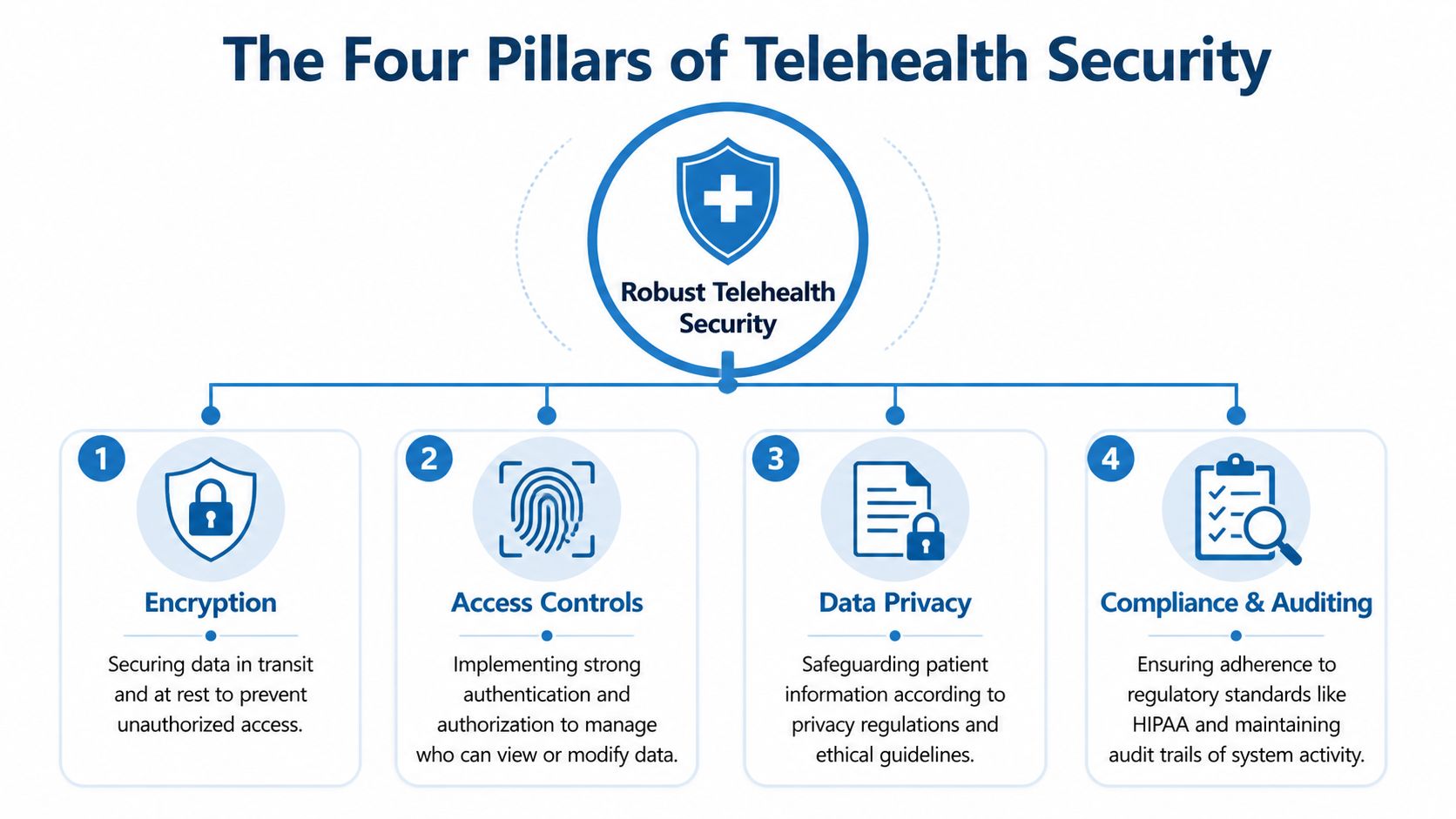
Most clinic buyers don’t need a deep cryptography lesson. They do need to know which safeguards are essential and why. For telehealth, four pillars deserve attention every time: encryption, access controls, auditability, and the BAA.
Encryption
Encryption is the part buyers ask about first, and many stop there too early.
For telehealth, platforms must protect data in transit and at rest. The transport standard should be TLS 1.2 or higher, and stored data should be protected with AES-256. End-to-end encryption is the gold standard for live session security because only session participants hold the decryption keys (telehealth encryption and BAA guidance from Accountable).
In plain language, that means two different protections:
- In transit: the call, chat, and files are protected while moving between users and the platform
- At rest: recordings, stored messages, and uploaded files remain protected after the visit
A useful example is a psychiatrist sharing a treatment handout during a video session. If transport protection is weak, someone could intercept the stream. If storage protection is weak, the handout or recording could be exposed later.
Encryption is also a value feature, not just a compliance feature. It lets you use recordings, secure document sharing, and other workflow tools with less risk when the platform is configured properly.
Access controls
Access control is more than a login screen.
Your billing coordinator shouldn’t have the same platform permissions as your medical director. A scheduler may need to create meeting rooms, but not access recordings. A clinician may need file-sharing rights for their own patients, but not everyone’s.
Good hipaa compliant telehealth software should support role-based access so you can match permissions to job duties. That reduces accidental exposure and makes staff actions easier to manage.
For small practices, this often starts with a simple question: Who needs access to what? If the answer is “everyone can see everything,” the setup needs work.
Multi-factor authentication also matters here. If your team needs a practical refresher on how to tighten access without making daily work miserable, Essential MFA security for SMBs is a solid plain-English resource.
Audit trails
Audit trails are the platform’s memory.
They help answer questions like:
- Who accessed a patient-related file?
- When was a recording viewed or downloaded?
- Which user changed a setting?
- Was a meeting started by the correct host?
Without logs, you’re stuck with guesses. With logs, you can investigate incidents, support internal review, and show that controls exist beyond policy documents.
A strong audit trail doesn’t prevent every mistake. It proves what happened and helps your team respond quickly.
For clinic managers, audit logging is often the difference between “we think this is what happened” and “we know exactly which account accessed the information.”
The BAA
The BAA is the legal pillar that many teams postpone until the end. That’s backwards.
If a vendor handles PHI in delivering the service, the BAA needs to be part of the decision, not an afterthought. The important nuance is this: even if a vendor says it can’t see encrypted PHI, that alone doesn’t remove BAA obligations. HHS guidance treats vendors with persistent access to the PHI stream as business associates, which means the contract still matters.
That point surprises buyers because some vendors talk as if encryption replaces accountability. It doesn’t.
A simple way to test the four pillars
Ask each vendor these questions in one email:
| Pillar | What to ask |
|---|---|
| Encryption | Do you support TLS 1.2+ in transit and AES-256 at rest? Is end-to-end encryption available for sessions? |
| Access | Can we assign roles so staff only see what they need for their job? |
| Auditability | What events are logged for meetings, recordings, file access, and admin changes? |
| BAA | Will you sign a BAA for the plan we are considering, and is that process straightforward? |
Vendors that answer clearly are easier to work with. Vendors that respond with vague marketing language usually create more work later.
Your Vendor Evaluation Checklist and Price Comparison
A clinic signs up for a familiar telehealth brand because the monthly price looks manageable. Two months later, the actual bill arrives. Webinar hosting costs extra. Recording storage is capped. The healthcare plan sits above the entry tier they first budgeted for. Staff are now juggling more than one tool, and the "affordable" choice is no longer affordable.
That pattern is common in small and medium-sized practices because buyers compare feature lists instead of total cost of ownership.
A better buying question is simple: which platform covers your actual visit flow, patient access, admin control, and compliance needs without forcing you into extra subscriptions? For a lean practice, that question matters more than whether a vendor has the longest enterprise feature page.
As noted earlier, smaller teams are often better served by tools that keep pricing predictable and avoid add-ons for common telehealth tasks.
The checklist that matters in real buying decisions
Use this shortlist before you book demos or ask for quotes.
Security and compliance fit
- BAA availability: Confirm the vendor will sign a BAA for the exact plan you are considering.
- Encryption support: Ask for clear documentation on transport security, stored data protection, and session protection.
- Access management: Check whether you can assign permissions by role so schedulers, clinicians, and admins do not all see the same things.
- Audit logging: Ask which actions are logged, how long logs are retained, and whether your team can review them without opening a support ticket.
- Recording controls: Clarify whether recordings can be turned off, restricted by role, or governed by policy.
Workflow fit
- Browser-based joining: Patients should be able to join with as few steps as possible. Every extra click works like another front-desk handoff. Some patients will make it through. Some will not.
- Waiting room controls: These help staff manage flow and reduce the chance of the wrong patient entering a session.
- Screen sharing and document sharing: Useful for care plans, education, consent review, and follow-up instructions.
- Webinar support: Group education, orientation sessions, community outreach, and staff training may all sit under telehealth operations. If webinars require a separate product, your cost picture changes fast.
- Moderation tools: Host controls, meeting lock, and participant management help keep visits orderly.
Financial fit
- Straightforward pricing: You should be able to tell what your monthly cost will be without reading fine print three times.
- Usage limits: Check for caps on meeting time, recordings, hosts, storage, or participant count.
- Contract terms: Long commitments increase risk if adoption is weak or workflows do not fit.
- Feature consolidation: One platform that covers visits, recordings, and webinars can lower total spend even if the base subscription is not the cheapest line item.
Practices often save more by reducing software sprawl than by picking the lowest sticker price.
Where price comparisons go wrong
The distortion usually starts with the advertised tier. Vendors highlight the lowest visible price, while the features a clinic needs may sit one or two levels higher. That is similar to pricing a copier without toner, maintenance, or paper trays. The machine still works, but not for the job you bought it to do.
For example, Zoom's healthcare offering is often evaluated as a higher-cost benchmark for practices that want a familiar platform and broader business tooling. Zoom for Healthcare plan information from Zoom is useful for checking current packaging and what is included at the healthcare tier. For some organizations, especially those already standardized on Zoom, that cost may make sense. For a smaller practice, it is a reference point that helps frame what enterprise-oriented pricing can look like once healthcare requirements are added.
By contrast, AONMeetings is one example of a value-focused option aimed at lean operations. It offers HIPAA-compliant meetings, built-in webinars, unlimited meeting time, recordings, screen sharing, whiteboards, document sharing, and bank-level encryption starting at ₹179 per user per month. For practices that want one predictable subscription instead of separate tools for visits and webinar-style sessions, that changes the buying math. This comparison of HIPAA-compliant video conferencing platforms for healthcare teams can help if you are comparing what each plan includes.
Telehealth Platform Price & Value Comparison (2026)
| Feature/Cost | Enterprise Platform (e.g., Zoom for Healthcare – Business) | Value-Focused Platform (e.g., AONMeetings) | Freemium/Basic Plan (Common Pitfalls) |
|---|---|---|---|
| Base pricing approach | Higher monthly benchmark, often tied to a larger business ecosystem and more admin layers | Lower entry cost aimed at lean teams and easier budgeting | Low entry cost or free tier may look attractive at first |
| HIPAA readiness | Usually available on designated healthcare plans with a formal process | Should be verified plan by plan, especially for BAA and admin settings | Often unclear, limited, or not appropriate for PHI workflows |
| Webinar hosting | May be separate, tiered, or sold as an add-on | Can be included, which may replace another subscription | Often absent or heavily limited |
| Meeting time | Usually built for business use without consumer-style caps | Unlimited meeting time can simplify scheduling and budgeting | Time limits can interrupt visits and create staff workarounds |
| Admin controls | Strong, though some small clinics may not need every layer | Focused controls may be enough for small to mid-sized practices | Basic controls can leave governance gaps |
| Patient usability | Familiar brand may help, but setup depends on configuration | Browser-based instant join can reduce support burden | Downloads and account prompts often lead to missed or delayed visits |
| Total cost of ownership | Can rise as you add webinars, recordings, storage, or advanced admin needs | Often stronger if one tool replaces separate meeting and webinar software | Hidden cost shows up in staff time, missed visits, and upgrade pressure |
How to make the final decision
Use three tests.
Does it match your real workflow?
Include actual visit types, intake steps, patient instructions, recordings, and admin tasks. A polished demo is not enough.Will staff and patients use it without constant help?
Every confusing join flow becomes a support task. Every support task becomes labor cost.What will it cost after six months, not just on day one?
Count add-ons, storage, webinar needs, training time, and any separate tools you can retire.
That is the buyer mindset that helps a practice avoid two expensive mistakes at once. Overbuying a platform built for a larger organization, and underbuying a tool that creates compliance or workflow problems later.
A Smooth Launch Plan for Your Telehealth Service
Buying the platform is the easy part. Launching it cleanly is where practices either gain confidence or create friction that never quite goes away.

A smooth rollout usually comes from doing a few operational basics well. Not from trying to activate every feature in week one.
Start with configuration discipline
Set up user roles before the first patient visit. Don’t wait until after people have already learned the wrong habits.
At minimum, define separate permissions for clinical staff, scheduling staff, and administrators. Decide who can start sessions, who can access recordings, who can share files, and who can change account settings.
A short written policy helps here. If staff can explain the rules in plain language, they’re more likely to follow them consistently.
Build around the patient experience
Your patient instructions should fit on one page or one short email. Include how to join, what browser or device to use, when to log in, and what to do if audio fails.
Run test visits with staff acting as patients. That exercise catches most of the practical problems that demos hide, such as confusing join flows, unclear waiting room behavior, or missing confirmation messages.
A simple launch sequence
Configure roles and defaults
Lock in security settings, waiting room behavior, and host permissions first.Pilot with a small group
Choose one provider or service line, gather feedback, and fix friction before full rollout.Standardize patient messaging
Use the same visit instructions, reminder wording, and support process across the practice.Train for privacy, not just buttons
Teach staff how to avoid accidental disclosures, not only how to start a call.
Connect telehealth to the rest of your workflow
If your platform integrates with an EHR, scheduling system, or messaging workflow, keep the first phase focused. Start with the connection that removes the most manual work.
For some practices, that’s scheduling. For others, it’s getting visit notes or documentation aligned with the telehealth workflow. The right first integration is the one that reduces copy-paste work and cuts handoff errors.
A practical operations checklist for online sessions can also help your team keep the basics consistent. These virtual meeting best practices are useful as a simple operating guide for hosts, moderators, and support staff.
The goal of implementation isn’t to use every feature. It’s to make secure visits feel routine.
Train staff on compliant behavior
Many rollout problems aren’t technical. They’re behavioral.
Staff need to know where they can work from, how to verify the patient, when to use chat, what can be shared on screen, and how to handle family members or interpreters joining a session. If you record visits for a specific workflow, document exactly when that’s allowed and who manages those files.
Short scenario-based training works better than long policy lectures. For example:
- A patient joins early while the clinician is finishing notes from another case
- A staff member sends the wrong document in chat
- A provider uses a personal device from home
- A patient asks to add a family member after the visit begins
Think about international patients early
Practices with cross-border patients need to go beyond HIPAA-only thinking. If you operate across jurisdictions, evaluate whether the platform can support compliance frameworks such as GDPR or India’s DPDP Act, because many buyers overlook how BAA expectations and data-handling obligations can differ for non-US entities (discussion of international telehealth compliance gaps from BHCOE).
That doesn’t always mean a bigger platform. It means asking sharper questions about where data is handled, which legal agreements are available, and how your workflow changes when patients are outside the US.
Common Compliance Pitfalls and How to Avoid Them
The most expensive telehealth mistakes usually don’t start with bad intentions. They start with assumptions.
A practice assumes a common video app is “good enough.” A manager assumes the vendor’s healthcare page means all settings are safe by default. A provider assumes that because a tool was widely used during a crisis, it must still be acceptable for routine care.
The consumer tool trap
A solo provider starts using a standard business or personal video account because it’s familiar. Visits happen. Patients like the convenience. Nobody checks whether the plan includes a BAA or whether the configuration supports healthcare use.
The fix is simple. Don’t treat familiarity as compliance. Evaluate the exact plan, the exact contract, and the exact settings you’ll use in production.
The BAA blind spot
A clinic signs a BAA, then leaves default permissions wide open. Recordings are enabled without a retention process. Too many staff accounts have broad access.
A BAA helps define legal responsibility. It doesn’t configure your environment for you.
Use a launch checklist that covers roles, recording rules, file-sharing permissions, meeting access, and admin review. Compliance fails in the gap between signed paperwork and daily behavior.
The free-access assumption
During the COVID-19 outbreak, some vendors offered free access to telehealth-capable tools. That history is useful, but the lesson is not “free means compliant.” The lesson is the opposite: providers still need due diligence and a BAA because access to a tool does not automatically make the workflow compliant, as noted in HIPAA Journal’s telemedicine guidance.
That mistake still shows up today in a different form. Teams see a free trial, launch quickly, and postpone compliance review until later. Later often arrives after staff adoption, which makes cleanup harder.
The set-and-forget mistake
A practice launches telehealth, writes a few instructions, and never revisits them. New employees inherit old habits. Settings drift. Nobody reviews logs or permissions.
Avoid this by assigning an owner. Someone should periodically review admin access, patient join experience, recordings policy, and staff questions. Telehealth is part of operations now. It needs the same maintenance mindset as scheduling, billing, and documentation workflows.
Software doesn’t drift into compliance on its own. People have to maintain it.
Frequently Asked Questions About HIPAA Telehealth
Is it ever okay to use a non-HIPAA platform for patient visits
As a long-term operating choice, that’s risky. Even when temporary flexibility existed in certain periods, practices still needed to think about privacy, contracts, and workflow risk. For routine care, choose software designed and configured for healthcare use.
What’s the difference between encryption and end-to-end encryption
Encryption is the broad idea that data is protected from unauthorized viewing. End-to-end encryption is a stricter model for session security where only the participants hold the keys needed to decrypt the communication. For a buyer, the practical takeaway is that both matter, but end-to-end encryption offers a stronger layer for live session privacy.
Does using HIPAA compliant telehealth software make my whole practice compliant
No. The software supports compliance. Your practice still needs proper policies, user setup, staff training, patient communication, and oversight. A strong platform reduces risk, but it doesn’t replace operational discipline.
Do I need a BAA if the vendor says it can’t see my data
You shouldn’t assume “we can’t see it” ends the discussion. If the vendor’s service handles PHI as part of delivering telehealth, the contract question still matters. Buyers should ask directly whether a BAA is available for the plan they’re considering and get that answer in writing.
What should a small or medium-sized practice prioritize first
Start with five things: BAA availability, strong encryption, role-based access, clear patient joining flow, and pricing that matches your actual workflow. If webinars are included, that can be a meaningful value advantage for practices that also run education sessions, staff training, or community outreach.
Are enterprise platforms always the safest choice
Not necessarily. Large platforms can be excellent, but they can also be expensive and operationally heavier than a smaller practice needs. A lean platform may be the better choice if it meets your security requirements, supports your workflows, and reduces software sprawl.
If you’re comparing options for secure virtual care, AONMeetings is worth reviewing as one practical path for clinics that want HIPAA-compliant meetings, built-in webinars, and predictable pricing without adding separate tools for routine telehealth operations.
