
You run a live webinar, answer questions, close strong, and then the familiar problem shows up the next morning. The event is over, the calendar slot is gone, and the content that took real effort to produce starts fading almost immediately.
That's where an on demand webinar changes the economics of the whole project. Instead of treating the session as a one-time broadcast, you turn it into an asset that keeps working after the live date. It can educate buyers, support onboarding, reduce repeat explanations from your team, and keep generating registrations while no one is actively presenting.
For marketers, trainers, clinics, consultants, and education teams, this shift matters because audience behavior has changed. People still register for live events, but many of them want the flexibility to watch on their own schedule. If you build your webinar process around that reality, you stop asking a single event to do all the work.
From Live Event to Lasting Asset
A common pattern looks like this. A SaaS team hosts a product webinar on Thursday, a clinic runs a patient education session on Friday, or a coaching business delivers a live workshop at the end of the month. The live session goes well, but the useful part isn't only the hour on the calendar. The useful part is the explanation itself, the slides, the demo, the answers, and the framing.
An on demand webinar keeps that material available after the live room closes.
That's no longer a minor side benefit. In a 2026 analysis of roughly 12,400 B2B webinars, the median live attend rate was 41.6%, and recorded replays generated 2.4 times as many unique viewers as the live session over a rolling 30-day window. The same analysis found that 71% of replay watch time happened in the first 14 days, with a mean live-attendee count of 257 and a median of 88. Those figures came from Digital Applied's webinar statistics analysis.
That pattern changes how a smart team should build webinars.
Practical rule: If the replay is likely to carry a large share of total viewing, record and structure the session as if the replay is the main product.
What this changes in practice
When teams treat webinars as lasting assets, they make different choices:
- They tighten the opening: Replay viewers won't tolerate a long warm-up, housekeeping, or several minutes of waiting for attendees to join.
- They remove date-specific references: “Good morning everyone” and “thanks for joining live today” age badly.
- They design for reuse: A product demo can become a lead magnet. A patient explainer can support staff intake. A training session can reduce repeat onboarding calls.
I've seen the strongest webinar programs come from teams that stop measuring success only by live turnout. Live attendance still matters, but it isn't the whole value. The replay often becomes the more durable channel.
What Exactly Is an On Demand Webinar
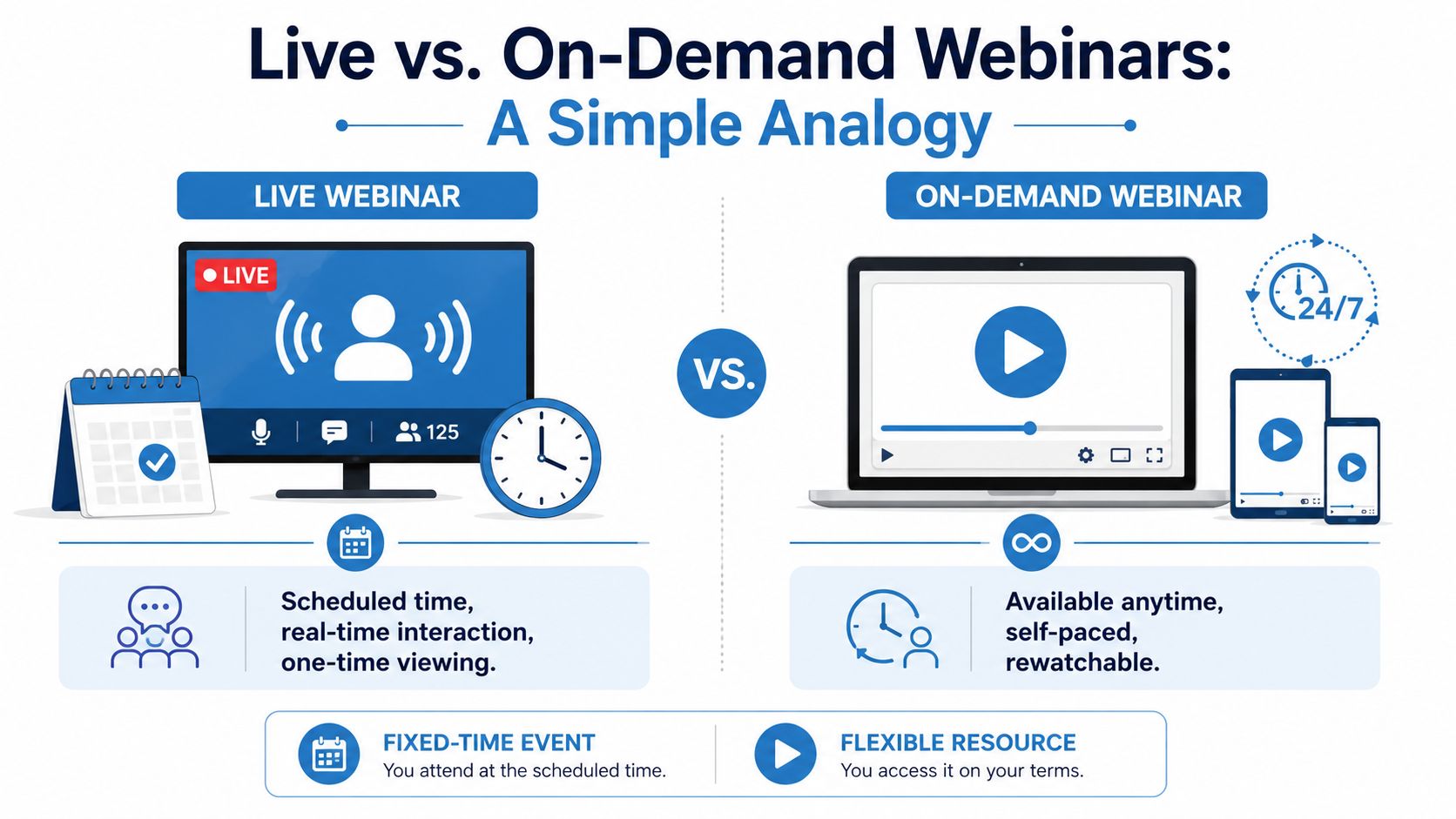
An on demand webinar is a pre-recorded webinar that a registrant can start whenever it suits them. The simplest analogy is this: a live webinar is like live TV, while an on demand webinar is more like a streaming library. One depends on a schedule. The other depends on availability.
Technically, it's different from a live webinar because it is pre-recorded and user-initiated, which removes presenter availability as a bottleneck and makes access asynchronous. That also makes the same session reusable as a lead-generation or training asset without rescheduling costs, as explained in GetResponse's definition of on-demand webinars.
Live, on demand, and evergreen are not the same
People often blur these terms together, but the distinction matters when you choose tools and workflows.
- Live webinar: Happens at a fixed time with a presenter and audience in the same session.
- On demand webinar: Uses a completed recording that viewers start on their own schedule.
- Evergreen webinar: Usually refers to a long-running automated webinar funnel. It may use on-demand delivery, simulated scheduling, or automated follow-up sequences.
If you're building from scratch, the practical starting point is usually the on demand format, not a more elaborate evergreen setup. It's easier to produce, easier to update, and easier to control.
Why audiences prefer it
The main appeal is simple. People don't have to rearrange their day to get the information.
For B2B buyers, that means they can watch a demo after meetings. For students, it means revisiting a lecture before an exam. For patients or clients, it means reviewing instructions without feeling rushed. The flexibility also helps distributed teams and international audiences who otherwise miss the live slot.
The strongest on demand webinars feel less like a replay and more like a well-prepared resource.
That difference is important. A raw recording of a live event can work, but a purpose-built on demand webinar usually performs better because it respects the way replay viewers watch. They skip faster, leave sooner when the opening drags, and expect a cleaner structure.
Strategic Benefits and Real-World Use Cases
A sales team finishes a strong live webinar on Thursday. By Monday, prospects are still asking for the recording, customer success wants to use it in onboarding, and regional teams need the same explanation for people who missed the session. That is where an on demand webinar starts paying for itself. One recording can support pipeline, training, and support without asking a presenter to repeat the same material all week.
The value is not just convenience. It is operational efficiency. Teams get a consistent explanation, prospects get access on their own schedule, and the business gets more mileage from content it already created.
Lead generation that keeps working after launch
For B2B marketing teams, an on demand webinar often works best in the middle of the funnel. It gives buyers enough substance to evaluate a problem, compare approaches, or see a product in action before they talk to sales.
The trade-off is clear. A registration-gated webinar can qualify intent and feed your CRM, but it also creates friction. An open webinar gets wider reach, but you lose some lead data. The right choice depends on the goal. Demand generation teams usually gate product demos and category education. Brand and audience growth teams often leave thought leadership open.
A focused recording usually beats a broad one. A 20-minute session on one workflow, such as reporting, integrations, or HIPAA-related admin controls, is easier to promote and easier for viewers to finish. If your team needs a repeatable production process, this guide on how to record webinars for replay use is a practical starting point.
Training and onboarding without repeating the same session
On demand webinars are also useful inside the business. Customer success teams use them to shorten time-to-value. HR and enablement teams use them to standardize onboarding. Support teams use them to reduce basic how-to tickets.
Consistency matters here more than polish. New hires, customers, and partners should hear the same setup steps, policy language, and escalation process every time. A recorded session also gives live instructors a better role. Instead of spending their time repeating basics, they can use office hours or Q&A sessions to handle exceptions and harder questions.
Common use cases include:
- Customer onboarding: account setup, key features, permissions, and first milestones
- Internal training: policy refreshers, security procedures, and role-specific workflows
- Partner enablement: positioning, demo standards, and implementation expectations
Strong use cases in healthcare, education, and advisory services
Regulated and service-based organizations often get the fastest return because they explain the same process again and again.
A clinic can use an on demand webinar to walk patients through intake steps, treatment preparation, or follow-up expectations. An education provider can publish orientation sessions, parent briefings, or revision workshops. A legal or financial advisory firm can explain timelines, document requirements, and process boundaries before the first appointment.
There is a compliance angle too. In healthcare, a webinar platform should do more than host video. It should protect access, support secure delivery, and fit HIPAA requirements when protected health information is involved. That is one reason teams often choose platforms such as AONMeetings. It gives smaller organizations access to secure webinar hosting and controls that are usually associated with higher-priced enterprise tools.
Better coverage across time zones and team schedules
Scheduling is a real constraint. Buyers miss live sessions because they are in meetings. Patients review instructions after hours. Distributed teams work across regions that do not share a convenient webinar slot.
An on demand format removes that bottleneck. It also improves cost efficiency. Instead of paying staff to re-run the same presentation for every region or cohort, teams can create one approved version and support it with targeted follow-up.
The strongest programs treat each webinar as a reusable business asset. If a recording can answer recurring sales questions, reduce onboarding time, and deliver a secure viewer experience at a reasonable platform cost, it is doing more than filling a content calendar. It is supporting operations.
A Step-by-Step Guide to Creating Your On Demand Webinar
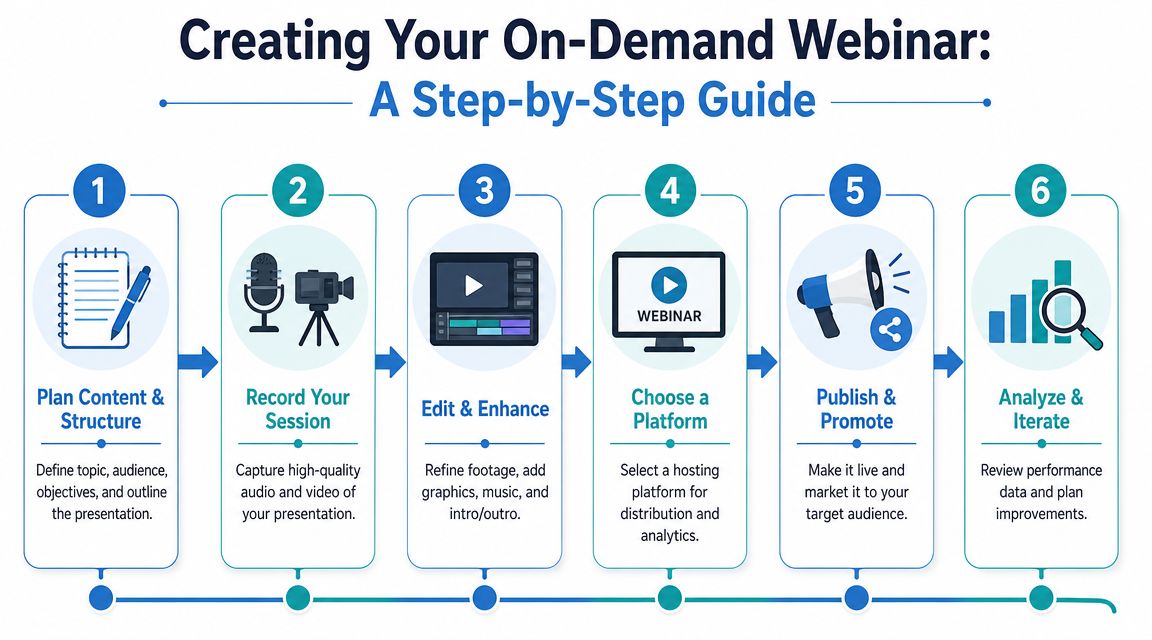
The difference between a webinar that keeps generating value and one that fades away usually comes down to production discipline. You don't need a television studio, but you do need structure, clear delivery, and a hosting workflow that supports searchability and follow-up.
Plan the session for replay first
Start with one audience and one outcome. Don't try to serve prospects, customers, partners, and internal staff in the same recording. Mixed audiences force vague messaging, and vague webinars rarely hold attention.
A simple planning framework works well:
- Define the viewer
Decide who this is for. New prospects, patients, enrolled students, current customers, or internal teams. - Choose a single promise
The title should imply one clear outcome, such as learning a workflow, understanding a process, or seeing a product in action. - Build a tight outline
Open with the problem, move into the explanation or demo, then close with next steps.
If you need help with the capture side, AONMeetings has a practical guide on how to record webinars outlining the basics of turning a session into a reusable asset.
Record with production quality in mind
Audio quality matters more than teams expect. Viewers will tolerate average lighting longer than they'll tolerate muddy sound. Use a dedicated microphone, a quiet room, and a stable internet connection if you're recording live to later repurpose the session.
For capture standards, Riverside's on-demand webinar guidance notes recording up to 4K video and 48 kHz lossless WAV audio. The same guidance also points to transcript-based repurposing, with webinar material split into bite-size clips and blog posts for searchability and reuse.
What usually works
- A short opening: State who the webinar is for and what viewers will learn.
- Screen-first demos: For software, product, or workflow education, clear screen capture often matters more than speaker video.
- Intentional pauses: Leave small gaps between sections so editing is easier.
What usually fails
- Long preambles: Replay viewers don't need housekeeping, sponsor mentions, or repeated welcomes.
- Unedited Q&A tangents: Good for live energy, bad for long-term clarity.
- Date-bound language: References to today, this morning, or a seasonal campaign make the asset expire faster.
Record the webinar you want someone to find three months from now, not just the one you need to deliver today.
Edit for clarity and reuse
Post-production is where an ordinary recording becomes a usable asset. Cut dead space, fix rough transitions, add intro and outro slides, and decide whether the full Q&A belongs in the final version.
Then create derivative assets from the transcript:
- Short clips for social and email promotion
- A blog post built from the core teaching points
- FAQ text pulled from repeated questions in the session
- Searchable captions or transcript pages so viewers can skim before committing
This is one of the most impactful steps in the whole process. A single webinar can supply weeks of downstream content if the transcript is clean and the topic is narrow enough.
Host, gate, and promote intelligently
Don't publish every webinar the same way. Some deserve a registration form because they qualify demand. Others should stay open to reduce friction, especially if the main goal is customer education or support deflection.
A practical way to decide:
| Goal | Better approach |
|---|---|
| Lead capture | Registration gate with follow-up email |
| Customer education | Low-friction access |
| Internal training | Restricted access with role-based sharing |
| Thought leadership | Landing page plus open replay |
Promotion should be simple and repeated. Put the webinar on a dedicated landing page, include it in nurture emails, send it to sales for follow-up, and use the short clips to drive replay traffic over time. The best-performing webinars rarely rely on a single launch email.
Choosing the Right On Demand Webinar Platform
The platform decision shapes more than hosting. It affects recording quality, registration flow, branding, analytics, security posture, and whether your team can manage both live and replay experiences without duct-taping several tools together.
That matters because modern attendance doesn't stop at the live session. In Univid's 2026 report based on anonymized data from more than 325,000 webinar attendees and hosts, total attendance including live and replay views was 57%, compared with a 49% live attendance rate alone. The same report found that 86% of attendees took part in the live webinar and 71% of webinars had fewer than 100 live attendees, according to Univid's webinar statistics report. The takeaway is straightforward. The platform needs to support replay as a core channel, not an afterthought.
What to check before you commit
Some features sound nice in a sales demo but don't change outcomes. Others are foundational.
Look for these first:
- Reliable recording and playback: If video or audio quality degrades badly, the replay loses value.
- Registration and access controls: You need options for gating, open access, internal sharing, or segmented campaigns.
- Branding controls: Landing pages, emails, and the viewing environment should feel consistent with your organization.
- Searchable recordings and transcripts: Helpful for long webinars and training libraries.
- Analytics for both live and replay behavior: You need to see where viewers drop, rewatch, or convert.
- Security features: Encryption, access management, and audit-friendly controls matter, especially in regulated sectors.
Webinar Platform Value Comparison
Price matters, but price alone is the wrong lens. The key question is what's included before add-ons, contracts, or separate webinar licensing start inflating the cost.
| Feature | Typical Enterprise Platform (e.g., Zoom, GoTo) | AONMeetings |
|---|---|---|
| Webinar access | Often separated by tier or add-on | Included with plans |
| Contract structure | Often sales-led or tier-restricted for larger needs | No contracts stated in the publisher brief |
| Meeting limits | Can vary by plan | No 40-minute limits stated in the publisher brief |
| Security | Usually strong, but compliance features may depend on plan and setup | Bank-level encryption and HIPAA-ready positioning in the publisher brief |
| Browser access | Varies by product and workflow | Browser-based use in the publisher brief |
| Base pricing | Typically higher and more layered | Starts from ₹179 per user per month in the publisher brief |
For small businesses, clinics, and education teams, the attraction of an integrated platform is reduced operational sprawl. Instead of buying separate tools for meetings, webinars, recordings, and compliance-sensitive use cases, one system handles the basics in a more straightforward way. A useful reference for that buying process is AONMeetings' overview of webinar software for small business.
AONMeetings fits the accessible end of the market while still including webinar hosting, recordings, and encryption in its plans, based on the publisher information provided for this article. That combination is relevant if you need to run client calls, webinars, and compliance-sensitive sessions without moving into expensive enterprise packaging.
Security and Compliance for Sensitive Industries
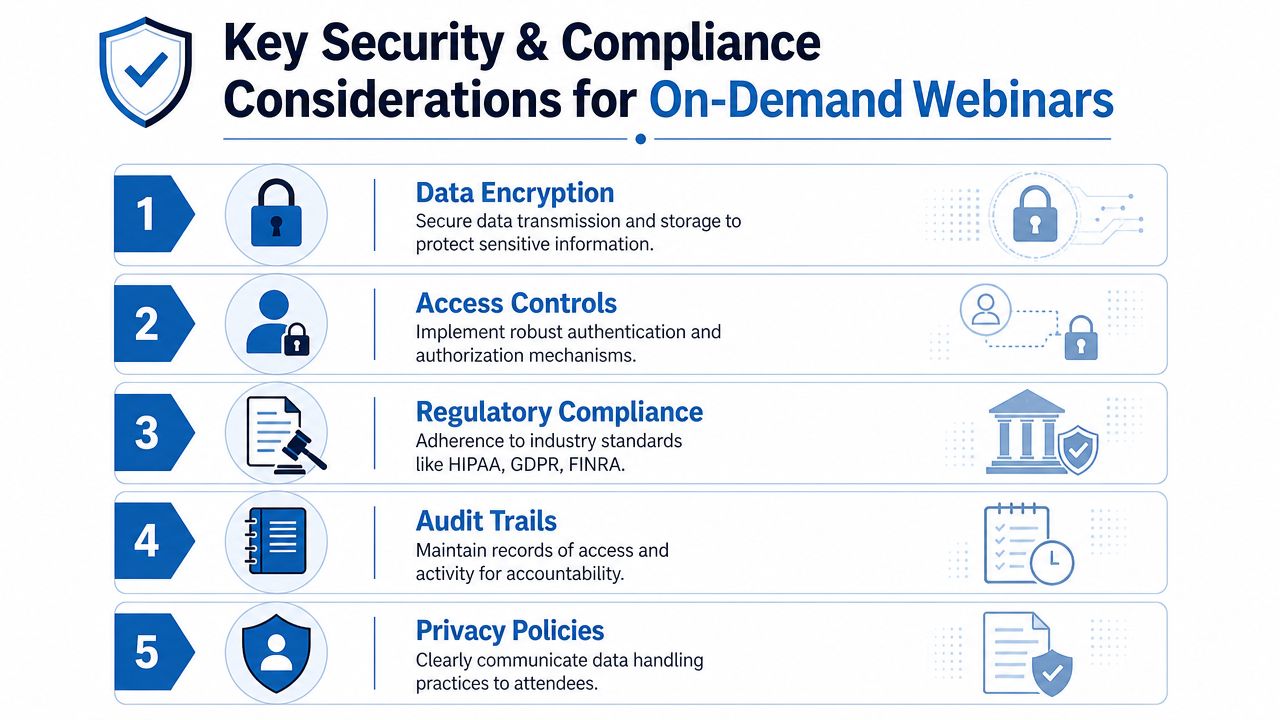
Security isn't a side feature for an on demand webinar program in healthcare, education, finance, or client advisory work. It affects how you collect registrations, where recordings are stored, who can access them, and whether the platform supports the obligations your organization already has.
What compliance means in practical terms
For healthcare, the conversation usually starts with HIPAA. In platform terms, that often means looking for a provider that can support a Business Associate Agreement, protect stored and transmitted data, and give administrators control over access and session handling.
Encryption belongs on that checklist. If a platform offers strong encryption as part of the default product, that's one less security gap your team has to patch through policy alone.
AONMeetings is relevant here because the publisher positions it as a HIPAA-compliant video conferencing platform with built-in webinars and bank-level encryption, rather than treating those items as separate premium purchases. Their overview of HIPAA-compliant video conferencing platforms is a useful starting point if you're evaluating healthcare-ready tools.
Accessibility is part of compliance
A secure webinar that people can't use still fails in practice. That's especially true in public-facing or high-sensitivity contexts where viewers may rely on mobile devices, recordings, or lower-friction access methods.
Research on webinar design in harder-to-reach settings highlights that success depends not only on hosting recordings, but on making sessions usable, inclusive, and accessible so people aren't excluded from participation, as discussed in this public-sector webinar discussion on engagement and accessibility.
Compliance isn't only about locking things down. It's also about making sure the intended audience can securely reach and understand the material.
For organizations handling personal data more broadly, it also helps to review practical guidance on GDPR and CCPA compliance, especially when webinar registration, email follow-up, and recording storage cross jurisdictions or marketing systems.
A realistic vetting checklist
Before signing anything, ask direct questions:
- Can the vendor support regulated use cases?
- Is encryption included or plan-dependent?
- Who can access recordings and transcripts?
- Can admins control permissions and retention?
- Does the platform make access simple for legitimate viewers without weakening security?
Those answers tell you far more than a generic feature list.
Optimizing Your Webinar for Long-Term Success
The teams that get steady results from on demand webinars usually do one thing differently. They manage each session like a product asset with an owner, a review cycle, and a defined conversion goal.
That changes how the webinar is handled after launch. Instead of treating the recording as finished, review audience drop-off points, registration-to-view patterns, replay behavior, and the actions viewers take next. Then make specific edits that improve performance, such as tightening the first two minutes, replacing dated examples, updating the CTA, or turning one broad session into a short series built around narrower search intent.
Keep the asset working
A practical maintenance rhythm looks like this:
- Refresh examples: Remove stale screenshots, dates, and product references.
- Review the landing page: Tighten the promise and clarify who the webinar is for.
- Repurpose the transcript: Turn core lessons into articles, FAQs, and short-form promotion.
- Match the offer to the viewer: Some webinars should lead to a consult, others to a trial, course, or downloadable guide.
Cost control matters here too. A webinar program becomes expensive fast if every update requires production help, a complicated re-publish workflow, or a higher-tier contract just to manage recordings and access settings. Platforms that keep hosting, replay delivery, and admin controls in one place reduce that drag and make it easier to maintain a library over time.
If your monetization model includes paid education or digital content, it's worth reviewing how webinars fit alongside courses, downloads, and memberships. This roundup of best platforms for selling digital products is useful for thinking through that wider content stack.
For regulated teams, long-term success also depends on keeping updates compliant. Review who can access recordings, whether retention settings still match policy, and whether any registration or follow-up workflow now collects more data than it needs. Those checks are easier to keep up with when the platform is affordable enough to use broadly and secure enough to support sensitive audiences from the start.
A strong on demand webinar stays useful, current, secure, and easy to access. That is what turns one recorded event into a repeatable acquisition, education, or support channel.
If you want a practical place to start, AONMeetings offers browser-based meetings and webinars, built-in webinar hosting, recordings, encryption, and HIPAA-ready capabilities with plans starting from ₹179 per user per month, based on the publisher brief. That makes it a sensible option for teams that need secure webinar delivery, included webinar functionality, and clearer pricing without jumping straight into enterprise contracts.
