
A leadership team finishes a video call about a pricing change, an acquisition target, or a patient workflow update. Ten minutes later, someone asks a simple question: “Who else was on that call, exactly?”
That is often the moment video conferencing security stops feeling like an IT setting and starts feeling like an operational risk. The problem is not only outsiders crashing meetings. It is the quieter failures too. A recording stored in the wrong place. A guest link forwarded one more time than intended. A host who assumed the platform’s default settings were safe enough.
Teams frequently trust the meeting room because the interface looks familiar. That trust is misplaced. Secure video calls depend on configuration, identity controls, recording policy, and user behavior. If any one of those is weak, the call is more public than people think.
Healthcare clinics, schools, financial teams, legal groups, and small businesses all face the same basic trade-off. The easiest meeting experience is rarely the safest one. The strongest controls can also slow people down if they are rolled out badly. Good video conferencing security is not about turning on every possible restriction. It is about picking the controls that reduce risk without making meetings unusable.
Why Your Virtual Meetings Are Not as Private as You Think
A sales director shares a screen with renewal forecasts. An HR manager discusses a termination. A clinician reviews follow-up instructions with a patient. In each case, the people in the meeting frequently assume privacy because the session was “invite only.”
That assumption breaks quickly in organizations.
A forwarded invite can bring in the wrong participant. A cloud recording can outlive the original purpose of the meeting. A moderator can forget to disable attendee screen sharing, and a routine webinar can turn into an avoidable incident. Even when nobody malicious joins, sensitive content can leak through weak device security, careless recording habits, or overbroad permissions.
Privacy fails in ordinary ways
Meeting incidents do not look dramatic. They look mundane.
A consultant joins from a personal laptop that syncs recordings to an unmanaged folder. A teacher reuses the same recurring link for every class. A team runs a confidential board call with default meeting permissions because nobody had time to review admin settings. None of those choices feel reckless in the moment. Together, they create exposure.
The hard lesson is that convenience settings become security settings the moment confidential information appears on screen or in audio.
The biggest gap is false confidence
Organizations typically focus on network security, email security, and endpoint protection first. They should. But many still treat meetings as if the platform vendor handles everything by default.
That is not how this works in practice.
A secure platform helps. Good administration matters more. So does host discipline. Waiting rooms, meeting locks, role controls, authentication requirements, recording limits, and retention policies all change the risk profile of the same tool.
Tip: If your team discusses regulated data, personnel issues, contracts, financials, or student information, treat every recurring meeting template as a controlled asset, not a casual calendar link.
Current Threat Environment for Video Calls
Video calls sit in the middle of business operations, not at the edge. Organizations use them for hiring, telehealth, support, internal planning, sales demos, classes, and webinars. That makes them attractive targets for both opportunistic abuse and deliberate intrusion.
In 2025, 44% of video conferencing users express concern over calls being recorded without consent, and 27% of breach victims trace incidents to video sessions according to Zebracat’s video conferencing statistics report. Those two figures matter because they point to the underlying risk pattern. The threat is not only someone barging into a meeting. It is also silent capture, stored data, and weak control over who can access what later.
Uninvited access is still the easiest problem to understand
The boardroom analogy is useful. If your office conference room door is unlocked and the reception desk waves everyone through, you do not have a private meeting. Video platforms work the same way.
Common failures include:
- Reused meeting links: A recurring room becomes a standing access point.
- Weak guest controls: External attendees bypass the waiting area.
- Overbroad presenter permissions: Guests can share screens, annotate, or disrupt a webinar.
- Open recordings: A link to a replay becomes easier to share than intended.
This category gets the most attention because it is visible. People notice when the wrong person joins. They do not always notice when the right person records, downloads, or forwards content.
Eavesdropping and interception are more technical, but significant
Not every risk comes from a visible intruder. Some come from weak encryption choices, poor device hygiene, or stored media in the wrong place. A meeting can be secure in transit and still become insecure at the endpoint if a participant uses an unmanaged device, stores files locally without protection, or runs risky browser extensions.
The practical takeaway is straightforward. Security does not end when the participant list looks correct.
A confidential HR call can still leak if:
| Risk point | What goes wrong in practice |
|---|---|
| Live session | Someone joins from a device that is already compromised |
| Screen sharing | Sensitive files, chat messages, or notifications appear unintentionally |
| Recording | The file is retained longer than necessary or shared too broadly |
| Transcription | Notes capture regulated or private content with no clear retention rule |
Social engineering now rides inside collaboration tools
Attackers do not always try to break the platform itself. Frequently they use the platform as the social channel.
A fake support request over chat, a convincing external invite, or a meeting request from a spoofed identity can push users to trust the environment too quickly. Once the call starts, people are more likely to comply with requests to open a file, click a link, install a remote tool, or approve access.
Monitoring therefore matters beyond the meeting room itself. Teams that want to strengthen visibility around suspicious user behavior often pair conferencing controls with broader insider threat detection tools, especially when they need to detect unusual downloads, access patterns, or policy violations around recordings and shared content.
Stored content is often the bigger liability
Organizations love recordings because they are useful. Training teams reuse them. Sales teams send them to prospects. Webinars depend on them. Compliance teams sometimes need them.
The problem is not recording itself. The problem is recording without a policy.
A stored executive call, a patient consultation archive, or a disciplinary meeting replay creates a second security surface. Now you are protecting not only the live meeting but also the file, transcript, access history, and retention workflow.
Key takeaway: If you secure the live meeting but ignore recordings, transcripts, and shared files, your video conferencing security program is only half built.
Understanding Core Security Pillars Encryption and Authentication
Buyers hear security claims from vendors that sound impressive but blur together. “Encrypted.” “Enterprise grade.” “Protected in transit.” Those phrases are not useless, but they are not enough to evaluate risk.
The two pillars that matter most are encryption and authentication. If you understand those clearly, vendor marketing becomes much easier to test.
Encryption decides who can read the meeting
Transport encryption protects data as it moves across networks. That is good and necessary. But it is not the same as end-to-end encryption, where the content is encrypted on the sender’s device and decrypted only on the recipient’s device.
The simplest analogy is this:
- Transport encryption: Your document travels in a guarded truck, but the logistics hub can still open the box.
- End-to-end encryption: The same truck carries a locked safe that only the intended recipient can open.
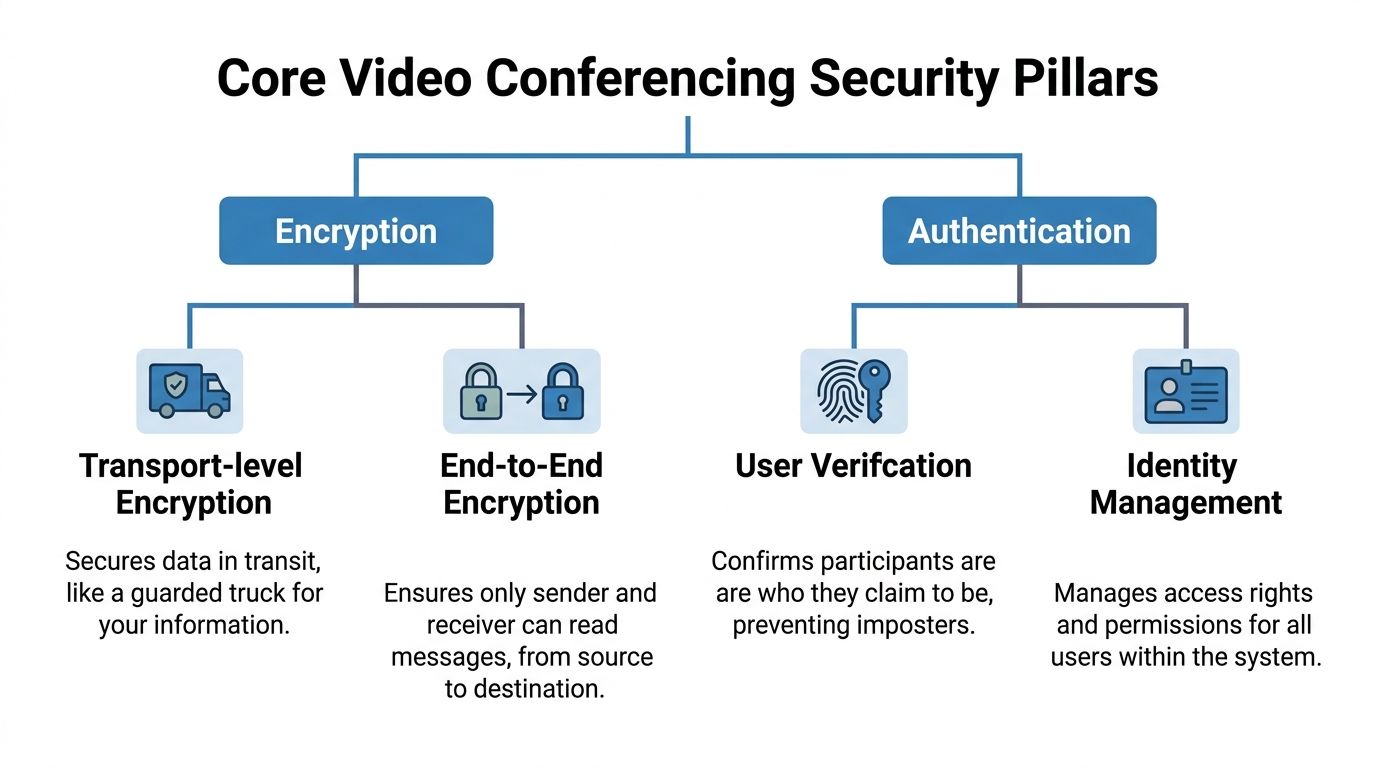
That distinction matters in regulated environments and sensitive executive meetings. According to the verified analysis assigned for this article, end-to-end encryption reduces interception risks by over 99% in controlled tests versus TLS-only setups, and for HIPAA-sensitive use, E2EE helps enforce participant authentication and block unauthorized joins and spoofing through Neat’s security best practices reference.
The trade-off vendors rarely lead with
E2EE is not free in operational terms.
When an organization enables stronger encryption, some convenience features can become harder to use. Cloud recording may require different handling. Some integrations become less flexible. Searchable transcripts may need a new workflow. Support teams frequently discover this late, after rollout.
That does not mean E2EE is optional for sensitive use cases. It means buyers should ask a better question: Which features change when stronger encryption is enabled, and what is the approved workaround?
For a telehealth clinic, the answer may be on-device recording only, or no recording at all. For a legal team, it may be restricted host-only notes and tighter export controls. For a training team running public webinars, full E2EE on every session may be less important than strict host controls and recording governance.
Authentication decides who gets in and what they can do
The second pillar is identity. A meeting is only private if the people inside are verified and limited appropriately.
The control stack usually includes:
- MFA or 2FA: A password alone should not be enough for host accounts or admins.
- SSO: Useful for central identity management and rapid offboarding.
- RBAC: Host, co-host, presenter, attendee, and admin roles should be distinct.
- ABAC: Access rules can also depend on location, device, or session context.
A practical example makes this clearer. In a webinar, attendees should not be able to take over screen sharing, start recordings, or remove other users. In an internal all-hands, a co-host may need moderation rights but not admin rights over retention policy. In telemedicine, the clinician and patient need a much narrower and more controlled meeting scope than a marketing event.
The assigned verified data also states that platforms with RBAC/ABAC + 2FA exhibit 70% lower breach rates in CIS evaluations versus password-only systems. That is a strong reminder that identity controls are not secondary features. They are core video conferencing security controls.
What works in practice
The strongest deployments are often boring in the best way. They standardize identity, then remove exceptions.
A solid baseline often looks like this:
- Require MFA for all hosts and admins. Do not leave it optional.
- Use SSO where possible. Especially for staff turnover and centralized policy.
- Separate host and attendee capabilities. Do not let default roles stay broad.
- Limit external access by policy. Allow only what specific teams need.
- Review service accounts and integrations. Meeting bots and connectors need the same scrutiny as users.
If your team is still rolling out identity controls, this practical guide to multi-factor authentication is worth reviewing alongside your conferencing policy.
Consultant view: If a vendor advertises encryption first but leaves authentication and role control weak, the product may still expose your meetings to the most common failures.
Using Essential In-Meeting Security Controls
Security settings in the admin console matter. The host’s actions during the meeting matter just as much. A well-configured platform can still be undermined by a host who starts late, admits everyone at once, allows unrestricted sharing, and forgets the recording policy.
Think of this as a pre-flight routine. It should be repeatable, quick, and easy enough that hosts follow it.
Before anyone joins
For sensitive meetings, hosts should make a few decisions before the room opens.
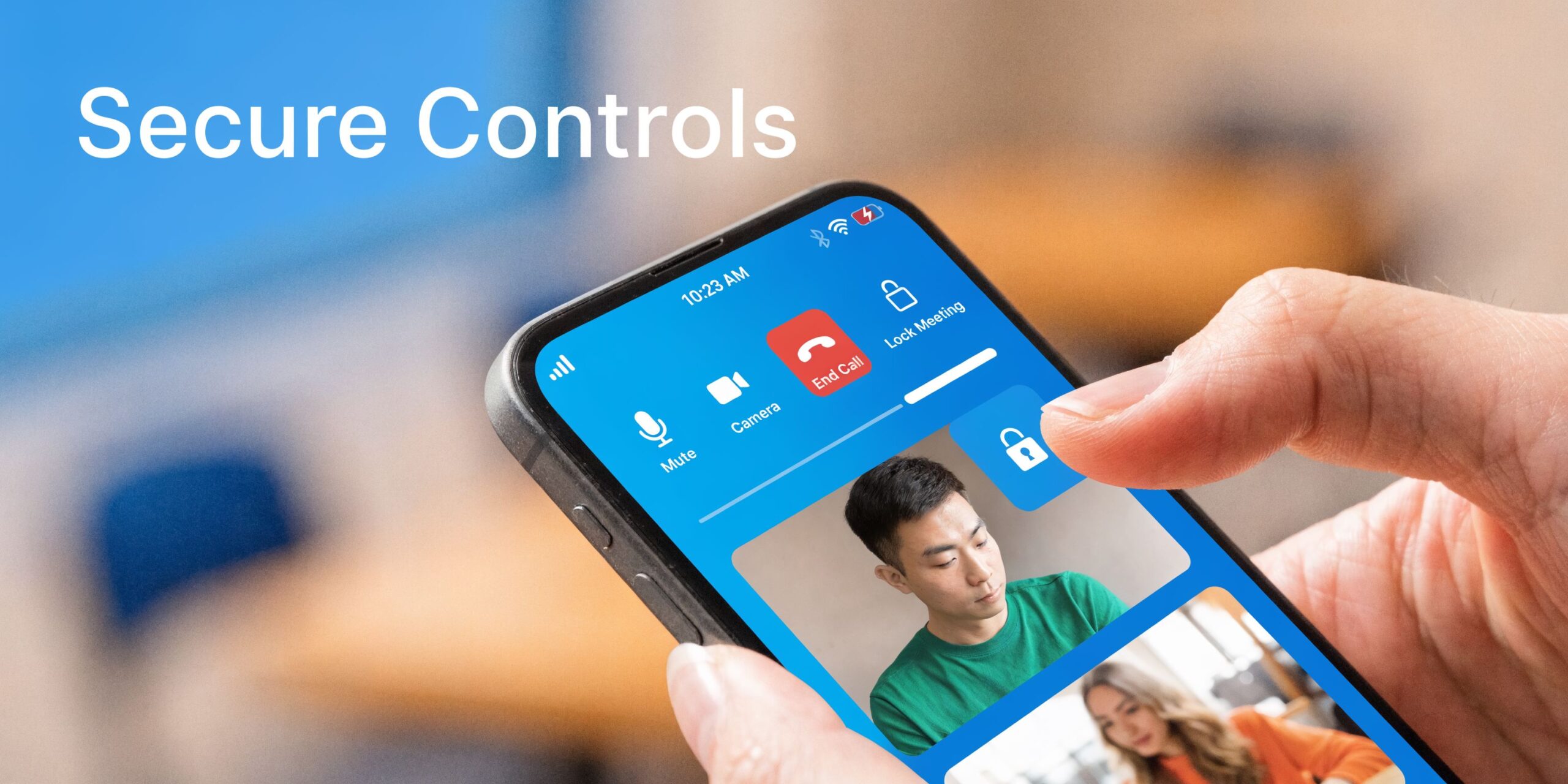
- Turn on the waiting room: Use it as a verification checkpoint for external guests, contractors, or patients.
- Restrict early join: If attendees can arrive before the host, you lose control of the room’s opening moments.
- Pre-assign roles carefully: Not every internal attendee needs presenter rights.
- Review screen share defaults: Set host-only sharing unless the meeting format requires otherwise.
A practical example: if an external consultant is joining a pricing review, admit that person intentionally after checking the name, organization, and expected timing. Do not assume the calendar invite is enough.
During the session
Once the meeting starts, the core controls are operational rather than technical.
Use the waiting room like a front desk
Do not admit a cluster of vague display names all at once. If a participant joins as “iPhone,” “Guest,” or an abbreviated first name you cannot place, pause and verify.
For recurring classes and community sessions, make this less awkward by setting a naming rule in advance. Ask attendees to join with full name and organization or student identifier.
Lock the room after the expected attendees arrive
Meeting lock is one of the simplest high-value controls. It is the digital equivalent of closing the door after everyone sits down.
This is especially useful for:
- board meetings
- HR conversations
- telehealth appointments
- internal incident reviews
Control who can share, record, and chat
Not every meeting needs open chat, file transfer, annotation, or attendee-to-attendee messaging. The safest default is to enable only what the session needs.
If your team frequently collaborates on live demos or training, create separate meeting templates. One template for internal workshops. Another for client reviews. Another for webinars. Mixing all use cases into one default room creates predictable mistakes.
For teams that train users on presentation etiquette and safe sharing, this walkthrough on how to share your screen is a useful operational reference because screen sharing is often where accidental disclosure begins.
After the meeting ends
Hosts frequently relax too early. Some of the most important controls happen after the call.
| Post-meeting control | Why it matters |
|---|---|
| Review recordings | Confirm the recording should exist and is stored correctly |
| Check participant list | Investigate unknown joins while details are fresh |
| Remove unneeded files | Shared documents should not linger in chat by default |
| Apply retention policy | Sensitive sessions need shorter, clearer storage rules |
Tip: For high-risk meetings, assign a co-host whose job is moderation, not content delivery. One person presents. One person watches participants, chat, sharing, and recording indicators.
Choosing Your Secure Platform A Vendor Comparison
Buying a meeting platform is no longer just a feature comparison. It is a risk decision with budget consequences. The market is projected to reach $13.07 billion in 2025, with 8-12% year-over-year growth, and only 32% of organizations currently default to end-to-end encryption, according to the assigned market data in this section’s source background. That tells you two things. Adoption is large, and secure defaults still lag.
For buyers, the practical question is not “Which platform has security?” Most major platforms have some security capabilities. The better question is: Which platform gives your organization the right combination of default protection, admin control, usability, and total cost?
What to compare first
Before price, compare these items:
- Encryption options: Is stronger protection available, optional, or always on?
- Authentication controls: MFA, SSO, guest management, and domain restrictions.
- Role controls: Host, co-host, presenter, attendee, webinar panelist.
- Recording governance: Local versus cloud, retention, access logs, export control.
- Browser access: Useful for reducing install friction, but check how security controls behave in browser sessions.
- Webinar value: Some platforms separate meetings and webinars into different product tiers or add-ons.
Security and value side by side
Below is a practical buyer view based on the publisher brief and the verified non-numeric platform facts available for this article.
| Feature | AONMeetings | Zoom (Pro/Business) | Microsoft Teams (Business) |
|---|---|---|---|
| Encryption positioning | Bank-level encryption, with encryption presented as a built-in feature | Optional E2EE available on supported meeting types | Uses AES 256-bit with TLS |
| HIPAA-focused fit | Positioned for HIPAA-compliant use cases | Can support sensitive use with the right plan and configuration | Often selected by organizations already standardized on Microsoft identity and admin stack |
| Webinar value | Built-in webinars included across plans per publisher brief | Webinar capability often evaluated separately from base meeting plan | Webinar and event capabilities depend on Microsoft licensing path and configuration |
| Browser access | Works in browser on any device | Widely used desktop and browser access | Strong fit in Microsoft ecosystem, often tied to Microsoft 365 usage |
| Meeting controls | Waiting rooms, moderator controls, meeting lock, breakout rooms on advanced tiers | Mature host controls and broad familiarity | Strong admin policy framework and identity integration |
| Pricing approach | Starts at ₹179/user/month per publisher brief, with no contracts and no hidden fees stated in the brief | Commonly segmented by plan tier and add-ons | Commonly bundled with broader business licensing rather than evaluated only as a meetings product |
| Best fit | Cost-conscious teams that still need webinars and regulated-use positioning | Organizations that prioritize familiarity and ecosystem adoption | Teams already invested in Microsoft identity, collaboration, and admin tooling |
Understanding the Trade-offs
Zoom
Zoom remains common because users know it, guests know it, and admins can get a lot done with it. Optional E2EE is a real plus for sensitive scenarios. The catch is operational. If the strongest settings are optional, admins must enforce them intentionally, and teams must understand what changes when those settings are turned on.
This is a good fit when adoption speed and broad familiarity matter, but it demands disciplined policy management.
Microsoft Teams
Teams is attractive when your identity, device management, and collaboration stack already run through Microsoft. Security policy can be strong because identity and access controls are close to the rest of the enterprise environment.
The trade-off is complexity. Teams can be excellent for organizations that already have admin maturity. It is less attractive when a small team wants a simpler standalone path for meetings, webinars, and guest access.
AONMeetings
For organizations that care about cost clarity, webinar inclusion, browser-based access, and a simple commercial model, AONMeetings presents a straightforward value proposition in the publisher brief. The pricing starts at ₹179/user/month, and the brief states that plans include unlimited meeting time, webinar hosting, recordings, screen sharing, whiteboards, and bank-level encryption.
That combination matters most for smaller clinics, educators, coaches, and small businesses that want security features and webinar capability without negotiating enterprise-style add-ons. For teams evaluating options in that segment, this page on best video conferencing for small business gives additional context on fit and feature priorities.
What I advise clients to do
Do not buy on branding alone. Run a short proof-of-use.
Ask each vendor to support the exact scenarios you care about:
- A confidential internal meeting
- A guest-access client review
- A recorded webinar
- A compliance-sensitive session
- A mobile join from a nontechnical user
The best platform is usually the one your admins can control, your hosts can operate correctly, and your users can join without friction.
Buying rule: If webinar hosting is a regular part of your workflow, price it as part of the core platform decision, not as an afterthought. Add-ons distort the true total cost quickly.
Your Implementation and Compliance Checklist
A secure platform does not stay secure by itself. Most failures come from rollout gaps, not missing features. The tool gets purchased, the tenant goes live, and nobody finishes the policy work around identity, recording, guest access, peripherals, or AI assistants.
That is why implementation needs both technical settings and operating rules.
Core rollout checklist
Start with the controls that reduce the most common failures first.
Identity and access
- Require MFA for hosts and admins: Do not leave powerful accounts on password-only access.
- Use SSO if your environment supports it: Offboarding and role changes become cleaner.
- Create role templates: Separate admin, host, presenter, moderator, and attendee permissions.
- Limit guest behavior: External users should not inherit broad capabilities by default.
Meeting governance
- Create approved meeting templates: One for internal confidential use, one for external client meetings, one for classes, one for webinars.
- Define recording rules: Decide who can record, where recordings live, and how long they stay.
- Set retention policy in writing: If a recording should not be kept, make deletion routine rather than optional.
- Control transcripts and summaries: Treat them as records if they contain sensitive content.
Host operations
- Train hosts on waiting rooms and meeting lock: These controls are only useful if people use them consistently.
- Assign co-hosts for high-risk sessions: A moderator should watch access and sharing while the lead focuses on content.
- Publish a host checklist: Keep it short enough that people follow it.
Industry-specific checks
Different sectors need different guardrails.
Healthcare
For healthcare, the platform must be configured to support privacy obligations operationally, not just technically. That means reviewing recording necessity, limiting third-party integrations, controlling exports, and confirming the right contractual and administrative safeguards with the vendor.
If your organization is comparing options for regulated care delivery, this guide to HIPAA-compliant video conferencing platforms is a useful implementation reference.
Education
Schools and coaching centers should focus on class link reuse, student naming rules, attendance controls, chat permissions, and recording consent. Teachers need a simpler, safer default room than a corporate webinar host.
Small business and professional services
Smaller teams frequently need the fewest settings, but they also suffer most from skipped basics. Shared host accounts, reused meeting links, and unmanaged recordings are common trouble spots.
Overlooked Risks Many Organizations Miss
The assigned research for this section highlights two blind spots that standard guidance often underplays.
First, smart peripherals and IoT devices represent a critical security blind spot, with research noting that smart headphones and webcams can create exploitable network entry points, as described in the PMC research reference. In practice, that means video conferencing security should include device allowlists, firmware update routines, and peripheral review. If the webcam, headset, or conference-room accessory is weak, the meeting stack is weaker than it appears.
Second, emerging AI assistants can attend, record, and transcribe meetings without clear participant awareness. Traditional waiting rooms and host permissions do not fully solve that problem when organizations lack explicit policy for non-human participants.
A workable policy should answer:
| Policy question | What to decide |
|---|---|
| AI assistant disclosure | Must bots and note-takers be declared in advance |
| Recording authority | Who can approve AI transcription or summaries |
| Storage location | Where generated notes and transcripts are stored |
| Audit requirement | How the organization logs non-human participant access |
Practical policy: If a meeting assistant can join, record, summarize, or export, treat it like a privileged participant. Give it the same approval and audit standard you would give a human with access to the full meeting.
Building a Lasting Culture of Security
The strongest platform can still fail if users treat security as someone else’s job. Video conferencing security holds up best when the organization treats it as a routine operating discipline.
That culture starts with simple expectations. Hosts verify participants. Admins enforce identity controls. Team leads classify which meetings can be recorded and which cannot. Employees know that a familiar face on screen is not enough to approve a risky request. Support staff know how to escalate a suspicious join, a strange recording indicator, or an unexpected AI assistant in the room.
Training should stay practical. Show people the exact settings they must use. Run a short host drill for waiting rooms, meeting lock, and screen-sharing restrictions. Review one or two real near-miss scenarios internally. That builds more security awareness than broad policy language alone.
Every organization also needs a light incident response path for meeting-related events:
- isolate the meeting or remove the participant
- preserve logs, recordings, and chat artifacts if appropriate
- notify the right internal owner quickly
- review whether the problem came from platform settings, user behavior, or policy gaps
Security culture is not paranoia. It is consistency. When teams apply the same habits every time, private conversations stay private far more often.
If you need a secure platform that balances cost, usability, HIPAA-focused needs, built-in webinars, and encryption without forcing enterprise-style complexity, AONMeetings is worth a close look. It offers browser-based access, unlimited meeting time, webinar hosting, and plans starting at ₹179 per user per month, which makes it a practical option for clinics, educators, small businesses, and teams that want stronger meeting controls without bloated pricing.
