
Not long ago, video conferencing felt like a nice-to-have, a tool for big corporations. Now, it's as fundamental to your small business as your website or your storefront. It's your digital handshake, your virtual meeting room, and a powerful way to punch well above your weight.
Why Video Conferencing Is a Must-Have for Small Businesses
The shift to remote and hybrid work wasn't a temporary blip; it permanently changed how we do business. The numbers back this up. The video conferencing market, valued at $12.30 billion in 2025, is on track to hit a staggering $23.28 billion by 2034. This isn't just a trend—it's core business infrastructure.
For a small business, this technology is a game-changer. It dissolves geography, letting you connect face-to-face with clients, suppliers, and team members, whether they're across town or across the globe.
Expanding Your Reach and Professionalism
Think about what that really means. If you run a local bakery, you can suddenly source specialty ingredients by negotiating directly with a supplier three states away. If you're a one-person marketing agency, you can pitch a dream client in another country without booking a flight, presenting yourself just as professionally as a massive firm.
This is where choosing a dedicated video conferencing for small business platform makes all the difference. Free, consumer-grade tools just don't cut it when your reputation is on the line. A professional solution brings critical features to the table:
- Serious Security: We're talking about robust, end-to-end encryption. This is an added feature that acts as a private, soundproof room for your digital conversations. This protects sensitive client information and your own business strategy from prying eyes.
- Built-in Webinars: Many paid plans include webinar functionality. This instantly transforms your communication tool into a marketing engine or even a revenue stream. You can host product demos, educational events, or paid workshops for a global audience. For example, a personal trainer can host a paid nutrition webinar for 100 people instead of just one-on-one sessions, drastically increasing their income.
Comparing Price and Value
It's tempting to look at the monthly price and pick the cheapest option. But that can be a costly mistake. That "free" or low-cost plan might have a 40-minute meeting limit, which is just long enough to get into a deep client discussion before the call abruptly cuts out. Talk about unprofessional.
A smarter way to look at it is through the lens of total value. A platform that gives you unlimited meeting times, strong encryption, and webinar tools for a predictable monthly fee delivers a much higher return. You're not just buying software; you're investing in reliability and a tool that can actually help you grow.
Unpacking the True ROI of Your Video Conferencing Tool
It’s tempting to look at a video conferencing tool and see only the monthly price tag. But for a small business, the real value isn’t just about what you pay—it’s about what you gain. The right platform isn't another expense; it’s an investment that can completely change how you operate, save money, and even create new income.
The most obvious win is cutting down on costs. Think about a small consulting firm that used to spend thousands every year flying to client sites for demos and project kickoffs. With high-quality video meetings, those travel expenses practically vanish. That’s cash that goes directly back into your business.
From Cost Center to Profit Center
The story gets even better when your tool includes powerful features without tacking on extra fees. A platform like AONMeetings, for example, rolls webinar functionality into its plans. This value proposition turns your communication software into a money-maker.
Suddenly, you're not just holding meetings. You can host paid training workshops, sell tickets to marketing events, or offer premium content to a global audience. A business coach can go from seeing clients one-on-one to leading group workshops, massively boosting their earning potential without adding another software bill.
Quantifying the Gains in Productivity
Beyond new revenue, the boost to your team's productivity is huge. Studies have shown that the right video tools can improve productivity by up to 50%. On top of that, businesses often see a 30% reduction in travel costs. With 94% of HR leaders agreeing that remote work actually enhances productivity, having a reliable platform is a no-brainer.
Think about it this way: a tool with robust end-to-end encryption isn't just a security blanket. It’s an added feature that boosts productivity. It gives your team the confidence to discuss sensitive client info or company secrets without worrying about eavesdroppers, which makes decision-making much faster.
So when you compare plans, look past the monthly fee. A slightly more expensive plan that gives you unlimited meeting times, top-notch encryption, and webinar capabilities delivers a much higher return. It gives you the power to collaborate securely and efficiently. To learn more, explore our guide on the best collaboration tools for remote teams and see how these features fit together. When you see your video conferencing software as a core part of your growth strategy, you'll get so much more out of it.
A Practical Price and Feature Comparison
Picking the right video conferencing platform can feel like navigating a maze. You're hit with flashy features and confusing pricing tiers, and it's tough to know what you really need. The secret is to look past the sticker price and figure out the true, all-in cost. Many plans hide their limitations behind a low monthly fee.
Think about it this way: if you're a therapist or run a small healthcare practice, that "free" tool is anything but. The moment you realize it lacks HIPAA compliance, you're facing a massive legal and financial risk. Or what about that 40-minute meeting limit on a basic plan? It’s a deal-breaker for standard hour-long client sessions. A platform like AONMeetings, which builds in HIPAA compliance and unlimited meeting times from the get-go, offers genuine professional security, not just a temporary bargain.
The Hidden Value of Included Webinars
One of the biggest differentiators you'll find is whether a platform includes webinars in its standard plan. For most providers, this is a premium add-on that can easily double your monthly bill. But when webinars are part of the package, your video tool stops being just an expense and starts becoming a way to make money. This value proposition is critical for small businesses.
- AONMeetings: You get webinar hosting with all paid plans, starting at ₹179/user/month. This means you can run marketing events, paid training sessions, or client workshops without paying for extra software.
- Zoom (Typical SMB Plan): Hosting a webinar usually requires buying a separate, and often pricey, "Webinar" add-on, which can cost an additional $40-$80 per month on top of your meeting plan.
- Microsoft Teams (Business Basic): Webinar features are typically bundled into more expensive, higher-tier plans like Business Standard (around $12.50/user/month), which a small business may not need otherwise.
This simple decision tree shows how including webinars can completely change your return on investment.
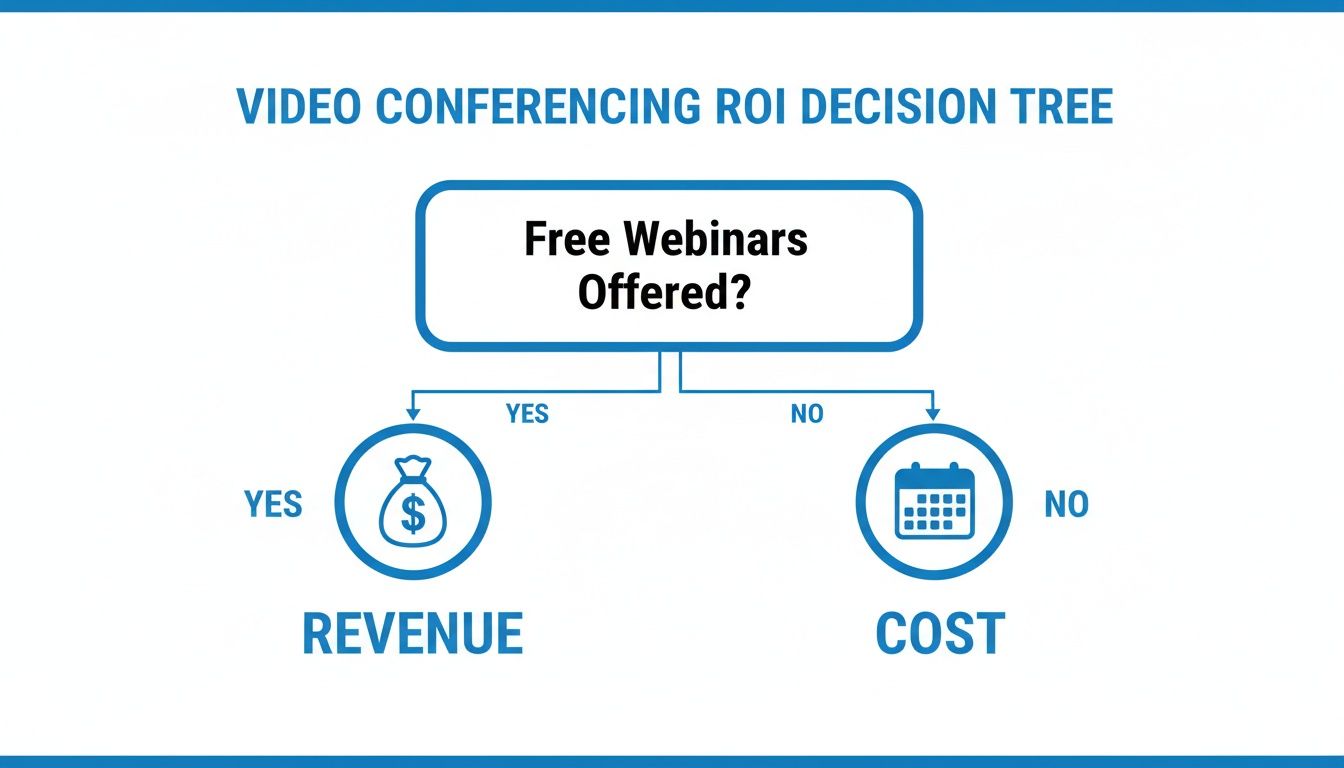
The takeaway here is powerful. When webinars are built-in, your communication software transforms from a simple line item on your budget into a tool for active business growth.
Price and Feature Showdown
To help you make a smart decision, we need to line up the options and see how they compare on the features that actually matter for a small business. A transparent, all-in-one price is your best defense against surprise fees later on. And don't ever overlook security—strong end-to-end encryption should be a non-negotiable added feature for protecting your business and client conversations.
Choosing a video conferencing solution is about finding a partner for your growth. A platform with predictable pricing and inclusive features gives you enterprise-grade tools on a small business budget, ensuring you're equipped for success without being trapped by hidden costs or restrictive contracts.
To give you a clearer picture of how these platforms stack up, we've put together a comparison table. It's designed to help you quickly spot where the real value is for a growing business.
Video Conferencing Platform Comparison for Small Businesses
This table compares key features and pricing models of popular video conferencing solutions to help small businesses identify the best value.
| Feature | AONMeetings | Zoom (Typical SMB Plan) | Microsoft Teams (Business Basic) |
|---|---|---|---|
| Price | Starts at ₹179/user/month | Varies; often higher for similar features. Plans start around $15/user/month. | Starts around $6/user/month (part of suite) |
| Webinars Included | Yes, in all paid plans | No, it's a paid add-on (approx. +$40/month) | Included in higher-tier plans only (e.g., Business Standard at ~$12.50/user/month) |
| Meeting Time Limit | Unlimited | 40-minute limit on free plan; time caps on some paid tiers | 30 hours per meeting |
| End-to-End Encryption | Yes, bank-level security | Yes, available on all plans | Yes, available |
| Contract Lock-in | No contracts, pay monthly | Annual contracts often required for best pricing | Annual commitment required |
As you can see, the details matter. A plan that looks cheap upfront might end up costing you more in add-ons or force you into a long-term contract you're not ready for.
Essential Features That Protect and Empower Your Business

When you're choosing a video conferencing for small business platform, it's easy to get fixated on the basics—a camera and a microphone. But the real value lies in the features that work behind the scenes to protect your conversations, secure your data, and even open up new ways to bring in revenue.
Think of bank-level encryption as the absolute minimum. It’s like putting every one of your conversations into a digital sealed envelope. Whether you’re brainstorming a new product, reviewing a client's financials, or discussing a patient’s health, end-to-end encryption makes sure no one is eavesdropping. This isn’t a luxury; it’s a fundamental added feature for building trust.
Features That Drive Growth and Security
If your business touches the healthcare world in any way—maybe you’re a therapist, a medical billing service, or a wellness coach—then HIPAA compliance is non-negotiable. Some platforms, like AONMeetings, build this in by default, helping you avoid staggering fines and protect sensitive patient data without having to spring for a pricey enterprise plan.
Another feature that can completely change your business is an included webinar platform. This isn't just an add-on; it’s a tool that can turn your communication software into a serious growth machine.
- Practical Example: I once worked with a business coach who was stuck doing one-on-one sessions. By using the webinar feature included in her plan, she shifted to hosting paid group workshops for 50 attendees at a time. It scaled her income dramatically and positioned her as an expert, all without adding another software bill.
The power of an included webinar feature is often overlooked. A platform that charges extra for webinars can cost double or triple the initial price, turning a promising tool into a budget-breaker. AONMeetings includes webinars in all paid plans, offering a significant value proposition that directly impacts your bottom line.
Must-Haves for a Modern Small Business
While security and webinars are heavy hitters, a few other features are essential for running a flexible and productive team. These are the tools that solve everyday small business headaches and let you operate like a much larger company.
Meeting Recordings are invaluable. A team member in a different time zone can catch up on the morning sync, or you can send a recording of a product demo to a prospect so they can review it on their own time. To learn more, check out our guide on how to record webinars and meetings.
Breakout Rooms are fantastic for making online training and workshops feel more interactive. You can split a large group into smaller ones for focused brainstorming or role-playing exercises, which is key to keeping people engaged instead of just staring at a screen.
Finally, while many small businesses feel priced out of professional tools, the productivity gains are real. Only 28% of companies with fewer than 250 employees use video conferencing regularly. But here's the kicker: those that do attend 50% more meetings. This gap shows a huge opportunity for small businesses to boost collaboration and outmaneuver the competition. You can explore more video conferencing trends to see just how much potential is there.
Your Quick-Start Guide to Professional Video Meetings
Running a great video meeting is less about having a flawless internet connection and more about mastering the fundamentals. It’s a blend of simple tech prep and good old-fashioned meeting etiquette. Think of it as setting the stage for a great conversation—a few small steps beforehand can make all the difference in coming across as polished and professional.
Before any big call, do a quick pre-flight check. Test your camera and microphone. You'll save yourself from the dreaded "Can you hear me?" routine that kills momentum right at the start. Find a quiet spot with good lighting. It’s a simple effort that instantly elevates how others see you.
Leading Meetings with Confidence
With the tech sorted, you can focus on what really matters: guiding the discussion. A truly professional video meeting has structure. Always kick things off with a clear agenda so everyone is on the same page about the meeting's purpose. It’s the easiest way to keep the conversation on track and show you respect everyone's time.
As the host, you’re in the driver's seat. Get comfortable with the moderator controls so you can steer the meeting smoothly.
- Mute Participants: Don't be afraid to gently mute attendees if a barking dog or a crying baby makes an appearance. It keeps the focus where it should be.
- Use the Meeting Lock: Once all your guests have arrived, lock the meeting room. This is a crucial security step, often backed by bank-level encryption, that prevents anyone from unexpectedly popping in and derailing your call. This added feature ensures confidentiality.
- Share Your Screen: When you’re giving a client demo or walking through a document, screen sharing is your best friend. It guarantees everyone is literally on the same page, making collaboration instant and effective.
It's easy to get lost in feature lists, but the real value of a platform is how it solves your problems. For instance, a platform like AONMeetings offers unlimited meeting time. This sounds basic, but it's a game-changer. Imagine your critical client demo getting cut off by Zoom’s 40-minute cap on its free plan. Suddenly, a plan starting at just ₹179/user/month for unlimited time doesn't just feel like a good deal—it feels like a professional necessity.
Engaging Attendees and Following Up
The biggest challenge with virtual meetings? Keeping people engaged. Use the tools at your disposal to pull people in. A quick poll can break up a long presentation and give you instant feedback. The chat box is also perfect for attendees to ask questions without interrupting the flow.
Your job isn't done when the call ends. A good follow-up is what turns a conversation into action. Send out a quick summary of the key decisions and next steps. Many modern video conferencing for small business tools now offer recordings and even AI-generated summaries, making this easier than ever. It’s the perfect way to make sure nothing falls through the cracks.
For a deeper dive into running stellar virtual calls, check out these virtual meeting best practices.
A Simple Plan for Switching to a Better Platform
So, you're thinking about upgrading your video conferencing tool. That’s a smart move. Making the switch can feel like a huge project, but it’s actually a straightforward process that often saves you money while giving you a much better experience. Let's walk through how to migrate to a more powerful platform like AONMeetings without causing any headaches for your business.
First things first, take a quick look at your current setup. What are you really paying, and what are the frustrations? Are you constantly getting cut off by that annoying 40-minute meeting limit? Are you paying extra for features that should be standard, like webinars or true end-to-end encryption? Getting a clear picture of your current tool's real cost and limitations is the essential starting point.
Choosing Your New Plan
Once you know what you need, it's time to pick a new plan that fits your budget and wish list. Don't just look at the sticker price. A platform like AONMeetings, for example, starts at just ₹179 per user per month but rolls things like unlimited meeting times and webinar hosting into every paid plan. This kind of bundling is where you find real value and avoid getting nickel-and-dimed for add-ons later.
Think of this as the perfect opportunity to get more for your money. You'll want to find a provider that lets you try before you buy, either with a risk-free trial or a solid guarantee. AONMeetings offers a 30-day money-back guarantee, which gives you a whole month to put every feature to the test and make sure it’s the right move for your team.
With your new platform chosen, it's time to bring your team along for the ride. Just follow this simple checklist to make the transition smooth.
- Test with a Pilot Group: Before you flip the switch for everyone, grab a few tech-savvy team members and have them run the new platform through its paces. They’ll help you spot and squash any potential quirks ahead of time.
- Run a Quick Training: Host a short, informal training session to show everyone the ropes. Focus on the essentials: how to schedule meetings, share a screen, and find recordings. A little guidance goes a long way.
- Update Your Communications: The final step is to swap out the old meeting links in all your calendar invites and client email templates. Be sure to let your clients know about the change, and you can even frame it as an upgrade to provide them with better reliability and security.
That’s all there is to it. By taking these few simple steps, you can move to a better video conferencing solution without skipping a beat. You’ll end up with stronger security, more professional features, and a much smoother experience for your team and your clients.
Frequently Asked Questions
Is a Free Video Conferencing Tool Good Enough for My Business?
Let's be honest, the temptation of 'free' is strong. But those free plans often have strings attached that can trip up a professional business. The biggest one? That dreaded 40-minute meeting cap. Imagine you’re 35 minutes into a killer sales pitch or a critical client negotiation, and suddenly… poof. The call just ends. It's not a good look.
Beyond that, you're missing out on crucial added features like strong encryption and the security is often much weaker. For any conversation that matters—especially with clients or partners—a paid platform gives you the unlimited time and professional polish that protects your brand. It’s a small investment that pays off big in reputation and reliability.
How Important Is Encryption for a Non-Healthcare Business?
You might think encryption is just for doctors and lawyers, but think again. Every single day, your business handles information that needs to stay private. We're talking about more than just client lists; think about your financial data, internal strategy documents, or unreleased product designs.
Bank-level encryption is a non-negotiable added feature. It acts as a digital vault for your conversations, ensuring they're shielded from prying eyes. Choosing a platform with strong encryption isn't just a tech spec—it’s a powerful signal to clients and partners that you take their privacy, and your own, seriously. A practical example: a small marketing agency can securely discuss a client's upcoming campaign budget and strategy, knowing the conversation is protected from competitors.
What Is the Difference Between a Meeting and a Webinar?
It’s a simple but important distinction. Think of it this way:
A meeting is a roundtable discussion. It's built for collaboration, where everyone can turn on their camera, speak up, and contribute. This is what you use for team huddles, brainstorming sessions, and client check-ins.
A webinar, on the other hand, is a presentation from a stage. One or a few people present to a larger audience whose mics and cameras are off by default. It's perfect for things like marketing presentations, company-wide announcements, or paid training seminars.
The real game-changer is finding a platform that bundles webinars with your standard plan. This value proposition turns your communication tool into a powerful marketing and sales engine, giving you a much higher return on your investment than plans that make you pay extra for webinar features.
Ready to upgrade your virtual meetings with a platform that delivers enterprise-grade security and features without the enterprise price tag? AONMeetings offers unlimited meeting times, included webinars, and bank-level encryption. Explore our plans and start your risk-free trial today!
