
A telehealth platform is rarely expensive because of the monthly fee alone. The real cost shows up later, in staff time, configuration mistakes, failed patient visits, extra compliance work, and the add-ons you thought were included.
Clinic directors usually start with price per provider or price per month. That is a reasonable starting point, but it is a poor way to choose a secure telehealth platform. A lower-priced system can become the more expensive option if you have to buy separate webinar capacity, recording controls, admin permissions, consent workflows, or stronger security settings after go-live.
I advise buyers to evaluate total cost of ownership from the first demo. Ask what your team will spend to train staff, support patients, manage access, document visits, and keep the platform aligned with privacy requirements. Then compare that against platforms that package more of those functions into the base plan.
Security affects value just as much as price. A platform that reduces risky workarounds, limits manual handling of patient data, and gives administrators clear control over users and sessions usually saves money over time. It also saves disruption, which matters just as much in a busy clinic.
The New Standard of Care is Virtual and Must Be Secure
Telehealth is now a routine part of care delivery, and a growing share of those visits runs through web-based and cloud-hosted platforms. That shift changes the buying decision. Clinic leaders are no longer choosing a convenience tool. They are choosing part of the care environment, with all the privacy, uptime, training, and budget implications that come with it.
That matters for cost as much as compliance.
A platform with a modest monthly fee can still become expensive if it creates failed visits, patient no-shows tied to login friction, extra help-desk work, or separate purchases for webinar capacity, admin controls, and recording management. I advise clinics to treat security as part of total cost of ownership from day one. If the platform pushes staff into manual workarounds, your labor cost rises. If it lacks the controls needed for clinical use, you end up paying for add-ons, outside tools, or both.
Security is a clinical issue, not just an IT issue
Weak telehealth security shows up in patient care quickly. A dropped session during medication counseling, uncontrolled screen sharing in a behavioral health visit, or a recording saved to the wrong device creates more than legal exposure. It interrupts treatment, erodes trust, and forces staff to spend time fixing preventable problems.
I usually frame this for clinic directors in operational terms. A secure platform protects privacy, keeps visits on track, and reduces the odds that your team will invent unsafe shortcuts under pressure. Those shortcuts cost money. They also create the kind of inconsistent patient experience that is hard to repair once it becomes normal.
Why browser-based delivery changes the security conversation
Browser-based access can reduce friction for both staff and patients. Fewer local installs mean fewer support tickets. Centralized updates reduce configuration drift across devices. A simpler join process can improve attendance for follow-ups and routine check-ins.
But convenience only has value if the platform handles security well inside that browser session. Encryption, session controls, user permissions, and audit visibility need to be built into the product, not left for your staff to manage by memory. If your team needs a plain-language refresher before vendor demos, this guide to end-to-end encryption in meeting platforms gives useful context for the questions that follow.
The practical standard is straightforward. The safe workflow should also be the easy workflow. If it is easier for clinicians to bypass the platform than to use it correctly, the product will cost more over time, even if the subscription price looks attractive on paper.
Decoding What Makes a Telehealth Platform Truly Secure
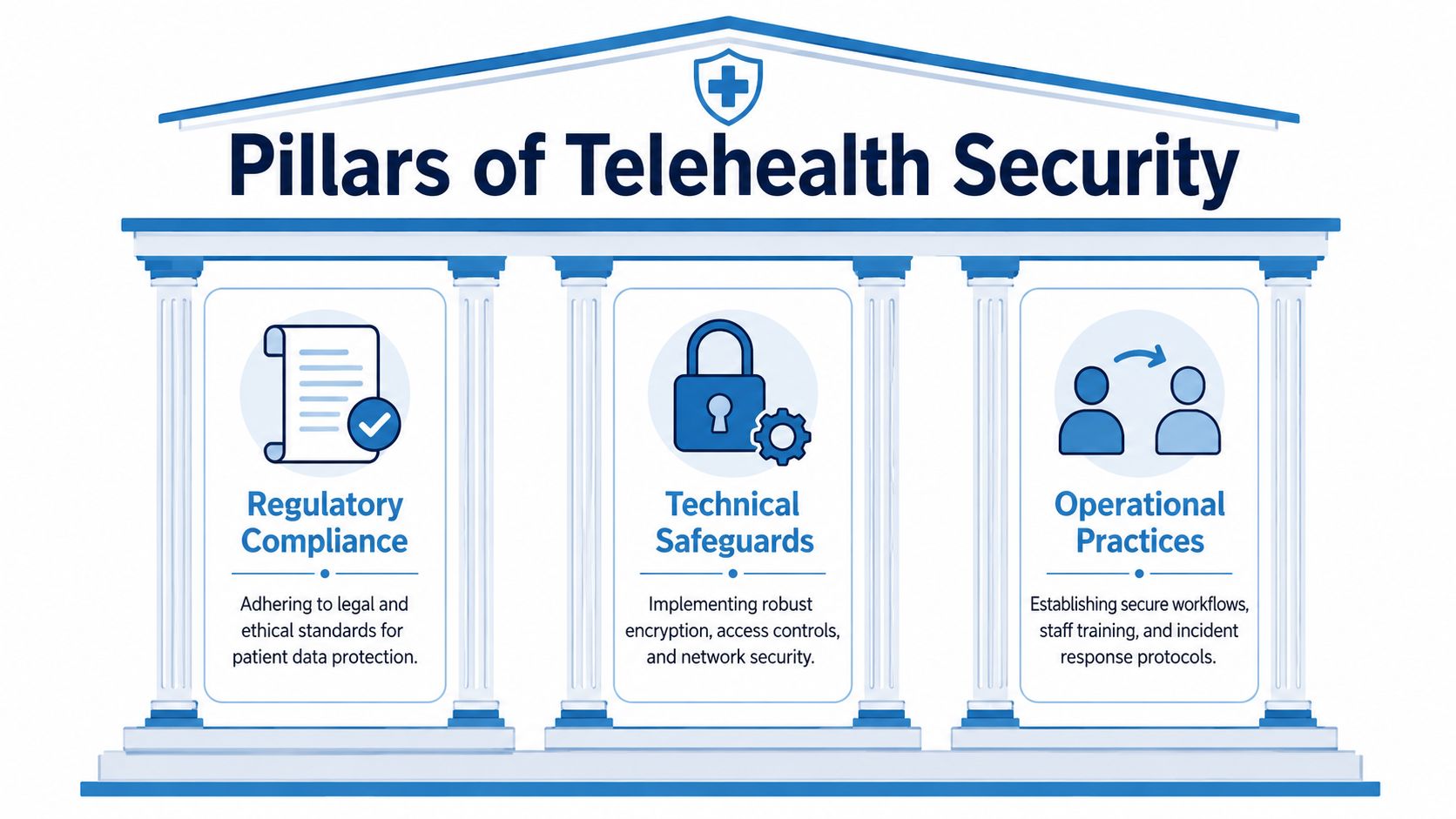
A secure telehealth platform isn't one feature. It's a stack of protections that work together. I think of it as the digital version of a well-run clinic. You need compliant policies, strong building controls, and staff who follow procedure every time.
If your team needs a plain-language primer on how encrypted communication works inside a meeting platform, this guide to end-to-end encryption is a useful starting point before you compare vendors.
Regulatory compliance
Compliance is the legal and contractual layer. In healthcare, that means the platform has to support HIPAA obligations and the way your practice handles protected health information. Marketing language like “secure” or “private” isn't enough.
Ask vendors direct questions. Will they sign a Business Associate Agreement? Do they define which services and storage locations fall inside that agreement? Can they explain how they support retention, access controls, and audit review?
A platform can have attractive meeting features and still be a poor clinical fit if the vendor won't stand behind its healthcare obligations in writing.
Technical safeguards
This is the lockset, alarm system, and controlled entry point of your digital clinic. Encryption, authentication, audit logs, hosting architecture, and session controls all sit here.
A common mistake is to stop at passwords. Passwords are only one small part of the technical picture. A healthcare-grade product needs protected data transmission, strong encryption for stored information, reliable session controls, and enough logging to investigate misuse or error.
Operational practices
The last pillar is how your staff uses the tool. Even a well-designed platform can be mishandled if front-desk staff start visits before identity checks, if clinicians allow unrestricted screen sharing, or if recordings are saved to unmanaged local devices.
Practical rule: Buy software that supports the workflow you want to enforce. Don't buy consumer-style software and hope policy documents will compensate for missing controls.
Security succeeds when these three pillars reinforce each other. Compliance tells you what must happen. Technology makes it possible. Operations make it real.
The Core Security and Compliance Controls You Must Have
When vendors say they offer a secure telehealth platform, I strip the pitch down to hard controls. If they can't show these clearly, the conversation shouldn't move to procurement.
Encryption isn't an upgrade
AES 256-bit end-to-end encryption is one of the clearest dividing lines between healthcare-ready systems and casual meeting tools. HIPAA-compliant telehealth platforms must implement AES 256-bit end-to-end encryption to protect data in transit and at rest so that video, audio, chat, and file transfers remain protected even if intercepted by unauthorized actors. This is a core safeguard under the HHS HIPAA Security Rule, not a premium add-on (HIPAA-compliant video conferencing guidance).
That satisfies the “encryption as an added feature” box in a buying checklist, but it also underscores something many buyers miss. Encryption isn't there for marketing copy. It's there because clinical conversations, attachments, and visit records create concentrated risk.
Also check transport security. A secure telehealth platform should use TLS 1.2 or higher for all data transmission so patient information stays protected during calls, file transfer, and storage operations, with audit trails retained in line with HIPAA expectations (HIPAA compliance requirements for telehealth platforms).
Controls that separate healthcare software from general meeting tools
A vendor should be able to answer these plainly:
- BAA support: Will the vendor sign a Business Associate Agreement, and does it cover the exact services you plan to use?
- Access controls: Can you limit who sees schedules, recordings, chat, shared files, and administrative settings?
- Audit logging: Can you review who logged in, who accessed data, and what actions were taken?
- Secure hosting design: Is the service built for controlled storage and monitored access, not casual file sprawl?
- Role separation: Can a front-desk coordinator admit patients without gaining broad access to clinical records?
If the sales team answers with broad assurances instead of direct product details, that's a warning sign.
Documentation and compliance have to line up
Security controls don't exist in isolation. They need to support your encounter documentation, consent workflow, retention policy, and supervision model. This is why many clinics should review current 2026 telehealth documentation requirements before they sign a platform contract. The documentation burden often exposes platform gaps that a feature demo hides.
A vendor discussion also gets more useful when your team understands what purpose-built healthcare software looks like in practice. This overview of HIPAA-compliant telehealth software is a good benchmark for the kinds of controls and workflows you should expect to see.
If a platform handles scheduling and video well but creates manual work for documentation, access review, or record retention, it isn't saving you money. It's shifting cost into operations.
How to Evaluate and Compare Vendor Platforms
Most clinics overfocus on license price and underweight total cost of ownership. That's how they end up buying a platform that seems affordable in procurement and becomes expensive in month three.
Price comparisons need to include bundled value
A meaningful comparison starts with what the base plan includes. One benchmark worth noting is that enterprise-grade telehealth platforms can bundle unlimited webinar hosting, bank-level encryption, screen sharing, whiteboards, document sharing, cloud recordings, and AI-powered meeting summaries at an entry price of ₹179/month, with no add-on fees for features often used in training, education, or patient engagement workflows (feature and pricing benchmark for HIPAA-compliant telehealth video platforms).
That matters because webinars aren't a fringe feature. Clinics use them for patient education sessions, staff onboarding, group programs, community outreach, and physician training. If webinars sit behind an enterprise upgrade, your actual cost rises quickly.
A platform such as AONMeetings is relevant here because it offers browser-based meetings, built-in webinars, cloud recordings, and healthcare-oriented controls in that bundled model. It isn't the only product you should review, but it is a good example of why sticker price alone can be misleading.
What to compare beyond monthly fees
Use a commercial lens and an operational lens at the same time.
- Upfront pricing clarity: Is the monthly fee easy to understand, or does the quote depend on meeting limits, host limits, storage tiers, or paid onboarding?
- Feature bundling: Are webinars, recordings, whiteboards, and summaries included, or sold separately?
- Contract structure: Can you start without a long lock-in if you're still validating adoption and workflow?
- Admin burden: Will your team manage fewer tools because the platform combines meetings, webinars, recording, and collaboration?
- Clinical fit: Does the workflow support healthcare use, or will staff need workarounds?
Telehealth Platform Evaluation Matrix
| Feature/Control | Basic Plan (e.g., AONMeetings) | Mid-Tier Competitor | Enterprise Competitor |
|---|---|---|---|
| Encryption | Verify AES 256-bit E2E and transport protections | Verify exact standard, not just “encrypted” | Verify exact standard and admin controls |
| Webinar hosting | Included in base plan | Often limited or add-on | Often included at higher tier |
| Cloud recordings | Included | May be tiered by storage | Usually included, often with admin complexity |
| AI meeting summaries | Included | Sometimes add-on | Often included |
| Screen sharing and whiteboards | Included | Usually included | Included |
| BAA availability | Confirm in writing | Confirm in writing | Confirm in writing |
| Audit logs | Confirm scope and retention | Confirm scope and retention | Confirm scope and retention |
| Browser-based access | Available | Varies | Varies |
| Hidden fees | Lower risk if bundle is broad | Watch for webinar and storage fees | Watch for implementation and support fees |
| Best fit | Clinics needing broad capability without layered add-ons | Teams with moderate needs | Larger systems with complex procurement |
Don't ask, “Which platform is cheapest?” Ask, “Which platform gives us the controls and workflows we need without forcing us to buy three more products later?”
Deployment and Secure Operational Practices
A secure telehealth platform should behave like a digital examination room, not a generic video call. That distinction shows up in daily workflow.
A platform must support mandatory virtual waiting rooms for every session and host-only screen sharing by default, which creates the digital equivalent of a front desk and controlled exam-room entry (HIPAA-compliant video conferencing platforms for telehealth).
What good workflow looks like in practice
A medical assistant opens the day's queue and admits one patient at a time from the waiting room. The provider joins after chart review. The patient can't wander into another session because access is controlled per visit.
During the call, the clinician shares a lab trend or discharge instruction. The patient doesn't automatically gain screen-sharing rights, which avoids the common problem of accidental file exposure or session disruption.
Recording is where many teams slip. Local recording should be disabled so protected information doesn't end up on a home laptop, an unmanaged desktop, or a synced personal folder. If recordings are clinically necessary, they should route to secured cloud storage managed inside the platform.
Settings that deserve admin attention on day one
- Waiting room enforcement: Turn it on as a default policy, not as a provider choice.
- Screen sharing restrictions: Set host-only sharing, then allow exceptions intentionally.
- Recording controls: Disable local recording and define who can access cloud recordings.
- Role-based permissions: Separate scheduler, clinician, and administrator rights.
- Session discipline: Require staff to lock down links and verify the correct participant before admitting.
Teams that need a simple operating baseline can adapt these telehealth best practices into staff SOPs and onboarding checklists.
A secure deployment isn't about adding friction. It's about putting the right friction in the right place so the visit stays private and the workflow stays predictable.
Common Pitfalls That Compromise Security and Care
The most expensive telehealth mistake isn't overpaying. It's underbuying.
Clinics get into trouble when they choose a platform because it feels familiar, because someone already uses it for internal meetings, or because the first quote looks low. That usually leads to compliance gaps, awkward workflow patches, and staff habits that create avoidable risk.
The bargain platform trap
A low monthly price often hides missing controls. The platform may not support healthcare workflows cleanly. It may require separate tools for webinars, cloud recordings, or admin oversight. It may push teams toward unsafe shortcuts because the safe workflow takes too many clicks.
Consumer-grade brand recognition doesn't solve this. A famous general-purpose meeting app can still be the wrong tool for handling protected clinical conversations.
Weak operations can erase clinical gains
Telehealth works best when the platform is stable, secure, and easy for staff to use correctly. That matters because telemedicine interventions have been associated with a mean reduction of 50 all-cause hospitalizations and 110 condition-related hospitalizations per 1,000 patients receiving telemedicine interventions (telemedicine outcomes review).
If patients struggle to enter sessions, if clinicians distrust the privacy model, or if staff use inconsistent procedures, the practice undermines the care model itself. Security failures don't just threaten compliance. They chip away at follow-through, continuity, and patient confidence.
Another common error
Some buyers assume implementation can fix a weak product. Usually it can't. Training helps, but training can't create missing encryption, audit logs, host controls, or proper data handling.
Your Action-Oriented Buyer Checklist
Use this list during every vendor call. If a rep can't answer these directly, pause the evaluation.
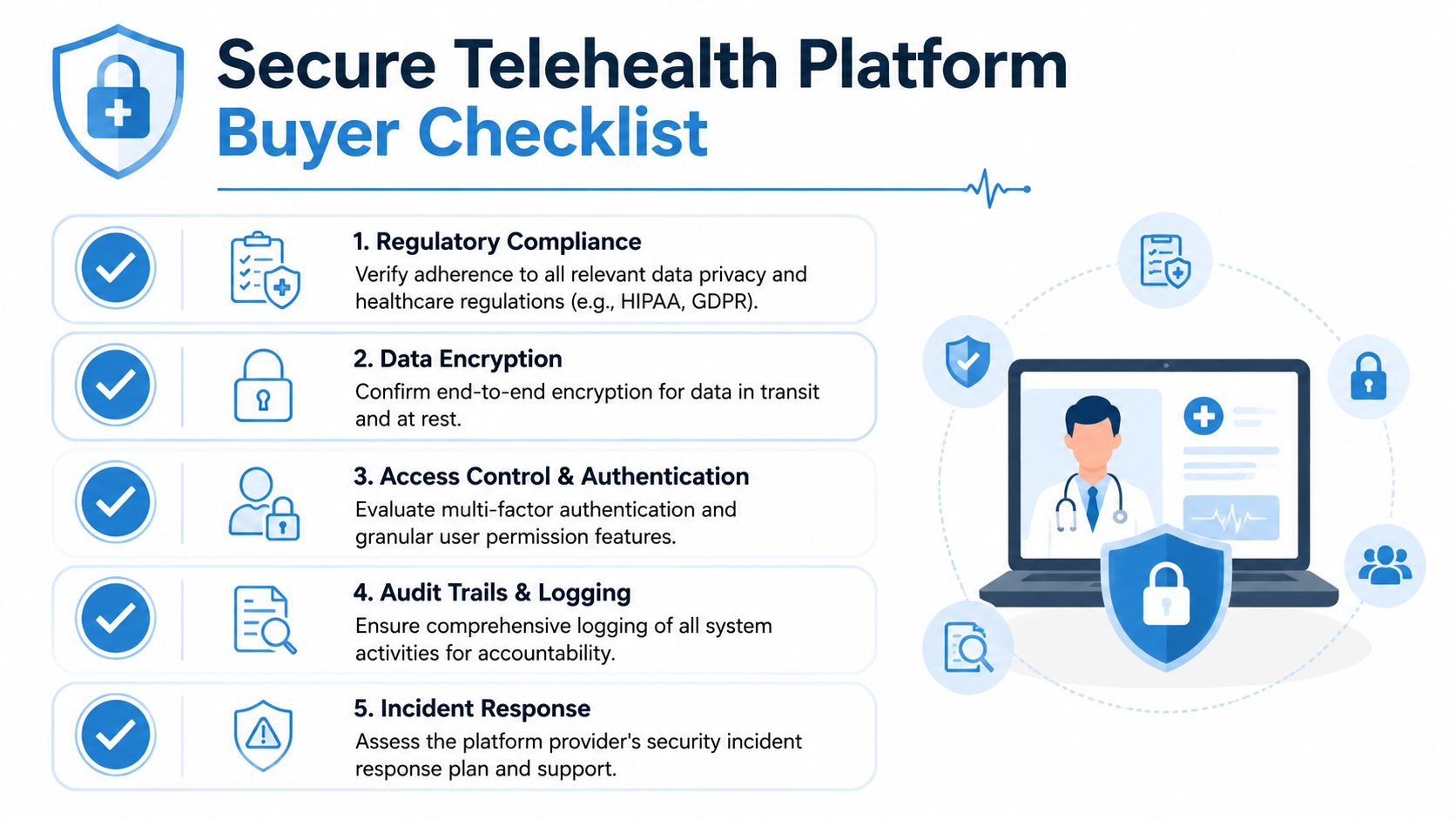
Five questions that cut through marketing
- Compliance in writing: Will you sign a BAA, and which services are covered?
- Encryption details: Do you provide AES 256-bit end-to-end encryption and protected transport for all sessions and files?
- Access control depth: Can we set separate permissions for clinicians, front-desk staff, and administrators?
- Audit visibility: What user actions are logged, and how can our team review them?
- Operational safeguards: Can we enforce waiting rooms, host-only screen sharing, and no local recording by default?
Two commercial questions buyers often forget
- Bundled features: Are webinars, cloud recordings, and collaboration tools included in the quoted price?
- Hidden costs: What will we pay extra for storage, support, onboarding, or advanced admin features?
Print that checklist. Use it live in demos. Good vendors answer quickly and specifically.
Frequently Asked Questions About Secure Telehealth
Is HIPAA compliance the same as “HIPAA certified”
No. Buyers should be cautious with that phrase. In vendor conversations, what matters is whether the platform supports HIPAA requirements in practice and whether the vendor will sign the required agreement, explain its safeguards, and document how protected data is handled.
Is encryption alone enough
No. Encryption is necessary, but it doesn't replace access controls, audit logs, user permissions, secure recording practices, and staff training. A platform can encrypt traffic and still create avoidable exposure if users have broad permissions or if recordings land on unmanaged devices.
Do small clinics need the same level of security as large health systems
Yes on the core controls. The size of the organization changes procurement complexity, not the sensitivity of protected health information. A solo specialist and a multisite group both need a secure telehealth platform that protects patient conversations and records.
Are webinars really relevant to healthcare buying
Often, yes. Practices use webinar-style functions for patient education, pre-procedure briefings, group counseling formats, staff training, referral outreach, and internal education. If those capabilities require another contract, your total cost rises and your workflow fragments.
Is browser-based access safer than downloaded software
Not automatically. Browser-based access can reduce deployment friction and simplify updates, but safety still depends on the vendor's encryption, controls, and hosting design. Convenience helps adoption. It doesn't substitute for security architecture.
What should a clinic ask for in a live demo
Ask the vendor to show the exact admin settings for waiting rooms, recording restrictions, user roles, and audit logs. Don't accept a slide deck summary. Ask them to demonstrate the workflow from scheduler to provider to patient.
The fastest way to expose a weak product is to ask the vendor to run a real clinical workflow instead of a polished marketing demo.
When should you walk away from a vendor
Walk away if the team avoids specifics, won't commit key terms in writing, or treats healthcare security as a configuration you should figure out on your own after purchase. Good products reduce uncertainty. Weak products push it onto your staff.
If you're comparing options and want a browser-based platform that includes HIPAA-compliant meetings, webinars, and healthcare-ready controls without long-term contracts or layered add-ons, take a practical look at AONMeetings. It's one of the clearer examples of how a secure telehealth platform can be evaluated on total cost of ownership, not just on monthly price.
