
Before you ever think about slides or speakers, the most successful webinars begin with a simple, quiet planning session. I've seen countless well-intentioned webinars fall flat because they skipped this crucial first stage. A great event isn't just a presentation; it's a strategic tool, and that starts with having a solid game plan.
Laying the Groundwork for Your Webinar Strategy
Think of this as building the foundation for a house. If you don't get the blueprint right, everything you build on top of it will be wobbly. A strong strategy ensures every choice you make—from the topic you select to the way you promote it—is intentional and drives toward a specific outcome.
Your very first question should be: what are we trying to accomplish? Are you looking to fill the sales pipeline with fresh leads? Or maybe your goal is to onboard new customers and reduce support tickets. The answer changes everything.
Pinpoint Your Specific, Measurable Goals
Vague goals like "building brand awareness" are impossible to measure and, frankly, don't help you prove your webinar's worth. You need to get specific. Without a concrete target, you're just throwing a party and hoping someone important shows up.
Let's say a law firm is hosting a webinar on intellectual property for tech startups. A weak goal is "to get our name out there." A strong goal is to schedule 15 free consultations with qualified founders who attend. See the difference? One is a wish, the other is a measurable business objective.
A practical example for a SaaS company could be: "To generate 50 marketing-qualified leads (MQLs) from our webinar on 'Advanced Project Management Techniques'." This is measured by the number of attendees who download the companion e-book offered at the end.
Key Takeaway: Your goal is your compass. It dictates your call-to-action, shapes your promotional copy, and defines the key metrics you’ll use to declare your webinar a success.
This entire strategic flow is a straight line. You start with your goals, which helps you define your audience, which in turn leads you directly to the perfect topic.
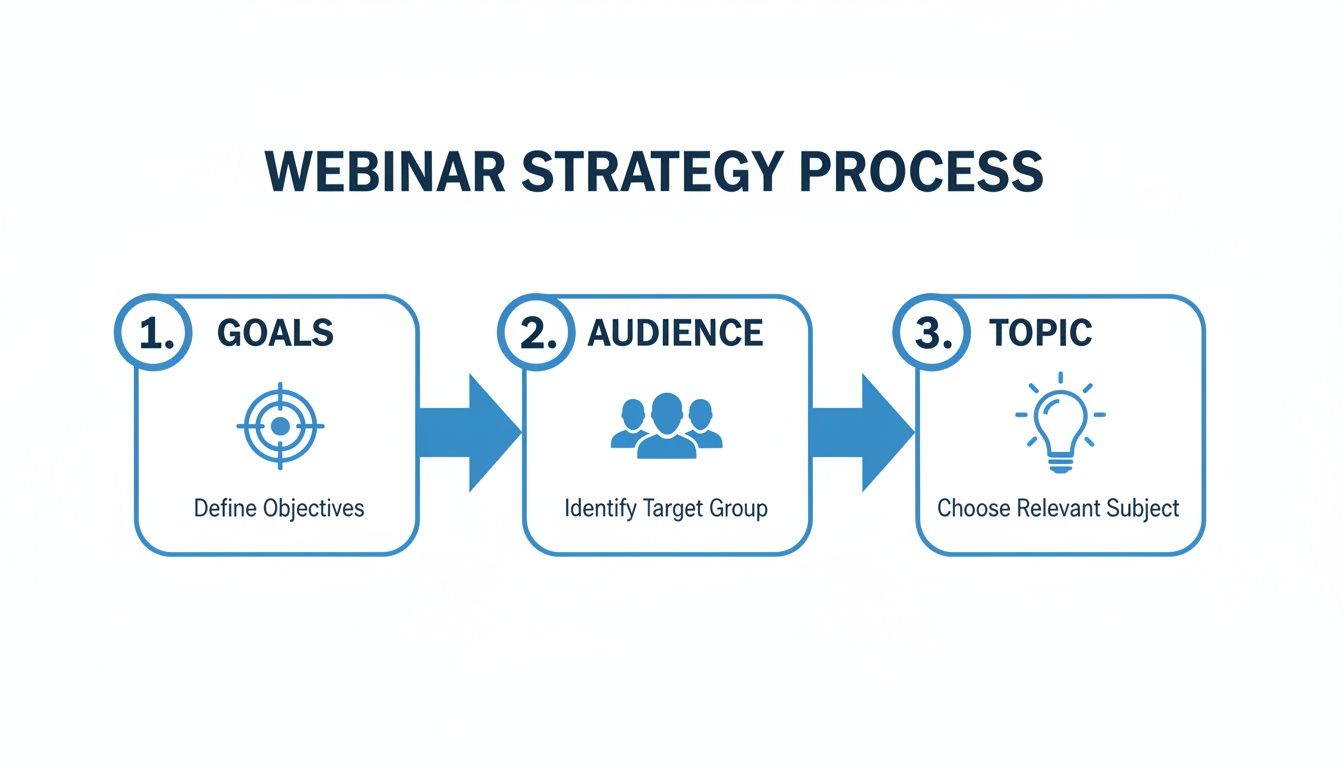
When you follow this path, you end up with a topic that not only resonates with your audience but also directly serves your core business objectives.
Get to Know Your Audience's Real-World Problems
Once your goal is set, you have to get crystal clear on who you're talking to. And I don't mean just their job titles or company size. You need to dig deep into their day-to-day reality.
What problems are they actually trying to solve? What's causing them stress or holding them back?
- B2B Software: Your audience isn't just "project managers." They're likely overwhelmed project managers who are tired of chasing down updates and dealing with missed deadlines because their tools don't talk to each other. Their pain is a lack of control and visibility.
- Financial Services: You're not just speaking to "people near retirement." You're speaking to individuals who are genuinely anxious about their savings lasting. Their core desire is peace of mind and a clear, simple plan they can trust.
Building out a detailed persona like this is the secret sauce. It’s what makes your content feel personal and urgent, transforming it from a generic lecture into a can't-miss event that speaks directly to their needs.
This is also where security becomes a non-negotiable part of your planning. If your audience is in a field like healthcare, law, or finance, their need for privacy is a massive part of their world. Choosing a platform that offers features like end-to-end encryption isn't just a technical detail—it's a fundamental sign of respect that builds immediate trust. Overlook this, and you risk alienating the very people you’re trying to connect with.
Choosing and Securing Your Webinar Platform
Think of your webinar platform as the venue for your event. The choice you make isn't just a technical detail; it’s a direct reflection of your brand's professionalism and how much you value your audience's experience. This is one of the first, and most important, decisions you'll make.
I've seen far too many great webinars cut short by a surprise 40-minute time limit because the host chose a basic meeting tool instead of a true webinar platform. Don't let that be you. You need a tool built for the job, one that won't leave you or your attendees hanging right when the conversation gets good.
Balancing Cost with Essential Features
When you start shopping around, it’s easy to get drawn in by a low monthly price. But you have to look deeper. The real cost often hides in the features that aren't included. Many platforms lock critical tools like webinar hosting, recording, or advanced security behind expensive enterprise plans.
As a practical example of a price comparison, a popular platform might advertise a plan for ₹1,200/month, but the webinar feature itself is an add-on costing an extra ₹3,200/month. In contrast, a platform like AONMeetings includes unlimited webinars in its base plan starting at just ₹179/month. This massive price difference highlights the importance of checking what's actually included.
The smarter move is to find a platform where the essentials come standard. The value proposition of AONMeetings is clear: features like unlimited webinar duration, webinars included in all plans, and built-in recording are part of every subscription. This straightforward approach means no surprise fees and no tough choices between your budget and your webinar's quality.
This all-in-one model gives you a huge advantage, ensuring you have the right tools from the start. You can dive deeper into this topic by exploring the best webinar software for small business, which really breaks down how to find value.
Why Security and Encryption Are Non-Negotiable
For many professionals, security isn't just a "nice-to-have" feature; it's a legal and ethical obligation. If you work in healthcare, finance, or law, the platform you use is a direct extension of your professional responsibility. A breach isn't just an IT problem—it's a catastrophic failure of trust.
Can you imagine a therapist hosting a group session or a financial advisor discussing investment portfolios on an unsecure line? The fallout would be devastating. That's why features like end-to-end encryption and HIPAA compliance are absolute must-haves.
Bank-Level Encryption: This is your digital armor. It scrambles all the data flowing through your webinar—video, audio, chat messages, and shared files—making it unreadable to anyone without authorization. This added feature is the same standard your bank uses.
HIPAA Compliance: If you handle any patient information, this is not optional. A truly HIPAA-compliant platform like AONMeetings will sign a Business Associate Agreement (BAA). This is a legally binding contract that holds them accountable for protecting patient data according to strict federal laws.
Putting these security measures in place isn't just about protecting data; it's about showing your audience that you take their privacy seriously. It builds instant credibility.
Key Platform Features to Evaluate
Beyond the big-ticket items of cost and security, a great platform gives you the controls to run your event like a pro. These are the details that separate a polished, memorable webinar from an amateur broadcast.
To give you a clearer picture, here is a practical price comparison of what different platforms offer.
Webinar Platform Cost and Feature Comparison
This table breaks down how entry-level plans stack up on key features. Notice how the most affordable option doesn't skimp on the essentials.
| Platform | Starting Price (Per User/Month) | Webinars Included | Unlimited Webinar Time | Added Feature: Encryption | HIPAA Compliance Included |
|---|---|---|---|---|---|
| AONMeetings | ₹179 | Yes | Yes | Yes | Yes |
| Competitor A | ₹1,200 | No (Add-on) | No (40-min limit) | Yes | No (Enterprise only) |
| Competitor B | ₹3,200+ (for Webinars) | Yes | Yes | Yes | No (Premium Tiers) |
As you can see, a higher price tag doesn't always translate to more value. The value proposition here is clear: AONMeetings bundles a complete, secure feature set, including the crucial webinar functionality, into a plan that's a fraction of the cost of its competitors.
When you're making your final choice, look for those practical features that give you total control. Things like robust moderator controls, a custom-branded waiting room to welcome guests, and secure, password-protected recordings are what truly elevate the experience.
Crafting Content That Captures Attention
This is where the magic happens. You’ve laid the strategic groundwork and secured your platform; now it’s time to actually build the content that will draw people in and hold them there. Think of this as the shift from architect to builder, where you craft both the presentation and the promotional materials that get people excited to show up.
And people are showing up. A staggering 73% of B2B marketers agree that webinars are the single best way to generate high-quality leads. You can dig deeper into these numbers and other key webinar statistics on bloggerspassion.com.
Building a Narrative That Connects
A great webinar isn't just a slide deck; it's a story. You need a clear beginning, a meaty middle, and a decisive end. This structure isn't just for show—it makes your advice stick and guides your audience on a journey from their problem to your solution.
The Hook (Beginning): Jump right into their world. Start by hitting on your audience's biggest pain point and promise them a way out. A practical example for a financial advisor could be opening with, "Worried you'll outlive your retirement savings? Today, we're going to build a simple framework that will finally give you peace of mind."
Actionable Insights (Middle): This is the core of your presentation. Forget high-level theory. Deliver on your opening promise with practical, step-by-step advice, real-world case studies, and proven methods your audience can actually use tomorrow.
Clear Call-to-Action (End): Don't leave them hanging. End with one specific, crystal-clear action you want them to take. Whether it's scheduling a demo, downloading a guide, or booking a consultation, make the next step obvious and irresistible.
Following this arc turns a boring information dump into a valuable, memorable experience.
Building Your Promotional Campaign
Remember, your content creation efforts start long before the webinar itself. The promotional materials are what get people in the door. You’ll need a compelling landing page and an email sequence that builds anticipation.
A great landing page isn't just a sign-up form; it's a sales page for your event. It should clearly articulate the value proposition: what attendees will learn, who should attend, and why it's a can't-miss opportunity.
Use what you know about your audience’s struggles to write copy that speaks directly to them. A solid email sequence might include an initial announcement, a "sneak peek" of the content, a reminder of the key takeaways, and a final "last chance to register" push.
Protecting Your Content with Encryption
As you put all this work into your presentation and promotional assets, remember that this content is valuable intellectual property. When you host your webinar on a platform like AONMeetings, your entire session—slides, chats, recordings, and all—is automatically protected by bank-level encryption as an added feature.
This is non-negotiable for a couple of key reasons:
- Protecting Intellectual Property: It prevents your proprietary information and strategies from falling into the wrong hands.
- Ensuring Audience Privacy: It secures any sensitive information shared by attendees during Q&A sessions or in the chat.
This built-in encryption acts as a digital lockbox for all your hard work. It's the quiet, foundational feature that ensures both your content and your audience’s trust are always secure.
Bringing Your Webinar to Life: Engagement and Flawless Delivery
The best webinars feel less like a presentation and more like a great conversation. You’re not just talking at your audience; you’re building a connection and talking with them. This is where you turn passive viewers into active participants, creating a memorable experience that truly resonates.
The key is learning to use your platform's interactive tools to your advantage. It’s no surprise that top-tier webinars see a 64% average engagement rate. In fact, hosts can hold audience attention for up to 50% longer just by weaving in features like chat, Q&A, and polls. As you learn how webinar engagement impacts attendance on zoom.com, you’ll see these tools aren’t just nice-to-haves; they're essential.
Kick Things Off with Immediate Interaction
Those first five minutes are everything. You have to grab your audience's attention right away, and my favorite way to do that is with a well-placed poll. It instantly shatters the passive listening mode and makes everyone feel like they're part of the show.
As a practical example, if you're a marketing consultant teaching SEO, you could launch a poll asking, "What's your single biggest SEO challenge right now?" Not only does this get people clicking, but it also gives you priceless, real-time feedback you can use to tailor your talking points.
The chat box is your secret weapon for building community. I always encourage attendees to drop a "hello" and mention where they're tuning in from. It’s a simple act that transforms a room of strangers into a group of people sharing an experience.
Here’s another pro tip: bring on a co-host or moderator to manage the chat. They can handle quick questions, share helpful links, and flag the really juicy questions for you to answer live. This keeps the energy high without derailing your presentation.
The All-Important Dry Run
That on-camera confidence you see in seasoned presenters? It doesn't come naturally; it comes from practice. A full "dry run" is, without a doubt, the most important step you can take to guarantee a smooth delivery. This is more than just reading through your slides—it's a complete dress rehearsal.
Your dry run checklist should cover:
- Tech Check: Is your microphone crystal clear? Is your lighting good? Is your camera framed well?
- Screen Sharing: Practice switching between your slide deck, a live software demo, and your face-to-camera view. Make it seamless.
- Platform Features: Test-launch your polls. Get comfortable with the Q&A management tools. Know where every button is.
- Co-Presenter Cues: If you have a guest, walk through every handoff and transition. Nothing looks more unprofessional than talking over each other.
This is your chance to discover that your Wi-Fi is shaky in the back office or that your screen share software clashes with another app. Finding these problems a day before is a relief; finding them live is a nightmare. It’s always a good idea to brush up on general virtual meeting best practices, as many of those principles apply here, too.
Why Security Is the Foundation of Great Engagement
While you’re busy planning polls and Q&A, don't overlook the security running in the background. Choosing a platform with built-in encryption, like AONMeetings, is about more than just protecting data; it's about building trust. This added feature of encryption secures everything—your video stream, your slide content, and every single message in the chat.
This isn't just a technical detail. It creates a safe space where attendees feel comfortable asking candid questions and sharing their real-world challenges, which is especially vital in fields like finance or healthcare. When your audience feels secure, they engage more authentically, leading to the open, valuable conversations that make a webinar truly impactful.
Turning Your Webinar Into a Lasting Asset
So, you’ve wrapped up your live webinar. You said your goodbyes, the broadcast has ended, and you’re probably breathing a sigh of relief. But don't close your laptop just yet. The moments immediately following your event are where the real long-term value gets created. This is your chance to turn that one-hour session into a powerful, evergreen asset that works for you long after you’ve gone offline.
Too many people just send a single "thanks for coming" email and call it a day. That’s a huge missed opportunity. A smart post-webinar strategy is what separates a one-off event from a lead-generating machine that builds your authority for months.
The Immediate Follow-Up: Strike While the Iron is Hot
Your first move needs to happen fast—ideally within 24 hours. This isn't just about being polite; it's about capitalizing on the momentum you just built. You need to email every single person who registered, but not with the same generic message.
It’s time to segment your list for a more personal touch:
- For the people who showed up: Send them a warm thank you, a link to the recording, and any resources you promised, like the slide deck. If you teased a special offer, this is where you make it available.
- For the no-shows: A friendly, "Sorry we missed you!" works wonders. Give them the recording link and maybe highlight one or two juicy takeaways to pique their curiosity and get them to watch.
- For your super-fans: Most platforms let you see who was most engaged—the ones asking questions or staying until the very end. These are your hottest leads. A quick, personal email from you can be incredibly effective in starting a real conversation.
As you share the recording, security should be top of mind. When using a platform like AONMeetings, you can rest easy. Every recording is automatically secured with the same bank-level encryption as the live session, so you can share the link confidently, knowing your hard work is protected as an added feature.
Digging Into the Data to Find the Gold
Once those initial emails are sent, it's time to put on your analyst hat and dive into the numbers. This isn't about vanity metrics; it's about finding out what actually resonated with your audience so you can improve next time.
Don't just glance at the attendee count. Look for the story in the data:
- Attendance Rate: What percentage of registrants actually came? A low number might mean you need to work on your pre-webinar reminders.
- Audience Retention: Pinpoint the exact moments where people started dropping off. This is unfiltered feedback on which parts of your presentation were less engaging.
- Engagement Scores: How many questions did you get? Did people participate in your polls? This tells you how captivated your audience really was.
- CTA Clicks: This is the big one. How many people clicked the link to your offer or demo request? This metric directly ties your webinar to your ROI.
This data is also your guide for monetization. If you delivered a really valuable session, the recording itself is a valuable asset.
Here’s a practical example I’ve seen work time and time again: Offer the on-demand recording for free for a limited period, say 48 hours. After that, move it behind a paywall or use it as a gated resource on your website. This creates urgency and rewards your live attendees while establishing the content's long-term value.
For more practical tips on capturing your session perfectly, check out our guide on how to record webinars.
Repurposing Your Webinar Into an Army of Content
Honestly, the biggest payoff from any webinar comes from repurposing it. Think of your one-hour presentation as a content goldmine just waiting to be excavated. You can slice and dice it into dozens of smaller pieces of content.
Modern platforms are making this process incredibly simple. For example, AONMeetings gives you searchable transcripts and smart summaries right after your event. Imagine being able to instantly find a specific quote or get an AI-generated overview of the entire session without re-watching a thing.
Let's say you just ran a 60-minute webinar on "AI for Small Businesses." Here’s a practical example of how you could spin that one event into a month's worth of content:
- Blog Posts: Use the smart summary to quickly write a main "recap" post. Then, pull out each of your key topics (like "Choosing the Right AI Tools" or "AI-Powered Marketing") and expand them into their own detailed articles.
- Social Media Clips: Go through the transcript and find the most compelling 60-second soundbites or Q&A moments. Turn these into short videos for TikTok, Instagram Reels, and LinkedIn.
- Lead Magnet: Condense your key frameworks and checklists into a polished, downloadable PDF. It’s the perfect resource to capture new leads on your website.
- Email Nurture Sequence: Break down your core concepts into a 5-part "welcome series" for new email subscribers, dripping value over time.
- Podcast Episode: Simply strip the audio from the recording, add a quick intro and outro, and release it as an episode on your podcast.
When you treat your webinar as the "pillar" of a larger content strategy, you multiply its impact exponentially. It's how you make sure the hard work you put in keeps paying dividends long after the live event is over.
Tying Up Loose Ends: Your Webinar Questions Answered
Alright, you've got the big-picture plan, but I know from experience that it’s the small details that can cause the most headaches. Let's walk through some of the most common questions I hear from folks who are new to hosting webinars. Getting these right can make all the difference.
How Long Should My Webinar Be? And When Should I Host It?
I’ve found the sweet spot for most webinars is between 45 and 60 minutes. This gives you a solid 35-45 minutes to present your core content without rushing, and still leaves a good 10-15 minutes for a dynamic Q&A session at the end.
Trust me, you'll start to see a real drop-off in audience attention after the one-hour mark. It's better to leave them wanting more than to have them checking their email.
As for the best time to go live, think about your audience's work week. Tuesdays, Wednesdays, and Thursdays almost always pull the best attendance. Aim for 10 AM or 11 AM in your audience's main time zone—it catches people after their morning coffee but before the afternoon slump.
How Can I Make Sure My Webinar Is Secure?
Don't ever treat security as an optional extra. It’s absolutely fundamental to building trust with your audience right from the start. You need to choose a platform where security isn't just a feature, but the foundation.
Here’s what you should demand from any platform you consider:
- End-to-End Encryption: This added feature is non-negotiable. It means all your data—video, audio, chat, everything—is completely scrambled from your device to your attendees'. It’s the same level of security your bank uses.
- Access Controls: Simple tools like password-protected events and virtual waiting rooms are your best friends. They give you complete control over who gets in the door.
- HIPAA Compliance: This is especially critical if you're in the healthcare space. You absolutely must use a platform like AONMeetings that provides a signed Business Associate Agreement (BAA). This is your legal assurance that patient privacy is protected.
Choosing a platform with built-in encryption isn't just a technical decision; it's a direct signal to your audience that you value their privacy, which builds immediate trust.
How Do Pricing and Value Compare Across Platforms?
Webinar platform pricing can be incredibly misleading. Many providers lure you in with a cheap base price, only to hide essential features like the webinar function itself behind expensive add-ons. Don't just look at the sticker price; you have to compare the total value.
Here is a practical price comparison: a common tactic is a low monthly fee around ₹1,200, but then you discover actually hosting a webinar will cost you an extra ₹3,000 per month. This is where you need to read the fine print and see what's really included.
Platform Value Proposition Comparison
To see what I mean, just look at how the value propositions and included features stack up.
| Feature Set | AONMeetings (Starts at ₹179/month) | Typical Competitor (Starts at ₹1,200+/month) |
|---|---|---|
| Webinars Included | Yes, in all plans | Often an expensive add-on |
| Unlimited Time | Yes, standard | Limited on basic plans (e.g., 40 mins) |
| Added Feature: Encryption | Yes, bank-level standard | Yes, but often part of higher tiers |
| HIPAA Compliance | Yes, BAA available | Locked behind enterprise plans |
The difference is pretty clear. The value proposition of a platform like AONMeetings is that you get a complete, secure webinar solution—including unlimited time, webinars in every plan, and critical features like HIPAA compliance—for a tiny fraction of what competitors charge. This is a huge advantage for anyone who wants to host professional, secure webinars without dealing with surprise costs.
Ready to host professional webinars without the frustrating limitations and enterprise-level price tag? With AONMeetings, you get unlimited webinar time, bank-level encryption, and HIPAA compliance built right into every plan.
You can start hosting engaging and secure events today. Find out more at https://india.aonmeetings.com.
