

You're probably dealing with this right now. A provider asks for a telehealth platform, the front desk wants something easy, IT wants something secure, and a vendor says their software is “HIPAA compliant.” That phrase sounds simple until you have to sign the contract.
Many clinic managers often encounter a common misunderstanding. They assume HIPAA compliance is a product label, like “FDA approved” or “energy efficient.” It isn't. HIPAA is an operating standard. The software matters, but your policies, your staff habits, your vendor agreements, and your day-to-day workflows matter just as much.
If you've been searching for what is HIPAA compliant, the practical answer is this: it means protected health information is handled in a way that matches HIPAA's privacy and security requirements in real life, not just on a sales page. That includes remote visits, staff working from home, shared calendars, recordings, screen sharing, cloud storage, and every other place patient information can travel.
Beyond the Acronym What Compliance Really Means
A clinic manager chooses a video tool for virtual follow-ups. The doctor wants clear audio, the billing team wants scheduling integration, and patients want a simple join link. Then someone asks, “Is it HIPAA compliant?”
That question usually gets treated like a yes-or-no checkbox. In practice, it's closer to asking whether a clinic is “safe.” Safe compared to what. Safe for whom. Safe under which policies. Safe with which staff behavior.
HIPAA was enacted in 1996, and its modern compliance framework is built around the Privacy Rule, Security Rule, and Breach Notification Rule, which define how protected health information may be used, disclosed, and safeguarded, as explained in this overview of HIPAA's compliance framework. That's why compliance isn't a one-time badge. It's a system of rules, safeguards, training, and documentation.
A useful way to think about it is this. Buying a secure telehealth platform is like installing a strong front door. It helps. But if employees prop it open, share keys, or leave charts on the counter, the building still isn't secure.
For modern clinics, that practical mindset matters even more. Telehealth, hybrid staffing, and cloud tools create convenience, but they also create more places where patient data can be mishandled. Teams working on digital operations often run into the same challenge when they're also optimizing health system EMR integration. The tool may be sound, but the workflow still needs careful design.
Practical rule: If a vendor says “HIPAA compliant,” your next question shouldn't be “great, done?” It should be “show me how this fits our workflow, access rules, and documentation.”
Compliance protects more than records. It protects trust. Patients may never ask which encryption method you use, but they will notice if a link goes to the wrong person, if a waiting room isn't private, or if a telehealth visit feels exposed.
The Core of HIPAA Who and What Must Be Protected
The clearest way to understand HIPAA is to answer two questions. Who has responsibility? And what information are they protecting?
Who HIPAA applies to
HIPAA applies to covered entities and business associates.
Covered entities include healthcare providers that transmit health information electronically, along with health plans and clearinghouses. For a clinic manager, think of the covered entity as the practice itself. Your physicians, nurses, front desk team, billers, and administrators all work inside that responsibility.
A business associate is a third party that handles protected health information on behalf of the covered entity. Common examples include:
- Telehealth vendors: The platform hosting virtual visits may process patient names, appointment details, chat content, or recordings.
- Billing services: An outside billing company may access diagnoses, treatment codes, and payment information tied to a patient.
- Cloud storage providers: A storage platform may hold referral forms, intake packets, or visit documentation.
- IT and support partners: A consultant troubleshooting systems may gain access to electronic protected health information.
That's where many teams get confused. They think HIPAA stops at the clinic walls. It doesn't. If a vendor touches patient data, that vendor becomes part of the compliance picture.
What PHI and ePHI actually mean
Protected health information (PHI) is individually identifiable health information. In plain terms, it's health-related information connected to a person's identity.
A simple analogy helps. Think of PHI as a lockbox with two ingredients inside:
- Identity: Name, contact details, or another identifier tied to a person
- Private health content: Diagnosis, treatment notes, medication details, insurance information, appointment history, or similar data
When that information is created, stored, or transmitted electronically, it becomes electronic protected health information (ePHI).
PHI isn't just the medical chart. It can show up in emails, meeting invites, intake forms, shared drives, transcripts, support tickets, and recorded telehealth sessions.
Why this matters in daily operations
A lot of compliance mistakes happen because staff only think about the EHR. But ePHI often appears outside the chart.
For example, a receptionist emails a patient list to a provider's personal account. A therapist shares a screen during a virtual session and accidentally shows another patient's name. A support vendor accesses recorded sessions to solve a technical issue. Those aren't abstract legal examples. They're normal workflow moments where HIPAA risk appears.
If you want a practical test, ask this question every time a process changes: Does this step reveal a patient's identity together with health-related information? If the answer is yes, treat it like PHI and protect it accordingly.
The Three Pillars of HIPAA Security Safeguards
When people ask what is HIPAA compliant, they often expect one feature, usually encryption. Encryption matters, but HIPAA security works more like a three-part building system. You need rules for people, protection for physical spaces, and technology controls for digital systems.

Administrative safeguards
This is your rulebook. Administrative safeguards cover the policies and procedures that tell your team how to protect ePHI.
Examples include staff training, role definitions, incident response procedures, risk analysis, and access approval processes. If a new employee starts on Monday, administrative safeguards determine what access they get, who approves it, and what training they complete before handling patient data.
These controls sound less technical, but they often decide whether your technical tools are used correctly. A platform can have excellent security settings, but if no one documents who may record visits or when recordings must be deleted, risk stays high.
A strong administrative program usually answers questions like these:
- Who gets access: Access should match job duties, not curiosity or convenience.
- How incidents are handled: Staff should know exactly what to do if they send data to the wrong person or suspect unauthorized access.
- How risk is reviewed: Annual risk assessments and periodic audits help teams catch weak points before regulators or attackers do.
Physical safeguards
This is the lock on the door part of HIPAA. Physical safeguards protect the places and devices that can expose ePHI.
That includes office entry, locked work areas, screen visibility, laptop storage, mobile device handling, and secure disposal of media. In a remote-work setting, physical safeguards can include requiring staff to take calls in private spaces, use privacy screens, and avoid printing patient information at home unless there's a controlled process for storage and disposal.
A practical example is a telehealth coordinator working from a shared apartment. The software may be secure, but if patient names are visible on screen while roommates walk by, there's still a privacy problem.
Technical safeguards
This is the digital alarm system. Under the HIPAA Security Rule, a system is only “HIPAA compliant” if it implements required technical safeguards for ePHI, including unique user identification, emergency access procedures, automatic logoff, audit controls, integrity controls, authentication, and transmission security, according to the HHS Security Rule requirements.
That list becomes much easier to manage when you translate it into daily use:
- Unique user identification: Every user needs their own login. Shared accounts make accountability weak.
- Automatic logoff: Systems shouldn't stay open indefinitely on unattended devices.
- Audit controls: You need logs showing who accessed what and when.
- Authentication: The system should verify the user is who they claim to be.
- Transmission security: Data moving across the internet should be protected.
If your clinicians share screens during remote visits, that's another moment to pay attention to privacy settings, notifications, and screen selection. A basic walkthrough on secure screen sharing habits in meetings can help teams avoid accidental exposure during visits or case discussions.
A compliant setup isn't the same as a feature-rich setup. The question isn't how many tools a platform has. The question is whether those tools can be configured and controlled safely.
Why the three pillars work together
A simple way to remember this:
| Pillar | Plain-language meaning | Example |
|---|---|---|
| Administrative | Rules for people | Staff training, access approvals, risk analysis |
| Physical | Protection for places and devices | Locked offices, private workspaces, secured laptops |
| Technical | Protection built into systems | Encryption, audit logs, authentication, automatic logoff |
If one pillar is weak, the others can't carry the whole load. That's why HIPAA compliance feels broad. It is broad. But it's also logical once you stop treating it like a mysterious legal label.
HIPAA in Action Controls for Modern Telehealth Platforms
Telehealth is where HIPAA confusion becomes very visible. A platform may work perfectly for business meetings and still be a poor fit for clinical visits. The difference isn't video quality alone. It's the surrounding controls.
For healthcare teams, the practical question isn't just “can we host a call?” It's “can we protect patient information before, during, and after the call?”
The controls that matter most
Expert guidance notes that compliance depends on capabilities such as role-based access, MFA or biometric authentication, encrypted ePHI at rest and in transit, logging and monitoring, annual risk assessments, and periodic audits, as described in this review of technology controls used for HIPAA compliance.
In telehealth, that usually translates into a short list of mandatory requirements:
- Business Associate Agreement: If the vendor handles PHI, you should expect a BAA where appropriate. Without that, the relationship is already on shaky ground.
- Encryption as an added feature: Encryption should protect data in transit and at rest. This matters for live sessions, shared files, and stored recordings.
- Access controls: Waiting rooms, meeting locks, moderator permissions, and role-based access reduce the chance of the wrong person entering or controlling a session.
- Authentication and login security: MFA helps protect clinician and admin accounts, especially for remote teams.
- Auditability: You need logs and monitoring so your team can investigate what happened if there's a complaint or incident.
A telepsychiatry practice makes this especially clear. Providers offering virtual behavioral health need a platform that supports privacy, simple joining, and controlled access for highly sensitive conversations. It helps to understand how remote psychiatric care is delivered in practice, such as these examples from licensed Florida telepsychiatrists, because the workflow often includes scheduling, secure joining, private sessions, and follow-up communications.
Comparing everyday options
Price matters. So does value. A “free” or low-cost general meeting app can become expensive if it lacks the controls your team needs, creates manual workarounds, or forces you to buy separate webinar and admin tools.
Here's a practical comparison:
| Feature | Standard Video Tool (e.g., Free Tiers) | AONMeetings (HIPAA-Compliant Plan) | Why It Matters for HIPAA |
|---|---|---|---|
| Business Associate Agreement availability | May be limited, unavailable, or plan-dependent | Available for HIPAA-focused use cases | The vendor relationship has to support PHI handling |
| Meeting duration | Often limited on free tiers | Unlimited meeting time | Clinical visits shouldn't be cut short by plan limits |
| Encryption | Varies by tool and setup | Bank-level encryption | Protects data moving through sessions and stored content |
| Webinar hosting | Often sold separately | Included in all plans | Useful for patient education, staff training, and outreach |
| Access controls | Basic in many entry tiers | Waiting rooms, moderator controls, meeting lock | Helps prevent unauthorized entry or disruption |
| Browser access | Sometimes app-dependent | Works in the browser on any device | Reduces patient friction and support burden |
| Pricing approach | Can require multiple add-ons and contracts | Starts from ₹179 per user per month, with no contracts or hidden fees | Easier budgeting and fewer surprise costs |
| Collaboration features | Basic by tier | Screen sharing, whiteboards, document sharing, recordings | Supports care coordination while keeping workflows centralized |
This isn't about declaring one category “safe” and the other “unsafe.” It's about fit. If your team is handling PHI, you need tools designed for controlled access, secure transmission, and administrative oversight. A review of HIPAA-compliant video conferencing platforms can help narrow the field if you're comparing several vendors.
What compliance looks like during a normal day
A compliant telehealth setup is often quiet and ordinary:
- The patient joins through a direct link.
- The provider verifies identity before discussing care.
- The host controls admission through a waiting room.
- Screen sharing is limited to the intended content.
- Recording is restricted by policy and permissions.
- Access to logs and stored content is limited by role.
- Accounts are protected with stronger authentication.
That's the point. Good HIPAA controls don't make the visit feel complicated. They reduce avoidable mistakes in the background.
If a vendor spends more time marketing “easy meetings” than explaining access control, logging, encryption, and BAAs, keep asking questions.
How to Verify a Vendor Is Truly HIPAA Compliant
Vendor pages often make compliance sound effortless. The harder truth is that “HIPAA-compliant software” alone doesn't make your organization compliant.
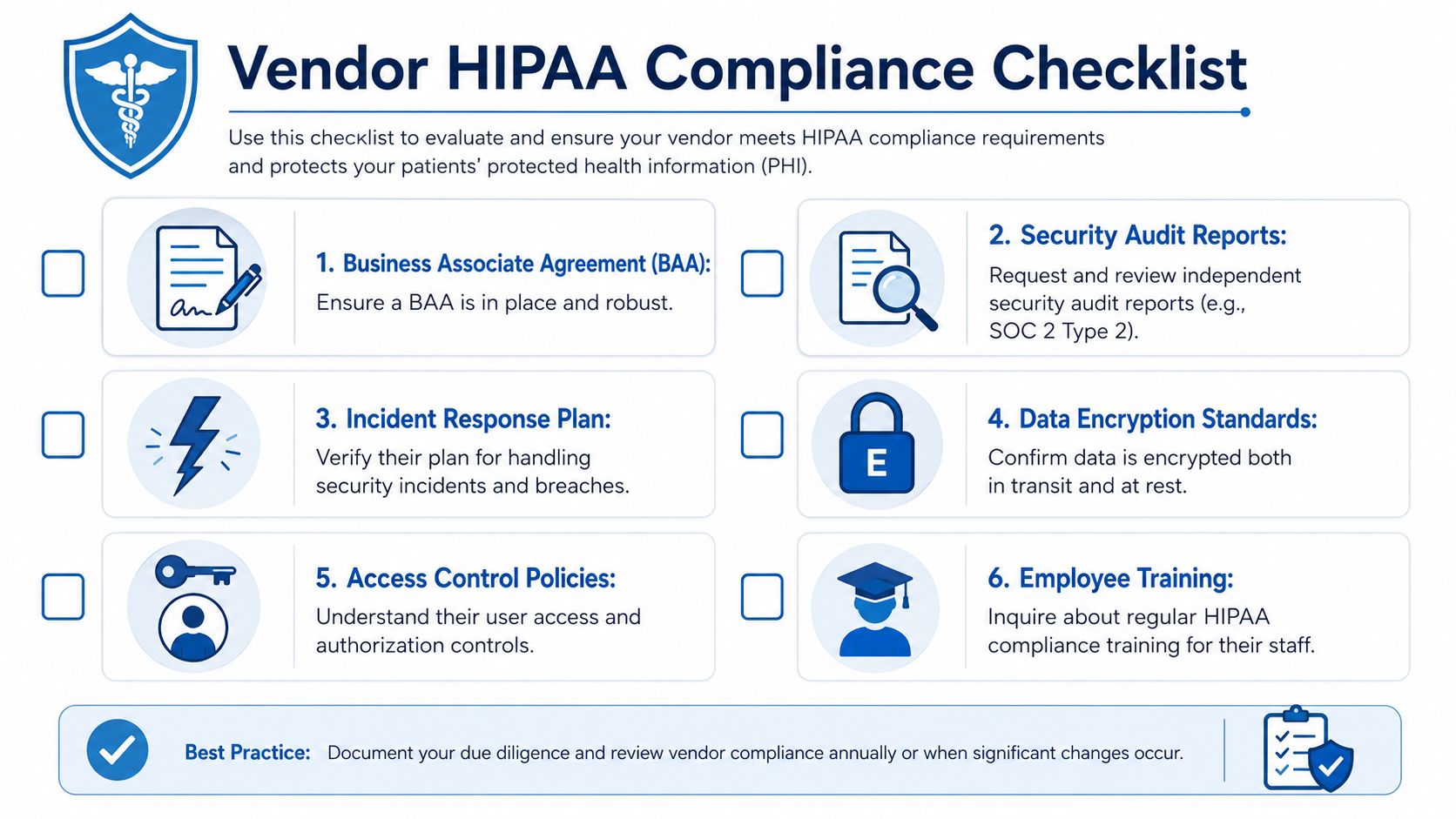
Guidance consistently notes that HIPAA applies to covered entities and business associates, and that third parties handling PHI must have appropriate safeguards and BAAs, but software alone isn't sufficient because the organization still has to assess each workflow and restrict access, as discussed in this explanation of vendor responsibility under HIPAA.
Questions to ask before you sign
Start with the basics, but don't stop there.
- Ask for the BAA early: If the vendor hesitates, redirects, or says it only applies to enterprise customers without a clear path, treat that as a warning sign.
- Ask how access is controlled: Can you set user roles, restrict admins, and remove access quickly when staff leave?
- Ask how data is encrypted: You want clear answers about data in transit and at rest.
- Ask about logging and monitoring: If there's an incident, can you see user activity and system events?
- Ask about incident response: What happens if the vendor detects unauthorized access or a service issue involving PHI?
- Ask about training and operations: Vendor security depends on their staff practices too.
A claim to be careful with
There is no simple government sticker that makes a product universally HIPAA compliant in every use case. Be cautious when a vendor markets itself as “HIPAA certified” without explaining the actual controls, agreements, and customer responsibilities.
That's similar to buying a secure filing cabinet and assuming your records program is complete. The cabinet may help, but someone still has to decide who gets the key, where the cabinet sits, and what gets locked inside.
For smaller practices comparing platforms, broad guidance on video conferencing for small business teams can be useful, but healthcare buyers need to go further. They should test each workflow where PHI appears, including scheduling, support chats, recordings, and document sharing.
Checklist mindset: Don't ask, “Is this vendor HIPAA compliant?” Ask, “Can this vendor support our HIPAA obligations in the exact workflows we use?”
The High Cost of Non-Compliance Penalties and Pitfalls
HIPAA isn't just about policy language. There are real financial and legal consequences when organizations fail to protect patient information.
HIPAA enforcement has included civil penalties of $100 to $50,000 per violation, with annual caps reaching $1.5 million for repeated violations, while criminal penalties can reach $250,000 and up to 10 years in prison in the most serious cases, according to this summary of HIPAA penalty ranges and enforcement exposure.

The part many clinics underestimate
The legal penalty is only one layer of damage.
A breach can also force your team into patient notifications, internal reviews, vendor disputes, rushed policy changes, and difficult conversations with clinicians and patients. Even if the technical issue gets fixed quickly, trust can take much longer to rebuild.
Here's the practical takeaway:
- A weak workflow can become an expensive problem: Shared logins, poor access control, or unsecured remote habits often look minor until something goes wrong.
- Documentation matters after the fact: Regulators and partners don't just want to hear that you take privacy seriously. They want evidence.
- Reputation loss hurts operations: Patients may become more hesitant to use your telehealth services or share information openly.
For a clinic manager, that's why HIPAA should be treated as risk management, not paperwork.
Your Practical Next Steps for HIPAA Compliance
The phrase what is HIPAA compliant becomes much less intimidating once you turn it into a short operating plan.
Start with these four moves
- Map where PHI lives: Identify every place patient information is created, stored, discussed, or transmitted. Include telehealth calls, email, recordings, staff devices, support tools, and cloud apps.
- Document your rules: Write down who can access what, how remote visits are conducted, when recordings are allowed, how incidents are reported, and how vendors are approved.
- Train staff on real scenarios: Don't keep training abstract. Use examples like misdirected links, screen-sharing mistakes, home-office privacy, and offboarding former employees.
- Review every vendor relationship: Make sure vendors that handle PHI support appropriate safeguards and the right agreements, and make sure your team knows how each tool should be used.
Keep the standard practical
You don't need to solve everything at once. Most clinics make progress by tightening one workflow at a time. Start with the highest-risk areas, especially telehealth, shared access, remote work, and third-party tools.
The reassuring part is this. HIPAA compliance doesn't require perfection on day one. It requires attention, documented effort, sound controls, and a willingness to keep improving. When you choose tools that support encryption, access controls, logging, and the right agreements, daily compliance gets easier for everyone using them.
If your team needs a secure meeting platform for patient visits, staff training, or outreach events, AONMeetings offers HIPAA-compliant video conferencing with webinars included, browser-based access, unlimited meeting time, encryption, and straightforward pricing starting from ₹179 per user per month. For clinics comparing value, that can be simpler than piecing together separate meeting and webinar tools under a larger enterprise contract.
