

You log in a few minutes before class. The slides are ready. Your examples are solid. Then the student list appears as a grid of initials, black boxes, and muted microphones. You ask a question and get silence. You wonder if online teaching itself is the problem.
It usually isn't.
The bigger issue is that many online classes are built like broadcast events instead of learning environments. Students get a stream of content, but not enough structure for participation, not enough psychological safety to speak, and not enough flexible paths for engaging when live talk isn't their strongest mode. That's why student engagement in online classes can feel unpredictable. It's often a design problem before it becomes a motivation problem.
What makes this frustrating is that online learning can work better than many teachers assume. A 2025 Nature study found that engagement can be significantly higher in synchronous online settings than in face-to-face classrooms, with students reporting they were “much more involved” because of resource accessibility, parental supervision, and the comfort of learning from home (Nature study on synchronous online engagement). The lesson is simple. Silent squares are not proof that virtual classrooms are doomed. They're usually a sign that the class needs stronger interaction design.
Beyond the Grid of Silent Squares
At 9:03, you ask a simple question. One student adds a short reply in chat. Two open the reaction panel. Another sends a private message saying they know the answer but do not want to speak on mic. That class is not empty. It is engaging in a non-linear way, and the platform is shaping who feels safe enough to join in.
Teachers miss this all the time. Visible talk is only one form of participation. In online classes, engagement also shows up in chat, polls, collaborative docs, annotation tools, reactions, direct messages, and follow-up posts after class. If those routes are available and low risk, more students contribute. If the only accepted signal of engagement is speaking aloud to the whole room, quieter students often disappear even when they are paying close attention.
The practical question is not how to get more voices in the air. The practical question is how to match a platform feature to the kind of thinking you want students to do.
Why online can work better than many teachers expect
Research cited earlier found that synchronous online classes can draw stronger involvement than many teachers assume. I see that most often when the tools lower social pressure without lowering academic demand.
Three patterns show up in real classes:
- Private-to-public participation works: Students will answer a poll, post in chat, or annotate a slide before they volunteer on camera. Those lower-risk actions often lead to stronger whole-group discussion a few minutes later.
- Resource access changes response quality: Students can check notes, reopen the reading, or compare examples while they answer. That usually improves accuracy and gives hesitant students a better entry point.
- Emotional safety affects cognitive effort: Students contribute more when they know a rough draft answer will be handled well. If the first wrong answer gets awkward, participation drops fast.
That is the part many engagement guides skip. Emotional safety is not a soft extra. It determines whether students will risk visible thinking. In online rooms, the risk can feel higher because every response is amplified. A typed comment sits on screen. A microphone answer lands in silence if no one responds. A breakout room can feel exposed or isolating, depending on how clearly the task is framed.
Platform choices shape that experience. Chat helps with quick checks for understanding. Polls help surface confusion without putting a name on it. Shared documents help students build an answer together before anyone speaks for the group. Reactions help you read the room faster than camera checks ever will. Used well, these tools support the pedagogy. Used poorly, they create extra clicks and dead air.
For teachers reworking their routines, Queens Online School's guide on student engagement is a useful companion because it ties classroom tactics to the practical limits schools face. The mechanics matter too. Clear joining instructions, predictable chat norms, and a stable screen-sharing setup reduce avoidable friction, and virtual meeting best practices for online sessions can help tighten that part of the experience.
A room full of silent squares is not a verdict on online teaching. It is often a signal that the class needs better participation routes, better pacing, and safer ways for students to show their thinking.
Design Your Course for Engagement from Day One
Most engagement problems start before the first live meeting. Students decide very quickly whether a course feels navigable, welcoming, and worth showing up for. If the LMS is confusing, the policies sound punitive, and every interaction feels high stakes, participation falls fast.
The strongest online courses make one thing obvious from day one. Students know where to go, what matters, how to ask for help, and how they can participate even on a rough week.
Build clarity before community
Start with the boring pieces, because they aren't boring to students. They're stabilizing.
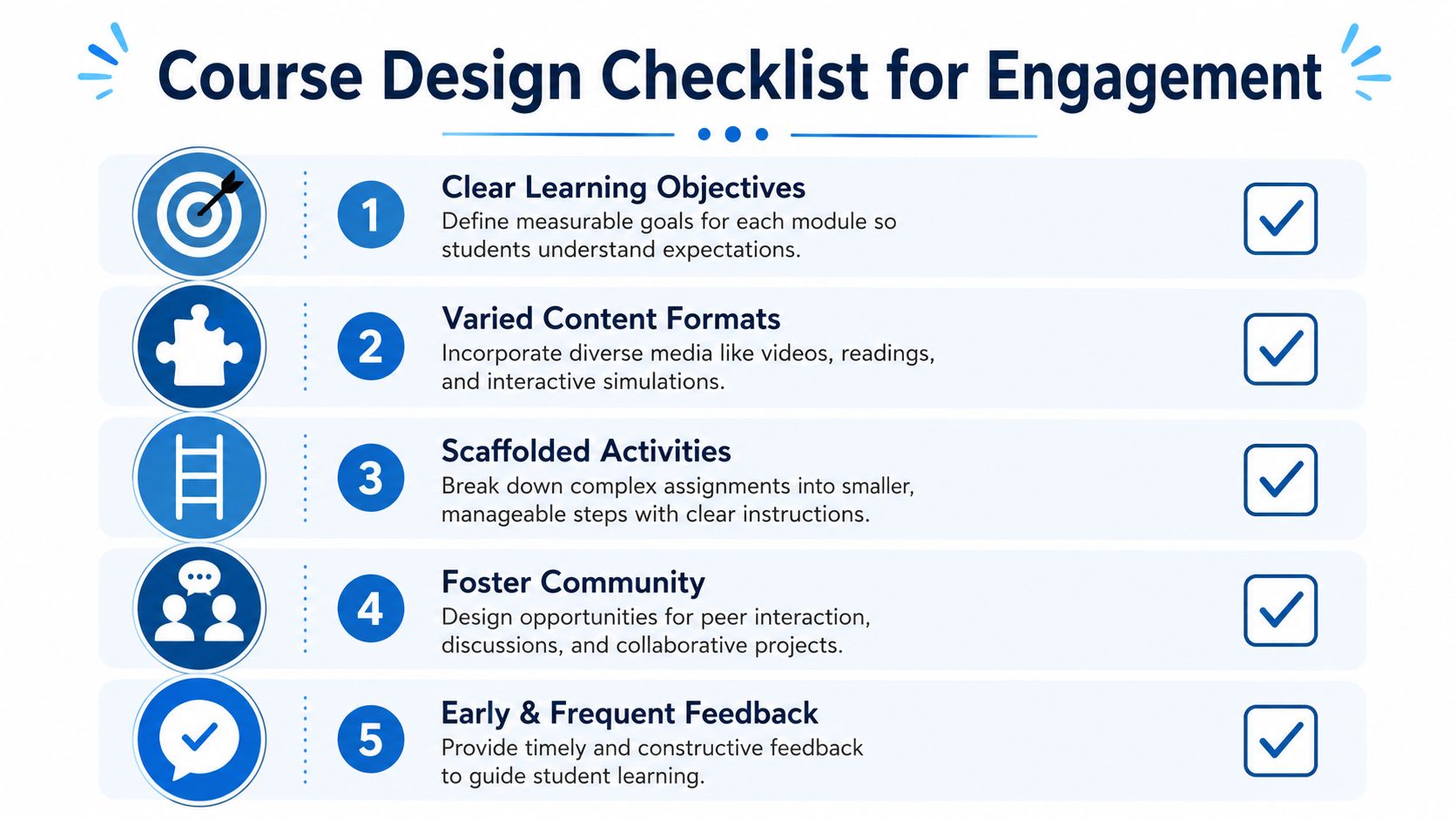
A simple course homepage should answer these questions immediately:
- Where do I start
- What happens every week
- How do I contact the instructor
- How will I be expected to participate
- What do I do if I fall behind
Students engage more when they don't have to decode your course architecture. Put weekly modules in the same order every time. Use consistent labels. Keep assignment instructions in one place instead of splitting them across announcements, slides, and discussion posts.
Remove avoidable social risk
A lot of online advice focuses on visible activity, but not enough attention goes to emotional safety. That's a mistake. Research on online learning highlights that emotional engagement depends heavily on teacher support and pedagogical safety, and that anonymous posts or removing harsh deficit language from policies can increase participation by lowering social risk (research on emotional engagement and pedagogical safety).
That changes how I recommend writing policies.
Instead of “Late work will not be accepted,” try language that still protects standards but leaves room for contact and recovery. Instead of “Attendance is mandatory and failure to participate will affect your grade,” tell students exactly what meaningful participation looks like and what to do when bandwidth, health, or caregiving disrupts live attendance.
Practical rule: Write policies as if an anxious but capable student is reading them at midnight. If the wording sounds like a threat, rewrite it.
Use low-stakes entry points in week one
Don't begin with a discussion prompt that asks students to perform confidence. Begin with prompts that let them enter with ease.
Good examples:
- Choice-based introductions: Let students post a short text, audio note, or image that reflects their learning goals.
- Micro check-ins: Ask, “What usually gets in the way when you try to learn online?” That gives you useful information without forcing self-disclosure.
- Expectation mapping: Have students rank communication preferences, office hour times, and feedback needs.
These are better than generic icebreakers because they create usable teaching data.
If you want a useful framing for participation-centered instruction, active learning for students gives a helpful overview of why students retain more when they do something with the material instead of just receiving it.
Create a communication plan that students can trust
Students disengage when they aren't sure when they'll hear back from you. A communication plan fixes that.
Include these specifics:
- Response windows: Tell students when you answer email and when you don't.
- Weekly rhythm: State when modules open, when announcements go out, and when feedback usually arrives.
- Help channels: Separate urgent technical help from content questions.
- Office hours with options: Offer at least one live option and one flexible pathway, such as advance question forms.
A course that feels predictable gives students enough cognitive room to focus on learning. That's the hidden foundation of student engagement in online classes.
Mastering Live Sessions with Interactive Tools
A live online class can lose momentum in the first five minutes. Students join late, cameras stay off, the teacher shares slides, and the session slips into passive watching. Engagement improves when each tool has a job and students know what they are expected to do with it.
That shift has measurable value. A 2024 Engageli study found that active learning sessions produced 13 times more learner talk time, 16 times more non-verbal engagement, and a 62.7% participation rate compared with 5% in passive lectures. Students in these courses were also 1.5x less likely to fail (Engageli active learning statistics).
Use polls to diagnose, not decorate
Polls earn their place when they change what happens next.
Use them at moments where you need a teaching decision:
- Prior knowledge checks: “Which concept feels least clear right now?”
- Commitment prompts: “Which answer is strongest before we discuss?”
- Mid-lesson pivots: “Do we need another example or are you ready to apply this?”
- Emotional safety checks: “Would you rather answer aloud, in chat, or anonymously?”
That last use gets ignored. Students participate more when the platform gives them a low-risk entry point. Anonymous or low-visibility response tools reduce the social cost of being wrong, which matters in mixed-ability groups and in classes covering personal or sensitive topics.
Make breakout rooms short and task-heavy
Breakout rooms go quiet when the task is broad or socially risky. “Discuss the reading” sounds easy, but it asks students to invent a structure, choose who speaks first, and decide what counts as a good answer. Many groups never get past that setup.
A better prompt does the setup for them. Give students a concrete task, a visible output, and a reason to return with something useful.
Better breakout design usually includes:
- A visible deliverable: one sentence, one ranked list, one shared slide, one whiteboard sketch
- A short clock: enough time to act, not enough time to drift
- A role or two: reporter, skeptic, summarizer
- A return task: something students must bring back to the main room
- A low-pressure contribution option: chat, sticky note, or collaborative annotation for students who need a quieter way in
Short rooms often outperform long ones. Six focused minutes with a clear artifact usually produces more discussion than fifteen vague minutes.
Whiteboards and screen sharing should support thinking
Whiteboards work best when students add ideas before anyone starts explaining. Ask for one misconception, one keyword, one example, or one confidence rating. Then sort the board together. That gives you a live map of understanding and gives quieter students a legitimate form of participation that does not depend on speaking first.
Screen sharing needs the same discipline. Students disengage when the teacher hunts through tabs, reads crowded slides, or hides the key document under notifications and browser clutter. A clean share lowers friction and keeps attention on the task. If you need a quick refresher, this guide to sharing your screen during online sessions covers the basic workflow.
Keep live sessions for work students cannot do as well alone. Clarify confusion, test ideas, practice with peers, and give feedback in real time.
Platform cost and feature trade-offs shape the teaching design
Tool selection then becomes a practical issue, not a tech hobby. Teachers often get advice that assumes access to premium webinar features, advanced breakout controls, and polished collaboration tools. Many schools do not have that budget, and independent tutors usually need to keep subscriptions tight.
Typical enterprise platforms with built-in webinars often cost more than $15 to $20 per user per month. In contrast, AONMeetings starts at ₹179, approximately $2.20 per user per month, with HIPAA-compliant meetings and webinars included.
Platform Cost and Feature Comparison Per User Month
| Feature | Typical Enterprise Platform | AONMeetings |
|---|---|---|
| Price range | Often exceeds $15 to $20 per user per month | Starts at ₹179, about $2.20 per user per month |
| Webinars included | Often limited to higher tiers or add-ons | Included |
| Screen sharing | Commonly available | Included |
| Whiteboards | Commonly available on select plans | Included |
| Recordings | Often plan-dependent | Included |
| Breakout rooms | Usually available on higher tiers | Available on advanced tiers |
| Encryption | Varies by platform and plan | 256-bit AES encryption |
| HIPAA-compliant option | Often enterprise-focused | Available |
Those differences affect pedagogy more than many teachers admit. If the platform budget is high, there is less room for extras such as Mentimeter, Kahoot!, or subject-specific tools. If webinars and recordings are already included, it becomes easier to run revision sessions, guest talks, parent orientations, or office hours without piecing together separate systems.
Security matters too, especially in counselling training, healthcare education, and any class where students discuss personal experiences. Encryption and access controls are not side features in those settings. They help create the emotional safety students need before they will speak openly, ask for help, or test an unfinished idea in front of peers.
Fueling Engagement Beyond the Live Class
Some students do their best thinking after the call ends. They pause, replay, reread, sketch connections, and answer once they've had time to process. If your definition of engagement only counts live talking, you'll miss a large share of real learning.
That's the blind spot in many conversations about student engagement in online classes. They reward visible, synchronous behavior and ignore quieter forms of deep processing.
Non-linear engagement is still engagement
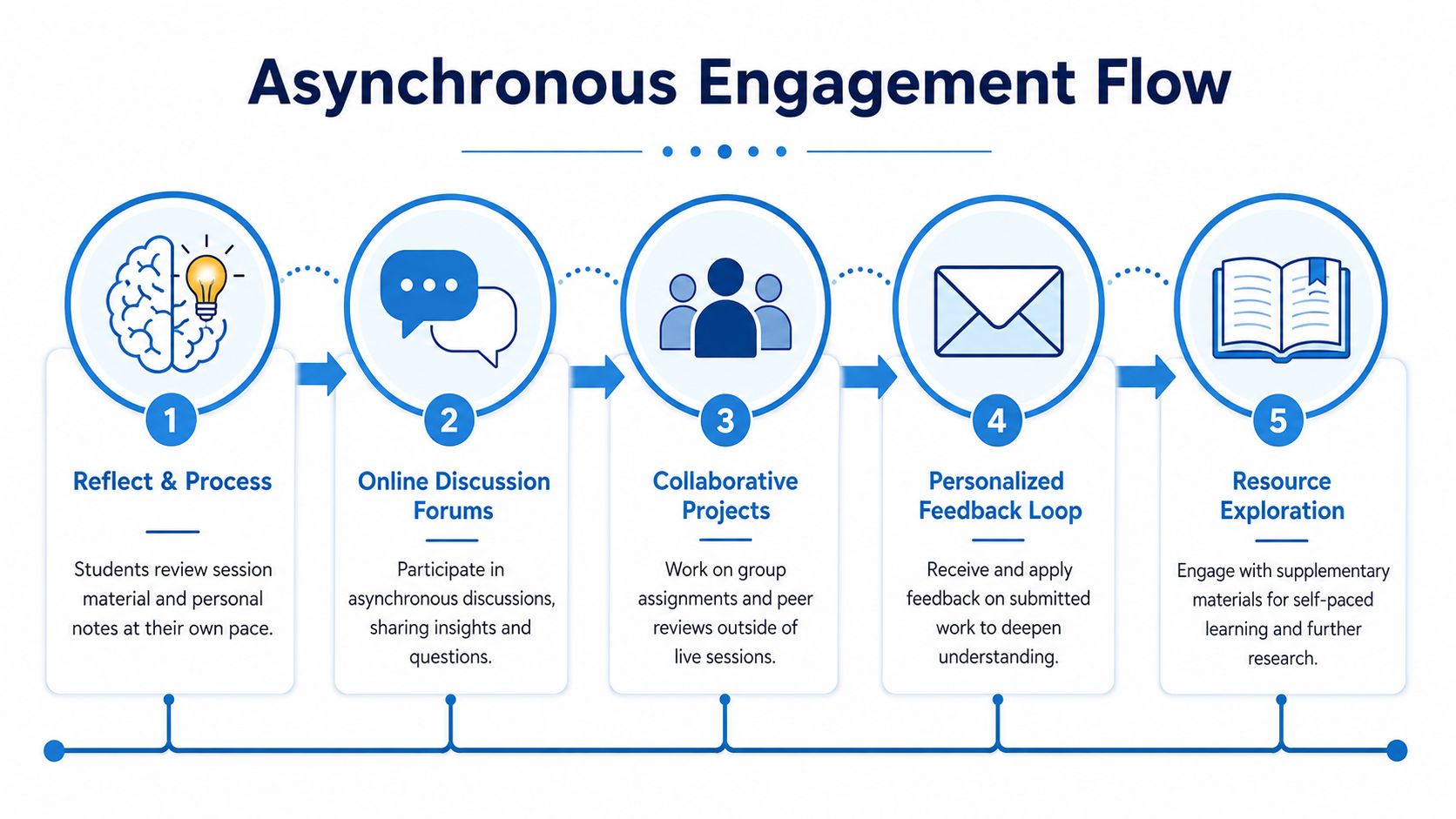
Research on online course conversion found that while active synchronous participation may decline, cognitive engagement often increases when students use asynchronous tools such as recorded lectures with embedded quizzes and pause-and-rewatch options (study on asynchronous cognitive engagement).
That tracks with what many teachers see. The student who says little on Zoom may submit the sharpest reflection, annotate readings carefully, and perform well because asynchronous work gives them processing time.
What to build outside the live session
Asynchronous work should do something a worksheet can't. It should ask students to interpret, connect, critique, or explain.
Three formats work especially well:
- Recorded mini-lectures with embedded checks: Stop the video at key moments and ask students to predict, apply, or identify a misconception.
- Discussion prompts that require stance-taking: Not “What did you think of the reading?” but “Which claim from the reading is most useful in practice, and what would you change?”
- Artifact-based responses: Ask students to create a visible product, not just post a paragraph.
A practical extension is to record live review sessions or short concept briefings so students can revisit them later. For teachers who need a straightforward workflow, this webinar recording guide covers the mechanics of turning live sessions into reusable learning material.
A concrete asynchronous example
One of the best online tasks for deeper processing is a mind map assignment.
Use it like this:
- Assign one article, chapter, or case.
- Ask students to build a mind map showing the central argument, key evidence, and one unanswered question.
- Require them to post the map before a peer exchange.
- In the peer step, each student explains one branch of their map and responds to another student's interpretation.
- Finish with a short reflection on what changed in their understanding.
This works because students don't just consume the material. They reorganize it. The map becomes both a study tool and a discussion object.
Students who need more time often aren't disengaged. They're processing. Good asynchronous design gives that processing a shape you can see.
Closing the Loop with Feedback and Measurement
If you can't tell whether your engagement strategies are working, you'll end up judging the course by vibes. That usually means the loudest students shape your perception of the class, while quieter or struggling students disappear until grades are posted.
The more reliable approach is to treat engagement data as an early-warning system. Not for surveillance. For support.
What to track in the LMS
A proven method is to pull time spent in course areas, page visits, and post volume from the LMS, then compare those patterns with grades to identify what high-engagement success looks like in your course (LMS engagement methodology).
That's useful because it shifts the conversation from “This student seems disengaged” to “This student stopped accessing weekly readings and hasn't returned to the discussion area.”
Look for patterns such as:
- Sharp drop-offs: A student who was active and then disappears for a week
- Surface participation: Frequent logins with minimal assignment interaction
- Resource avoidance: Students who skip readings or review pages tied to assessments
- Late surges: Students who only enter the course close to deadlines
None of these patterns tells the whole story. They tell you where to ask better questions.
Turn the data into outreach
The worst use of engagement data is punishment. The better use is a brief, specific check-in.
Try messages like:
- “I noticed you haven't been in the weekly module much this week. Is there a course access issue I can help with?”
- “Your quiz attempt is in, but the prep pages were barely touched. Want a short study plan before the next one?”
- “You've been reading but not posting. If discussion feels high-pressure, you can start with a shorter response.”
Those messages work because they focus on behavior you can see and support you can offer. They don't accuse.
Use measurement to improve course design
Engagement data also tells you whether your course itself needs revision.
If lots of students stop at the same page, that page may be overloaded or unclear. If readings get ignored but a short explainer video gets strong completion, your materials may need chunking. If students post more after you add choice in response format, that's a design lesson worth keeping.
A practical review cycle looks like this:
| Checkpoint | What to examine | What to change if needed |
|---|---|---|
| Week 2 | Logins, first discussion, early assignment access | Clarify navigation or reminders |
| Mid-course | Reading access, post quality, missed tasks | Shorten tasks or add examples |
| Before major assessment | Study resource use, review session attendance | Add review prompts or recorded support |
| After course end | Strongest engagement patterns tied to success | Replicate what worked next term |
The key is simple. Measure what students do, respond quickly, and redesign what creates friction.
Troubleshooting Disengagement and Ensuring Equity
Some students will still look disengaged even after you improve the course design. That doesn't mean they don't care. It often means the course is colliding with access barriers, anxiety, caregiving, disability, or unstable internet.
That's why camera mandates usually backfire. They confuse visibility with learning. A student might be fully present in chat, on the whiteboard, and in shared docs while keeping the camera off for privacy, bandwidth, or comfort. If you want more visible participation, create activities that reward contribution, not compliance.

Replace mandates with multiple pathways
One practical move is the two-minute writing routine. At the start of class, ask students to write everything they know about the day's topic, then give them a choice to share orally or in chat. That low-stakes structure is a proven way to include reluctant speakers (two-minute writing activity for reluctant speakers).
Other equity-minded adjustments help just as much:
- Offer response choice: oral, chat, poll, shared doc, or follow-up post
- State participation alternatives clearly: especially for students who miss live class
- Chunk instructions visibly: long spoken directions vanish quickly online
- Normalize help-seeking: tell students what to do before they feel lost
Read disengagement as information
When students stop responding, ask what the pattern might mean.
A student who joins late every week may be navigating work or caregiving. A student who watches recordings but avoids live talk may need more processing time. A student who never turns work in may not understand the LMS at all.
The fix for low engagement is often not “push harder.” It's “reduce the barrier.”
Equity in online teaching doesn't mean lowering standards. It means giving students a fair route to meet them. That's what makes engagement durable instead of performative.
If you need a platform that supports interactive teaching without forcing enterprise-level pricing, AONMeetings is one option to consider. It offers browser-based video meetings, webinars included, screen sharing, whiteboards, recordings, breakout rooms on advanced tiers, and 256-bit AES encryption, which can be useful for educators and healthcare training teams that need secure online sessions.
